Is it possible to increase this number? If not, what is the reason?
No, it is not currently possible as long as you are using the official MusicBrainz API.
Reason:
MusicBrainz has finite resources and wishes to make the MusicBrainz database available to as much of the Internet community as possible.
2 Likes
As of 2012-01-08 our rules are as follows:

When a request reaches our servers we check three conditions, in the following order:

User-Agent string: are we receiving too many requests from this application?
Source IP address: are we receiving too many requests from this particular IP address?
Global: are the MusicBrainz servers as a whole too busy to handle this request?
And nothing has changed until 2012?
Yes - since 2012 normal usage has grown and AI Bots now make millions of requests, so this is even more important than it was then.
There has been an idea to rework the API in a major way to simplify the underlying data retrieval and allow a much higher request rate - the consequence being that for each release Picard would have to make several simple requests at a faster rate instead of one complex one at a slow rate. But this is a major undertaking and hasn’t yet happened.
However, if you have the resources there is nothing stopping you from hosting your own copy of the musicbrainz database / server and pointing picard at your copy without any rate limits.
Docker Desktop and WSL?
2 Likes
Remember that this project is different from other Docker containers.
You cannot simply download an image, set a few variables and volumes, and then let it run.
You will need to download several gigabytes of MusicBrainz- and search server data.
To keep your local copy up to date with the latest data, you need to set up a one-way replication between the official MB source and your database.
All of this is well documented; it’s just not as easy to set-up and maintain as other Docker containers.
BTW: You need very fast local hardware to achieve the same response time as the official MB API.  Even if your local database can handle more requests per second, you will only benefit from increased speed if you have enough memory, fast CPUs and fast local SSD storage. One of the magic words is “caching”.
1 Like
I change serwer to localhost :80 however, I get red disks in the right panel of Picard and an error for each track:
E: 13:40:07,137 webservice._handle_reply:535: Network request error for https://localhost/ws/2/release/b49898e9-011d-4fc7-856a-45e4007cea2d?inc=aliases%2Bannotation%2Bartist-credits%2Bartist-rels%2Bartists%2Bcollections%2Bdiscids%2Bgenres%2Bisrcs%2Blabels%2Bmedia%2Brecording-level-rels%2Brecording-rels%2Brecordings%2Brelease-group-level-rels%2Brelease-groups%2Brelease-rels%2Bseries-rels%2Burl-rels%2Bwork-level-rels%2Bwork-rels -> Connection refused (QT code 1, HTTP code 0)
E: 13:40:07,137 ui/item.error_append:108: <Album b49898e9-011d-4fc7-856a-45e4007cea2d ''>: Connection refused
Please open a new topic for your current technical problems and provide a more detailed description of what you have done so far.
1 Like
Not sure that we need a new topic, but we definitely need details of your system and what you have done so we can see whether you have:
- Set up the docker container correctly
- Downloaded and set up the current database correctly
- Setup the database update feed correctly if you want to use that
Personally I’d just like a “Send token for faster rate” feature like LB instead. Could help actual users get their data faster.
1 Like
Cache for CAA?
I wonder if it’s already purchased.
What do you think about this?
plugin 1
PLUGIN_NAME = "Limit Requests to 5/s"
PLUGIN_AUTHOR = "Custom"
PLUGIN_DESCRIPTION = "Ogranicza liczbę żądań do 5 na sekundę (domyślnie MusicBrainz pozwala na 1/s)."
PLUGIN_VERSION = "0.1"
PLUGIN_API_VERSIONS = ["2.0"]

from picard.webservice import RateToLimit

# Domyślnie Picard ma ustawione 1000ms (1 żądanie na sekundę)
# Ustawienie 200ms pozwala na 5 żądań na sekundę
RateToLimit["musicbrainz.org"] = 200
plugin 2
PLUGIN_NAME = "Increase Request Rate"
PLUGIN_AUTHOR = "Custom"
PLUGIN_DESCRIPTION = "Sets the request rate to 5 per second (200ms delay)."
PLUGIN_VERSION = "1.0"
PLUGIN_API_VERSIONS = ["2.0", "2.1", "2.2"]

from picard.webservice import ratecontrol

# To achieve 5 requests per second, set the minimum delay to 200ms (0.2 seconds).
# This overrides the default 1000ms (1.0 second) limit.
ratecontrol.set_minimum_delay(None, 200)
It is almost certain that the MB API has a rate limiter, and I would guess that if you increase the rate that Picard sends requests, you are likely to trigger this and get a temporary (or possibly permanent) ban on your IP address.
If you want to go faster than the defined rate limit then implement the MB server in a docker container, download the MB database and run your own server which can have no rate limiting at all.
This is not true.
Having your own server also has limitations.
https://community.metabrainz.org/t/problems-with-docker-musicbrainz-and-windows/813892/7
You are right - the code has changed substantially since I last looked at it several years ago.
So - you still need to host your own server, but you can then set the URL in options to your locally hosted server:
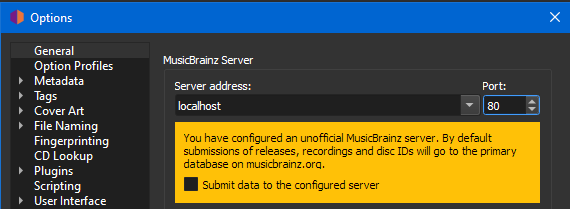
And then you set the rate for that (in a trivial plugin) as follows (as per the example in the ratecontrol.py source code):
from picard.webservice import ratecontrol
ratecontrol.set_minimum_delay(('localhost', 80), 1)  # 1000 requests/second
P.S. I guess it would be nice if Picard could recognise locally hosted sites in some way e.g. if you set the server address to one of the following, then it would assume that it was self-hosted and reduce the minimum delay - however this is not an easy fix:
- local domain names e.g. localhost, *.local etc.
- local fixed IP addresses e.g. 10.x.x.x, 192.168.x.x etc.
1 Like
This plugin has not worked for six years.
It does work. It directly changes the rate limit for the host and port you have specified there. If you set it to the proper host and port of your local Picard instance it will reduce the rate limit accordingly.
Of course it still depends on the request time to your server.
2 Likes