Nevermind, I realized it’s caused by my browser which assumed Russian to be my default language on Deezer for whatever reason.
1 Like
Used the holidays to make a couple of updates:
MusicBrainz Nuclear Tags now shows saved tags/quick tag buttons on more pages (label, work, area, event, recording). It also now uses ‘GM_setValue’ instead of ‘localStorage’ to save remembered tags, making them stick across different domains (e.g. prod and beta). Thanks for making tickets @chaban
MusicBrainz Quick Recording Match now loads reliably and reliably gives results (instead of going too fast and not picking up suggestions).
I thought I’d shared this, but I can’t find it, so maybe not. Reminded because @sound.and.vision was asking about Soundcloud support on Harmony etc.
I had AI throw together a script that will go through and grab track titles and lengths from souncloud sets/releases etc, copying them to the clipboard in a MB track parser-readable format. I found it a must-have for adding Soundcloud stuff over the break, since it otherwise obfuscates the track times.
No issues so far: MusicBrainz Soundcloud track parser (draft)
2 Likes
I think there is also a SoundCloud: MusicBrainz import userscript, but I don’t know any soundcloud album URL to test it.
Update
I reactivated my SoundCloud account and then found an album page, there.
Sorry, this userscript doesn’t work.
1 Like
Yeah, I should have mentioned that I tried that script and couldn’t get it to work. I’ll add a note to the userscript page that it doesn’t work
1 Like
Still works for me but you have to be logged in:
1 Like
I haven’t had any issues. Send me your browser + userscript engine and I will see if I can reproduce / fix the issue.
1 Like
Does anyone know how to fix these? Or are there updated editions around somewhere?
I used to use the following ones a lot, but the buttons just don’t press in any more on Win10\Vivaldi\Violent Monkey.
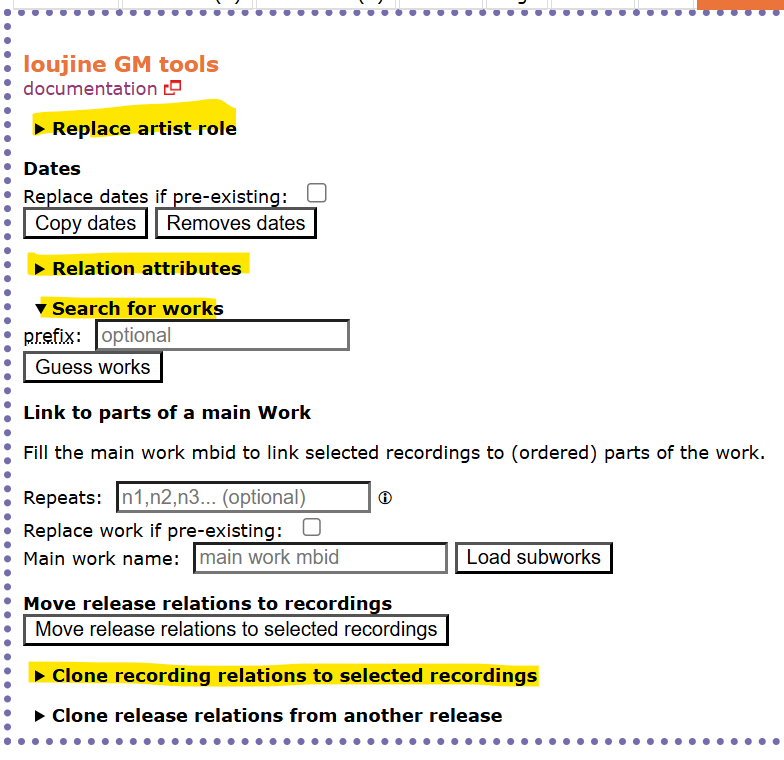
Some work - Dates and Clone Release Relations - but the rest don’t any more.
I tried reading at github, but it is dev talking to dev in dev language and I no idea what to do with this knowledge. Replace removed getSourceEntityInstance by reosarevok · Pull Request #115 · loujine/musicbrainz-scripts · GitHub and Clone recording relationships not working in Beta · Issue #114 · loujine/musicbrainz-scripts · GitHub
If someone can point what code I can swap where, then I can edit the script. But github language looses me.
Others users have made some great updates 
MusicBrainz Nuclear Tags has been pretty much entirely refactored by @chaban, to use the API instead of crawling through one-by-one. It also works on more page types, like labels! And allows up-tagging to release groups, where applicable. Tested by both of us over the break.
If you run into issues please set ‘const ENABLE_TEST_MODE = false;’ to true and feedback.
MusicBrainz Quick Join Phrases now has support for custom join phrases, thanks to @YoGo. Set them via the userscript options interface in your userscript manager.
1 Like
Fixed! (Totally didn’t take me 4 months lol)
1 Like
A post was merged into an existing topic: A new MusicBrainz user script was released
MusicBrainz Release Group Linker has had a rewrite and now works on Firefox (and hopefully other browsers).
It now incorporates @RandomMushroom128’s ‘MusicBrainz: add release(group) links from level above’ userscript - thanks for giving permission Random! - to avoid some browsers not liking cross-userscript chatter. You will notice duplicate buttons if you run both scripts at the same time.
Recommended companion script, and the script that made me care about release group relationships in the first place: Display shortcut for relationships on MusicBrainz
1 Like
This thread needs to be linked here for anyone else trying to get @loujin’s scripts working.
3 Likes
I recently uploaded my version of ToadKing’s “Apple Music Barcodes and ISRCs” userscript. This userscript allows you to lookup Apple Barcodes and ISRCs on an Apple Music webpage. I’ve significantly modified the UI and added some more functionality to it so that you can more quickly make edits.
edit: Screenshots attached


3 Likes
[mod: moved from the ‘new userscript’ thread, was in reply to this new script.]
oh nice, I had no idea beatsource had an actual API
I wrote a script for it a while ago, it uses the html of the page directly instead of the API but the end result is more or less the same 
1 Like
Indeed, at first I too just wanted to scrape the HTML of the release pages (namely the Next.js hydration data, which is the technical term for the big JSON blob at the bottom of the page source). Took me many trials and errors until I considered it might be a good idea to check the network tab of my browser’s developer tools, with the API call being listed among the GET methods.
Event Setlist Search
Just pushed an update, You can now paste links in the search box to look them up directly
2 Likes
It didn’t work for me on Firefox for Android.
It opened the search field but no effects and I could not dismiss it either.
1 Like
Yeah, the way its listening for events requires an actual keyboard… I should work on a way to get it to work on mobile.
1 Like
MASS MERGE RECORDINGS (from releases) does detect input value changes on mobile. It listens to the input event, for that.
I guess it would probably also work with the change event, if you prefer…
1 Like