Problem is I don’t know what I need. I just have .tbl tr td + td:not(.video) a as a selector for all recording links on a release page, and I don’t remember why the .video part was added.
Someone added a link to a userscript book here: Guides/Userscripts: Difference between revisions - MusicBrainz Wiki
Table of contents looks nice, but the actual content is… lacking (try chapter 4). Best case, this looks like work in progress that might have been abandoned (since it says 2023). But a bit of searching brings up webgpugems·com and xbdev·net/books/index.php which both link to many more books all by the same author (~ 80 books in ten years). Either way, to me it doesn’t look like a link to a valuable resource.
Did you read the book and find it useful @zabey?
Yeah I skimmed the whole thing, and I think it could be useful for someone just starting to make userscripts. The vibe I got was more “work-in-progress“ rather than “abandoned.” But 80 books in 10 years does change my math a bit  . I’m happy to remove it if others don’t find it useful.
2 Likes
I personally found it pretty useful as I perused the pages this morning.
Having it’s depth of (niche) domain knowledge in one spot is pretty nice when compared to the kurt Reddit posts that proliferate search results as I’m trying to fix something; the scenario is usually someone wanting to block some page element, with a kind soul providing them with a script that works, but they (understandably) don’t go into depth why it works.
1 Like
The “Edit Release: No Label Button” from @Lioncat6 got an additional “No Catalog Number Button” but that latter button when pressed (although it fills in “[none]” in the “Cat. No:” text field) actually doesn’t seem to trigger an actual change event on the page for that field … as on the submit page it says I havent’ provide any change.
With the help of Gemini I could fix it:
I had to replace the block of code
                    const event = new KeyboardEvent('keydown', {
                        key: '',
                        bubbles: true,
                        cancelable: true
                    });
                    catNoInput.dispatchEvent(event);
with
                    // Trigger update using InputEvent and ChangeEvent
                    const inputEvent = new Event('input', { bubbles: true });
                    const changeEvent = new Event('change', { bubbles: true });
                    catNoInput.dispatchEvent(inputEvent);
                    catNoInput.dispatchEvent(changeEvent);
1 Like
Ill fix it when im free, thanks for letting me know!
The part for the “No label” button should also probably be replaced with
                    // Trigger update using InputEvent and ChangeEvent
                    const inputEvent = new Event('input', { bubbles: true });
                    const changeEvent = new Event('change', { bubbles: true });
                    labelInput.dispatchEvent(inputEvent);
                    labelInput.dispatchEvent(changeEvent);
to make it consistent.
Nice, but could it get a tweak to just take out the main streamers - Spotify, Apple, Deezer, etc. If it just goes for a shortlist then we’d still see the Discogs link, etc.
A much needed script though. This removes a lot of noise from a search. Thanks
Edit: A a bug report \ user feedback. When you hit the button, the button also disappears… Or maybe that was due to testing it on a Release with no URLs… (okay - see how it works now… so really just need to use BACK to get out of I guess?)
1 Like
This script filters out ALL relationships, for me, not only those streaming URL.
If you want to reduce noise, in the meantime, there is this “Pure entity edits” links, currently part of SUPER TURBO’s COOL_SEARCH:
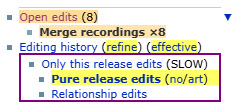
Even the Relationship edits link, will not display recording-URL streaming relationships, because they are not at release level.
I think I will make a userstyle to hide those tons of recording-level streaming URL at the bottom of the releases.
But I can’t find a release with those, at the moment.
Yes, as the post says:
I might look at changing the name of the script tomorrow since it should be more obvious that it removes a lot of edits.
1 Like
Aaaah OK! It was not obvious, by the name of the script and of the button!
Then it’s a duplicate of COOL_SEARCH Pure entity edits. 
1 Like
Ooh good to know. I’ll have a look and compare tomorrow.
I think there might be a script to hide/collapse those release page recording links as well.. but I’m on my phone and can’t find it sorry.
1 Like
I use these. Much useful. Though I can time out the search server too often.
Initially I was hoping @aerozol’s script would work on a general Search. Most days I start with a variation of an “Edits for Subscribed Entities” search. I tried bookmarking an edited version of that to do 48hrs, Newest First, but not been too successful as it always stalls out as “busy” on the first attempt. You’ve both given me some ideas of how I can try adjusting it.
2 Likes
Thanks @jesus2099 and @IvanDobsky, I’ve renamed the script to more clearly indicate that it’s a brute force tool, not a delicate scalpel that only removes streaming link edits. It was a pain but I guess I should have done it in the first place 
I tested out SUPER TURBO’s COOL_SEARCH and it’s great! I’m going to leave it enabled. But I will also leave my script because I mainly view edit pages from my edit subscription emails, and a quick button on the edit page is what I need. Or have I missed this functionality in COOL_SEARCH @jesus2099?
edit: I also added a link to SUPER TURBO in the hide button description here.
1 Like
No indeed, pure entity edits is only available from entity pages.
There are a few “cool links” added to the header of edit history and open edits pages (edits not voted, mostly), but not this pure stuff.
1 Like
When using the Bandcamp import script I’ve noticed an error on MB at least twice now. E.g. from Evidence of Inequity | Beneath the Massacre | Total Dissonance Worship
 The data you’ve seeded contained the following errors:

    Invalid artist_credit.names.0.mbid: “dced5431-3733-42fb-99ad-45a48bb1ebcd”.

Review the documentation on release editor seeding and make sure your data is formatted correctly.
Doesn’t seem to break anything, it’s just there.
edit: I think I know what happens. https://totaldissonanceworship.bandcamp.com (which is linked as artist on the album page) is a label page linked to Total Dissonance Worship - MusicBrainz and it tries to use this MBID as an artist ID which doesn’t exist.
2 Likes
[mod: moved reply from the new userscript thread, the below replies relate to @Akeldama’s Paste-A-Date! 0.2 userscript update]
Thank you so much for this! I’ve been missing this script so bad.
2 Likes
The original author was nikki and it worked in several languages. AI rewrote the English part?
Like @chaban does, you should cite the original author (nikki), and mark it as an AI generated code.
6 Likes
I’ve recently noticed that Taggregator started fetching Russian-language tags from Deezer on releases instead of the English ones. Curious to know whether it’s caused by Deezer or the userscript.
Speaking of which, it would be nice if Taggregator filters out translations of the word music while fetching tags from Apple Music links localized for non-Anglophone countries. I manually remove them every time I seed tags because IMO they are redundant. But I also see that the script actively ignores the English word already.
1 Like