I just tried to find an album like this:
https://musicbrainz.org/search?query=9b2b704e-c2f9-4e42-a717-8c712bd55b1f&type=release&method=indexed
I was looking for
Is it - or was it - not possible to search an album or an artist with a known MBID as search text in the higher right corner?
You have to use the “Indexed search with Advanced Query Search” and add reid: to it as below
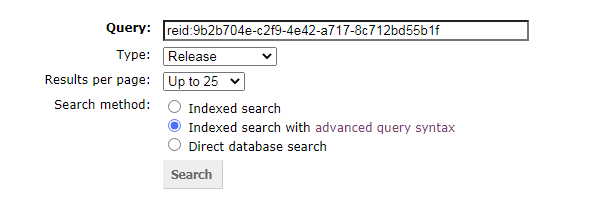
Probably quicker\simpler just to type https://musicbrainz.org/release/ in front of it.
4 Likes
Thanks @IvanDobsky.
Why should I manually add reid: as prefix if I choose the Type from the drop-down box anyway? 
Is this a new search server behaviour?
I suggest using “Search Entities” from the search menu. There is a box labelled MBID. Paste in there and select the corresponding search button.
Alternately for MBIDs you can also just navigate directly to https://musicbrainz.org/mbid/9b2b704e-c2f9-4e42-a717-8c712bd55b1f
4 Likes
I tried it before replying, and the only way I got it to work was to ignore the basic thing in the corner and use the Advanced Query Syntax. Notice the blue dot selecting it in my image.
I like the Search Entities option from @draconx - never seen that one before.
I don’t know if things have changed. I have always found search at MB “unique” in its “special” abilities… 
1 Like