hi! i’m trying to add some albums to software that uses the MusicBrainz API, and it’s getting confused because all the releases are in one release group. i know this isn’t a support forum for that software, but after reading the style guides here it does seem like they’re incorrectly organized here on MB. i haven’t made any edits on MB before, so i’m looking for confirmation before i make any changes.
background: between 2005 & 2011 the rock radio station WCCC in Connecticut released a series of 6 live compilation albums with various artists on each album. as far as i can find, each album was only released once, on CD.
the 5 releases in this release group are different albums - different tracks, different artists, different recording years, etc. i believe they should each have their own release group, is that correct?
so should i create a new release group for each release, titled the same as the release, then edit each release and change the release group to the new per-album release group? if that’s not the correct procedure, what is?
the rest of the metadata on these releases seems good to me, big props to the people who entered all that info! i’ve spent a lot of time listening to these albums and i appreciate that the data is all here already.
I agree, these should be separate release groups and splitting them is the way to go. I think this was a misunderstanding of the release group concept. A series could be added to group the different volumes together.
And if you need any help sort this out, just ask in this thread.
Example, to add a series as mentioned here:
Go to the Editing Menu and there is Add Series. Select a Release Group Series. And for each new Release Group you add, you can then add them into that series so they stay grouped together. No doubt what the original editor was attempting to do.
That process would work, but I think there’s kind of a shortcut way to do it.
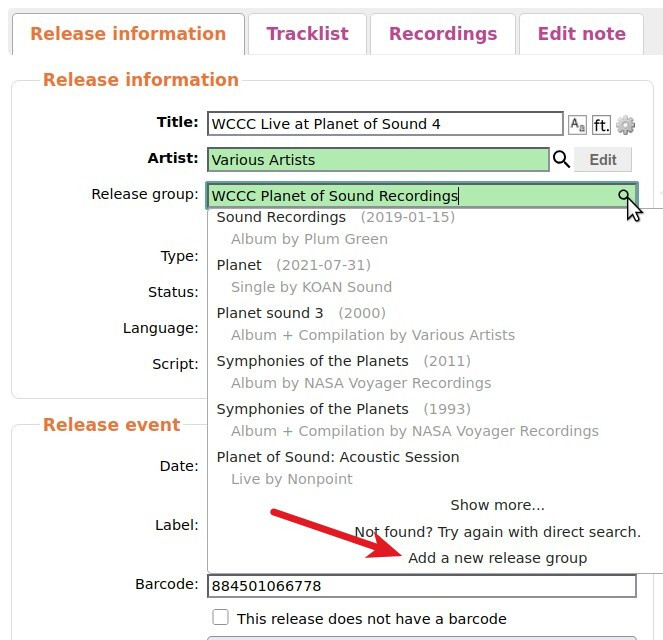
If you edit the Release that needs its own RG, you can hit the magnifying glass icon in the Release Group field and select “Add a new release group” from the bottom of the dropdown:
i went ahead & moved them to their own release groups, thanks for the input all! and thanks for the tip about the magnifying glass @Beckfield! i very much appreciate communities that are this supportive of beginners
I read some of the old thread about “release” vs. “Release Group” series. I can sure see the difficulty about when to use which. One thing that never seemed to be mentioned was releases in multiple formats (CD, cassette, LP, etc.).
It seems to me that an RG series would be best when:
the album is unlikely to be re-published in a non-series kind of way (or a new series)
the album was released in multiple formats
There’s a series that I have an interest in (KINK Lights Out) that is similar to the WCCC series (Radio station issues to benefit local food banks). Although they haven’t been added to MB, all of the releases were available in multiple formats.
Yeah, when there is one Release in a Release Group then a Release series works.
When there are multiple formats a Release Group series is needed.
But sometimes you get a specific series of Releases that overlap many release groups, and now you are back to Release Series (i.e. a “Nice Price” release or something like that)
A series really just mean something in common. And in this case that means both a Release and Release Group series can work equally.
 i’ve spent a lot of time listening to these albums and i appreciate that the data is all here already.