Hi, I tried to repair the DVD release of Release “11,000 Clicks” by Moloko - MusicBrainz. Originally the tracklist was as listed on the release. However, this does not correspond to the chapters on the DVD. Track (chapter) 5 with a length of 9:00 consists of two songs. On Discogs, the tracklist has been adapted to the division into chapters. That makes sense to me. If you rip the DVD, you will extract the chapters. Track lengths can only be fixed with a live album in this way.
But there are additional chapters after the last song: #17 (unlisted) words of farewell, #18 and #19 the end credits. There is no apparent reason why these were separated and I initially thought it would be a good idea to merge them into one track. It could be a “partial recording of” a known work, played during the credits (it would be useful to rip both chapters into one file).
If, however, the DVD is ripped strictly by chapters, you get 19 files and you wouldn’t get a recording on MB for #19…
I’m not at all sure how a DVD should be listed though. There are no specific guidelines for DVDs (I found none). And I don’t want these changes to go unnoticed by other editors.
Yes you should have 19 MB recordings of there are 19 chapters.
It’s like an uncredited CD track (that we should materialise as an MB recording also), but happens more often, because videos have more content than just the songs listed on the back cover.
Many DVD have a trailing empty last chapter, for navigation purpose, you can of course ignore these empty chapters (1s of silent blank screen).
I’m not sure yet if I should be thankful or rather cry about this post.
Working on the DVD for https://musicbrainz.org/release/dfd4f772-8244-40c8-8178-b33e166985d9 seems a bit more difficult.
DVD Decrypter shows VTS_01 to VTS_10 where the tracks already added are in VTS_06, Chapter 2 to 10 (of 11) and VTS_10, Chapter 1 to 12 (of 13). VTS_05, 07 and 09 are those 1sec things, the remaining have 1, 2, 1, 2, 2 chapters.
So what am I supposed to do?
EDIT: a look/vote/apply on the open edits of the above release would be very helpful before adds/corrections.
It’s only if you really want to have a perfect DVD listing.
A thing that I do also is to submit the audio rip as a release through Picard Add Cluster As Release command.
I do this to have milliseconds set in track durations, it’s very OCD.
Then I have to merge this DVD release with the 2CD rest of the release…
I surely have a tendency to perfection, but in this case I’ll leave it as is.
The videos of the concert performances are complete, that’s the important thing, I think.
I’m expecting some combined CD+DVD releases from Snarky Puppy which will lead to a lot of release changes. In most of them the DVD part is missing on MB though they were released as combi only, afaik.
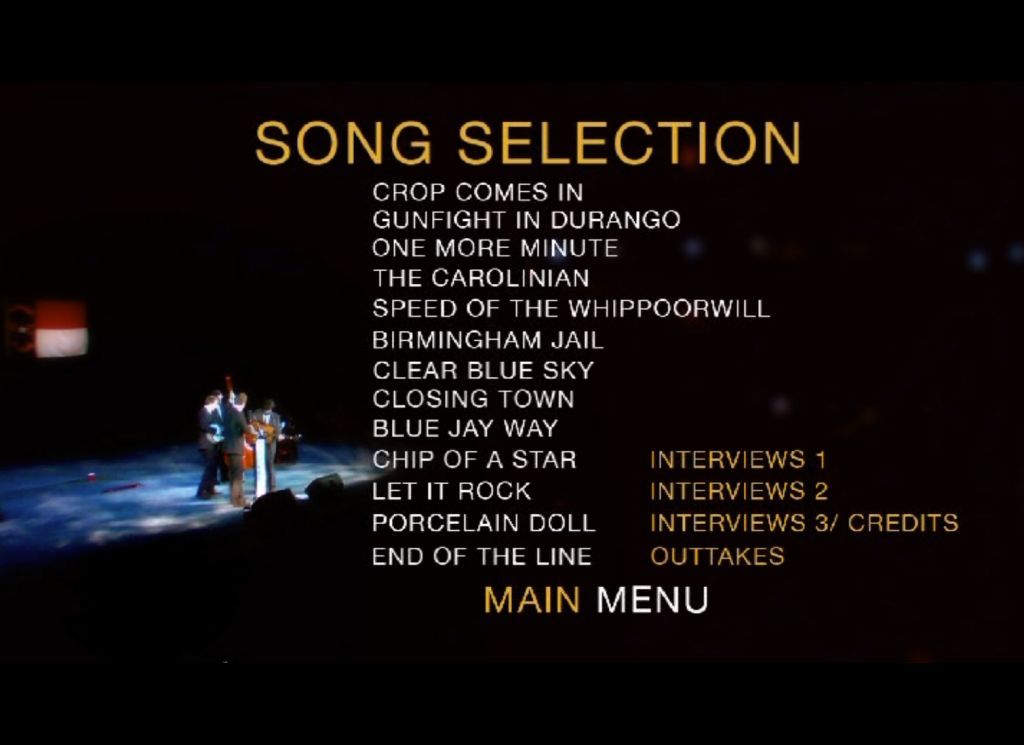
Instead of creating a new topic I am adding to this one since it closely resembles my issue. I just received https://musicbrainz.org/release/59a6f631-6bb6-4cc1-b893-f91a565f5177 and looked extensively at the DVD, using handbrake to rip. The back art lists 13 music tracks for the DVD (which are shown on medium 2) but there are 19 chapters. I have tried to summarize the chapters/tracks below:
track chapter title - artist (length)
1. [unnamed chapter] Dressing Room to Stage (Applause) - Chatham County Line (0:54)
1 2. Crop Comes In - Chatham County Line (4:22)
2 3. Gunfight in Durango - Chatham County Line (2:30)
3 4. One More Minute - Chatham County Line (4:53)
5. [unnamed chapter] Banter With Crowd - Chatham County Line (1:31)
4 6. The Carolinian - Chatham County Line (4:27)
5 7. Speed of the Whippoorwill - Chatham County Line (3:35)
6 8. Birmingham Jail - Chatham County Line (4:07)
9. Interviews 1 - Chatham County Line (1:46)
7 10. Clear Blue Sky - Chatham County Line (1:47)
8 11. Closing Town - Chatham County Line (3:25)
9 12. Blue Jay Way - Chatham County Line (4:43)
10 13. Chip of a Star - Chatham County Line (4:28)
11 14. Let It Rock - Chatham County Line (3:34)
15. Interviews 2 - Chatham County Line (3:49)
12 16. Porcelain Doll - Chatham County Line (3:39)
13 17. End of the Line - Chatham County Line (4:56)
18. Interviews 3 / Credits - Chatham County Line (2:23)
19. Outtakes - Chatham County Line (1:03)
The following are from the “chapter image”
chapter 1 [unnamed chapter] Dressing Room to Stage with Crowd Applause and Yelling
chapter 5 [unnamed chapter] Talking to the Crowd and Banter Between Musicians
chapter 9 “Interviews 1” spoken words, no music
chapter 15 “Interviews 2” spoken words, no music
chapter 18 “Interviews 3 / Credits” spoken words, no music
chapter 19 “Outtakes” spoken words, no music
I listened to the whole DVD to match up the chapters to the video recordings.
I believe I need to fix the credits for the DVD to show all 19 chapters. For my self I sort of named the “unnamed chapters” as I was not sure what to do there.
I have the following question:
Do I add the chapters in the correct order as they differ from the back art and the “chapter screen image”?
For the “unnamed chapters” what sounds appropriate as a name or do I just credit as “untitled” and add a annotation.
Most MC and member presentations are usually not credited.
They often only credit the full songs, which is the most interesting thing when choosing a video from the shop.
For the titles, take those from the DVD menu, if any.
Or in last resort, you can make up titles and write them between square brackets, to show these are made up titles.
What about the difference in back art numbering and the untitled chapters? Suggestions? The beginning chapter 1 [untitled] starts with the group in the dressing room then moving out to the stage, no music but crowd applause and yelling. Chapter 5 [untitled] has the group talking to the crowd and then talking to each other (banter).
Usually I number tracks in order, like those chapter numbers you can actually skip to with your DVD player.
I don’t care with the printed numbering, as they are not the actual DVD chapter numbers.
And also something that I like to do for concert DVD. I audio-rip them to Add cluster as release with Picard, in order to set precise track times, with milliseconds.