Track artist not copying to metadata

I have been trying to refresh my metadata for CDs that were ripped ages ago. I’m just getting to my Soundtracks folder, and in multiple recordings I’m not seeing the track artist come through in my metadata. My process has been:

  1. Look up the disc using Picard
  2. match the disc ID to MusicBrainz to get the correct version
  3. match my current ripped files by dragging to the clusters section (Picard)
  4. click “save” to overwrite metadata
  5. In Plex, refresh metadata and scan files

After doing this, I have no track artist. I can see the artists entered on the MusicBrainz website. I do not see them anywhere in the Picard metadata values (box at the bottom). They also don’t appear in the properties of my actual mp3 file.

In Plex, the Album Artist field contains the composer, but the Artist field for each track is blank. I am able to copy/paste from the MB website into that Plex field and it seems to be sticking, but that’s tedious for several albums when I feel like that data should transfer somehow.

What am I missing?

Thanks for any help you can give me!
Do you have the artist tag set in Options > Tags > “Preserve these tags…”? What script do you have in Options> Scripting?

Do the files already contain an artist tag, and it gets removed, or do they have no artist tags set yet?

That’s not fully clear to me. Do you have the files only on the left pane as a Cluster?

If so you will only see the existing metadata of the files. To actually tag the files with data from MB you need to load the release into Picard on the right pane and match your files to it.

2 Likes

I don’t have anything listed in the “preserve these tags” section. I’m pretty sure there was not an artist listed to begin with, my original metadata is pretty sparse on the mp3s.

I have nothing in the Scripting window as well, it is disabled.

Should I be listing something in either of these? I’m guessing there were the default settings as I’m still pretty new to this program.

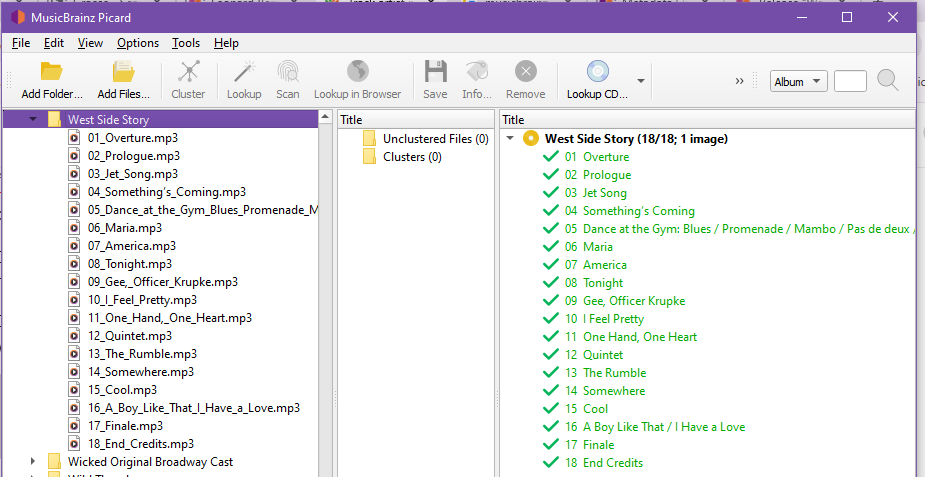
In Picard I’ve got three windows across. The left pane is my mp3 file structure. The center pane is the cluster section. The right side is what I pull from the MusicBrainz database.

I look up my CD in the database and make sure the details match. For example, I’m on West Side Story right now.

When I feel I have the right match, I drag the mp3s from the left into the center cluster section. The pic above is post-match, with the green check marks.

The listing at https://musicbrainz.org/release/33e83f04-bf4d-47ae-ac5d-2918420d2969 shows a bunch of data. For example, track 3 shows several voice credits.

image

I see these come through in the bottom window of Picard, in both my mp3 and the database because I’ve already saved it.

image

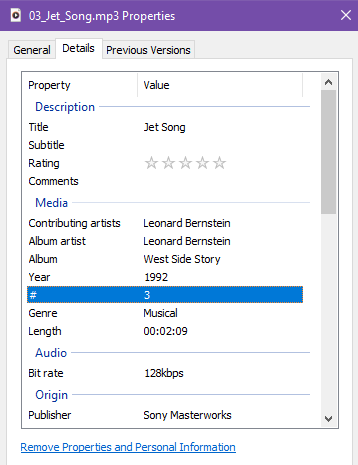
However, in the file properties for the mp3 version, I don’t see mention of Tucker Smith or any of the other names. I’ve scrolled all the way through the listing, this image just shows the top. I don’t see a category for performer at all.

And after I re-scan my Plex library and refresh metadata, the artist field is blank. It’s considering the whole album to be Leonard Bernstein.

Does that make sense?

Becki

Thanks for the clarification and the details. Now I see what’s going on. I couldn’t understand this before because of different understandings of the naming: what you referred to as the artist are what is being called performers in Picard.

If you look at the metadata for the loaded tracks in Picard you will see that the “artist” field (aka “track artist”) is being set to “Leonard Bernstein” for this release:

I think this release follows the classical style where the track artist is being set to the composer. The different performance roles are credited using relationships, and they are available in Picard as “performer” with the corresponding roles:

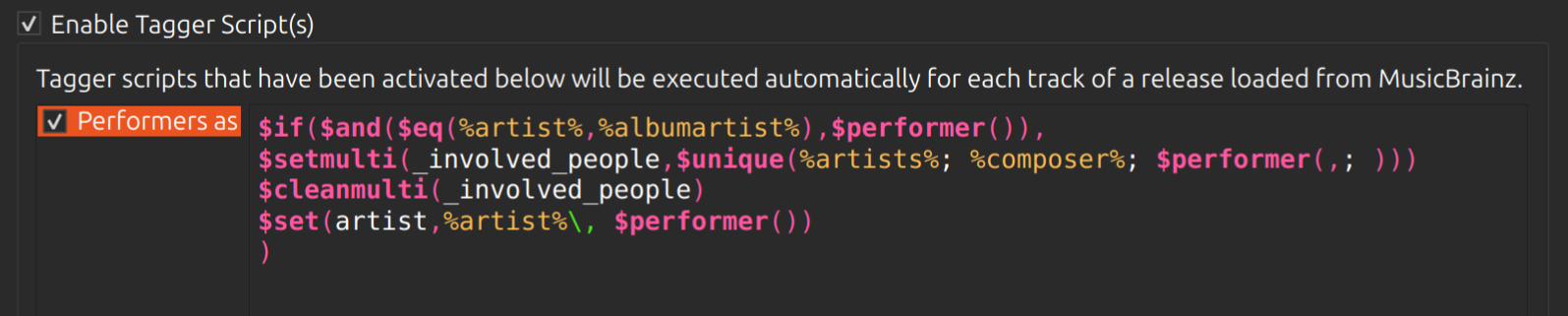
If you want to set the performers as track artists instead of or in addition to the composer you can do so using Picard’s scripting. In Options > Scripting make sure “Enable Tagger Script(s)” is enabled, then add a new script. Give it a name, e.g. “Performers as track artist” and enter the following script:

$if($and($eq(%artist%,%albumartist%),$performer()),
$set(artist,$performer())
)

This will check, whether the artist is identical to the album artist and performers are not empty. If that’s the case it sets the artist tag to the list of performers (comma separated). If you still want to include the composer as well you could adapt the script to:

$if($and($eq(%artist%,%albumartist%),$performer()),
$set(artist,%composer%\, $performer())
)

Your scripting options should look something like this:

Make sure the script is enabled (the checkbox in front of the script name is checked) and save the options.

With the second version of the script the “artist” tag for track 3 would look like this:

Windows is not really good at displaying audio metadata. It doesn’t surprise me that it can’t handle the performers.

2 Likes