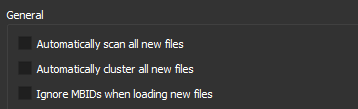
Hi, as the title suggested, is there a way to make Picard stop automatically scanning and replacing metadata with me just draggin them to clustered/unclustered section, it’s annoying even though auto scanning is disabled in settings, it keeps scanning and replacing tags with just dragging, because I only wanna use it to sort and send to the music folder using the existing data without messing with the metadata.
Thanks 
You show three settings. I assume you have ticked the third one? You need to tick that to make Picard ignore the MBID. It is the third option that moves releases to the right hand side.
2 Likes
See also the description of “Ignore MBIDs when loading new files” in the documentation:
1 Like
Your description in the help is written backwards.
Ignore MBIDs when loading new files
If you disable this option Picard will not use MusicBrainz identifiers (MBIDs) stored in the files to automatically load the corresponding MusicBrainz release and match the loaded file to the correct track. This is useful when re-processing files that have been previously tagged with incorrect information."
To “disable” means to NOT tick the option. This means the image above is following the instructions. The option is disabled…
I think you may need to re-word something here…
A TICK will ignore MBIDs. No TICK will use the MBIDS. So to disable means to untick…
When re-wording this beware of translations…
I just submitted a pull request to correct this.
3 Likes
Thanks. Seems logical to follow the language of the items above with “Check this box if you want Picard…” style for clarity. Follows the flow of the document then.
1 Like