Hello,
to get the artist info and various artist info to match, I noticed the the when running the a scan in Musicbrainz, the top artist/album artist is correct, but the next section has Various artist, how do I get the true artist information
Hello,
to get the artist info and various artist info to match, I noticed the the when running the a scan in Musicbrainz, the top artist/album artist is correct, but the next section has Various artist, how do I get the true artist information
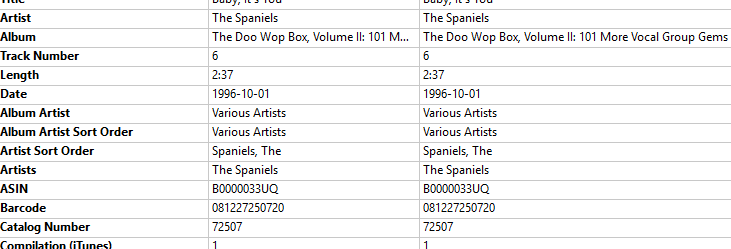
As far as I see, MB Picard has found a compilation album “The Doo Wop Box, Volume II”.
This is a collection of “Various Artists” collected on one album.
The Artist per song is visible in “Artist”. In your example “The Spaniels”.
To keep all the different artists from all the different 101 songs together, the Album Artist is called “Various Artists”.
This is the usual behaviour for a compilation album.
If you want to set the Album Artist to the same content as Artist, you would have to use a script to change that.
Please note, that the most playing software expects “Various Artists” on a compilation album. Otherwise you could see up to 101 “different albums” with the same name.
Picard is primarily designed to match releases of multiple tracks and not individual tracks.
You have not really given us enough information to know whether you are trying to match a single track or an album of tracks, nor which workflow you are using to match your music files against releases in Musicbrainz.
If you want to give us a breakdown of how you went about getting this match, we can almost certainly help you with the workflow that best matches what you are trying to achieve..
I want to do an album of tracks, but I want to replace the Various Artist, with actual artist name…
Sorry - but I am still unclear whether you have all the tracks of a genuine album, or whether you have various tracks and you are trying to create your own album of them.
I am also unclear what steps you used after loading the files in order to get the screenshot you gave us, nor what exactly you want to happen.
The track you showed us is from this release.
This is a compilation album containing tracks by various different artists. In the screen shot you gave us, it shows that the TRACK artist has been correctly identified as The Spaniels, and (because The Spaniels were not the artist for all the other tracks) the Album Artist is understandably shows as Various Artists. This seems to me to be correct and to me it wouldn’t make sense to set the Album Artist for each track to the Track Artist, and if you did you would have to take great care to ensure that the tracks were not moved separate directories containing the track artist rather than being grouped together in one directory for the whole album.
But if you want to explain in detail what you are trying to achieve we can see if we can help you.
Sorry for the delay, and you are correct, it is a compilation Box set, for each individual song I want the correct artist to display vs. always saying various artist, I use plex and Emby to play my songs.
I’d go ask the question on the Plex\Emby forums. Your image shows the tracks are correctly tagged. The “Album Artist” is correctly “Various Artist” and the track “Artist” and “Artists” are the expected “The Spaniels”. As this is the standard way to tag a compilation album, there must be a trick Plex users do to get the name on screen. KODI doesn’t have a problem with something like this and the two projects share a common past.
Tagging this way makes sure the 4CD compilation appears as a single album in your collection. With each track having the correct credit for playback. If you changed “Various Artist” to the “The Spaniels” then Plex would give you 100 different albums with one track each.
I’m not a Plex user, as I use KODI. But they both share similar ways to handle data. In Plex check that it is using your metadata. Setting \ Music \ Manage Library \ Edit… Under Advanced make sure “Prefer Local Metadata” is ticked. If you are tagging correctly, this makes sure Plex reads it.
Random article I read to confirm this: How to Use Embedded Metadata for Music in Plex - Plexopedia