Since July 2025 Chrome has force disabled all extensions that are still using manifest version 2. This affects popular extensions such as Violentmonkey.
For the time being it’s still possible to easily re-enable them by setting two flags on chrome://flags
First enable “Temporarily unexpire M137 flags.”, then restart Chrome and afterwards you can set “Extension Manifest V2 Deprecation Unsupported Stage” to disabled:
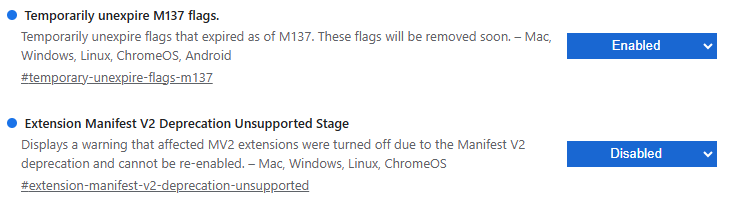
You should then be able to re-enable MV2 extensions in Chrome that are still installed and make a backup of their settings. Afterwards consider switching to a MV3 based userscript manager like ScriptCat or Tampermonkey
However there are still some caveats for MV3 extensions that can negatively affect performance.
For more methods how to re-enable MV2 extensions see: