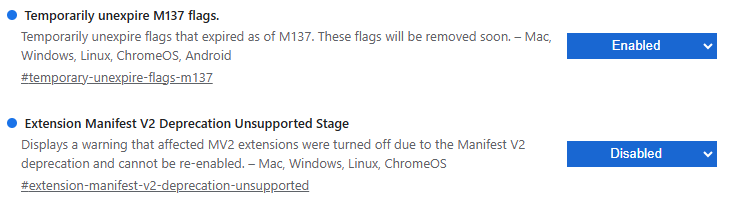
For the time being it’s still possible to easily re-enable them by setting two flags on chrome://flags
First enable “Temporarily unexpire M137 flags.”, then restart Chrome and afterwards you can set “Extension Manifest V2 Deprecation Unsupported Stage” to disabled:
You should then be able to re-enable MV2 extensions in Chrome that are still installed and make a backup of their settings. Afterwards consider switching to a MV3 based userscript manager like ScriptCat or Tampermonkey
However there are still some caveats for MV3 extensions that can negatively affect performance.
For more methods how to re-enable MV2 extensions see:
Importantly that lets me export everything to a backup. Today it is still operating, but I now know I am on my last few weeks of violentmonkey MV2.
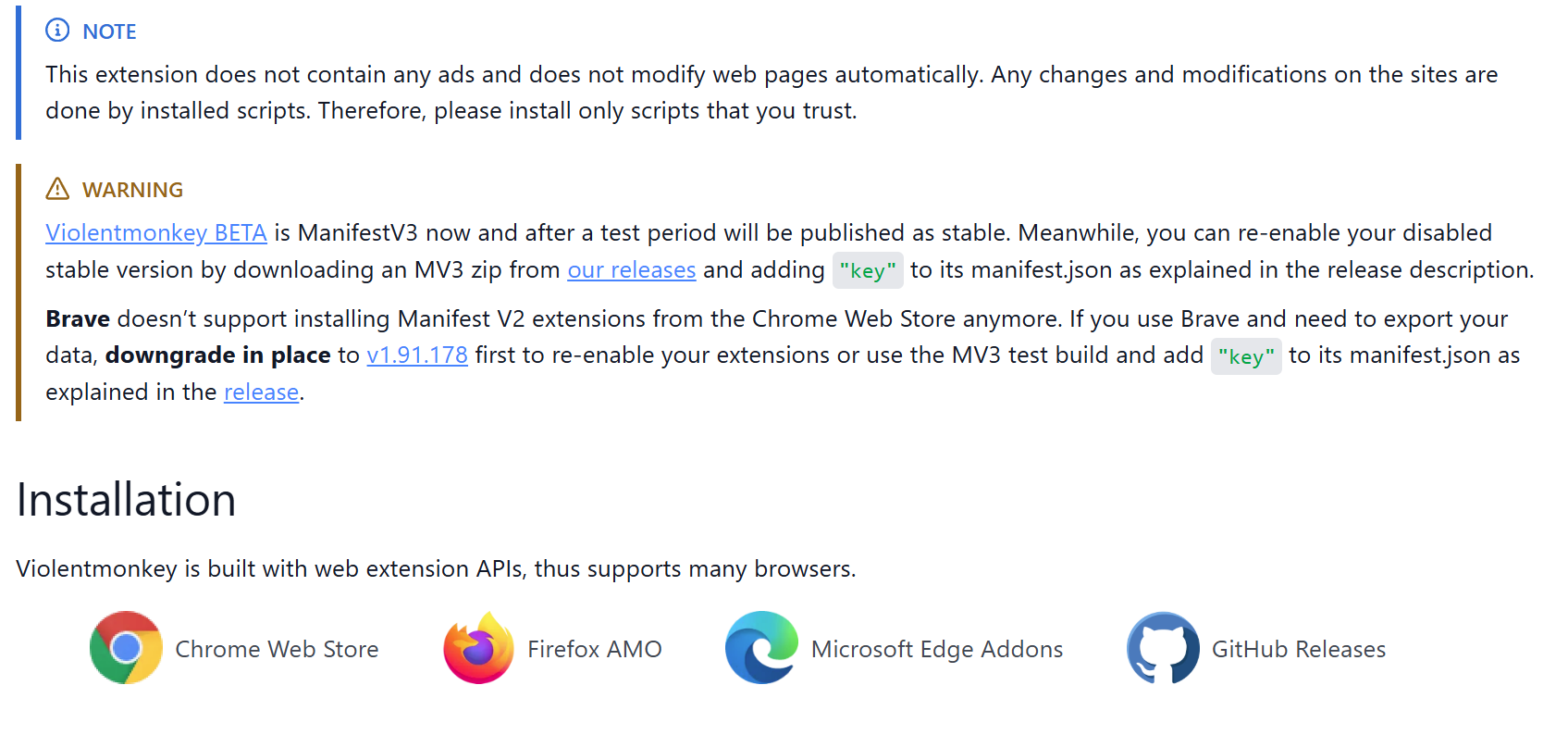
This ( https://violentmonkey.github.io ) then said there is a beta being tested which does MV3. Do I hang on for the Beta to hit release status? Will extension then autoupdate to MV3 compliant? Or do you recommend I jump now to the beta alongside the old one?
I have v2.41.0 of violentmonkey even though I see v2.43.0 on that github page
Violentmonkey 2.43.0 does work with MV3.
Once it automatically updates, you don’t lose any installed userscripts but it opens its extension settings where you have to Allow user scripts (radio button)!!
I think the MV3 violent monkey is still beta, if not alpha. Just had five crashes when trying to line up a rather large merge that meant having 50 recording pages open. Something old Vivaldi + violent monkey never worried about…
No github account, so can’t do. But also I can’t really describe it yet. Just have had dozens and dozens of crashes that have stopped me editing for the evening.
Have disabled ViolentMonkey for now and see how things behave. May need to move to an alternate script tool as MB is unusable without the scripts, but currently the site is unusable for me fullstop.
What does “allow user errors” mean? If there is a switch I can hit to make it work I would prefer to do that over moving to TamperMonkey. I notice that Github thread is also saying it is browser and not the addon (which means no one will look at it).
I am at a state if I turn on ViolentMonkey then Vivaldi crashes even on this page when I am trying to reply to you. A page where no scripts are set to run. Forget trying to do real MB work.
Turn off the extension and calm returns.
Update: OUCH!! Just spent the last hour fighting to recover Vivaldi. It crashed, and then just plain would not restart. I now not sure if this is Violent Monkey or how it interacts with a different plugin. Don’t dare re-enable it now until I see something update…
Update a few hours later: Vivaldi in a crash loop. Just would not start. Needed extreme violence at the app. And once back in my extensions got so FUBAR that I could not even disable or remove them in Vivaldi Setting. Just caused Vivaldi to crash every time it tried to toggle a setting… had to get ingenious with a fix
Gory details of my fix...
I had to go to each extension, make separate backups of their settings with their various exports. Next I closed Vivaldi and nuked the four %appdata%\Local\Vivaldi\User Data\DefaultExtensions*** folders. Reopened Vivaldi and Extensions page was aware these should exist, but now not working. At last I could remove each and every extension. So cleared the lot out.
Close and reopened Vivaldi and added my extensions back one by one, restoring from their individual backups.
Vivaldi is now stable again.
So whatever happened it was Vivaldi that blew up and went mental. Not sure if that was specific to Violent Monkey, or just the monkey triggered it more than other extensions due to what it does.
Got the same issue this morning on linux vivaldi + latest violent monkey.
Browser crashed so hard the profiles were completely unusable.
Vivaldi would not even start, whatever the profile I selected, same from the CLI, even with --disable-extensions flag.
Had to delete some subfolders as well to be able to recover some functionalities. Created a new profile, reinstalled my extensions and same happened.
Since then created a profile with all my previous extensions except violentmonkey and no crash since then.
I’ll test a few more days to see if problem happens without Violent monkey.
yes I was on 2.45.0
I’ll wait a bit to see how it is going, maybe I’ll create a dedicated test profile with just Violent monkey to see what happens. But having vivaldi refusing to start any profile just because of that makes me a bit reluctant