My box is Opensuse Leap 15.6, Mate
I use MusicBrainz Picard flatpak v.2.13.3 with Classic Extras plugin. Working fine.
I want to use now Matroska Tagger. Installed in the Options>Plugins.
When I add a .mka file, the name is red. The error is mkvmerge not found at 'mkvmerge'. Install MKVToolNix and set the folder path in Options > Plugins > Matroska Tagger.
From terminal ~> which mkvmerge /usr/bin/mkvmerge
This is the system PATH. I tried to add /usr/bin in the option but nothing better
When running Picard as a flatpak it runs inside the flatpak sandbox and does not have access to the mkvmerge tool on your system.
There is a workaround to make the commands available to the plugin, but it involves some steps. First you have to allow the Picard flatpak to run commands from the host system:
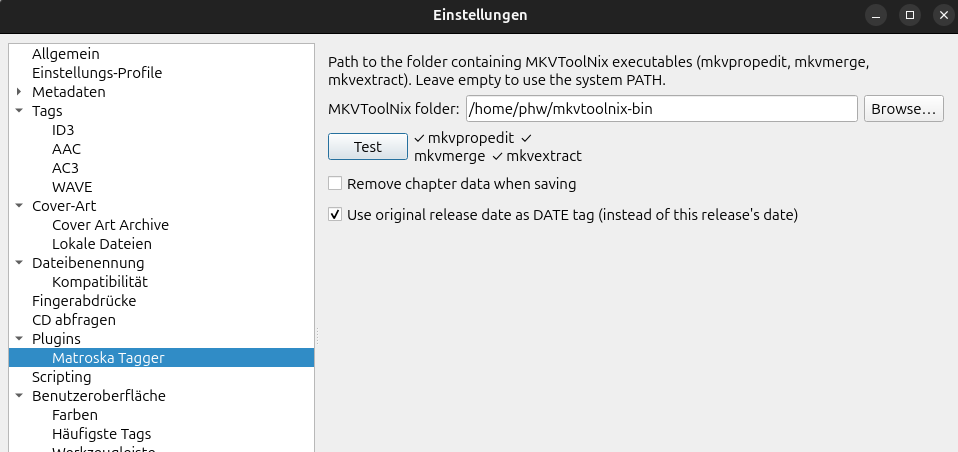
This will allow the Picard flatpak to use the flatpak-spawn --host command to launch any command from your host system. However, this does not directly allow the plugin to function, as it expects the commands mkvextract, mkvmerge and mkvpropedit to be directly available in PATH or the configured directory. Hence we need to create some wrappers at a location the flatpak has access to. It does have full access to your home directory, so I created a directory $HOME/mkvtoolnix-bin (feel free to choose something else). Inside I create three shell scripts mkvextract, mkvmerge and mkvpropedit that run the flatpak-spawn command. Just create three text files with the proper name with the following content:
mkvextract:
#!/bin/sh
flatpak-spawn --host mkvextract $@
mkvmerge:
#!/bin/sh
flatpak-spawn --host mkvmerge $@
mkvpropedit:
#!/bin/sh
flatpak-spawn --host mkvpropedit $@
Make them executable. Then inside the plugin settings configure the path to the mkvtoolnix-bin directory and try it using the “Test” button:
Maybe we should consider making this easier for plugins and allow them to run a command regardless of whether the app is running as a flatpak or not. As a side note, when using a Snap you are lost, Snap’s don’t allow extending the access in a similar way and can’t run host commands.
Thank you for your answer, I’ll try it.
But before, I have read some stuff like adding mkvtoonix flatpak inside the flatpak sandbox. I don’t know if this is a good solution, I don’t know how to do it and if it’s working and easier.
What do you think about it?
AFAIK that is not something the user can do. It would need to be included when building the flatpak already, like rsgain is bundled inside the flatpak package.
mkvtoolnix is also available as a flatpak itself at https://flathub.org/en/apps/org.bunkus.mkvtoolnix-gui (despite the name it also provides the CLI tools). Maybe there is a way to have the Picard flatpak make use of that somehow?
This was easy to set it up thanks to your clear explanations.
I can add .mka files an see there tags. However, after adding some info, I get an error message when I try to save the files;
mkvpropedit failed: Command '['/home/jp/mkvtoolnix-bin/mkvpropedit', '/home/jp/Picard/Test_tag/4.Add new value.mka', '--edit', 'info', '--set', 'title=Add new value', '--edit', 'track:a1', '--set', 'name=Add new value', '--tags', 'all:', '--tags', 'global:/tmp/picard_mkv_jx_fbt5a.xml']' returned non-zero exit status 2.
The test file name is 4.Add new value.mka
All files have the same error
It’s probably because of that temp file path. I haven’t looked at the plugin code closely, but I suspect it is first creating the temp file, then passing it to the mkvpropedit command.
But since the temp file is created inside the sandbox the path is not valid outside. I think that means the approach does not work for this plugin unfortunately. Not without some further changes.
Thank you outsidecontext,
I think my only way is to postpone the .mka files, upgrade to Opensuse 16.0 (I am late as 15.6 is no longer supported) and install Picard 2.12 from repo or maybe 2.13. Matroska Tagger will work strait forward.
I never thought of someone trying to use it with a flatpak. Flatpaks are kind of awful in general. If anyone discovers a workaround or changes I need to make then I would definitely consider an update for the Picard 3 version to make it work with the flatpak version of Picard but I don’t know whether that would even be possible. Flatpaks are designed to keep applications isolated from one another while my plugin is designed to glue two independently developed programs (Picard and MKVToolNix) together, so they seem to be fundamentally at odds with one another.
Just an update that I just merged @BenMcLean’s request to include this plugin in the v3 registry. About the Flatpak situation: We plan to make it easier for plugins to call external tools. One part of that could be that we also look into some functionality for Flatpak. Maybe there is a way to make this work, but needs to be investigated.