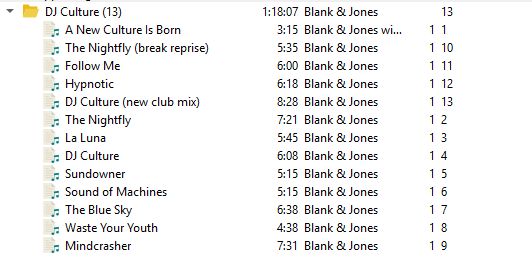
Could it be, that the sorting of Tracknumbers was changed from natural in 2.0 to (whatever) … Or is it possible that i couldn’t find the button in options?
THX bkh
Could it be, that the sorting of Tracknumbers was changed from natural in 2.0 to (whatever) … Or is it possible that i couldn’t find the button in options?
THX bkh
I can’t reproduce the issue.
Can you provide a debug log as described in General Troubleshooting — MusicBrainz Picard v3.0 documentation ?
We need to know on which platform it is and what is your locale.
It is weird your track no column isn’t aligned to the right, your screenshot doesn’t show headers either.
@bkh From the information it is unfortunately not clear, on what OS you are running. Is this on macos? If so, is this the ARM or Intel build and which macos version exactly?
I did some testing on macos, and at least with the ARM version sorting currently seems to be completely broken. Does sorting work for other columns for you, e.g. sorting by track title?
On Windows and Linux sorting works fine, though. The track number column will use natural number sorting by default. If you add custom columns you can select the sorting algorithm to use.