We have released a second release candidate for Picard 3. We got good feedback for the previous one and did quite some testing ourselves. The RC 2 addresses all the found issues and even has some feature improvement.
Downloaded and ran the portable edition. After the initial wizard warning saw this
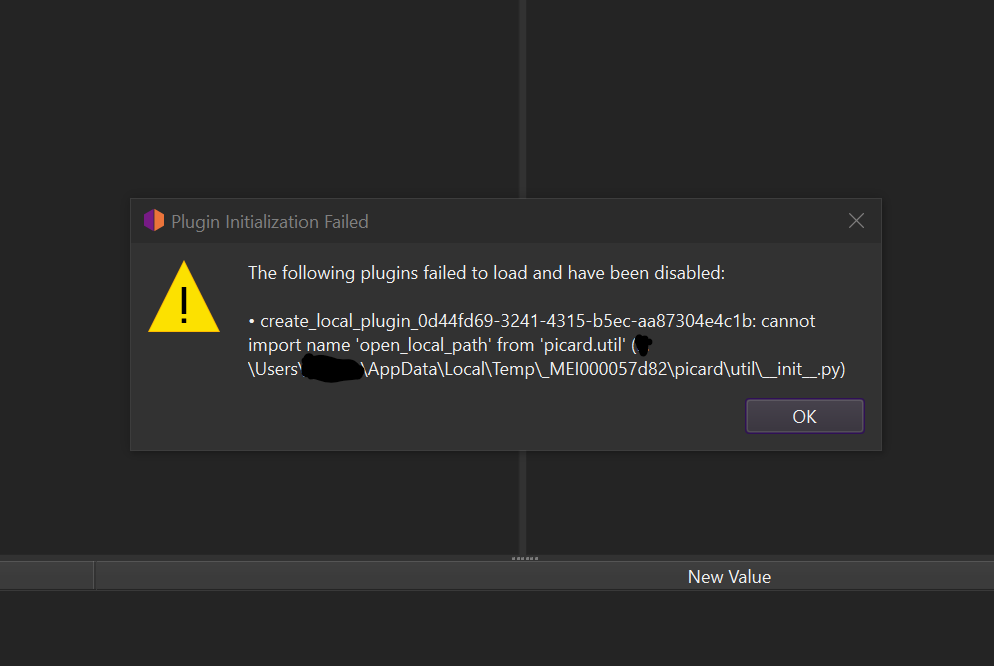
This was due to running in the same folder as I did other tests… Remove the old (beta3) test data and it got past that error and showed me the First Run wizard instead.
Comments:
- Interesting to see it shipping with no plugins. Are any of the old common ones getting a re-write? It is how I learnt how to write my own little plugin was cloning one of those and hacking something out.
1 Like
This is the first time I am trying Picard 3 – I didn’t try previous betas or RCs. When I installed RC2 it replaced my existing Picard 2 installation.
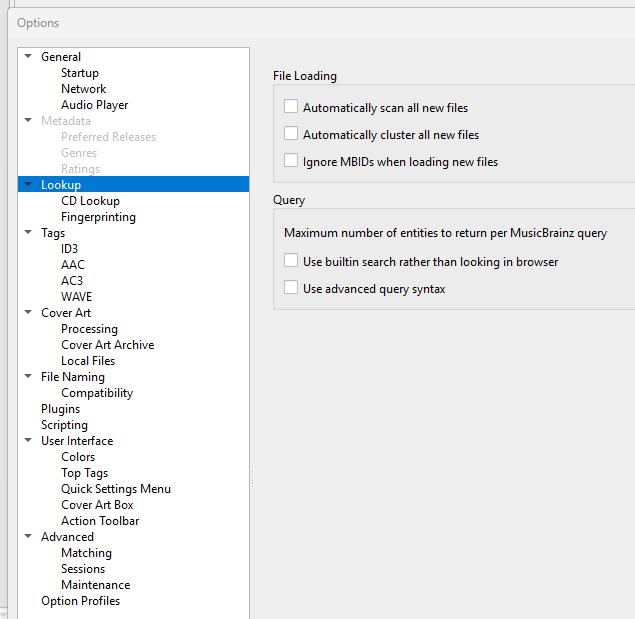
When selecting Options → Options, I can access the Metadata section once, and then it greys out and I cannot access it again.
2 Likes
Can you provide the debug log (see General Troubleshooting — MusicBrainz Picard v3.0 documentation) ?
The plugin needs updating. This is one of @rdswift’s plugins.
It’s the same as before, a fresh installation of Picard shipped with no plugins. There is a central plugin registry to install from. Click on “Install plugin…” to see them. There are several of the known plugins, but also new ones, already available.
This indicates an error loading this options page. Please provide the log output from Help > View Error/Debug log
After looking closer, I think the message box is a “worked as planned” as it told me the old beta was bad. So it was fine to abandon a bad (beta3) plugin.
I did my first test after the message box. And that run did not let the “Install Plugin…” button to show me anything. Now it does, but I would say the box feels a little small. Cramped.
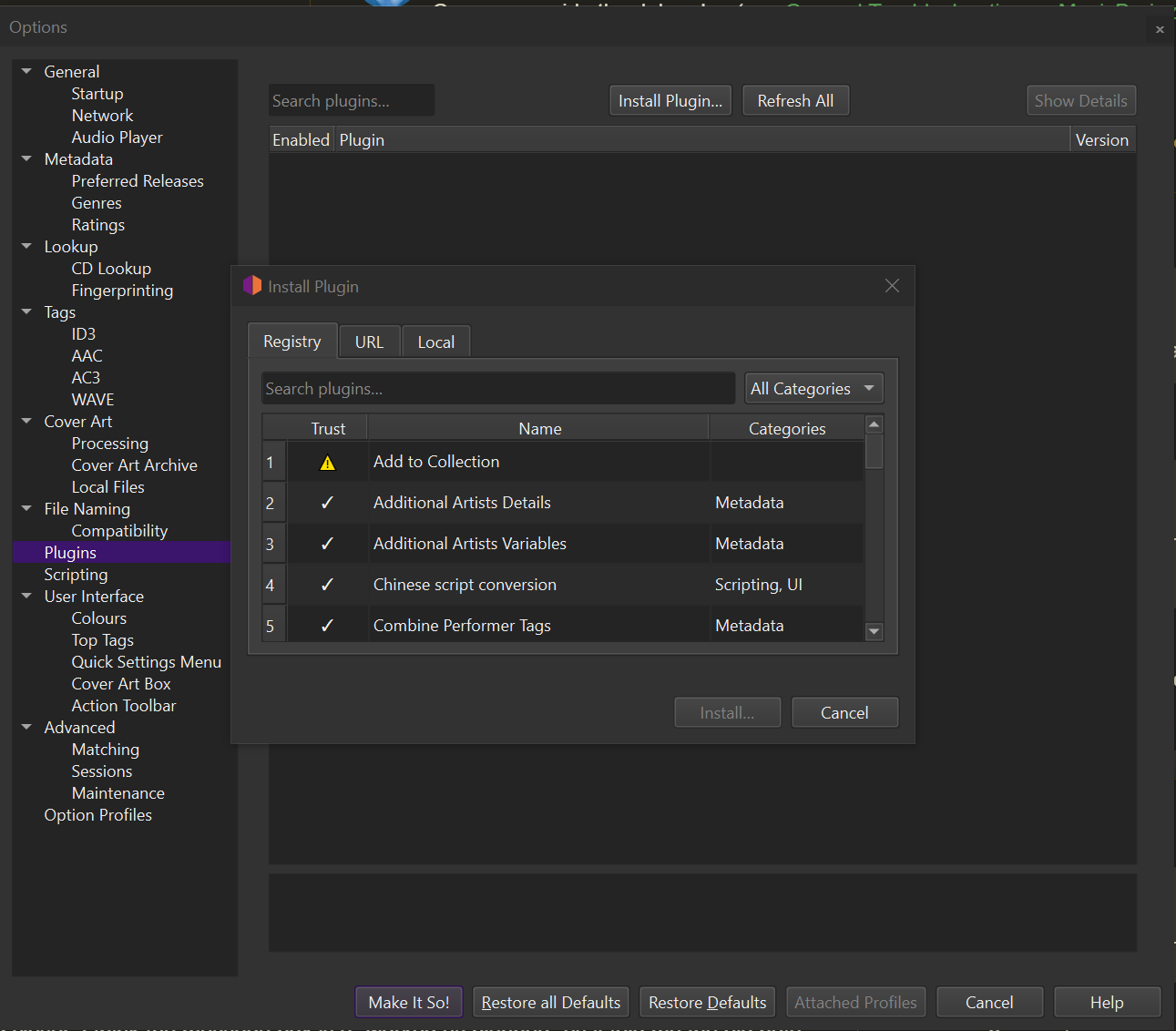
That little box is missing something major. The descriptions are not visible like in Picard 2.0. It makes it pretty hard to skim through those plugins looking for something to use. Having to open every one individually would take ages.
Please consider a Details panel like in Picard 2.0. It helps massively in discovery of plugins.
Old interface to compare:
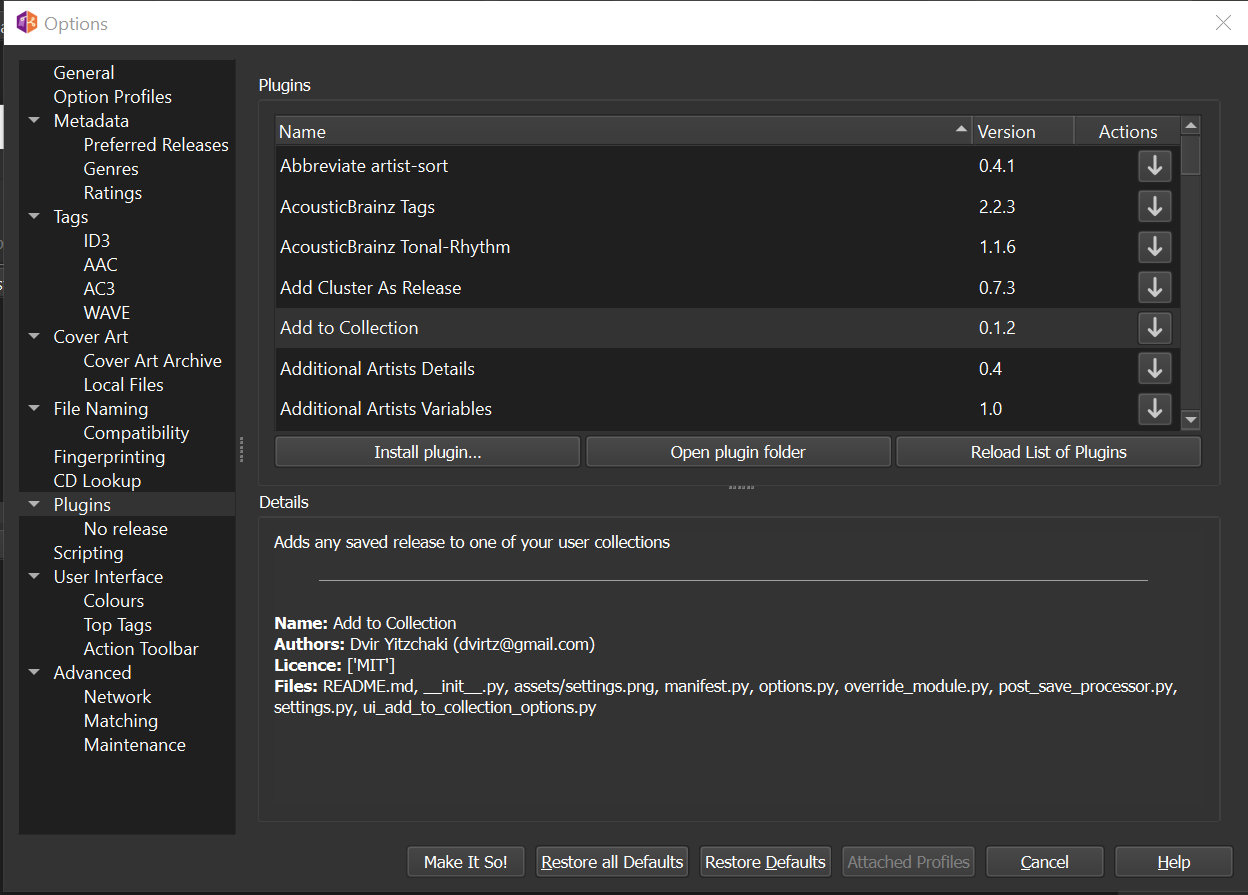
Okay - found the little tool-tip pop-ups. Wasn’t obvious and think the old interface was clearer. Especially if you have a cluttered pair of monitors like I do and tend to be cross referencing windows a lot. Also from an accessibility viewpoint it removes keyboard discovery of the list. Not everyone can use a mouse.
- Attempted to install a plugin
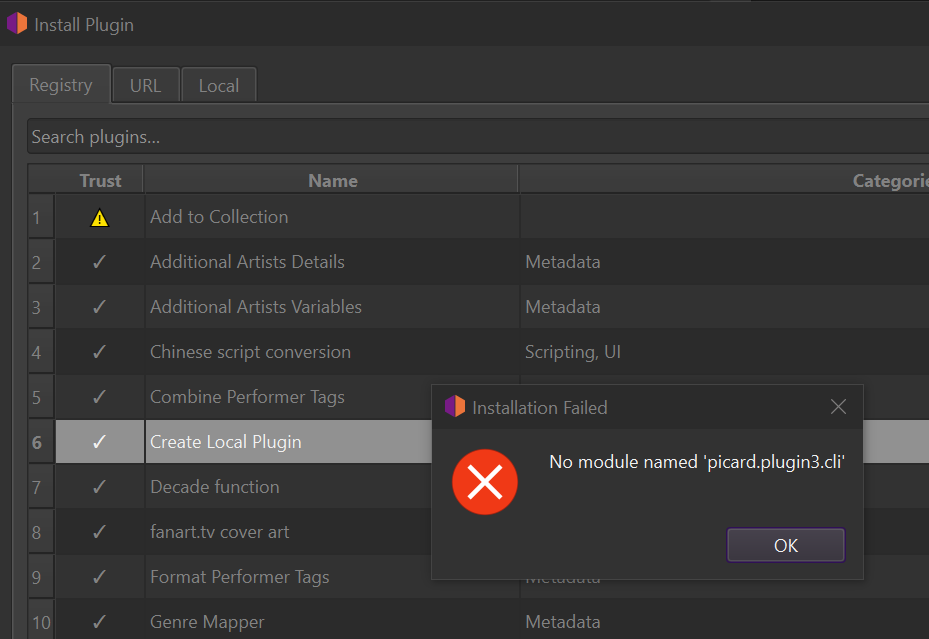
Thought I’d try and get my old plugin to work, so picked Create Local Plugin. Got this error on install. (Portable Version)
Error Log (Fresh run, deleted the settings folder, so running “as new”)
Debug Log
I: 13:59:29,660 picard\util\readthedocs._call_api:126: Documentation updates disabled in user settings.
I: 13:59:29,964 picard\browser\server.start:126: Browser Integration: Starting, listening on address 127.0.0.1 and port 8000
I: 13:59:40,035 picard\ui\mainwindow._check_for_plugin_updates:2198: Skipping plugin update checks based on user settings
I: 13:59:45,847 picard\util\readthedocs._call_api:126: Documentation updates enabled in user settings.
I: 13:59:46,368 picard\util\readthedocs._versions_json_loaded:167: Available documentation versions: {'latest', 'v3.0', 'v2.13'}
I: 13:59:47,137 picard\util\readthedocs._languages_json_loaded:202: Available documentation languages: {'nl', 'en', 'fr'}
D: 13:59:55,837 picard\plugin3\manager\update_checker.check_for_updates:30: Checking for 0 plugin updates.
D: 13:59:55,838 picard\plugin3\registry._try_next_url:227: Trying registry URL 1/2: https://raw.githubusercontent.com/metabrainz/picard-plugins-registry/refs/heads/main/plugins.toml
D: 13:59:56,075 picard\plugin3\registry._save_cache:315: Saved registry to cache: c:\Users\Username\Downloads\+APPS+\AudioVisual\Picard\MusicBrainz-Picard\Cache\plugin_registry_1719d2d2488dc410a72c11846f8d4132b0813602.toml
D: 13:59:56,076 picard\plugin3\manager\update_checker._on_registry_refreshed:37: Plugin registry and caches refreshed successfully.
D: 13:59:56,076 picard\plugin3\manager\update_checker._on_plugin_update_checks_finished:56: Finished checking for plugin updates.
D: 14:00:01,844 picard\ui\options\dialog.__init__:345: OptionsDialog init: Trying to restore page ''
D: 14:00:01,860 picard\ui\options\general.update_login_logout:115: update_login_logout: is_logged_in=False, is_authorized=False, username='', error_msg=None
D: 14:00:01,865 picard\ui\options\dialog.switch_page:745: switch_page: Saving page 'general' to options_last_active_page
D: 14:00:05,925 picard\ui\options\dialog.switch_page:745: switch_page: Saving page 'plugins' to options_last_active_page
D: 14:00:07,443 picard\ui\dialogs\installplugin.__init__:82: InstallPluginDialog: Fetching registry on dialog open
D: 14:00:07,447 picard\plugin3\registry._load_from_cache:180: Loaded registry from cache: c:\Users\Username\Downloads\+APPS+\AudioVisual\Picard\MusicBrainz-Picard\Cache\plugin_registry_1719d2d2488dc410a72c11846f8d4132b0813602.toml
D: 14:00:11,963 picard\git\backends\pygit2._apply_network_timeouts:415: Set libgit2 server_connect_timeout to 30 seconds
D: 14:00:11,963 picard\git\backends\pygit2._apply_network_timeouts:415: Set libgit2 server_timeout to 60 seconds
D: 14:00:15,850 picard\ui\options\dialog.refresh_plugin_pages:754: refresh_plugin_pages: Starting refresh
D: 14:00:15,851 picard\ui\options\dialog.add_pages:253: add_pages: Found matching page 'plugins', setting as default_item
D: 14:00:15,852 picard\ui\options\dialog.switch_page:745: switch_page: Saving page 'plugins' to options_last_active_page
D: 14:00:15,852 picard\ui\options\dialog.refresh_plugin_pages:832: refresh_plugin_pages: Refresh complete
D: 14:00:15,854 picard\plugin3\manager\lifecycle.enable_plugin:132: Enabling plugin create_local_plugin_0d44fd69-3241-4315-b5ec-aa87304e4c1b (UUID 0d44fd69-3241-4315-b5ec-aa87304e4c1b, current state: discovered)
E: 14:00:15,858 picard\plugin3\manager\install._create_and_register_plugin:209: Plugin installation failed during enable: No module named 'picard.plugin3.cli'
D: 14:00:15,895 picard\plugin3\manager._safe_remove_directory:645: Cleaned up failed plugin directory for create_local_plugin_0d44fd69-3241-4315-b5ec-aa87304e4c1b: c:\Users\Username\Downloads\+APPS+\AudioVisual\Picard\MusicBrainz-Picard\Plugins\create_local_plugin_0d44fd69-3241-4315-b5ec-aa87304e4c1b
I: 14:00:15,895 picard\plugin3\manager._cleanup_failed_plugin_install:617: Successfully cleaned up failed plugin installation: create_local_plugin_0d44fd69-3241-4315-b5ec-aa87304e4c1b
E: 14:00:15,899 picard\util\thread.run:114: Traceback (most recent call last):
  File "picard\util\thread.py", line 111, in run
  File "picard\plugin3\asyncops\utils.py", line 59, in _wrapper
  File "picard\plugin3\asyncops\manager.py", line 53, in _install
  File "picard\plugin3\manager\__init__.py", line 677, in install_plugin
  File "picard\plugin3\manager\install.py", line 113, in install_plugin
  File "picard\plugin3\manager\install.py", line 363, in _install_from_remote_url
  File "picard\plugin3\manager\install.py", line 349, in _install_common
  File "picard\plugin3\manager\install.py", line 207, in _create_and_register_plugin
  File "picard\plugin3\manager\__init__.py", line 819, in enable_plugin
  File "picard\plugin3\manager\lifecycle.py", line 136, in enable_plugin
  File "picard\plugin3\plugin.py", line 700, in load_module
  File "<frozen importlib._bootstrap_external>", line 759, in exec_module
  File "<frozen importlib._bootstrap>", line 491, in _call_with_frames_removed
  File "c:\Test\Picard\MusicBrainz-Picard\Plugins\create_local_plugin_0d44fd69-3241-4315-b5ec-aa87304e4c1b\__init__.py", line 38, in <module>
ModuleNotFoundError: No module named 'picard.plugin3.cli'
After restarting RC2 I cannot reproduce the Options → Metadata issue. It no longer greys out and is now fully functional. 
When you report issues, it would help a log if you provided debug logs.
About new plugin system, please create tickets if you have suggestions, so we can track those for next dot release.
I think I identified the issue, a fix will be in next release. Thanks for the report.
1 Like
I’ll try and get a log from that error that popped up.
Debug log added to above post.
I’ll also quit on the feedback as I don’t do tickets as I can’t get my head around that system.
As I wrote previously, this plugin needs updating due to some changes in Picard.
I do recognise that. This is why I was trying to load “Create Local Plugin” to use as a start point for trying to get my old lines of code to work. It is just a character swap thing based on the old Hyphen Unicode plugin.
It is “Create Local Plugin” that caused that error box to appear.
Yes, but it is the “Create Local Plugin” that needs the update 
Sorry. Misunderstood. So I basically triggered the same error from two different angles.
Just made the update and pushed v1.3 of the plugin. It should be working again.
4 Likes
Thank you. I just tested the update and it works well here.
1 Like
Still get the same pop-up message here. Assume it is due to running the portable version.
But now got past the need for that as after a bit of confusion in getting debugging working I managed to get my own little plugin upgraded to v3 API. Biggest thing that tripped me up was realising I had to add that extra argument of (api) to all my old functions so I can get api.logger.info() to work. The auto-convert script (migrate_plugin.py) didn’t put those in and the warnings didn’t make sense
- Processors: Use ‘api’ parameter (first argument)
- Processors: Parameters of track metadata processors have changed
Plugin2to3MigrationGuide.md is a little confusing on this. I found better examples in API.md so I thank you all for the API.md notes. And allowing me to create a local plugin.
2 Likes
I need to update Plugin2to3MigrationGuide and the migration script, we made changes to the api since and there weren’t updated.
2 Likes