New to Picard

Hello All

I suffered a massive debacle where i lost all my music and playlists files.

As such i now need to load over 500 cd and 120 albums onto my nas.

Many of my cds are compilations.

I used musicbrainz in the past to remove disk and track number. and this was fine.

Now i see that with Musicbrainz i can separate the compilation cds and sort them by artists when saving.

I am not a programer nor do i understand the syntax on how to build a scip to save the cd content once loaded into musicbrainz

my objective is to save the results as Artistname then save the Albumname for that artist and then the track. How do i accomplish this?

When I delete the track and disk number i am left with a - before the track name. is there anyway i can remove this -?

Thank you in advance for any help
1 Like

The “-” is part of the naming script. So you can remove that part from the script.

Please share the naming script you are using here and we can take a look and recommend the needed changes.

2 Likes

Thank you for your reply

The track presents’ itself as 1-03 sunny.wav

I go to the bottom of musicbrainz section once the tracks

i go to the tag section of the screen and delete the track number and then if the case the disk number.

where i am in a situation as above i’m left with -sunny.wave in my dataset

I’m not using a naming to do this

$if2(%artist%)/

$if(%albumartist%,%album%/,)

$if($gt(%totaldiscs%,1),$if($gt(%totaldiscs%,9),$num(%discnumber%,2),%discnumber%)-,)$if($and(%albumartist%,%tracknumber%),$num(%tracknumber%,2) ,)$if(%_multiartist%,%artist% - ,)%title%

I hope this helps

once again thank you

Actually, we need to see what file naming script you are using.

If you don’t want the disc and track number be part of the title you can change the script with the track number handling removed like this:

$if2(%artist%)/
$if(%albumartist%,%album%/,)
$if(%_multiartist%,%artist% - ,)%title%
1 Like

Thank you all for your help and suggestions.

$if2(%artist%)/

$if2(%album%)/

$if2(%title%)/

I changed my scripts to this above (i do not know what i’m doing)

however i tried this on a compilation cd and this is what i ended up with this in windows explorer.

Instead of title in the script is there a better variable?

Otherwise i guess i must be happy with this result.

Once again thank you for your patience and help

sonny & cher

   Am Gold_1965
        I Got You Babe
              "name" Sonny & Cher - I Got You Babe
              "title" I got You Babe
However in Jellyfin all Looks good


Sorry, I cannot see what you got or what you want to have instead.

But if all you want is really just a folder artist, then a folder album and then the track title as filename you could use:

%artist%/%album%/%title%

Just understand that this will split compilations by track artist. So if you tag a compilation with multiple different artists you will have a folder with the compilation album name in each artist folder.

As I understood you question that is actually what you want, but just wanted to point this out. If you want a single folder with the album artist name use %albumartist% instead of %artist%.

1 Like

Thank you for your patience and help

%albumartist% in my example this would mean Sonny & Cher.

Is so then why in %artist%/%album%/%title% you only have artist.

I tried to process a single artist cd …. excellent

then i processed a single disk compilation and i got artist>compilation album>original album>track name

I processed a second compilation and i got perfectly artist>album>track

What could cause this difference?

Musicbrainz is turning out to be a brilliant solution

Thank you for your assistance

Hello all

I’ve been happy ripping my cds (20) with EAC son far. This rips is saved in a temporary folder once finished.

While ripping the cd in EAC i use the MB plugin to identify the tracks. OK

Then i use MB and load the ripped tracks from this temp folder and i remove the track number and save the files which is save in a MB done folder.

Everything was going fine.

Since yesterday as i load the files in MB remove the track numb. instead of getting a green check mark i get a round red x.

I play the files from the temp folder and they play correctly to the end. However when i try to play the files from the MB done folder they do not play.

This is happening on all my ripped cd today

What did i do/configure wrong?

Thank you for your help

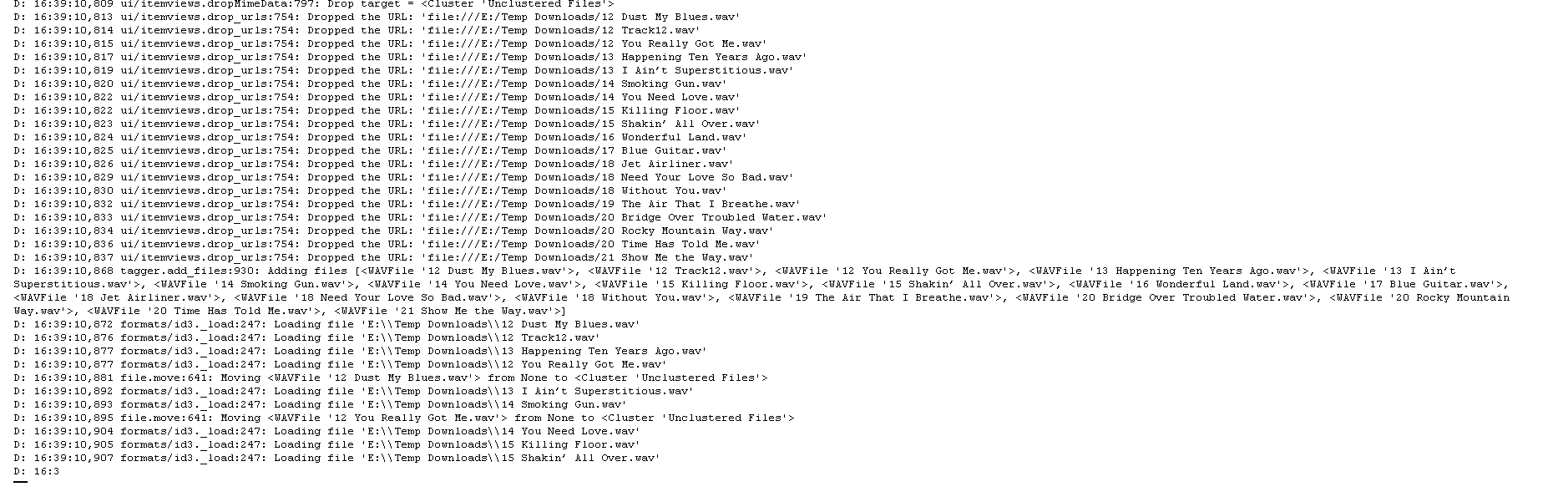
Please share a debug log as described in General Troubleshooting — MusicBrainz Picard v2.13.3 documentation

Thank you for your time and reply

i hope this is what you need

Again thank you for your help

Thanks. That’s generally the log view, yes :slight_smile: But it doesn’t show any errors on save. As I understood your original question you are getting the red icon when saving the files.

Hence please repeat this process for one or two files: start Picard, load the files, do the tag editing you do and save them, so you see the red error icon again. Then share the full text of the debug log here.

Also for a specific file you can also see the saving error when right clicking the file and opening the Info dialog. In case of errors there should be a error tab in this dialog with details.

Thank you for your patience

I copied 2 files to MB, I scanned them, and i deleted the track number from both files

this is what i got

E: 17:45:00,377 util/thread.run:69: Traceback (most recent call last):

File “shutil.py”, line 791, in move

OSError: [WinError 17] The system cannot move the file to a different disk drive: ‘E:\\Temp Downloads\\Savage Garden - Truly Madly Completely The Best Of (2005) Flac EAC peaSoup\\02 I Knew I Loved You.flac’ → ‘D:\\MB Picard\\Savage Garden\\Truly Madly Completely_ The Best Of Savage Garden\\I Knew I Loved YouSavage Garden - I Knew I Loved You (1).flac’

During handling of the above exception, another exception occurred:

Traceback (most recent call last):

File “util\thread.py”, line 66, in run

File “file.py”, line 396, in _save_and_rename

File “file.py”, line 565, in _rename

File “util\filenaming.py”, line 493, in move_ensure_casing

File “shutil.py”, line 811, in move

File “shutil.py”, line 435, in copy2

File “shutil.py”, line 264, in copyfile

OSError: [Errno 28] No space left on device: ‘D:\\MB Picard\\Savage Garden\\Truly Madly Completely_ The Best Of Savage Garden\\I Knew I Loved YouSavage Garden - I Knew I Loved You (1).flac’

E: 17:45:00,391 ui/item.error_append:108: <FLACFile ‘02 I Knew I Loved You.flac’>: [Errno 28] No space left on device: ‘D:\\MB Picard\\Savage Garden\\Truly Madly Completely_ The Best Of Savage Garden\\I Knew I Loved YouSavage Garden - I Knew I Loved You (1).flac’

1 Like

Thanks

So Windows says there is no disk space left on your D: drive, or at least not enough for the file. Please check that.

1 Like

DUH

My stupidity i9s acting up again Sorry. I added a 4tb ssd to the system however i forgot to change the destination drive in MB

I truly am sorry to have wasted you time and i thank you for your patience

2 Likes

No need to apologize, you’re most welcome. Glad to see the issue solved :smiley:

1 Like