MusicBrainz database ...a couple of question

Hello everyone!
I have a couple of questions about the MusicBrainz database and Picard.

Recently, I noticed that for some albums I submitted, MusicBrainz Picard inserted “Soundtrack” into the “Album Artist Sort Order” field. In my opinion, this was incorrect, and I wanted to enter the right name (in this case, it was for Cirque Du Soleil). I edited the field by entering what I thought was the correct text and clicked “Save.” Contrary to my expectations, all the albums were still saved with “Soundtrack” at the beginning, like this:
Soundtrack – Title

How can I fix this?
I should point out that my script uses %artist% and %albumartist%.

$set(_albumartistname,$swapprefix(%albumartist%))
$set(_artistname,$swapprefix(%artist%))
$set(_basepath,$if2(%_albumartistname%,%_artistname%)

$set(_basepath,$if2(%_albumartistname%,%_artistname%) - %album% \(%_year%\) %_format% %_audio% %_catno% %_label%)

Another thing, also related to the database:

It has happened to me several times that I analyze an album where I know the artist and title, and I get multiple results on MusicBrainz Picard. Let me explain: I analyze the album and get results where some songs are correctly identified as belonging to the album I know, but other songs (which I know belong to the same album) are, according to the database, part of other albums (sometimes more than one). So I get fragmented results.

Does this happen to others? Is there a solution for this?

edit:
Ok Understood… drag&drop songs for album n. to album i want to recognize… perfect :slight_smile:

First question - need Release examples. And your whole script. Something has to be buggy if it adds “soundtrack” to “album artist sort order” as they should not be connected at all.

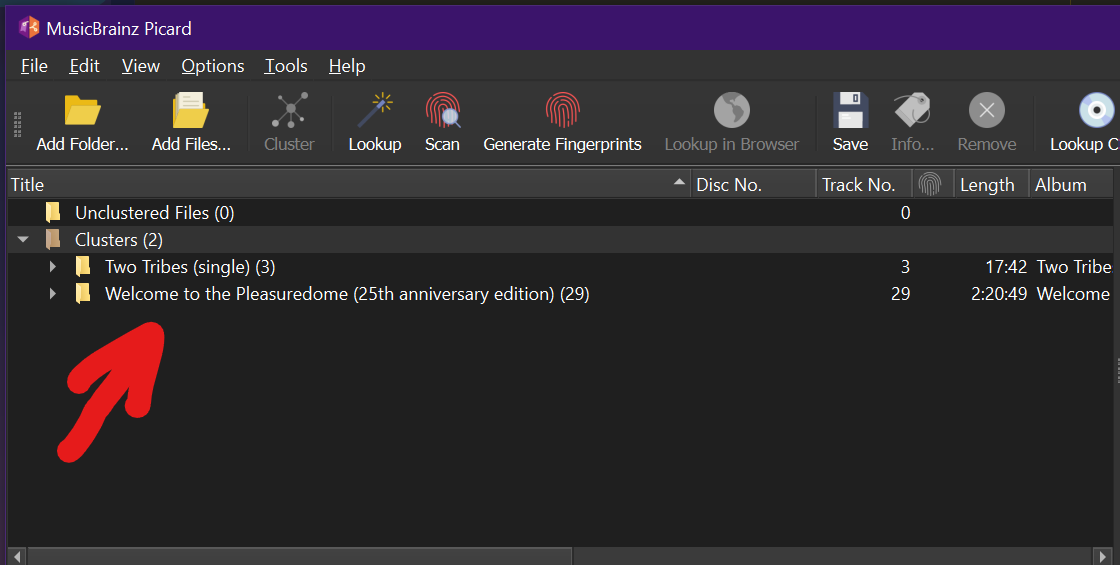
“And another thing” - this is likely happening due to using Scan. Or not hitting cluster first if doing a Lookup. Ultimately the issue is down to Picard spotting the same track on multiple Releases and picks the popular ones that are a closest match. You have got the correct solution to drag and drop things into place. Personally I drag back over to a cluster on the left so I know I have everything cleanly together, then drag and drop onto that correct selection.

2 Likes

@IvanDobsky

Here it is a list:

Soundtrack - 'Twas the Night Before... (2019) FLAC 16-44 No_Cat_Number Cirque du Soleil Musique
Soundtrack - Alegría (1994) FLAC 16-44 09026_62701_2 RCA Victor
Soundtrack - Alegría_ The Film (2000) FLAC 16-44 09026_63454_2 RCA
Soundtrack - Amaluna (2012) FLAC 16-44 CDSMCD_10046_2 Cirque du Soleil Musique
Soundtrack - Cirque du Soleil (1990) FLAC 16-44 CSCD_0790 Nâga Productions
Soundtrack - Corteo (2006) FLAC 16-44 CDSMCL_20025_2 Cirque du Soleil Musique
Soundtrack - Criss Angel_ Believe (2010) FLAC 16-44 CDSMCD_10032_2 Cirque du Soleil Musique
Soundtrack - Delirium (2006) FLAC 16-44 No_Cat_Number Cirque du Soleil Musique
Soundtrack - Dralion (1999) FLAC 16-44 09026_63559_2 Cirque du Soleil Musique; RCA Victor
Soundtrack - IRIS (2011) FLAC 16-44 CDSMCD_10042_2 Cirque du Soleil Musique
Soundtrack - Journey of Man (2000) FLAC 16-44 SK_89097 Sony Classical
Soundtrack - Joyà (2014) FLAC 16-44 No_Cat_Number Cirque du Soleil Musique
Soundtrack - KOOZA (2008) FLAC 16-44 CDSMCD_10028_2 Cirque du Soleil Musique
Soundtrack - Kurios_ Cabinet des Curiosités (2014) FLAC 16-44 CDSMCD_10051_2 Cirque du Soleil Musique
Soundtrack - KÀ (2005) FLAC 16-44 CDSMCJ_10024_2 Cirque du Soleil Musique
Soundtrack - La Nouba (1999) FLAC 16-44 101L01 Cirque du Soleil Inc_
Soundtrack - Luzia (2016) FLAC 16-44 CIRQ_100532 No Label
Soundtrack - Mystère (1994) FLAC 16-44 09026_62686_2 RCA Victor
Soundtrack - Nouvelle Expérience (1990) FLAC 16-44 09026_61531_2 RCA Victor
Soundtrack - O (1998) FLAC 16-44 09026_63358_2 RCA Victor
Soundtrack - Ovo (2010) FLAC 16-44 CDSMCD_10033_2 Cirque du Soleil Musique
Soundtrack - Quidam (1996) FLAC 16-44 No_Cat_Number No Label
Soundtrack - Saltimbanco (1992) FLAC 16-44 09026_61486_2 RCA Victor
Soundtrack - Totem (2011) FLAC 16-44 CDSMC_10034_2 Cirque du Soleil Musique
Soundtrack - Volta (2017) FLAC 16-44 CDSMCD10056_2 Cirque du Soleil Musique
Soundtrack - Zaia (2009) FLAC 16-44 CDSMCD_20029_2 Cirque du Soleil Musique
Soundtrack - ZED (2009) FLAC 16-44 CDSMCD_10031_2 Cirque du Soleil Musique
Soundtrack - Zumanity (2004) FLAC 16-44 CDSMCJ_10023_2 Cirque du Soleil Musique

My script (in evolution) is actually this:

$set(_year,$left($if2(%originaldate%,%date%,0000),4))
$set(_format,$upper(%_extension%))
$set(_audio,$if2(%_bits_per_sample%,0)-$div($if2(%_sample_rate%,0),1000))
$set(_catno,$if2(%catalognumber%,No Cat Number))
$set(_catno,$replace(%_catno%, ,_))
$set(_catno,$replace(%_catno%,-,_))
$set(_label,$if2(%label%,No Label))
$set(_albumartistname,$swapprefix(%albumartist%))
$set(_artistname,$swapprefix(%artist%))
$set(coverart,%_coverart_url%)


$set(_disccount,$if($gt(%totaldiscs%,1),%totaldiscs%Discs))

$set(_basepath,$if2(%_albumartistname%,%_artistname%) - %album% %_disccount% \(%_year%\) %_format% %_audio% %_catno% %_label%)
$if($gt(%totaldiscs%,1),$set(_basepath,%_basepath%/Disc %discnumber%))

$if($and(%albumartist%,$ne(%albumartist%,%artist%)),%_basepath%/$num(%tracknumber%,2) %title% - %artist%,%_basepath%/$num(%tracknumber%,2) - %title%)

Are you using this plugin?

2 Likes

I assume you have set the script you mention in Options > Scripting, but use the %_basepath% variable then in your file naming. Is this right?

If yes, any change you make to the artist names won’t have an impact on the path, as this is already preset with _basepath.

To solve this move the script to the start of your filenaming script, so it runs when saving the files.

Move the files to the release you want to tag against and save them. You can load any release available in MusicBrainz into Picard and tag your files with it. See also Retrieving Album Information — MusicBrainz Picard v2.13.3 documentation

Also consider using Cluster then Lookup, as this will lookup full releases instead of individual recordings.

4 Likes

Yes it is switched ON in
Options - Plugin

Thank so much for your suggestion @chaban .
I’ll try to switch it off

And thanks to you @IvanDobsky :slight_smile:

2 Likes

I read carefully your answer but due to my bad english maybe i haven’t understodd well…

Yes it is

$if($gt(%totaldiscs%,1),$set(_basepath,%_basepath%/Disc %discnumber%))

So if the condition is true (i.e. the number of discs in the album is greater than 1) then execute the statement that redefines the _basepath variable (i.e. where to save the audio files) as the content of _basepath/Disc disc_number; otherwise do nothing (the else condition is in fact not defined)

In this last case I suppose _basepath remain the “mother” directory
(in fact in this case Picard correctly moves " * " as set in options / rename file)

Sorry! this is not clear…
I do not understand (sorry) what you suggest me to move…
Do you suggest another kind of “approach” to the issue?

This is also not completely clear;

Lookup si an automatic action which Picard do when I upload files: it read existent metadata in my files to query its database (is it correct?)

Lookup is different to scan:

Lookup: Uses existing metadata (artist, album, title, etc.) to query the database.
Scan: Analyzes the “acoustic fingerprint” of each audio file and uses that data to find a match. It’s slower but can identify tracks even if they don’t have any metadata.

So I do not understand which is “cluster” (…literally a specific group of data?)

Thank so much for your patience

1 Like

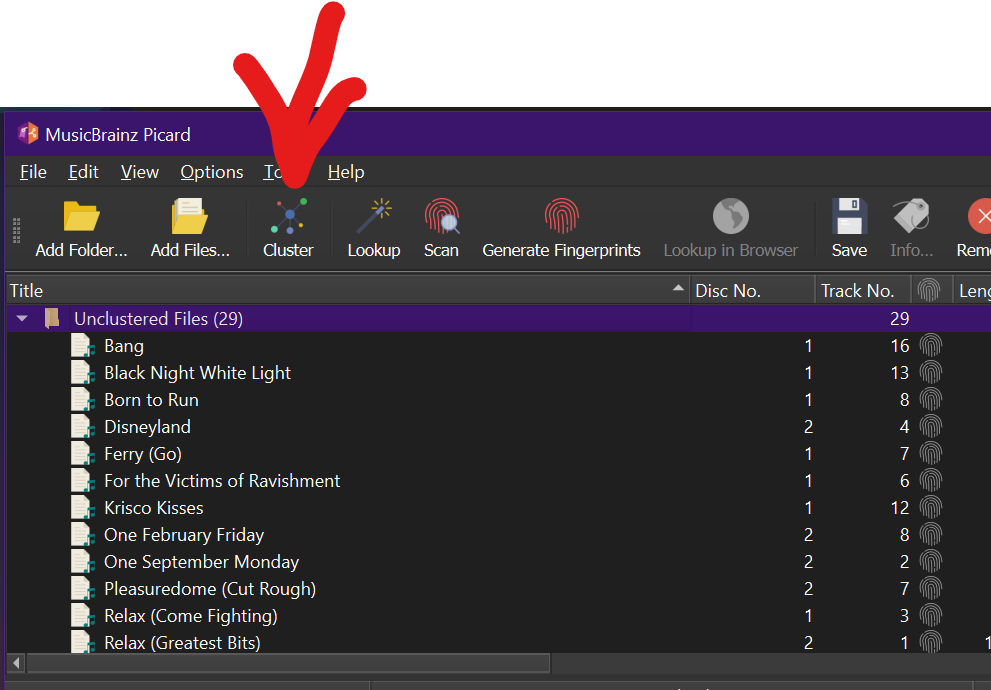
Lets get some pictures…. the Cluster button

I assume the button is translated on your Picard. The button in front of Lookup is called Cluster. This takes loose files and groups (or “clusters”) them together into albums. Click on this before you click on Lookup. This lets Lookup know to work on them as complete items.

3 Likes

Yep!
I got it! Thank so much @IvanDobsky

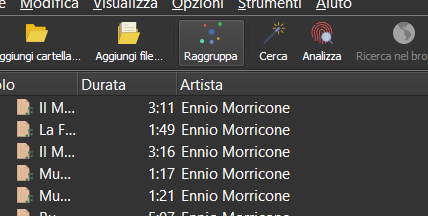
it names “Raggruppa” (Cluster) - “Cerca” (Lookup) - “Analizza” (Scan)

So it’s the same than moving from right column files from variuos album to the correct one

1 Like

It uses the tags and data of the current files to group them together. This is just what the raw files have before you start updating anything or running scripts.

It allows Lookup to work more intelligently on the album instead of loose files.

1 Like

The scripts configured in Options > Scripting run when data gets loaded on the right¹. The primary purpose of those scripts is to modify the loaded data in some way.

Your problem is that you set _basepath there, but use it later in the file naming script. The _basepath contains the artist name. But when you later change the artist name the _basepath stays the same.

To solve this, add the script that sets the _basepath to your file naming script. E.g. add this at the very beginning of your file naming script:

set(_year,$left($if2(%originaldate%,%date%,0000),4))
$set(_format,$upper(%_extension%))
$set(_audio,$if2(%_bits_per_sample%,0)-$div($if2(%_sample_rate%,0),1000))
$set(_catno,$if2(%catalognumber%,No Cat Number))
$set(_catno,$replace(%_catno%, ,_))
$set(_catno,$replace(%_catno%,-,_))
$set(_label,$if2(%label%,No Label))
$set(_albumartistname,$swapprefix(%albumartist%))
$set(_artistname,$swapprefix(%artist%))

$set(_disccount,$if($gt(%totaldiscs%,1),%totaldiscs%Discs))

$set(_basepath,$if2(%_albumartistname%,%_artistname%) - %album% %_disccount% \(%_year%\) %_format% %_audio% %_catno% %_label%)

The file naming script gets run just when saving the file to generate the file path.

If this is still unclear, please share your full filenaming script.


¹) To be exact, it runs on loading and also when assigning files to tracks.

2 Likes

@outsidecontext
Really thanks to you for your time :heart:

This is my actual script that I updated and modified

$set(_year,$left($if2(%originaldate%,%date%,0000),4))
$set(_format,$upper(%_extension%))
$set(_audio,$if2(%_bits_per_sample%,0)-$div($if2(%_sample_rate%,0),1000))
$set(_catno,$if2(%catalognumber%,No Cat Number))
$set(_catno,$replace(%_catno%, ,_))
$set(_catno,$replace(%_catno%,-,_))
$set(_label,$if2(%label%,No Label))
$set(_albumartistname,$swapprefix(%albumartist%))
$set(_artistname,$swapprefix(%artist%))
$set(coverart,%_coverart_url%)

$set(_disccount,$if($gt(%totaldiscs%,1),%totaldiscs%Discs))

$set(_basepath,$if2(%_albumartistname%,%_artistname%) - %album% %_disccount% \(%_year%\) %_format% %_audio% %_catno% %_label%)
$if($gt(%totaldiscs%,1),$set(_basepath,%_basepath%/Disc %discnumber%))

$if($and(%albumartist%,$ne(%albumartist%,%artist%)),%_basepath%/$num(%tracknumber%,2) %title% - %artist%,%_basepath%/$num(%tracknumber%,2) - %title%)

So do you suggest to move

$set(_basepath,$if2(%_albumartistname%,%_artistname%) - %album% %_disccount% \(%_year%\) %_format% %_audio% %_catno% %_label%)
$if($gt(%totaldiscs%,1),$set(_basepath,%_basepath%/Disc %discnumber%))

at the top? Is this correct also if I have do not set other variables like _albumartistname% and %_artistname%?

1 Like

If that’s your full file naming script, then it actually looks good. Do you still have any problems with this full script?

1 Like

Thank so much for your patience :slight_smile: @outsidecontext

Yes the issue with moving " *" form original directory to “mother” destination directory is still present.

I’m learning more about Picard and I’m improving my script:

This is actually last version:


$set(_album,%album%)
$set(_album,$trim(%_album%))
$set(_album,$rreplace(%_album%,\\s+, ))

$set(_albumartistname,$swapprefix(%albumartist%))
$set(_albumartistname,$trim(%_albumartistname%))
$set(_albumartistname,$rreplace(%_albumartistname%,\\s+, ))

$set(_artistname,$swapprefix(%artist%))
$set(_artistname,$trim(%_artistname%))
$set(_artistname,$rreplace(%_artistname%,\\s+, ))

$set(_year,$left($if2(%originaldate%,%date%,0000),4))
$set(_format,$upper(%_extension%))
$set(_audio,$if2(%_bits_per_sample%,0)-$div($if2(%_sample_rate%,0),1000))
$set(_catno,$if2(%catalognumber%,No Cat Number))
$set(_catno,$replace(%_catno%, ,_))
$set(_catno,$replace(%_catno%,-,_))
$set(_label,$if2(%label%,No Label))
$set(coverart,%_coverart_url%)

$set(_disccount,$if($gt(%totaldiscs%,1),%totaldiscs%Discs))

$set(_basepath,$if2(%_albumartistname%,%_artistname%) - %_album% %_disccount% \(%_year%\) %_format% %_audio% %_catno% %_label%)
$set(_basepath,$rreplace(%_basepath%,  +, ))

$if($gt(%totaldiscs%,1),$set(_basepath,%_basepath%/Disc %discnumber%))

$if($and(%albumartist%,$ne(%albumartist%,%artist%)),%_basepath%/$num(%tracknumber%,2) %title% - %artist%,%_basepath%/$num(%tracknumber%,2) - %title%)

As I said before, this is currently not possible.

2 Likes

Really thanks for your explanation and suggestion. …and sorry for my bad english :slight_smile:

2 Likes