I am having trouble updating the ‘Genre’ tag via MP. I first cleared/saved the Genre tag with the script:
$unset(genre)
$set(genre,%genre%)
Then I try to process and save the entire library (cmd+S). After saving the changed files, they all end up in the ‘Unknown Genre’ directory, and when I check this tag, it is not saved in the resulting files at all. What am I doing wrong?
I am not sure what you try to achieve with the script.
But what it does is effectively unsetting the genre. The first unset call clears all values from the “genre” variable. The set call sets the genre variable with itself, which is empty.
Depending on whether you have “clear existing tags” disabled or enabled this will either just not write any genre to the file, but keep existing values, or actually result in genres being removed from the files.
Perhaps I messed up the script, AI suggested it to me ;).
Regardless of the above, MP does not replace the Genre tag (I want to delete what is saved). When I use the above script (it works ), the Genre tag disappears completely from the file after processing by MP.
When I don’t use any script, MP does not change the Genre but CLEAR the tag after processing the files.
PS. These are FLAC files, and I have read that the format itself can cause problems.
I still don’t know what your actual goal is So I can’t really recommend you something.
If the above script leads the genre to be deleted from files this indicates you have “Clear existing tags” enabled in Options > Tags and there are not tags from MusicBrainz. I usually recommend to have “Clear existing tags” disabled unless you are totally sure what you are doing. This option will cause Picard to remove all tags from the files and only write back those tags for which it got some data (either from MB, generated by a script or plugin or manually set).
If you didn’t get genres from MB you probably don’t have fetching genres enabled in Options > Metadata > Ratings. Or maybe there are no genres on MB for the recordings / releases you are tagging with.
Picard shows you what tags it has and what data is saves in the lower tag panel. So check this before saving. The data you see there is what will be written to the files. If there are no genres, no genres will be written. If there are genres on the left but shown in red and striked-through there are genres in your file but they will be deleted.
Ok, so from the scratch The goal is to update the Genre tag in all FLAC files. The FLAC files are from different souces, so I want to replace the Genre from MP’s database.
I have:
matadata → genres turned on
Clear current current tags on (except some ones, used by Rekordbox) + remove ID3 from FLAC files - on
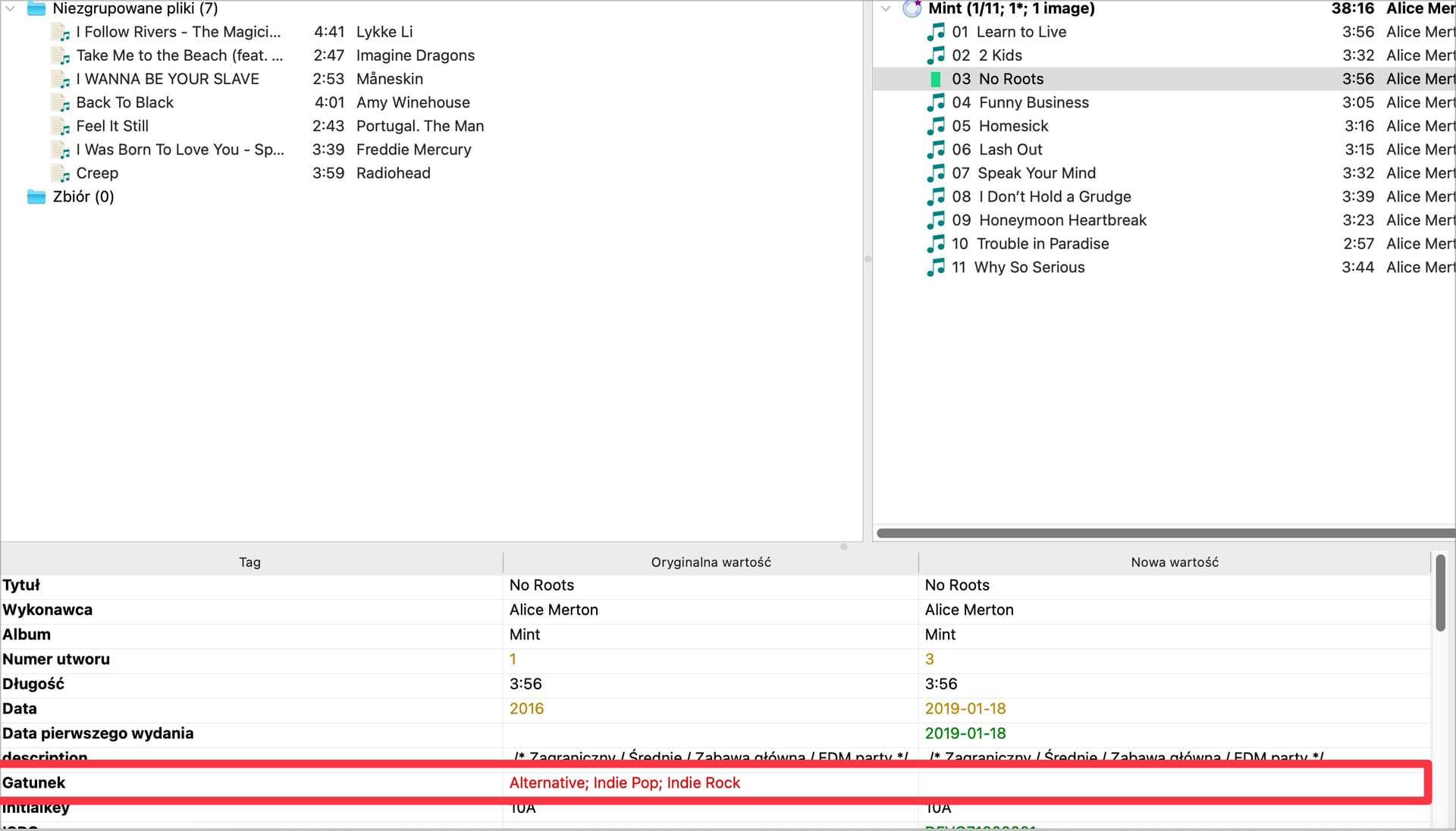
When I try to check (process does the same) files I get this:
If you still have the script from your initial post active than this would be the expected result. The script runs an $unset(genre), that is it clears the genres loaded from MusicBrainz. So inside the data Picard loaded there is no genre.
Because of clear existing tags the genre in the file would be removed (original value shown in red, no new value).
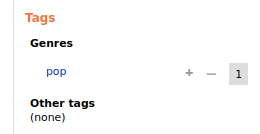
With “Use genres from MusicBrainz” enabled but otherwise leaving the default settings the “pop” genre should have loaded. But depending on your genre setting maybe it got filtered out. Reasons for this can be that “pop” is in the exclude list (e.g. you could say this is too generic), or you have “Use only my genres” selected (which would only return genres from MB that you have personally tagged).
If you suspect it could be because of filtering, please share a screenshot of your genre settings.
Another thing to check is that you don’t have any other genre plugin enabled. Picard currently does not support multiple genre sources and cannot combine the results. So if you enable MB genres and one or multiple plugins only one of the plugins wins and sets the genres.
 ), the Genre tag disappears completely from the file after processing by MP.
 The goal is to update the Genre tag in all FLAC files. The FLAC files are from different souces, so I want to replace the Genre from MP’s database.