Media tag and replace of particular character

I have in my script a part wich analyze media info:

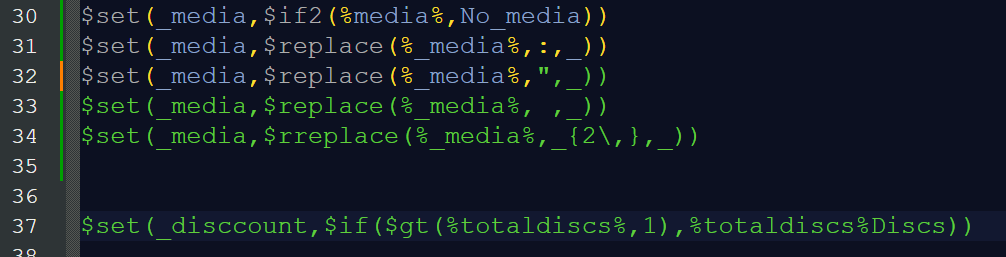
$set(_media,$if2(%media%,No_media))
$set(_media,$replace(%_media%,:,_))
$set(_media,$replace(%_media%,",_))
$set(_media,$replace(%_media%, ,_))
$set(_media,$rreplace(%_media%,_{2\,},_))

as you see i search for characters: “:” and " " " to substitute with “_”

When I wrote code I used Notepad+ and I saved my various version of script in “.bash” suffix

It happens something strange for me who I’m not expert in coding:

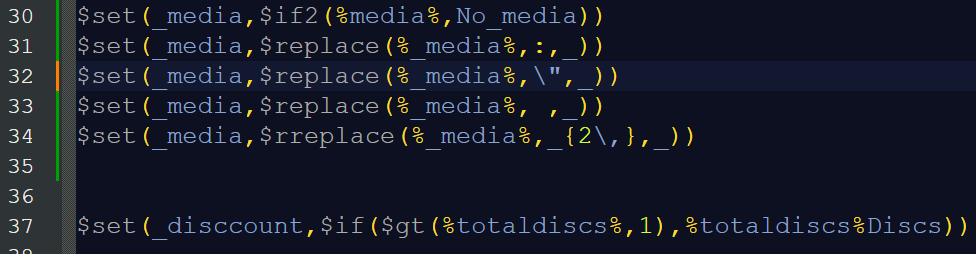
As you see after " " " character in row n.32 all text became green; I supposed I forgot to escape the character and this is what happen if I escape it…

But this doesnt work in Picard; I had a warning “Unexpected character”

The version which works without error is the first one I posted at the top of the post…

Why?

I suggest saving your script file as a text file (*.txt) rather than a shell file (*.bash). The double quotes character is signalling the start of a string (which is being shown in green) which is never closed. Also have a look at the formatting definition that @outsidecontext developed and posted about in Picard Tagger Script Language Definition for Notepad++ - #5 by anklebiter.

2 Likes

I also recommend that you do your script development in Picard itself. That way there are things like real-time error checking and autocomplete available in addition to the syntax highlighting.
2 Likes

Thank so much for your anser… I see…
The problem is that characters in Picard editor are really smalll and I see… nothing.

I thought that using an editor wich color various element in the script could be better to understand mistakes and also “logic” of the script itself..

Thank so much again :slight_smile:

I’m sorry… but i do not understand… i do not see a .pdf file but only 2 .xml files… am I wrong?

Since you are using Notepad++, you need to install the User Defined Language (UDL) into the program. This is explained in the Notepad++ documentation.

2 Likes

Thank so much! I learned something new! :slight_smile: hurray! :slight_smile:

3 Likes

…but you still escape the double quote :slight_smile:

2 Likes

I dont know why but in my script it works without “escape”

but maybe I do not understand corrrectly OR
I have escaped in a wrong way :flushed_face:

You don’t have to escape the double quote. It works without back slash. You already said this in your first post. :slight_smile:

Scripting — MusicBrainz Picard v2.13.3 documentation (first “note”)

2 Likes
