Feature Proposal: User Onboarding
1. Login Page Redesign
The first step is to redesign the login page (Login.tsx) for which I will replace the current plain login page with a two column layout.
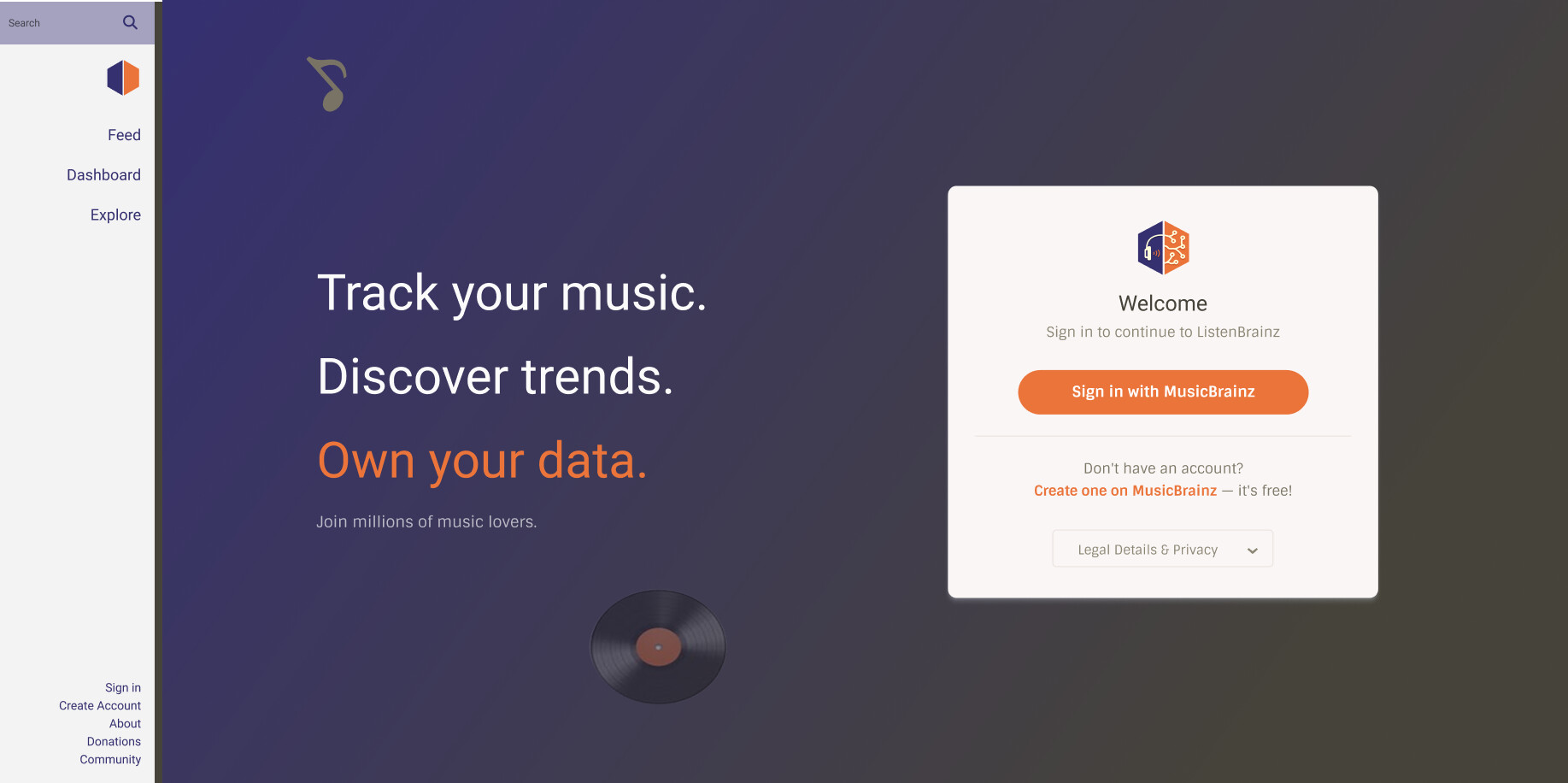
I’m proposing an onboarding system consisting of an initial Welcome & Setup Tour for new users, alongside 6 feature tours (Listens, Stats, Social, Explore, Recommendations, and Link Listens) that unlock progressively as the user interacts with the platform.
2. Initial Onboarding Flow
When a new user logs in for the first time, a Welcome Modal will greet them and offer them two choices: Skip tour which takes them directly to their dashboard, and Show me around which starts the Welcome & Setup Tour.
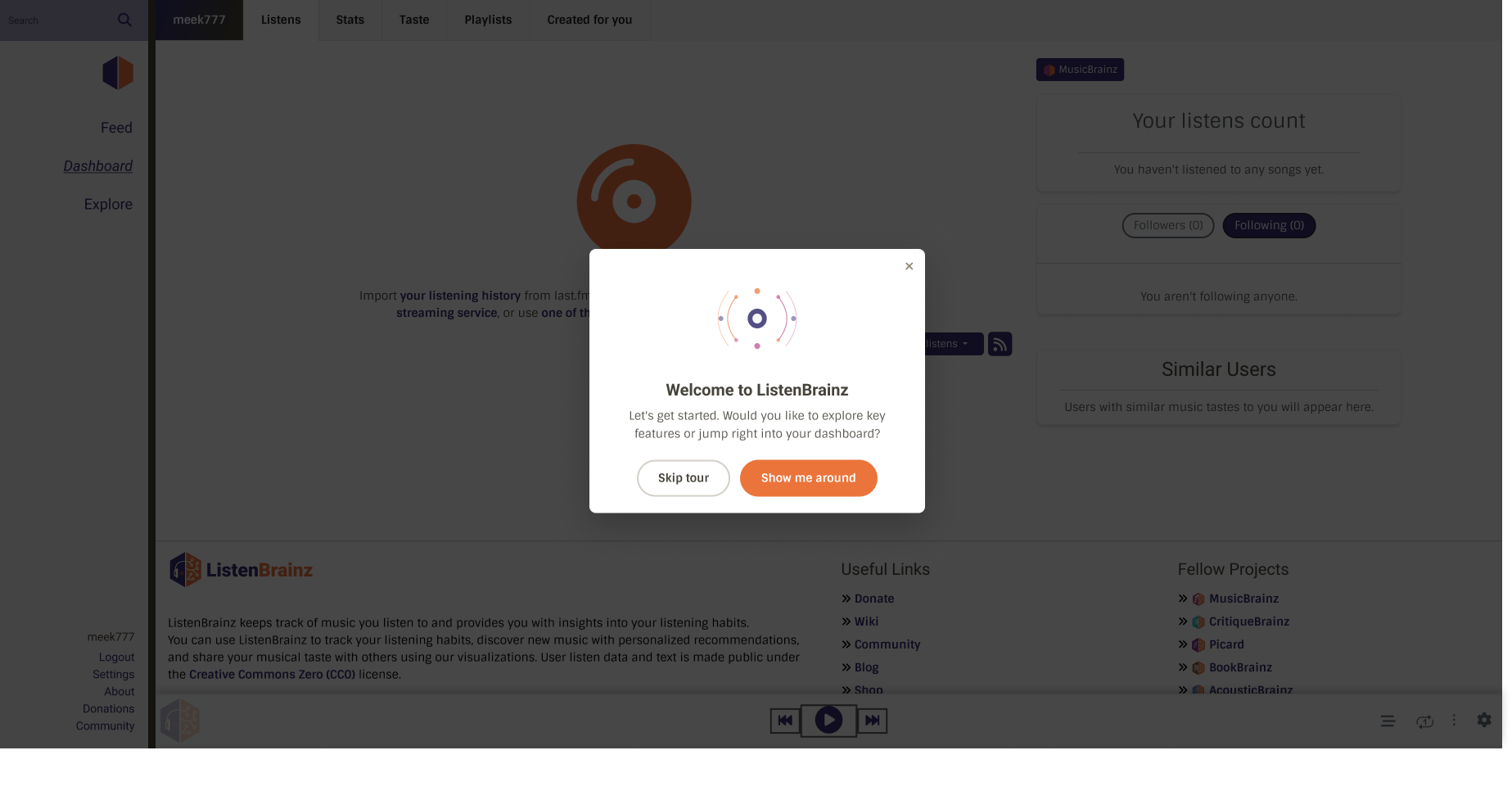
2.1 Welcome & Setup Tour
The Welcome & Setup Tour will guide a new user through the basic onboarding steps:
- Step 1: Spotlights the ‘Settings’ link in the sidebar nav. Clicking Next will navigate to
/settings/. - Step 2: On the Settings page, spotlight the ‘Connect services’ sidebar link. Clicking Next will navigate to
/settings/music-services/details/. - Step 3: Spotlights the music services panel so the user can connect Spotify, Apple Music, etc. Clicking Next navigates back to
/user/{username}/. - Step 4: Spotlights the ‘Add listens’ dropdown button on the dashboard to manually add the listens.
2.2 TourManager
Each tour will be managed by TourManager and each tour will have its own TourManager component (e.g. WelcomeTourManager for the Welcome tour, StatsTourManager for stats, SocialTourManager for social, etc). It will wrap an instance of React Joyride and define the specific ordered list of step targets and tooltips, and handle the logic for routing or transitions during that tour.
All tour managers will be in the root layout (layout/index.tsx). Because the root layout remains mounted continuously as the user navigates, these manager instances survive route transitions.
If a developer adds a new feature (e.g. a new stats chart), they only need to modify StatsTourManager without risk of breaking other tours.
2.3 Tooltip Card
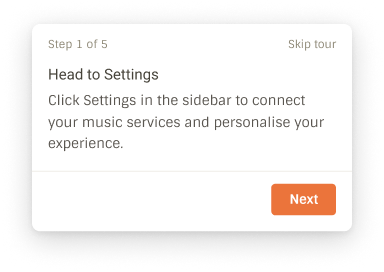
Instead of Joyride’s default tooltip, I will use a custom react component styled to match the existing LB card design.
2.4 Cross Page Navigation (MutationObserver)
When a tour step targets an element on a different route, the TourManager cannot spotlight it immediately therefore it will follow these steps.
- Pause the Joyride so that no tooltip is shown during navigation.
- Call
navigate('/target-route/')to switch the page. - Wait for the target element to be confirmed in the DOM.
I will use a MutationObserver that watches for the target element to actually appear in the DOM before resuming Joyride. This guarantees the tour resumes the moment the target element mounts,
2.5 Database & API Structure
To support progress tracking, unlock states, and mid tour resumption, each tour’s state will be stored in a database table and exposed via API endpoints.
2.5.1 Database Schema
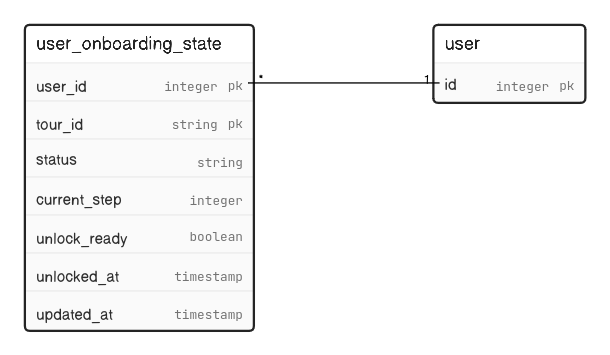
I will create a new table user_onboarding_state to track each user’s progress for each onboarding tour:
2.5.2 API Endpoints
GET /1/user/{username}/onboarding: To fetch onboarding states, it will returns the status, current step, and unlock eligibility of all onboarding tours for the requested user.
Response Payload:
{
  "welcome": {
    "status": "completed",
    "current_step": 4,
    "unlock_ready": true
  },
  "listens": {
    "status": "in_progress",
    "current_step": 2,
    "unlock_ready": true
  },
  "social": {
    "status": "not_started",
    "current_step": 0,
    "unlock_ready": false
  }
}
2. POST /1/user/{username}/onboarding: To update onboarding progress, it will update the status and active step index of a specific tour. It will be called when a user moves to a new step, skips, or finishes a tour.
-
Request Body:
{
  "tour_id": "listens",
  "status": "in_progress",
  "current_step": 3
}
2.6 Mid Tour Fallout & Resume Behavior
If a user drops off mid tour (e.g. closes the browser, navigates away, or refreshes the page) and returns later:
- The
current_stepin the database stores the exact step index the user was on. - The
TourManagerreads the user’sonboardingStatefrom the global context on app load. - If a tour’s status is
in_progress, theTourManagerrenders a resume modal prompting: “Would you like to resume your tour?” - When the user clicks “Continue”:
- The
TourManagerlooks uptargetStep = steps[current_step]. - It checks the step’s
targetRoutemetadata. If the current browser location (window.location.pathname) does not match thetargetRoute, it callsnavigate(TargetRoute). - It updates
stepIndexstate tocurrent_stepand setsrun={true}to resume the Joyride tour.
- The
On the frontend, GlobalAppContext will expose onboardingState so TourManager components can read tour statuses to resume an in-progress tour without additional API calls.
3. Feature Guide (Settings Page)
I will add a Feature Guide page at /settings/feature-guide/. This will act as a hub where users can start, restart, or track all available tours.
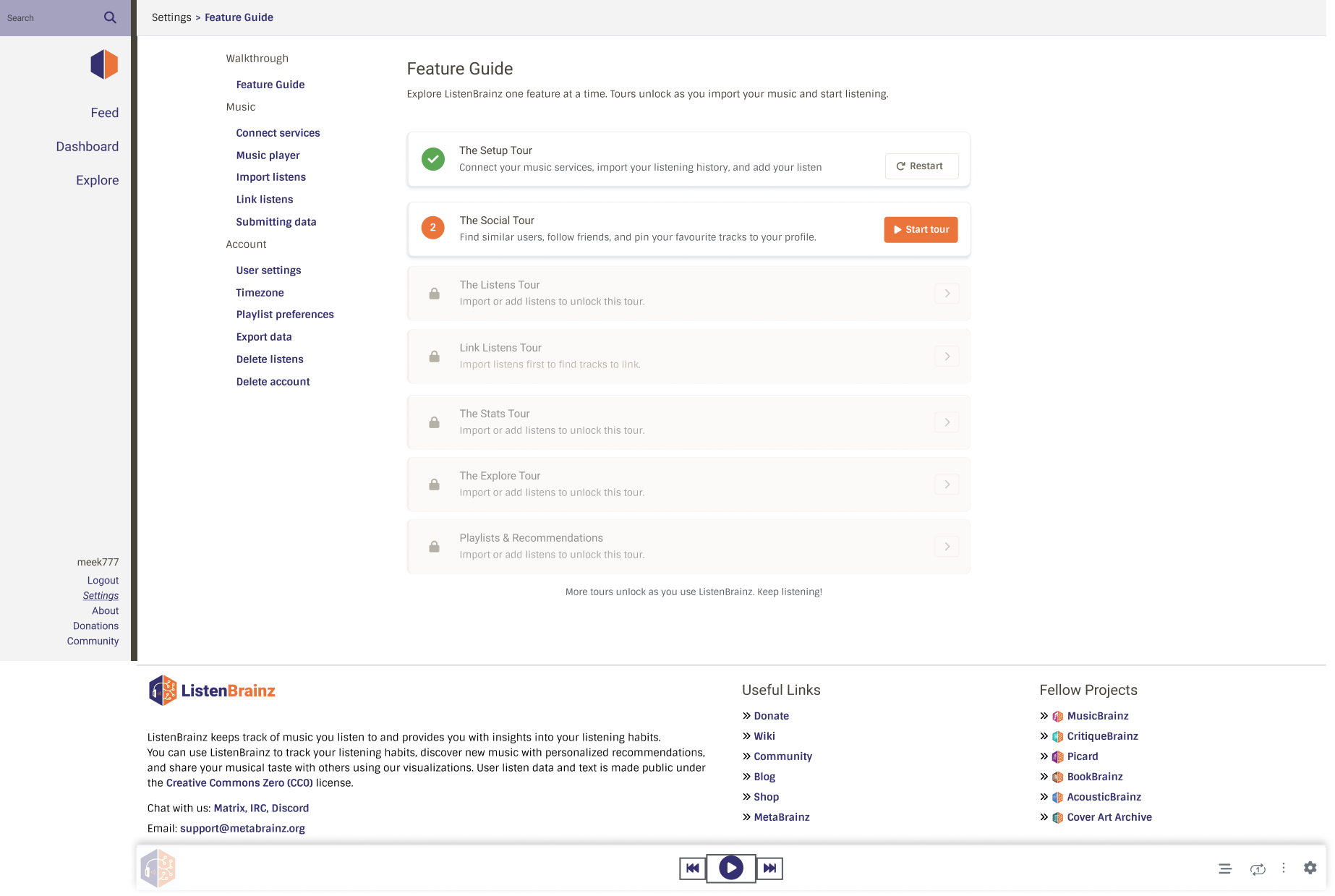
A new user’s account is essentially empty (no listens, no stats, no social connections, no recommendations). If we showed every tour at once, most of them would spotlight empty components with nothing meaningful to demonstrate. Therefore, tours will appear and become available on the Feature Guide only once the underlying data they showcase actually exists.
3.1 Onboarding Tours
There are 6 tours which focuses on a core features of LB. They are locked initially and become active progressively as the user interacts with the platform.
1. Listens Tour
-
Tour Steps:
- Step 1: Spotlights the brainzplayer at the bottom of the dashboard.
- Step 2: Spotlights the brainzplayer settings icon. Clicking Next will navigate to
/settings/brainzplayer/. - Step 3: Spotlights the brainzplayer setting to connect music service.
- Step 4: Spotlights the playback priority list to control which music sources play first. Clicking Next navigates back to
/user/{username}/. - Step 5: Spotlights a listen card on the dashboard to show how to play any listen.
- Step 6: Spotlights the queue button on the player to show how to add tracks to the queue.
-
Unlock Condition: User has at least one listen (
listens.length > 0). -
DB Query:
SELECT 1 FROM listen WHERE user_id = ? LIMIT 1on the listen table
2. Stats Tour
-
Tour Steps:
- Step 1: Spotlights the stats top bar to toggle between different time ranges.
- Step 2: Spotlights the Listening Activity chart (
#listening-activity) showing listening volume over time. - Step 3: Spotlights the Top Artists, Albums & Tracks rank tables (
#top-entity). - Step 4: Spotlights the Visualise & Share link to design shareable grids.
- Step 5: Spotlights the Daily Activity heatmap (
#daily-activity). - Step 6: Spotlights Artist Activity (
#artist-activity) showing album breakdown. - Step 7: Spotlights the Music by Decade chart (
#era-activity). - Step 8: Spotlights the Artist Evolution Activity stream chart (
#artist-evolution-activity). - Step 9: Spotlights the Genre Activity chart (
#genre-activity). - Step 10: Spotlights the Artist Origin (
#artist-origin).
-
Unlock Condition: All stat types have been generated and are present in the database for the user.
-
DB Query:
SELECT COUNT(DISTINCT stat_type) FROM user_data WHERE user_id = ? AND stat_type IN ('listening_activity', 'artists', 'release_groups', 'recordings', 'daily_activity', 'artist_map') AND stats_range = 'week'
Social Tour
-
Tour Steps:
- Step 1: Spotlights the latest activity feed where followed user activity appears.
- Step 2: Spotlights the followers/following section on the right.
- Step 3: Spotlights the similar users section.
-
Unlock Condition: User is following at least one other user and similar users data has been calculated.
-
DB Query:
SELECT 1 FROM user_relationship WHERE user_0 = ? AND relationship_type ='follow' LIMIT 1SELECT 1 FROM recommendation.similar_user WHERE user_id = ? LIMIT 1
Explore Tour
- DB Query: Same as that of stats tour.
- Unlock Condition: Same as that of stats tour.
Recommendations Tour
- Unlock Condition: At least one recommendations playlist exists for the user.
- DB Query: SELECT id FROM playlist WHERE additional_metadata->>‘source’ = ‘recommendations’ AND creator_id = ? LIMIT 1
Link Listens Tour
- Unlock Condition: At least one unlinked listen exists for the user (mbid mapper has run).
- DB Query:
SELECT id FROM missing_musicbrainz_data WHERE user_id = ? LIMIT 1
3.2 Unlock Mechanism
The unlock conditions are evaluated server side inside the GET /1/user/{username}/onboarding endpoint every time the Feature Guide page is loaded.
The unlock_ready flag in the payload response determines whether the tour card will be shown as “Active” or “Locked”.
{
  "welcome": { "status": "completed", "current_step": 5, "unlock_ready": true },
  "listens": { "status": "in_progress", "current_step": 2, "unlock_ready": true },
  "social": { "status": "not_started", "current_step": 0, "unlock_ready": false },
  "stats": { "status": "not_started", "current_step": 0, "unlock_ready": false }
}
On every GET /onboarding request, the server only runs unlock condition queries for tours that are still locked (unlock_ready = FALSE). unlock_ready and unlocked_at are stored in the user_onboarding_state table.
Once a tour flips to unlock_ready = TRUE, that database row is never updated again for the unlock flag; the write happens exactly once per tour per user.
3.3 Tour Triggering & Events Registry
Because the Feature Guide page (/settings/feature-guide/) and the global TourManager components are located in completely separate react component trees, they cannot pass props or callbacks to each other directly.
To keep communication lightweight, tours will be triggered and restarted using the browser’s native custom event system.
Feature Guide dispatches an event when the user clicks “Start tour”:
// FeatureGuide.tsx
window.dispatchEvent(new CustomEvent("lb:start-stats-tour"));
The relevant TourManager listens for it:
// StatsTourManager.tsx
window.addEventListener("lb:start-stats-tour", () => {});
This allows the Feature Guide to initiate or restart any tour simply by broadcasting the registered event:
| Tour | Start Event | Restart Event |
|---|---|---|
| Welcome | (auto on first login) | lb:restart-tour |
| Social | lb:start-social-tour |
lb:restart-social-tour |
| Playlists | lb:start-playlists-tour |
lb:restart-playlists-tour |
| Listens | lb:start-listens-tour |
lb:restart-listens-tour |
| Stats | lb:start-stats-tour |
lb:restart-stats-tour |
| Explore | lb:start-explore-tour |
lb:restart-explore-tour |
| Link Listens | lb:start-link-listens-tour |
lb:restart-link-listens-tour |
All the design mockups are here.