How do make Album Artist Sort, and Artist Sort Order the same as Album Artist?

Hello,

I recently switched to MusicBrainz Picard. I am not familiar with scripts at all so will need quite a bit of help. With the help of a friend, I manage to save a script that does almost what I would like. The script is:

$if2(%albumartist%,%artist%)/

$if($and($if2(%albumartist%,%artist%),$year(%originaldate%)),$year(%date%) - %album%/,)

$if($gt(%totaldiscs%,1),$if($gt(%totaldiscs%,9),Disc $num(%disknumber%,2)/,Disc $num(%discnumber%,1)/),)

$if($and(%albumartist%,%tracknumber%),$num(%tracknumber%,2),) - %artist% - %title%$noop( New Script )

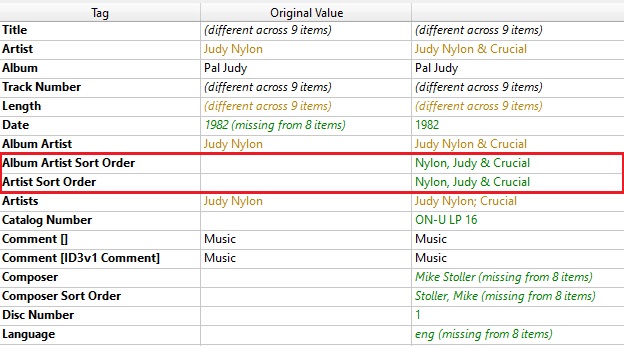
However, I noticed (see image below), that the Album Artist Sort and Artist Sort Order is not the same as the Album Artist. I would like them to be the same. So, in this example -

Album artist: Judy Nylon & Crucial
Album Artist Sort: Nylon, Judy & Crucial
Artist Sort Order: Nylon, Judy & Crucial

I would like the last two to read Judy Nylon & Crucial.

It’s the same with John Zorn. He appears as Zorn, John. I would like it to be John Zorn.

Can someone please amend the script above to fix this issue for me?

Many thanks.
It all depends on what you want to achieve. If you never want to use a different sort order but always sort by the literal artist name, you essentially don’t need the sort tags at all in your files. The only reason for these tags to exist ist that typically discographies get sorted by person last name first and bandname without article (like in a library). But if you want to sort by artist name as it is, then essentially there is no need for those separate tags.

So you could also just get rid of them. Add a script in Options > Scripting with the following content:

$delete(albumartistsort)
$delete(artistsort)

If you for some reason want to have the tags in the files, but want them to always be identical to the artist / albumartist tags, then you can set them explicitly with this script:

$set(albumartistsort,%albumartist%)
$set(artistsort,%artist%)

What is about band names starting with an article, how do you want them sorted? E.g. do you want “The Beatles” be sorted under T or B? If you still want to to get rid of the article for such bands you could use the above script with the $swapprefix function:

$set(albumartistsort,$swapprefix(%albumartist%))
$set(artistsort,$swapprefix(%artist%))

That way your example of “Judy Nylon & Crucial” would stay like that, but “The Beatles” would get the sort name “Beatles, The”.

2 Likes

Thank you for your reply. I would like to use the above. How do I change my existing script to reflect this?

The issue for me is that when I have music on my phone, the app(s) will sort the artists by surname first, then name. I know that is the correct way, but my folders are sorted name + surname and I am trying to keep things the same for reference sake.

For names that start with an article, I prefer them to start with “A” or “The” so I won’t change that e.g. A Winged Victory For The Sullen would remain A Winged Victory For The Sullen, not Winged Victory For The Sullen, A.

The way to handle this is to put this small script into Options > Scripting.

Picard knows two kinds of scripts. The ones configured in Options > Scripting are for manipulating the tags. When active, they run automatically when releases are loaded on the right. But you can always run any of those scripts also manually by right clicking on selected files and select the script in the scripts context menu.

The other script is file naming scripts, the one you posted in your initial post. Those are solely to generate the folder and filenames to use when saving files. They can use the metadata of the file, but you cannot use them to change the file tags.

1 Like

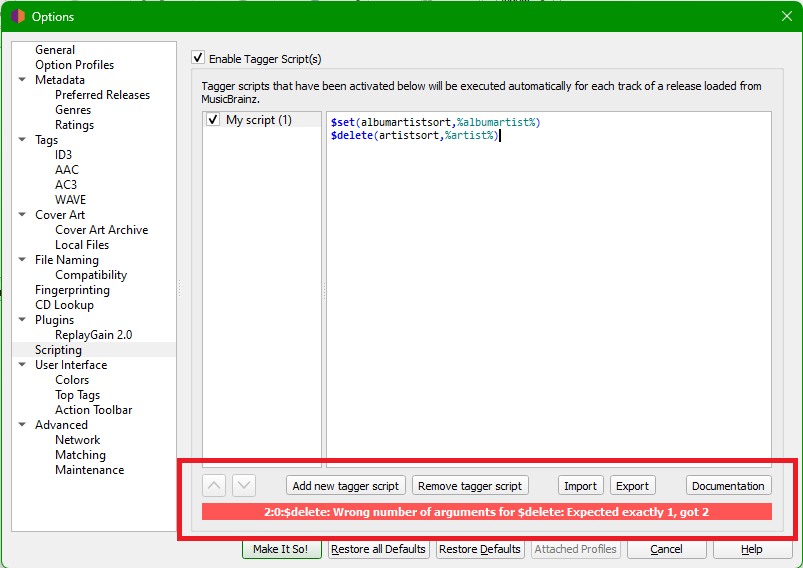
Thank you for explaining this to me. I tried what you suggested but got an error message (see image below). Any ideas what to do next?

The code that @outsidecontext provided starts the second line with ‘$set’ (you have used ‘$delete…’):

I have tested that, and it works :slight_smile:

1 Like

Sorry, I had this wrong in my script originally. Yes, as aerozol said use $set both times.

1 Like

I don’t know which app(s) you’re using but you may want to consider saving ALBUMARTIST and ARTIST as multivalue tags rather than as the collaboration, as support for ALBUMARTISTS/ARTISTS is still quite limited e.g.

ALBUMARTIST: “Judy Nylon”; “Crucial”
ALBUMARTISTSORT: “Judy Nylon”; “Crucial”

$setmulti(albumartist,%_albumartists%)
$setmulti(albumartistsort,%_albumartists_sort%)

$setmulti(artist,%artists%)
$setmulti(artistsort,%_artists_sort%)

Thank you to everyone that replied and helped. I am delighted to report that my issue has been resolved. I appreciate it very much.

This fixed the issue:

$set(albumartistsort,%albumartist%)
$set(artistsort,%artist%)

2 Likes