I am going through my music collection on my server to tag them better. I also want the files to be moved under folder structure: artist / album /
My current script moves all tagged and saved albums to my pc music folder - thats not desired. It takes long and i’ll need to move everything back to the server.
what do i need to add in front of my script to keep the original (or desired) base folder?
That says “don’t move it”. If you want to just fix things in place, turn off the move option.
Or if you want to know where you have got to, setup a folder on the server. \\server\music!to-be-fixed\ and move stuff you need to work on into there. Then adjust the move script to \\server\music\
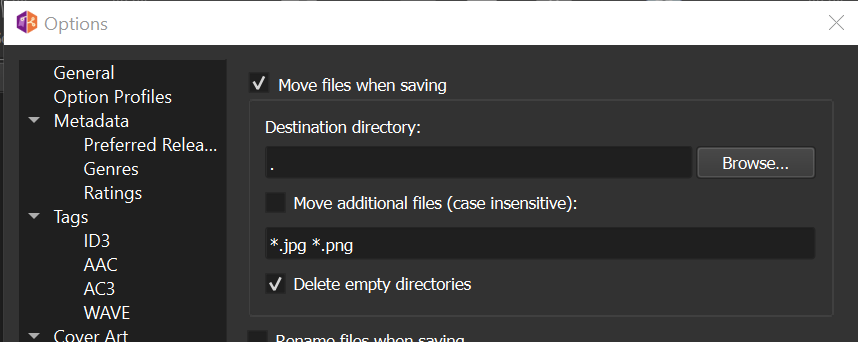
I don’t move my files with Picard, I do things manually. But looking in the options I see this when I turn it on:
That “.” in the destination means “put it here”. In your example I would change that to \\server\music\
Or something like that
As I understand you load the files from the server directly into Picard, so you have made the server files available via a network share / mount, right?
In this case set the destination folder in the renaming options to the location on the server where you want the files placed. Please note that the files still need to pass through the network.
Just to make sure if someone sees this: setting the destination folder to “.” Is usually a bad idea, especially with a renaming script that creates a folder hierarchy (such as Artist/Album).
Since “.” means the files current location Picard will create the folders there and move the file. But now the location of the file is in this subfolder, and the next time you save the file another set of folders will be created there.
Set the destination directory to the root were you want the folder hierarchy to be created.
2 Likes
Thank you outside. Very useful addition! I like that you pointed out the pro’s and cons.
I did use the server address, and works well:
e.g. \\svr.ip.he.re\Music\CDs
will create the folders under the main folder CDs
1 Like
Thank you Ivan.
Actually I do want to move it, but from folder “artist - album a” to a structure of “artist”/”album a”
In other words, rename the folder structure but keep it on the same drive.
I found the destination folder, and that works. Thanks
1 Like