PERSONAL INFORMATION
Name: Devaditta Patra
Email: devadittapatra@gmail.com
IRC/matrix handle: celestiancoder
Github: celestiancoder
Linked In: Devaditta Patra
Time Zone: +5:30 UTC (Indian Standard Time)
INTRODUCTION:
Hi, I am Devaditta Patra , a second-year undergraduate student pursuing my B.Tech in Electronics and Communication Engineering at Indian Institute of Information Technology, Jabalpur.My programming journey started in my first year, when I started learning about Python and C++ for competitive programming. I work primarily with React, Typescript/Javascript, Tailwind and Next js. I also have interest in Game Development and have explored C# along the way.
I have been contributing to the Listenbrainz server since December 2025 and have merged the following PR’s.
-
LB-1896: Added missing alt-text in buttons in Brainzplayer
-
LB-1857: While manual submission,field does not change on toggling between add album/add artist
-
LB-1518: Remembering custom color presets in the Art Creator page. Implemented using localforage.
-
LB-1488: Allowing youTube video to be resized. Implemented using react-resizable library.
PROJECT OVERVIEW:
ListenBrainz offers incredible tools for tracking and exploring music, but the user can be overwhelmed by the sheer number of features or confused about how to get their data into the website.There is no guidance on how to connect to Spotify, import from LastFM or use any of the scrobbling apps that work with ListenBrainz. Users who do successfully import their listens then face another problem, after navigating to the stats page and see empty charts and have no idea whether something has gone wrong or they simply need to wait.
Additionally features like Art Creator, Hue Sound, LB radio and Music Neighbourhood go completely undiscovered by most users because there is no guided path to explore.This project aims to improve the user retention by introducing an interactive onboarding experience.
I will implement a seamless onboarding experience using react-joyride library which will include-
-
A core onboarding setup wizard: A first login modal that guides users through connecting a music service, explains the dashboard and sets expectations regarding the delay in listens and stats generation.
-
Individual page tours: I will build individual tours for specific and important pages (like Playlist, recommendation, Art Creator ,etc.
-
An import and tracking page: A new “how to get my listens” page that explains all connect/import options and routes the users to the respective existing pages.
-
Re-onboarding: Add an option of re-onboarding, of the sections that could be onboarded, in the settings.
PROPOSED SOLUTION:
This solution has three parts, all building on a single shared onboarding state system.
Part 1: Welcome Wizard
A modal that fires exactly once on first login, immediately after MusicBrainz OAuth. It includes two parts:
-
Show two primary options: Connect Spotify (automatic continuous tracking) and Import Last FM (import full history). A link saying “Explore more options” which leads to the dedicated page for explaining all connect and import options (let us call this connect hub page)
-
A tour of the dashboard explaining the Recent Listens panel, Add listens button, stats summary card with the daily update note, similar users panel and the feed, explore and the navigation bar.
Flowchart:
This flowchart maps the user journey from first login ,their interaction with the main modal and dashboard mini tour
Part 2: Per Page Joyride tour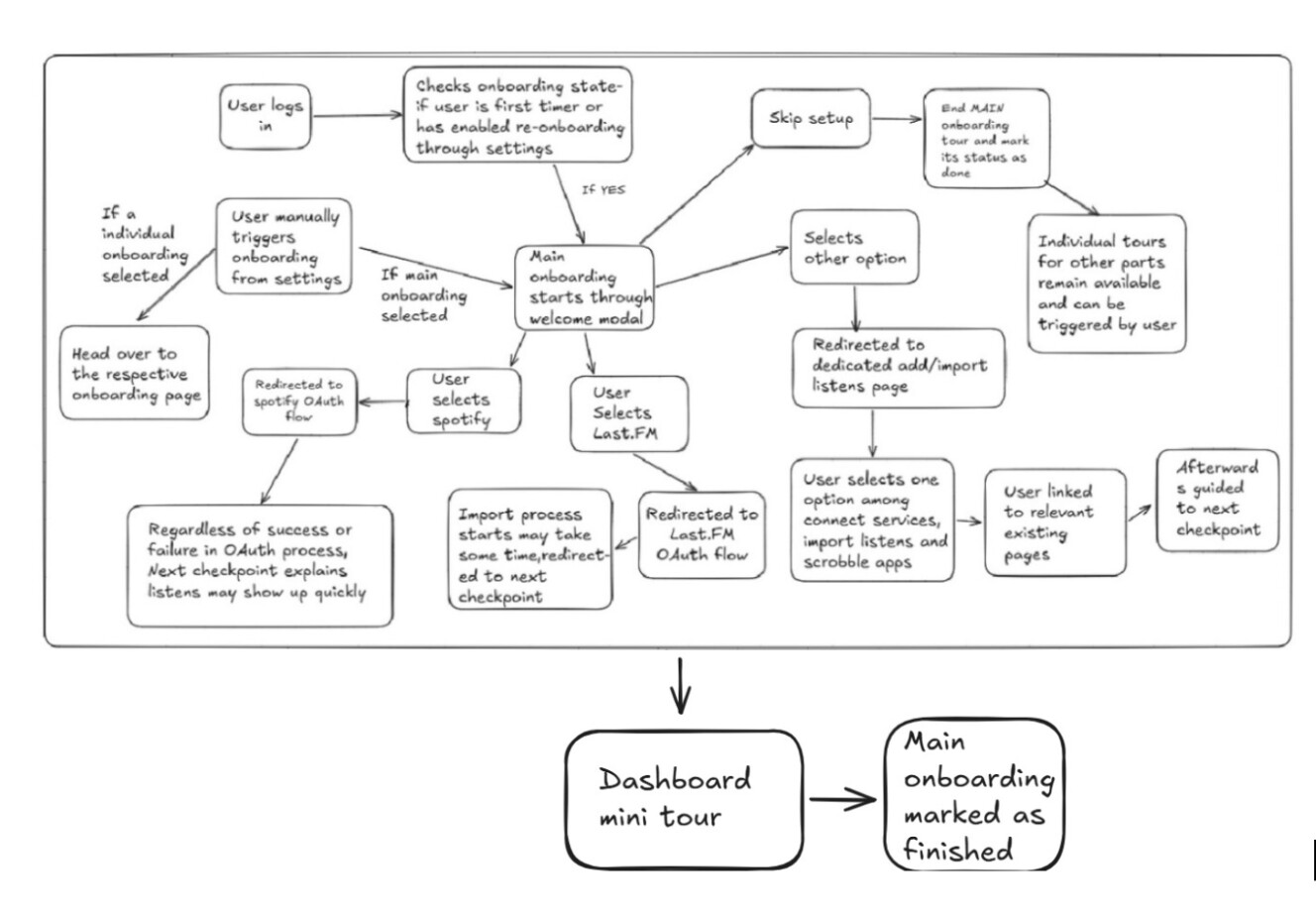
Every major page gets an individual tour using React Joyride. Tours fire automatically on first visit and can be replayed every time by setting the re-onboarding option in the settings. The pages covered are :
-
Stats Page: Overview of what page shows, the time range selector, top artists/releases/recordings sections, and a dedicated step targeting the stats update info explaining the refresh cycle of up to 24 hours only after submitting a listen.
-
Taste page: Loved/Hated tracks explanation (post GSoC)
-
Playlists Page: Create playlist button and export to Spotify/download option.
-
Created for you page: Explaining weekly/last week’s exploration and them updating on every Monday depending on user’s timezone.
-
Feed page: Timeline events , how to find users to follow, how to receive songs that similar users listen to.
-
The explore page in general with all the options , will be explained briefly.
This would then branch into all the available options , i.e , Art Creator, Fresh Releases, Year in Music, Link Listens , Hue sound, Music Neighbourhood, and similar users.
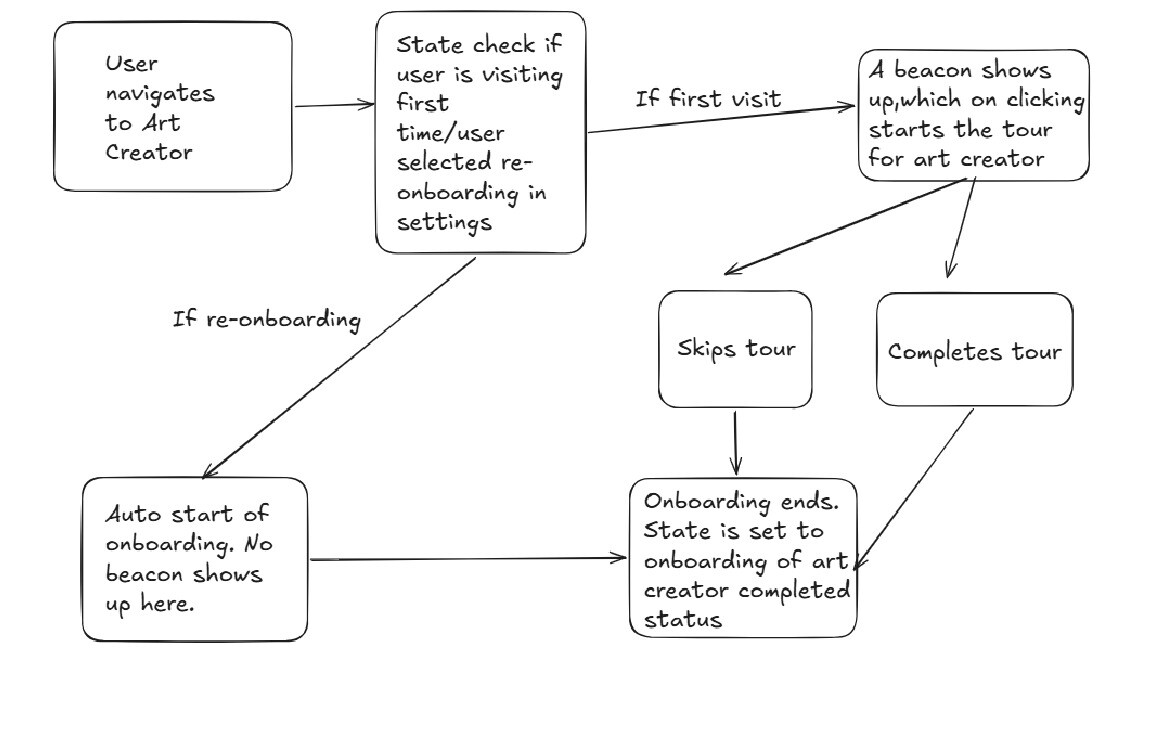
Each of them will be toured accordingly. In each page of the explore section a pulsating beacon would be there which on clicking would begin the tour for a new user who just visited the page for the first time. The beacon can be dismissed. For those users who are triggering re-onboarding through settings would be asked for a confirmation and then would be automatically onboarded.
Part 3: Connect hub page (LB- 1644)
A new dedicated page at /settings/connect-hub serving as the entry point for new users. A decision tree structure would be used so as to not overwhelm the users with all the new services and definitions. The categories/options would be below where each category would be explained briefly and when users click on a particular category, they are redirected to a specific existing page and section.
The categories would be:
- Live tracking and listening
LB pulls your listens automatically with no extra software
- Import your past history (File upload)
Upload a history export file from a previous service. Supports Spotify ZIP, Last.FM, Libre.FM, PanoScrobbler, Maloja, Audioscrobbler/Rockbox, and Spinitron.
- Submit music from music apps and servers
Install a plugin on your local player, self-hosted server, or mobile device. The plugin pushes listens to LB using your User Token. Works with 30+ apps including foobar2000, VLC, Jellyfin, Navidrome, and Pano Scrobbler.
Apple Music and YouTube Music users neither have native LB support.
- Web playback only
Connect Apple Music, SoundCloud, Funkwhale, Navidrome, YouTube, or Internet Archive to play music on the LB website. These connections do not record listening history
- Submit via API
Submit listens programmatically using the LB API with a User Token from Settings
In this connect-hub page, users are shown all 5 categories with a brief about each of them. They are then given famous options which they would choose and then get routed to the respective page with the DOM highlighted that contains that option.
For example in “Live Tracking and Listening” if the user clicks on spotify ,they get redirected to the connect-services page (and auto scrolled if it was Libre FM and the rest of the page would have reduced opacity as compared to the Libre FM card). However if the users click “Connect to these services” they simply get redirected to the connect-services page.
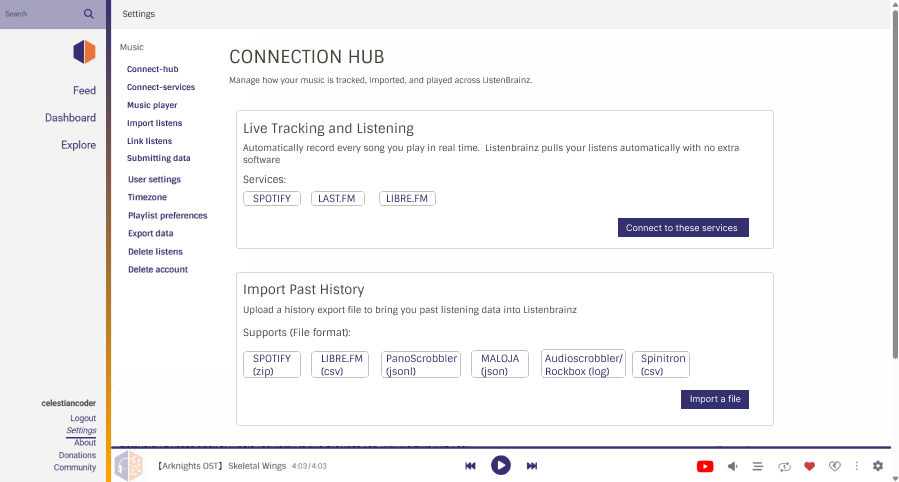
This page is linked from the welcome wizards “Explore more options” link.
CODE IMPLEMENTATION
Postgres Schema (admin/sql/create_tables.sql)
This table allows to track the completion status of the initial welcome onboarding and allows the database to support other page specific tours.
A user_onboarding_page table that would track the status of the page( If the tour is completed or not), the user’s last_step(for mid-tour resuming) and the tour_version. This status is useful to check if the onboarding modal should load or not. Each page will have a key associated with them so all of them can be tracked separately.
CREATE TYPE onboarding_status AS ENUM ('not_started','in_progress', 'dismissed', 'completed');

CREATE TABLE user_onboarding_page (
    user_id                  INTEGER NOT NULL REFERENCES "user"(id) ON DELETE CASCADE,
    page_key                 TEXT NOT NULL,
    last_step                INTEGER NOT NULL DEFAULT 0,
    tour_version             INTEGER NOT NULL DEFAULT 1,
    dismissed_at             TIMESTAMPTZ NULL,
    completed_at             TIMESTAMPTZ NULL,
    status onboarding_status NOT NULL DEFAULT 'not_started',
    updated_at               TIMESTAMPTZ NOT NULL DEFAULT NOW(),
    PRIMARY KEY (user_id, page_key)
);

CREATE INDEX user_onboarding_page_user_id_idx
 ON user_onboarding_page (user_id);
GET and POST endpoint for checking the status of onboarding tours for a user.(/listenbrainz/webserver/views/api.py)
Here a brand new record for the user and the specific page with status set as ‘not started’ is attempted to be created. If there is a conflict(if the user_id and page_key) exist the creation would be ignored and if no conflict then status:’not_started’ would be returned. If the INSERT does nothing then that means the user exists. And the current status of the user is returned.
The GET endpoint does a simple SELECT and returns a JSON payload mapping the user’s onboarding tour status If database query returns no rows , the backend simply returns an empty JSON object . The frontend will default the status to ‘not_started’ and tour_version=0.
The POST endpoint handles mid-tour progress, dismissals and uses CASE statements to protect against older version of tour, accidently downgrading or overwriting the new version.
@user_settings_api_bp.get("/onboarding/statuses")
@crossdomain
@ratelimit()
def get_all_onboarding_page_status():
    user = validate_auth_header()
    rows = db_conn.execute(
        """
        SELECT page_key, status, last_step, tour_version
        FROM user_onboarding_page
        WHERE user_id = %s
        """,
        (user["id"],),
    ).fetchall()

    status_map = {row[0]:{"status": row[1],
                  "last_step": row[2],
                  "tour_version": row[3],
                    }
                  for row in rows
                }

    return jsonify({
        "status": "ok",
        "payload": status_map
    })
@user_settings_api_bp.post("/onboarding/<string:page_key>")
@crossdomain
@ratelimit()
def update_onboarding_page(page_key):
    user = validate_auth_header()
    data = request.get_json(silent=True)
    status = data.get("status", "in_progress")
    last_step = data.get("current_step", 0)
    tour_version = data.get("tour_version", 1)
    db_conn.execute(
        """
        INSERT INTO user_onboarding_page (user_id, page_key,last_step,tour_version, status, dismissed_at, completed_at, updated_at)
        VALUES (%s, %s, %s, %s, %s,
        CASE WHEN %s='dismissed' THEN NOW() ELSE NON NULL END,
        CASE WHEN %s='completed' THEN NOW() ELSE NON NULL END,
        NOW())
        ON CONFLICT (user_id, page_key)
        DO UPDATE SET
          status = CASE
             WHEN EXCLUDED.tour_version < user_onboarding_page.tour THEN user_onboarding_page.status
             WHEN EXCLUDED.tour_version = user_onboarding_page.tour_version
             AND user_onboarding_page.status = 'completed' AND EXCLUDED.status = 'completed' THEN user_onboarding_page.status
             ELSE EXCLUDED.status
          END
          last_step = CASE
            WHEN EXCLUDED.tour_version > user_onboarding_page.tour_version THEN 0
            WHEN EXCLUDED.tour_version < user_onboarding_page.tour_version THEN user_onboarding_page.last_step
            ELSE EXCLUDED.last_step
          END
        # logic would be here by using CASE for tour_version,dismissed_at,completed_at.
        """,
        (user["id"], page_key, last_step, tour_version, status),

    )

    return jsonify({"status": "ok"})
Frontend pseudocode:(frontend/js/src/components/joyride.tsx)
Library: React-Joyride (V3)
A type OnboardingState is defined here. shouldStart tells the react component if the tour should be rendered or not. markComplete function that persists completion state whether user finishes or skips.
type OnboardingState = {
  shouldStart: boolean;
  markComplete: () => Promise<void>;
};
This mock function would be later replaced by an actual custom hook from APIService (frontend/js/src/utils/APIService.ts). This pretends onboarding should start if page_key and userToken exist
function useOnboardingPlaceholder(
  pageKey: string,
  userToken?: string
): OnboardingState {
  const shouldStart = Boolean(pageKey) && Boolean(userToken);

  const markComplete = React.useCallback(async () => {
    return Promise.resolve();
  }, []);

  return { shouldStart, markComplete };
}
pageKey defines which page tour this instance belongs to and steps are the actual steps the onboarding modal would go through, in React-joyride these steps define the content of all the stages of a specific tour.
type OnboardingTourProps = {
  pageKey: string;
  userToken?: string;
  steps: Step[];
  readyTour: boolean;
};
In this code snippet, shouldStart and markComplete are read from the placeholder hook. The code checks if the tour ended by finish or skip, then calls markComplete. This handle event would be passed on to onEvent in the joyride component.In actual implementation, should_start is directly evaluated in the frontend. The React component compares the user’s cached tour_version(returned from backend) with the frontend constant TOUR_VERSION[PAGE_KEY] If the frontend version is greater, should_start is true and tour resets to the first step. It resumes from the last step if status in_progress.
export default function OnboardingTour({
  pageKey,
  userToken,
  steps,
  readyTour = true,
}: OnboardingTourProps) {
  const { shouldStart, markComplete } = useOnboardingPlaceholder(
    pageKey,
    userToken
  );

  const runTour = shouldStart && readyTour;

  const handleEvent = async (data: EventData, controls: Controls) => {
    const done =
      data.status === STATUS.FINISHED ||
      data.status === STATUS.SKIPPED;

    if (done) {
      await markComplete();
    }
  };

  if (!shouldStart) return null;

  return (
    <Joyride
      run={runTour}
      steps={steps}
      onEvent={handleEvent}
      continuous
      options={{
        primaryColor: "#eb743b",
        zIndex: 2000,
        showProgress: true,
        buttons: ["back","close","primary"],
      }}
      locale={{
        last:"Finish",
        skip:"skip",
      }}
    />
  );
}
This is the mock react joyride component (I will use a custom tooltipComponent)
ARCHITECTURE DECISIONS
Database storage Vs Localtorage
The onboarding status is intentionally stored in Database rather than Localstorage because Localstorage is bound to the same browser and device. So if the user logs in from a different device or browser they would have to go through the tour again. This is not ideal for any user. By using the database the status can be stored and will be available across all devices and browsers of the same user account. LocalStorage can be cleared by the user causing tours to reappear unexpectedly. Database storage enables re-onboarding features from settings page and can be done from multiple devices.
Caching API response
To avoid making an api call on every page load, I will retrieve the user’s overall onboarding status in a single JSON object mapping all the tours on login. This data will be cached using React Query(configured with a large staleTime). On every new session a GET request is made which will fetch the data from the database. This would then be cached in React Query. Then any time a different page is loaded this cache will be checked instead of making a GET request every time. When a user completes the tour of a page, both the cache and the database(through a POST) is updated ,this ensures that even if the react query cache is cleared from memory the updated copy is there with the database.
Handling Async Component Mounting
For pages that fetch data asynchronously (like Stats page via Spark) I will use a local state readyTour to check if the joyride tour should fire or not. The tour fires when both readyTour, should_start and return true and isGlobalTourActive returns false. readyTour becomes true when the first critical section of the page has finished loading(settled as data, empty data/ error) through a callback prop and the first target node exists in the DOM. In async processes that take time to render I would use targetWaitTimeout which polls for a set amount of time for the target to render(for non critical processes). If the Joyride’s onEvent callback catches EVENTS.TARGET_NOT_FOUND only non critical steps are skipped.
Multi Page Tour routing
While Joyride tours are scoped to individual pages, the welcome wizard spans across the dashboard and stats pages. For this just before finishing the dashboard tour, technically, the last step is shown where they are shown a message like “want to see your stats”. They click on a “Go”(name subject to change) button ,a POST is fired to mark the Dashboard tour as complete, and users are navigated to the stats page(/user/:username/stats/), but from the user perspective it would appear sequential(UX). The user is simply routed to the stats page where the should_start status is checked(from the react query cache which is already populated at the start of the session) as in every page and the tour fires.
For global feature announcements a tour with a page_key like announcement: topic can be mounted in the layout(top level component). For this the Joyride component needs to live in a layout component that persists across route changes. Individual Joyride tour instances still exist for the respective pages. The individual and multi tour have different run conditions and instances so they don’t affect each other.
For feature announcement placement prop would be used to center the announcement tooltip. This tooltip will be given priority over page Joyride tours.
A local page tour will start (should_start and readyTour) additionally if no global tour/announcement is active. To check for collisions, the local page would check if isGlobalTourActive is false.
EXAMPLE IMPLEMENTATION
Below is the example Figma design and user flow for the Art Creator page. This pattern will be followed in every page that exists in the explore page.
A pulsating beacon would be there in every page, to manually start the onboarding.
UI mockup for Art Creator
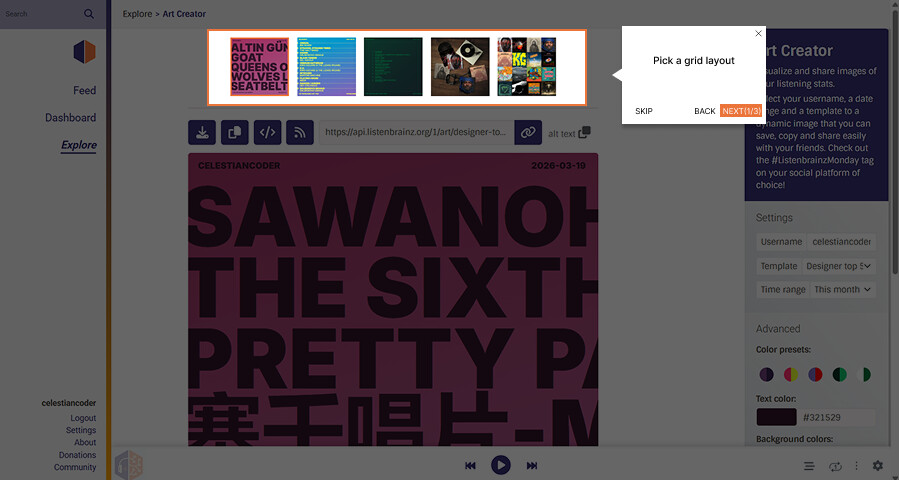
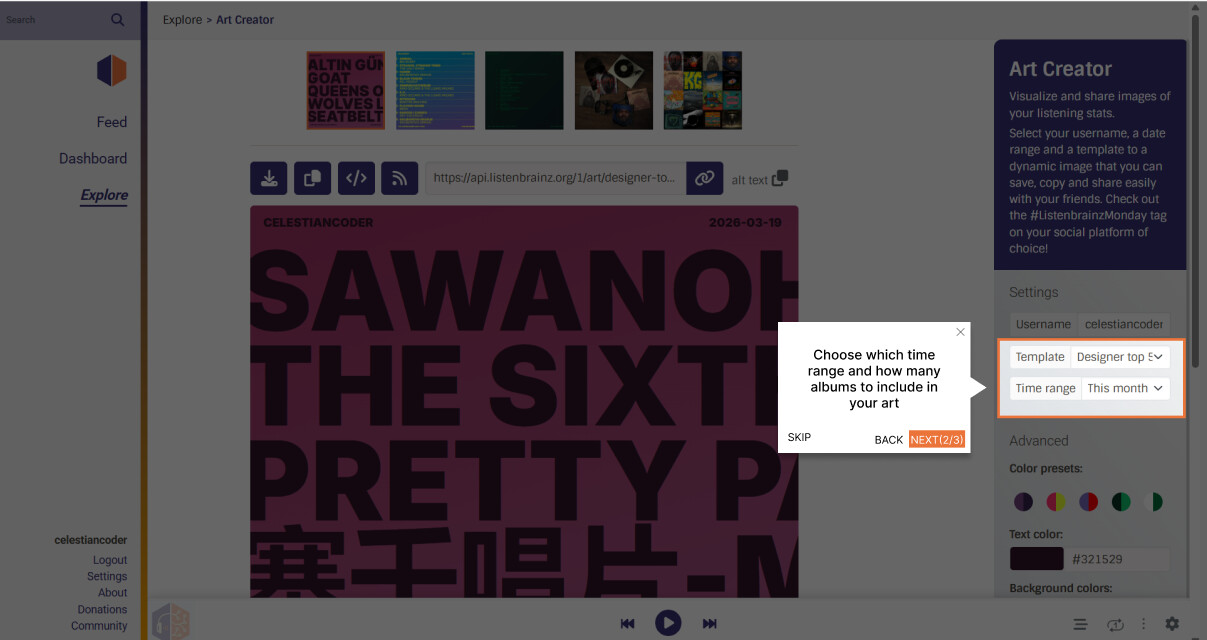
Here on completing the tour field for Art Creator in the DB is set to finished and the beacon disappears.
All figma designs: GSoC26:ListenBrainz – Figma
PROJECT TIMELINE (90 HOURS , 12 WEEKS):
Community Bonding period (May 1 - May 24)
-
Setup and verify local dev server, populate postgresql instance with test data to verify working
-
Finalize Figma UI cards with mentor feedback, confirm DB schema and API route names
Deliverable: Approved Figma designs, DB schema, and fully working dev environment.
Week 1 :
-
Write Database migration(user_onboarding_page table) and implement all Flask API endpoints(GET,POST complete,POST reset)
-
Write backend unit tests
Deliverable: Complete backend API
Week 2:
-
APIService (
/frontend/js/src/utils/APIservice) Typescript methods, custom hook for communication with API -
Unit tests to see if communication is working
Deliverable: Working hook returning should_start properly
Week 3:
-
Focus on joyride setup,building a core react joyride wrapper component and implement a basic tour
-
Welcome modal component design and wired to custom hook (The connect hub link will temporarily point towards a placeholder route until week 5)
-
Writing unit tests to verify if the welcome modal only fires once and all three options work properly.
Deliverable: New users only see welcome modal for one time on first login.
Week 4:
-
LB-1644 /connect-hub/ page skeleton
-
Category-1 (Live tracking) and category-2(import history) cards with correct link
-
Write tests for components verifying rendering and routing.
Deliverable: /connect-hub/ page partially complete.
Week 5:
- category-3(music apps) , category-4(playback only) and category 5(API). Adding section headers to existing connect-services page to match the categories made.
- Write tests for rest of the newly added components and verify welcome modal routing.
Deliverable: /connect-hub page (LB-1644)
Week 6:
-
Dashboard joyride tour
-
Implement stats page tour and resolve LB-1645
-
Write tests to verify the tour triggers, skipping and completion steps take place correctly.
Deliverable: Dashboard primary tour and stats tour complete
Midterm evaluation:
- LB-1644 , dashboard tour,stats tour
Completed before Week 7: Backend API, custom hook, Welcome modal,LB-1644 Connect Hub and primary dashboard tour are complete and merged.
Week 7:
-
Playlist page tour
-
Created for you tour
-
Write tests for tour rendering for both pages
Deliverable: created for you page and playlist page.
Week 8:
- Explore page tour with basic explanation and touring of all the options available in explore page
- Write tests verifying explore page tour
Deliverable: Joyride tour for explore and created for you page
Week 9:
-
Feed page tour implementation
-
Art creator tour
-
Write tests for tour rendering for both pages
Deliverable: Full implementation of Feed and Art creator page tour
Week 10:
-
Settings onboarding panel (for enabling re-onboarding)
-
Fresh Releases tour
-
Write tests to verify that toggling re-onboarding in settings panel correctly updates the status in database and react query cache.
Deliverable: Section for enabling re onboarding for all available tours implemented to date and tours for Fresh Releases page.
Week 11:
-
Write Frontend tests verifying state persistence when navigating mid tour.
-
Validate behaviour across all screen sizes
-
Developer documentation on how future contributors can use custom hook to make page tours for other pages.
Deliverable: Frontend testing and documentation
Week 12
- Cross browser testing, final bug fixes and final PR cleanup
Deliverable: Final project submission
Post GSoC:
-
I plan on completing the tours(Taste,LB Radio, YIM, Music neighbourhood, Link Listens). I will also continue working with ListenBrainz and keep enhancing the website.
-
Updated tour versioning if additional functionality is added. So old users can be onboarded with newer features
Community affinities
What type of music do you listen to?
I primarily listen to Japanese music, specifically anime OSTs and video game soundtracks. I am a huge fan of Hiroyuki Sawano (MBID: cb191900-8ad8-46b9-b021-a093ee2b2f9b).
One Last Kiss(MBID:e9e72dc3-178f-43bc-b8d1-1b6ddfb5fec3) by Hikaru Utada
Brave shine(MBID: a16d3407-7ef9-45e6-864f-ff02dca37630) BY Aimer
What aspects of Listenbrainz interest you the most?
What interests me is how ListenBrainz has become a hub for all music data, services, and users. As a user, ListenBrainz has become a place for me to browse new recommendations and music other people listen to. As a developer I am fascinated by how the heavy backend data is connected to the frontend and the unique challenges that come with it. My primary interest in this project is to help translate the complex architecture into a seamless experience for everyday users.
Have you ever used MusicBrainz Picard to tag your files or used any of our projects in the past?
I have not used MusicBrainz Picard yet,though I have been using ListenBrainz for the past few months.
Programming precedents
When did you first start programming?
I was introduced to basic programming in Python in high school but seriously started learning from my first year of college. I started off with JavaScript and C++ in my first year.
Have you contributed to other open source projects? If so, which projects and can we see some of your code?
ListenBrainz-server has been my first open source experience.
Below is the link to my PR’s so far in ListenBrainz.
(see PR list in introduction)
What sorts of programming projects have you done on your own time?
I have worked on a website called AniVerse- an app that provides search/browse functionality for anime, manga and light novels using Next js and Typescript. I t is a simple website that fetches data from mal API and displays it in the website.
Link: https://aniverse2.vercel.app
Practical requirements
What computer(s) do you have available for working on your SoC project?
I will be working on ASUS Vivobook 16X with windows 11 (WSL 2 Ubuntu) , i5 13th gen, rtx 3050, 16 GB RAM, 512 GB storage
How much time do you have available per week, and how would you plan to use it?
I can commit 8-10 hours per week throughout the GSoC period which aligns with 90 hour project over 12 weeks. I will distribute my hours across 3-4 sessions a week rather than concentrating them on weekends. I will stay active throughout the project and continuously update weekly about my work. I do not have any classes or college studies during the summer.
If a specific week introduces an unexpected situation where work would extend beyond the given time, I will be available to dedicate additional hours to ensure weekly deliverables are met.