Project Overview
Title: Use Solr search server
Proposed Mentor: Monkey, Lucifer
Project Length: 350 hours
Expected outcomes: A functional multi-entity search server with the same features as the existing search functionality
Other MetaBrainz projects use Solr search server, while BookBrainz was created using ElasticSearch and has not evolved since. This creates some extra overhead by running two separate search infrastructures and prevents us from optimizing resources.
For this project, you would entirely replace the search server infrastructure and adapt the existing search to work with Solr. This makes for a project relatively isolated from the rest of the website, the only surface of contact being this file handling most of the indexing and ElasticSearch-specific logic, and this file which adds the website routes that allows users and the website to interact with the search server.
One relevant point of detail is that we want to maintain multi-entity search (search for authors, works, edition, etc all in one go) compared to the MusicBrainz search for example which requires selecting an entity type before performing a search. This would need to be investigated.
BookBrainz uses Elasticsearch 5.6 for search. MusicBrainz and other MetaBrainz projects already use Solr. Running two separate search backends means extra infrastructure and maintenance for the team. This project switches BookBrainz from ES to Solr.
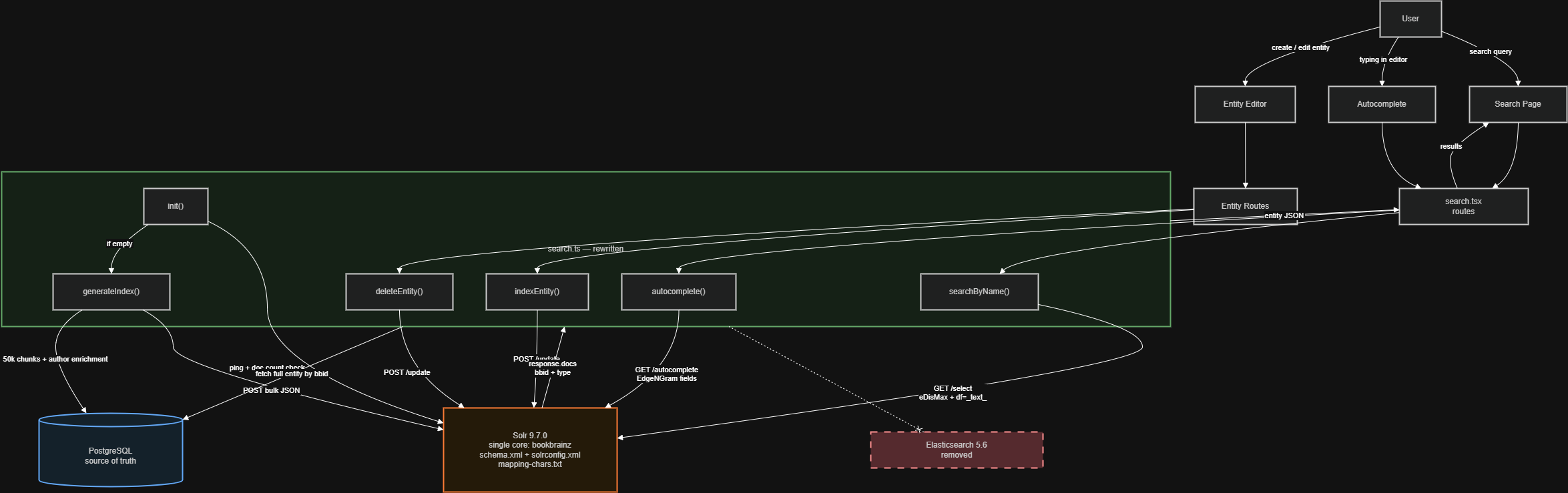
The good news is that all ES interaction lives in one file → src/common/helpers/search.ts. Nothing else in the codebase touches Elasticsearch. So the migration comes down to: rewrite the internals of that file to talk to Solr HTTP instead of the @elastic/elasticsearch SDK, design a Solr schema that replicates the current indexing behavior, and swap the Docker container. Routes, frontend, ORM, database layer ! none of that changes.
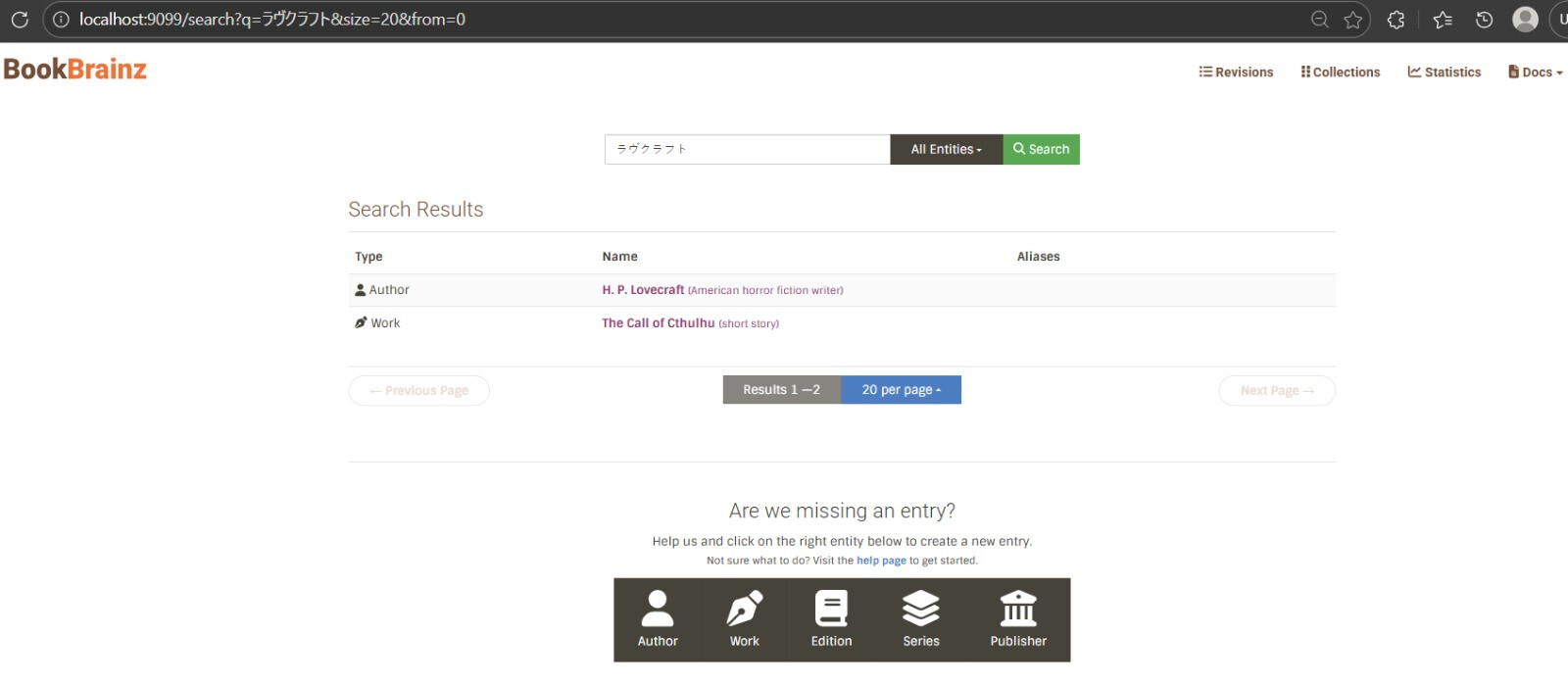
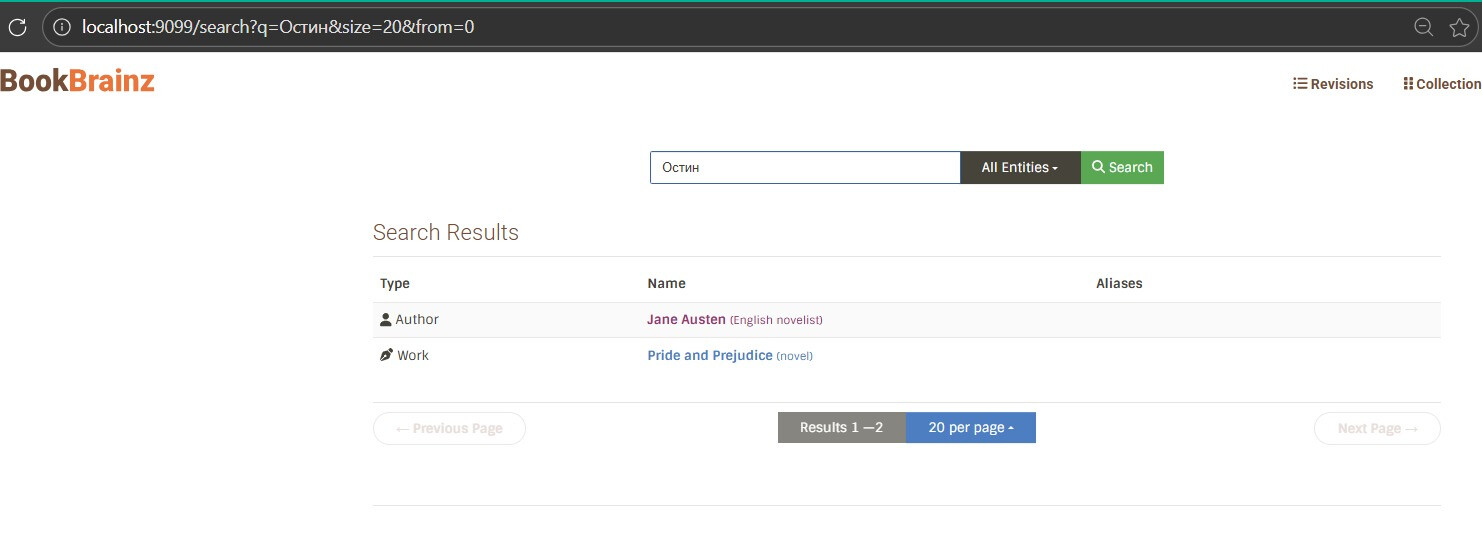
This is also a good opportunity to improve multilingual search. The current ES setup only uses asciifolding + lowercase, which does not handle CJK, Cyrillic, or Arabic text well. Solr’s ICU analysis which MusicBrainz already uses gives us proper Unicode-aware tokenization and cross-script normalization out of the box .
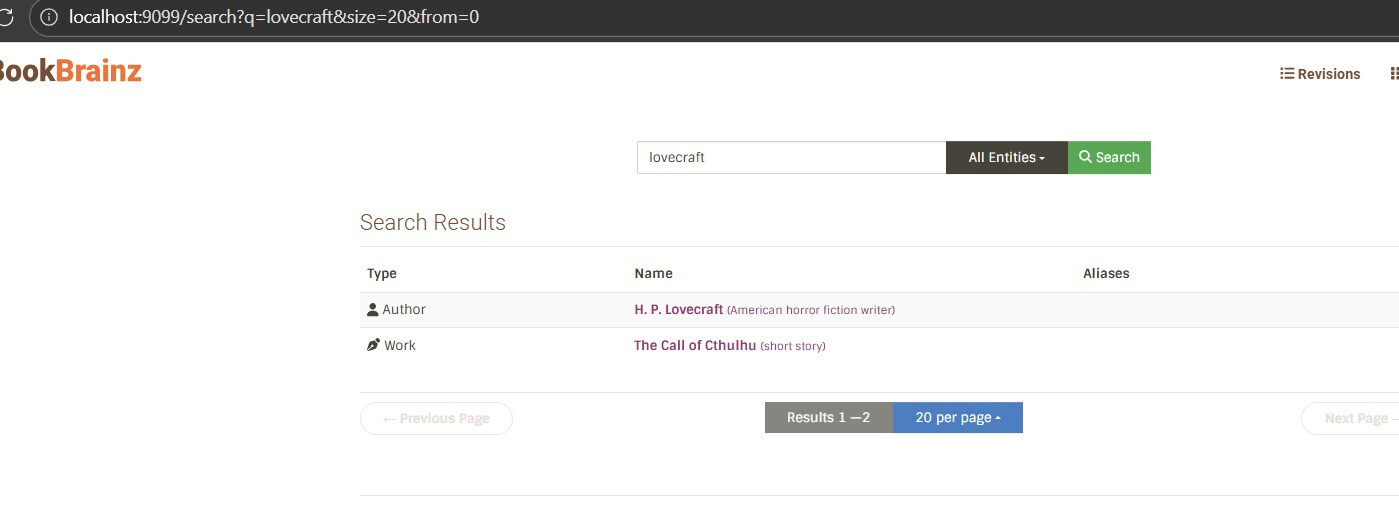
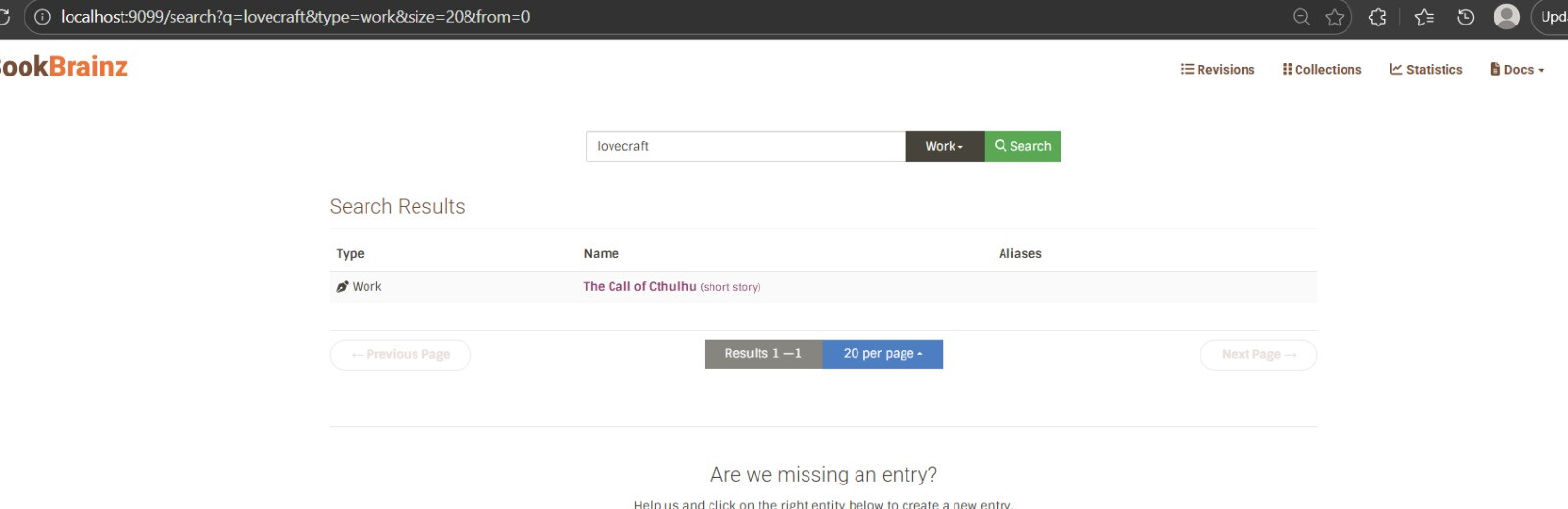
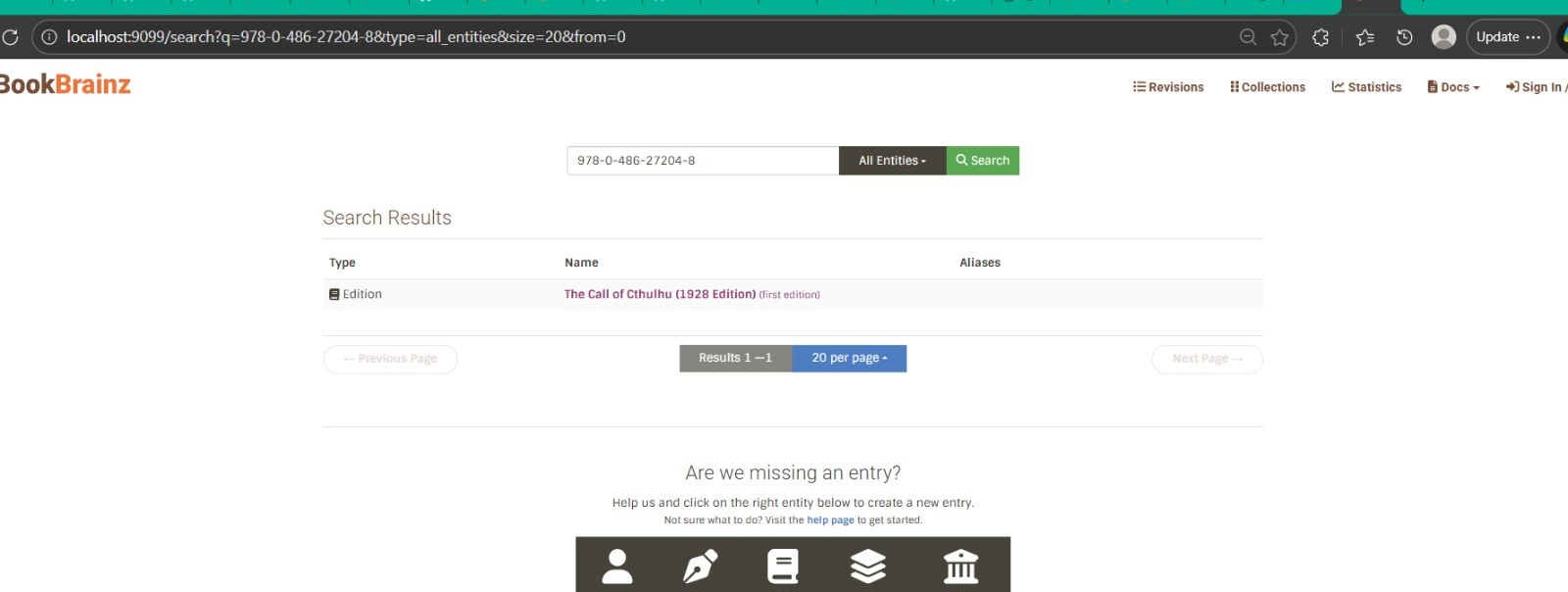
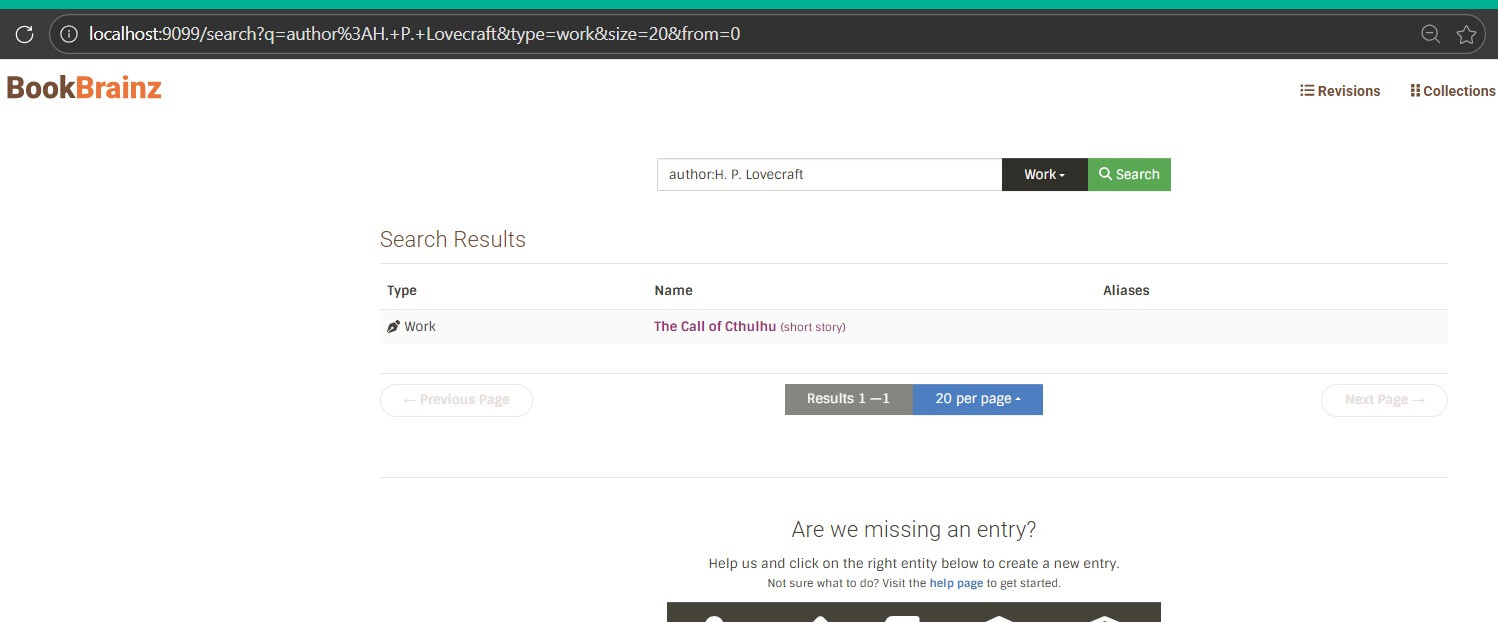
I have already built a working demo that runs on the actual BookBrainz website → tested with Japanese, Cyrillic, and Latin queries also work-author relationship queries . The demo is up as a draft PR with a video.
Understanding the Current ES Architecture
Before explaining how I will migrate to Solr, it is worth walking through exactly how the current Elasticsearch setup works, because the whole migration is about replicating this behavior.
The whole ES layer lives in one file: src/common/helpers/search.ts (729 lines). It is the only file that imports @elastic/elasticsearch. It creates a client on startup and exports functions that the rest of the app uses. Nothing else knows about ES.
The key functions:
-
init()– runs at server startup, connects to ES, and auto-indexes everything if the index doesn’t exist yet. -
searchByName()– the main search. Builds amulti_matchquery acrossaliases.name^3,aliases.name.search(trigram-analyzed),disambiguation, andidentifiers.value. Usescross_fieldswithminimum_should_match: '80%'. For work queries, it addsauthorsto the field list so searching an author name also finds their works. -
autocomplete()– used by entity editor dropdowns. Queriesaliases.name.autocomplete(EdgeNGram 2-10 chars) for prefix matching. -
getDocumentToIndex()– flattens aBookshelf.jsmodel into a document withbbid,name,type,disambiguation,aliases,identifiers, and forworks,authors. -
indexEntity()/deleteEntity()– single-document CRUD, called when entities are created or edited. -
_bulkIndexEntities()– bulk indexing with retry logic for ES’s429 Too Many Requests. -
generateIndex()– full reindex. Fetches entities from PostgreSQL in 50k chunks, attaches author names to works via relationship type 8 (“author wrote work”), and bulk-indexes. Also handles areas, editors, and collections. -
checkIfExists()– the “does this exist?” check in entity editors. Doesn’t use ES at all – queries PostgreSQL directly.
The schema is defined as a JS object inside search.ts (not a separate file). Two custom analyzers:
-
edge– EdgeNGram (2-10 chars) + asciifolding + lowercase, for autocomplete -
trigrams– NGram (1-3 chars) + asciifolding + lowercase, for partial matching
The route layer (src/server/routes/search.tsx) just calls exported functions from search.ts and returns results. It does not know what search backend is behind them – which is exactly why the migration is safe.
Important pattern: after getting results from ES, the code fetches full entities from PostgreSQL by bbid. The search index is just a lookup layer, not the source of truth. Same pattern applies with Solr.
What changes in the migration we must focus on :
-
ES client calls →
fetch()to Solr HTTP -
indexMappingsJS object →schema.xml+solrconfig.xml -
ES
multi_match/cross_fields→ Solr eDisMax withqf,mm,fq -
ES response format (
hits.hits._source) → Solr format (response.docs) -
ES bulk format (alternating metadata/doc) → Solr JSON array
What stays the same: function signatures, route layer, ORM fetching, frontend, everything else.
Migration Approach & Key Design Decisions
Single core, not multi-core
MusicBrainz uses separate Solr cores per entity type – artist, release, recording, etc. – because their search UI makes you pick an entity type first, they have millions of entities per type, and each type has different search fields.
BookBrainz is different. Multi-entity search is a core feature – users type a query and get authors, works, editions, publishers, series all in one list. The dataset is also way smaller (~200k entities) its a guess :)i am assuming . A single core handles that easily.
If we went multi-core, every search would mean one HTTP request per core, then merging results and dealing with relevance scores that aren’t comparable across cores. Pagination would be painful. A single core avoids all this – one query, one response, Solr handles ranking. For type filtering, we just add fq=type:author as a filter query, which Solr caches separately from the main query.
The current ES setup already uses a single index. Matching that pattern keeps the migration straightforward.
Solr version: 9.7.0
Same version MusicBrainz runs in production (per mb-solr). If we hit anything version-specific we can ask the MB team directly.
No SDK, just fetch()
ES uses the @elastic/elasticsearch SDK. For Solr, I’m not adding a client library. Solr’s API is plain HTTP + JSON – GET /select for queries, POST /update for indexing. Node’s built-in fetch() is enough. The @elastic/elasticsearch dependency gets removed entirely.
Keep trigram fields out of the default search path:
This was the biggest thing I learned from building the demo.
My schema defines name_trigram and alias_trigram fields (NGram 1-3 chars) for partial matching. Early on I tried adding these to eDisMax’s qf and pf parameters to get fuzzy matching on every search. The result: every query matched every document. Searching “tolkien” returned all 17 documents with roughly equal scores.
The reason: when trigram fields are in qf, Solr breaks the query into 1, 2, and 3-character grams – t, to, tol, o, ol, olk, … – and each tiny gram matches against grams from every indexed document. With a small dataset it’s hard to spot, but the relevance is garbage and at scale it would match everything.
The fix: don’t set qf/pf for the default search path. Instead, rely on df=_text_ configured in the /select handler in solrconfig.xml. The _text_ field is a text_general catch-all populated by copyField rules from name, alias, disambiguation, author, and identifier. This gives proper word-level matching. The trigram and autocomplete fields still exist in the schema for specific use cases (the /autocomplete handler uses name_autocomplete and alias_autocomplete via its own qf), but they’re deliberately kept out of the main search path.
This is consistent with how MusicBrainz does it in mbsssss – they define multiple field types but keep the default search on standard-analyzed fields.
Schema Design
The current ES schema lives as a JS object inside search.ts.
For Solr, this moves into a proper schema.xml file.
Here’s how each piece maps across!
Current ES index mapping (the thing we’re replacing)
This is the full ES index config defined in search.ts:
const indexMappings = {
	mappings: {
		_default_: {
			properties: {
				aliases: {
					properties: {
						name: {
							fields: {
								autocomplete: {
									analyzer: 'edge',
									type: 'text'
								},
								search: {
									analyzer: 'trigrams',
									type: 'text'
								}
							},
							type: 'text'
						}
					}
				},
				authors: {
					analyzer: 'trigrams',
					type: 'text'
				},
				disambiguation: {
					analyzer: 'trigrams',
					type: 'text'
				}
			}
		}
	},
	settings: {
		analysis: {
			analyzer: {
				edge: {
					filter: [
						'asciifolding',
						'lowercase'
					],
					tokenizer: 'edge_ngram_tokenizer',
					type: 'custom'
				},
				trigrams: {
					filter: [
						'asciifolding',
						'lowercase'
					],
					tokenizer: 'trigrams',
					type: 'custom'
				}
			},
			tokenizer: {
				edge_ngram_tokenizer: {
					max_gram: 10,
					min_gram: 2,
					token_chars: [
						'letter',
						'digit'
					],
					type: 'edge_ngram'
				},
				trigrams: {
					max_gram: 3,
					min_gram: 1,
					type: 'ngram'
				}
			}
		},
		'index.mapping.ignore_malformed': true
	}
};
Two custom analyzers (edge and trigrams), both using asciifolding + lowercase.
That’s the whole text analysis story in the current setup.
Solr field types (replacing those analyzers) :
Each ES analyzer maps to a Solr fieldType. But we don’t just replicate them 1:1 – we improve them by adding ICU support and char normalization:
- ES
edgeanalyzer → Solrtext_autocomplete:
<fieldType name="text_autocomplete" class="solr.TextField" positionIncrementGap="100">
  <analyzer type="index">
    <charFilter class="solr.MappingCharFilterFactory" mapping="mapping-chars.txt"/>
    <tokenizer class="solr.StandardTokenizerFactory"/>
    <filter class="solr.LowerCaseFilterFactory"/>
    <filter class="solr.ASCIIFoldingFilterFactory"/>
    <filter class="solr.EdgeNGramFilterFactory" minGramSize="2" maxGramSize="10"/>
  </analyzer>
  <analyzer type="query">
    <charFilter class="solr.MappingCharFilterFactory" mapping="mapping-chars.txt"/>
    <tokenizer class="solr.StandardTokenizerFactory"/>
    <filter class="solr.LowerCaseFilterFactory"/>
    <filter class="solr.ASCIIFoldingFilterFactory"/>
  </analyzer>
</fieldType>
Same EdgeNGram(2-10) idea as ES, but the query analyzer skips n-gramming so the user’s input stays intact. ES doesn’t make this index-vs-query distinction as cleanly.
- ES
trigramsanalyzer → Solrtext_trigram:
<fieldType name="text_trigram" class="solr.TextField" positionIncrementGap="100">
  <analyzer>
    <charFilter class="solr.MappingCharFilterFactory" mapping="mapping-chars.txt"/>
    <tokenizer class="solr.StandardTokenizerFactory"/>
    <filter class="solr.LowerCaseFilterFactory"/>
    <filter class="solr.ASCIIFoldingFilterFactory" preserveOriginal="false"/>
    <filter class="solr.ICUFoldingFilterFactory"/>
    <filter class="solr.NGramFilterFactory" minGramSize="1" maxGramSize="3"/>
  </analyzer>
</fieldType>
This is the workhorse – used for name, alias, and the _text_ catch-all field. ES doesn’t have a dedicated equivalent; it just uses the default analyzer.
3 ) (this is not in ES at all) → Solr text_multilang:
<fieldType name="text_multilang" class="solr.TextField" positionIncrementGap="100">
  <analyzer>
    <charFilter class="solr.MappingCharFilterFactory" mapping="mapping-chars.txt"/>
    <tokenizer class="solr.ICUTokenizerFactory"/>
    <filter class="solr.ICUTransformFilterFactory" id="Katakana-Hiragana"/>
    <filter class="solr.ICUTransformFilterFactory" id="Traditional-Simplified"/>
    <filter class="solr.ICUFoldingFilterFactory"/>
    <filter class="solr.LowerCaseFilterFactory"/>
  </analyzer>
</fieldType>
Full multilingual support – covered in detail in the next section.
Every text field type starts with MappingCharFilterFactory using mapping-chars.txt. This normalizes punctuation before tokenization – fullwidth CJK spaces become regular spaces, smart quotes become straight quotes, various hyphens become a standard hyphen, ligatures get expanded. This file is based on MusicBrainz’s mapping-MBCharEquivToChar.txt:
# spaces
"\u3000" => " "
"\u00A0" => " "

# hyphens
"\u2010" => "-"
"\u2014" => "-"
"\u2212" => "-"

# ligatures
"\uFB01" => "fi"
"\uFB02" => "fl"
"\u00C6" => "AE"
"\u00E6" => "ae"
One improvement over the current ES setup:
ES uses asciifolding + lowercase as separate filters, which only covers basic Latin diacritics. The Solr schema adds ICUFoldingFilterFactory on top, which handles broader Unicode normalization – diacritics, case folding, and character equivalences across scripts. This is what lets José match jose and Björk match bjork without needing explicit per-language rules.
Fields
ES supports nested objects natively (aliases: [{name: "..."}]).
Solr doesn’t , it uses flat multi-valued fields. So aliases becomes alias (multi-valued), and identifiers becomes identifier (multi-valued exact-match strings).
Here’s the Solr field definitions that replace the ES mapping:
<!-- core fields -->
<field name="bbid" type="string" indexed="true" stored="true" required="true"/>
<field name="type" type="string" indexed="true" stored="true" required="true"/>
<field name="name" type="text_general" indexed="true" stored="true"/>
<field name="alias" type="text_general" indexed="true" stored="true" multiValued="true"/>
<field name="disambiguation" type="text_trigram" indexed="true" stored="true"/>
<field name="identifier" type="string" indexed="true" stored="true" multiValued="true"/>

<!-- denormalized work-author names -->
<field name="author" type="text_trigram" indexed="true" stored="true" multiValued="true"/>
<field name="author_exact" type="string" indexed="true" stored="false" multiValued="true"/>

<!-- analyzed copies for autocomplete + trigram search -->
<field name="name_autocomplete" type="text_autocomplete" indexed="true" stored="false"/>
<field name="name_trigram" type="text_trigram" indexed="true" stored="false"/>
<field name="alias_autocomplete" type="text_autocomplete" indexed="true" stored="false" multiValued="true"/>
<field name="alias_trigram" type="text_trigram" indexed="true" stored="false" multiValued="true"/>

<!-- catch-all: the default search target (df=_text_) -->
<field name="_text_" type="text_general" indexed="true" stored="false" multiValued="true"/>

<!-- stores full entity JSON for demo; in real migration, removed -->
<field name="_store" type="string" indexed="false" stored="true"/>

<uniqueKey>bbid</uniqueKey>
What each part replaces from ES:
| ES | Solr | What changed |
|---|---|---|
aliases.name (nested property) |
alias (flat multi-valued field) |
Solr can’t nest, so we flatten |
aliases.name.autocomplete (sub-field with edge analyzer) |
name_autocomplete / alias_autocomplete via copyField |
ES uses sub-fields, Solr uses copyField to separate analyzed copies |
aliases.name.search (sub-field with trigrams analyzer) |
name_trigram / alias_trigram via copyField |
Same idea, different mechanism |
authors with trigrams analyzer |
author (text_trigram) + author_exact (string) |
Added an exact-match copy for field-specific queries like author:lovecraft |
disambiguation with trigrams analyzer |
disambiguation (text_trigram) |
Direct mapping |
identifiers.value (nested) |
identifier (string, multiValued) |
Flattened to exact-match strings for ISBN / Wikidata ID lookups |
ES _type param for entity routing |
type string field + fq=type:author |
ES has built-in type routing; Solr uses a regular field we filter on |
asciifolding + lowercase filters |
ICUFoldingFilterFactory |
Single filter that covers broader Unicode normalization, not just Latin |
copyField rules
Instead of manually indexing the same content into multiple fields, Solr’s copyField handles it at index time:
<copyField source="name" dest="name_autocomplete"/>
<copyField source="name" dest="name_trigram"/>
<copyField source="name" dest="_text_"/>

<copyField source="alias" dest="alias_autocomplete"/>
<copyField source="alias" dest="alias_trigram"/>
<copyField source="alias" dest="_text_"/>

<copyField source="disambiguation" dest="_text_"/>
<copyField source="author" dest="_text_"/>
<copyField source="author" dest="author_exact"/>
<copyField source="identifier" dest="_text_"/>
When a document is indexed with just name, alias, author, etc., all the analyzed variants get populated automatically. The _text_ catch-all ends up containing everything searchable, which is what df=_text_ on the /select handler uses for the default search.
Document flattening
The ES version of getDocumentToIndex() returns nested objects:
// current ES format
return {
  ...entity.toJSON({ ignorePivot: true, visible: commonProperties.concat(additionalProperties) }),
  aliases,                    // [{name: "H. P. Lovecraft"}, {name: "Лавкрафт"}]
  identifiers: identifiers    // [{value: "Q169566"}]
};
For Solr, we flatten these into multi-valued fields:
// solr format
const doc = {
  bbid: entity.bbid,
  type: snakeCase(entity.type),
  name: entity.name,
  alias: entity.aliases?.map(a => a.name) || [],          // ["H. P. Lovecraft", "Лавкрафт"]
  identifier: entity.identifiers?.map(i => i.value) || [], // ["Q169566"]
  disambiguation: entity.disambiguation || '',
  ...(entity.type === 'work' && entity.authors ? { author: entity.authors } : {}),
  _store: JSON.stringify(entity)
};
For works, the authors array (author names attached at index time via relationship type 8) maps to the author field. This is the same denormalization pattern the current ES code uses – author names get baked into work documents so searching “lovecraft” also finds “The Call of Cthulhu”.
Request handlers (solrconfig.xml)
Instead of building the full query config in code every time, Solr lets you define request handlers with sensible defaults:
<!-- main search -- conservative, uses df=_text_ catch-all -->
<requestHandler name="/select" class="solr.SearchHandler">
  <lst name="defaults">
    <str name="df">_text_</str>
    <int name="rows">10</int>
  </lst>
</requestHandler>

<!-- dedicated autocomplete endpoint -->
<requestHandler name="/autocomplete" class="solr.SearchHandler">
  <lst name="defaults">
    <str name="defType">edismax</str>
    <str name="qf">name_autocomplete^3 alias_autocomplete^3</str>
    <str name="mm">80%</str>
  </lst>
</requestHandler>

<!-- indexing, wired to dedup chain keyed on bbid -->
<requestHandler name="/update" class="solr.UpdateRequestHandler">
  <lst name="defaults">
    <str name="update.chain">dedupe</str>
  </lst>
</requestHandler>
The deduplication chain uses SignatureUpdateProcessorFactory keyed on bbid, so re-indexing an entity overwrites the old document instead of creating duplicates:
<updateRequestProcessorChain name="dedupe">
  <processor class="solr.processor.SignatureUpdateProcessorFactory">
    <str name="signatureField">bbid</str>
    <bool name="overwriteDupes">true</bool>
    <str name="fields">bbid</str>
  </processor>
  <processor class="solr.LogUpdateProcessorFactory"/>
  <processor class="solr.RunUpdateProcessorFactory"/>
</updateRequestProcessorChain>
The config also sets up autoCommit (hard commit every 15s, no new searcher opened) and autoSoftCommit (soft commit every 1s for near-real-time visibility), plus CaffeineCache for filter queries, query results, and document lookups.