Contact information
Nickname: Atharv Patil
Matrix handle: @atharv002:matrix.org
Email: atharvsp002@gmail.com
GitHub: atharvsp02
Linkedin: Atharv Patil
Time Zone: UTC+05:30
Project Overview
Title: Use Solr search server
Proposed Mentor: Monkey, Lucifer
Project Length: 350 hours
BookBrainz currently uses Elasticsearch for its search functionality. Other MetaBrainz projects like MusicBrainz already use the Solr search server. Running two separate search infrastructures creates unnecessary overhead. This project migrates BookBrainz from Elasticsearch to Solr while keeping the same search features including the multi entity search that allows users to find all entities in a single query.
In the current codebase, a single file search.ts handles all of the search logic. This file is responsible for indexing all entity types into a single Elasticsearch index and handling every search query the application makes. No other part of the codebase interacts with Elasticsearch directly, they rely on exported functions from this file. To migrate to Solr, this project will update this file to use Solr instead of Elasticsearch, implement a Solr schema that mirrors the current indexing and search behavior, and configure the necessary Docker services to run the new search infrastructure
My Contributions
Over the past few months, I have been actively contributing to BookBrainz , focusing on bug fixes and feature improvements to better understand how the project works. Through this process, I have gained a solid understanding of the project’s architecture and its core components.
Up to this point, my contributions include:
Merged PRs: Check Out
-
BB-874 - I improved the editor workflow by adding a “recently used languages” section to language dropdowns, saving editors from having to repeatedly search for the same language codes. The PR for this has been successfully merged.
-
I made a PR to fix a bug where clicking the clear button in the Work dropdown didn’t properly reset the form and triggered console errors.
-
BB-852 - I submitted a PR to fix a bug where the sort name guessing incorrectly stripped existing commas from titles.
-
BB-875 - I simplified the language selection workflow via this PR by removing the redundant [Multiple languages] option from dropdowns, as users can now select multiple individual languages directly.
Open PRs: Check Out
-
BB-874 - This PR extends the “recently used” concept to all entity selection dropdowns to improve workflow efficiency. (In Review)
-
BB-805 - I opened a PR to build a “Create Multiple Works” feature. This saves users time by letting them add multiple works at once without typing the same shared information over and over
-
BB-872 - In this PR, I have added language specific sort name generation for the most commonly used languages, along with the ability to differentiate between person names and titles so that each is sorted correctly.
-
BB-399 - This PR adds a checkbox to copy the title language to the content language, saving users from selecting the same language twice.
-
BB-650 - With this PR, I have improved ISBN and Barcode detection for spaced or hyphenated inputs and adds a confirmation checkbox to allow the submission of unusual identifiers that don’t match the standard format. (In Review)
-
BB-634 - I opened a PR to enable relationships between Series entities, allowing users to link related series such as subseries, translations or followed by. (In Review)
-
BB-854 - Here, I have opened a PR that fixes Enter key submission in Author Credits and enables the browser’s right click context menu in fields.
-
BB-831 - This PR enables automatic parsing of OCN/Worldcat IDs from the new WorldCat search URL format.
-
BB-887 - I opened a PR that prevents navigation to other tabs in the Unified Form if the current tab contains empty or invalid required fields.
-
BB-888 - This PR adds built-in ISBN-10 and ISBN-13 checksum validation, along with an admin dropdown to assign validation functions to identifier types, making it easy to add new checksums for other types in the future.
My Commits: Check Out
Proposed Architecture
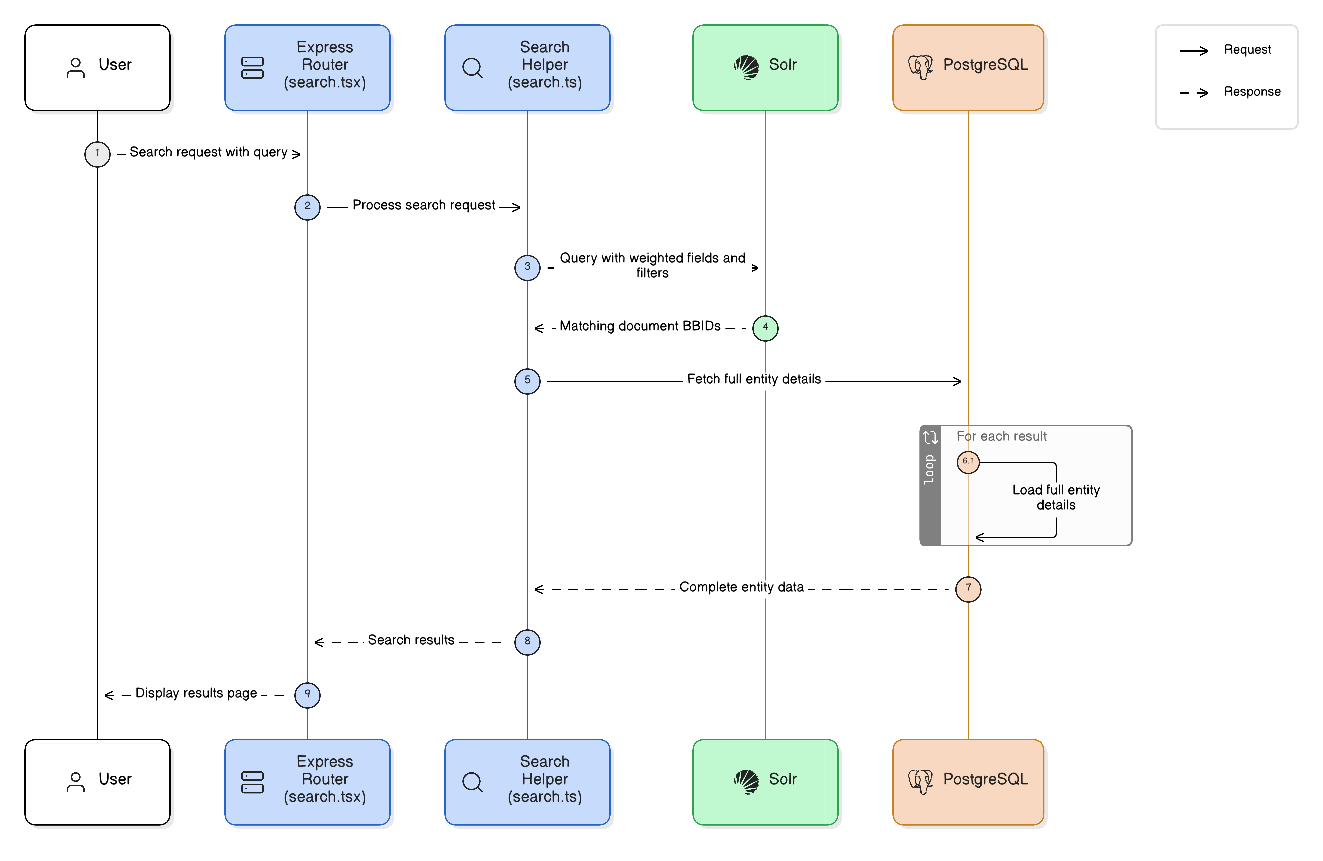
This migration replace Elasticsearch to Solr Search at the infrastructure layer. Because the search logic lives entirely inside src/common/helper/search.ts.
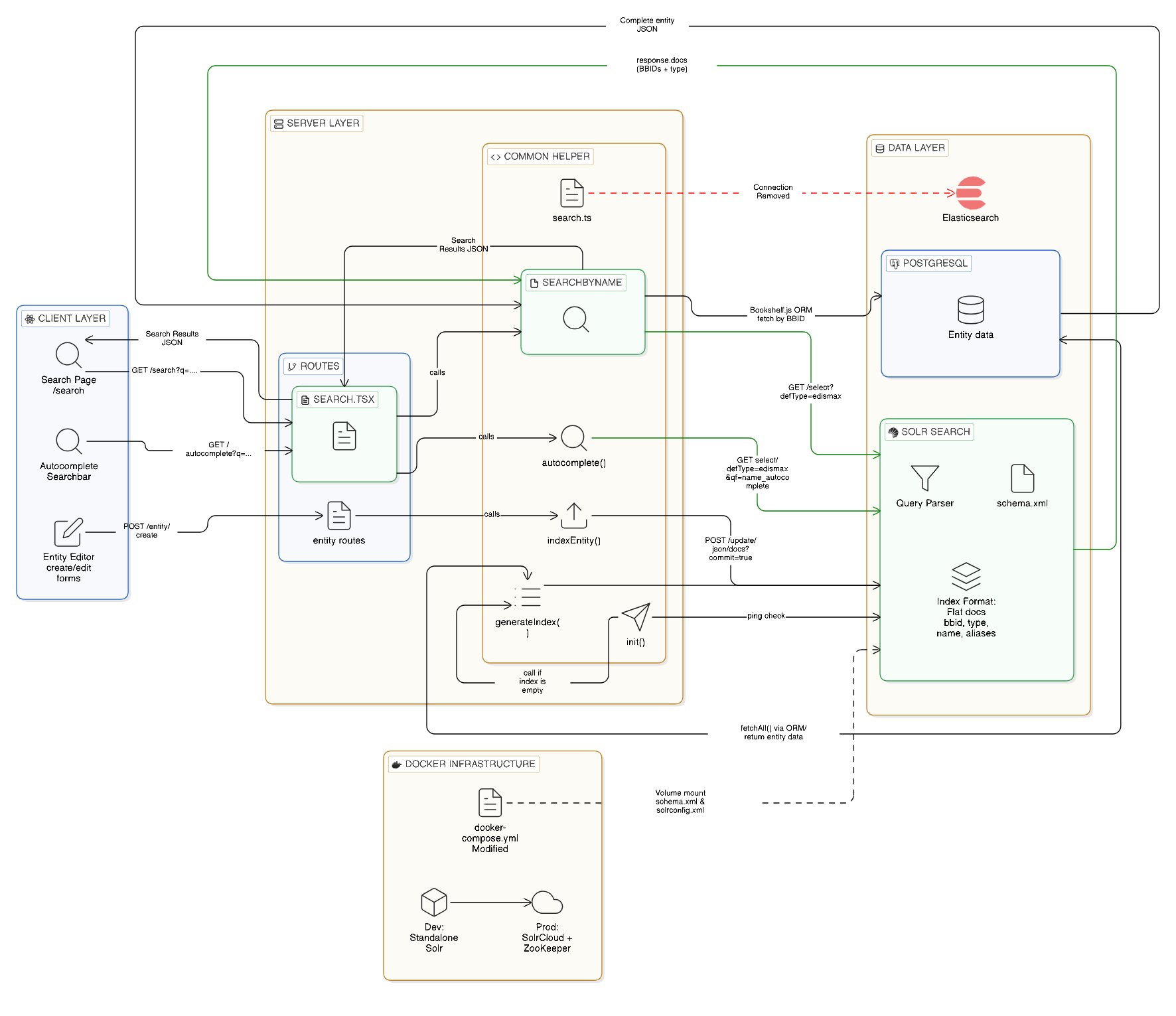
- When a user searches on BookBrainz, the search page sends a request to the server routes.
- The routes call
searchByName()orautocomplete()insearch.ts, which builds a Solr eDisMax query with the right fields and parameters. - Solr receives the query, runs it through the Query Parser using the field types defined in schema.xml
- Solr returns matching documents.
- The code reads
bbidandtypefrom the response and fetches the complete entity from PostgreSQL. - The full entity JSON is sent back to the search page for display.
- When an entity is created or edited,
indexEntity()sends the document to Solr for indexing. - On server startup
init()pings Solr to check if it is reachable. - If the Solr index is empty,
init()callsgenerateIndex()to build the search index. generateIndex()fetches all entities from PostgreSQL using the Bookshelf.js ORM, converts them into flat Solr documents, and bulk POSTs them to Solr’s/update/json/docsendpoint- The Elasticsearch connection is removed entirely (red dashed line in diagram).
- Docker Compose runs Solr in standalone mode for development. For production, this can be moved to SolrCloud with ZooKeeper
Single Core Design
BookBrainz currently indexes all entity types into a single Elasticsearch index called bookbrainz. For the Solr migration, the plan is to keep the same approach using a single Solr core, instead of using separate cores per entity type like MusicBrainz does.
Unlike MusicBrainz, BookBrainz needs to maintain its multi entity search capability, which allows users to search across all entity types simultaneously in a single query.
If we used multiple cores:
-
every search needs to send many HTTP requests (one per core)
-
needs to merge and sort the results manually in Node.js
-
it gives different relevance scores for every entity type and we need to deal with incomparable scores
-
implementing pagination across multiple cores adds unnecessary complexity
With a single core, all of this is handled natively by Solr in one request. Entity type filtering is done with a simple Filter Query like fq=type:author, which is fast because Solr caches filter queries separately from the main query.
Folder Structure
bookbrainz-site/
├── config/
│   └── config.json
├── solr/
│   ├── schema.xml
│   └── solrconfig.xml
├── src/
│   └── common/
│       └── helpers/
│           └── search.ts
├── test/
│   └── src/api/routes/
│       └── test-search.js
├── docker-compose.yml
└── package.json
Changes to these files:
config.json: Update the Elasticsearch URL to point to the new Solr HTTP endpoint.schema.xml&solrconfig.xml: Define the Solr core, field types, analyzers, and query handlers.search.ts: The entire search and indexing logic is rewritten. Elasticsearch DSL queries are replaced with standard HTTP requests to the Solr API, and the response parsing is updated to handle Solr’s format.test-search.js: Verify existing tests pass with Solr. Update comments and add test coverage if needed.docker-compose.yml: Swap the existingelasticsearchcontainer definition withsolrand mount thesolr/config folder.package.json: Remove the@elastic/elasticsearchdependency completely.
For development, the project runs Solr in standalone mode. The solr/ folder holds the schema and config file and Docker mounts them directly into the container on startup. In production, BookBrainz will run SolrCloud, where these same files get uploaded to ZooKeeper instead of being mounted
Implementation
The migration is scoped to the search infrastructure layer, the core application logic, database schema and frontend remain completely untouched. The most of the work happens in a single file that is src/common/helpers/search.ts, which currently handles all interactions with Elasticsearch. Right now, every search and indexing call in that file goes through the @elastic/elasticsearch SDK. I will remove the Elasticsearch client library and use fetch to make direct HTTP calls to Solr instead, which BookBrainz already uses in codebase. Then I will add schema.xml and solrconfig.xml to define how solr indexes and queries our entities and update the Docker setup to run Solr instead of Elasticsearch.
1. Solr Schema
The schema defines the field types, analyzers, and copy fields that replicate the current Elasticsearch index behavior.
Current Elasticsearch Index Mapping
The existing index is defined entirely in search.ts using the indexMappings object. This is the complete current configuration that needs to be replicated in Solr:
const indexMappings = {
 mappings: {
  _default_: {
   properties: {
    aliases: {
     properties: {
      name: {
       fields: {
        autocomplete: {
         analyzer: 'edge',
         type: 'text'
        },
        search: {
         analyzer: 'trigrams',
         type: 'text'
        }
       },
       type: 'text'
      }
     }
    },
    authors: {
     analyzer: 'trigrams',
     type: 'text'
    },
    disambiguation: {
     analyzer: 'trigrams',
     type: 'text'
    }
   }
  }
 },
 settings: {
  analysis: {
   analyzer: {
    edge: {
     filter: ['asciifolding', 'lowercase'],
     tokenizer: 'edge_ngram_tokenizer',
     type: 'custom'
    },
    trigrams: {
     filter: ['asciifolding', 'lowercase'],
     tokenizer: 'trigrams',
     type: 'custom'
    }
   },
   tokenizer: {
    edge_ngram_tokenizer: {
     max_gram: 10,
     min_gram: 2,
     token_chars: ['letter', 'digit'],
     type: 'edge_ngram'
    },
    trigrams: {
     max_gram: 3,
     min_gram: 1,
     type: 'ngram'
    }
   }
  },
  'index.mapping.ignore_malformed': true
 }
};
Mapping to Solr
Here is the Solr schema.xml that replaces the above ES mapping:
<?xml version="1.0" encoding="UTF-8" ?>
<schema name="bookbrainz" version="1.6">

    <!-- Autocomplete -->
    <fieldType name="text_autocomplete" class="solr.TextField">
        <analyzer type="index">
            <tokenizer class="solr.EdgeNGramTokenizerFactory" minGramSize="2" maxGramSize="10"/>
            <filter class="solr.ICUFoldingFilterFactory"/>
        </analyzer>
        <analyzer type="query">
            <tokenizer class="solr.KeywordTokenizerFactory"/>
            <filter class="solr.ICUFoldingFilterFactory"/>
        </analyzer>
    </fieldType>

        <!-- Partial search -->
    <fieldType name="text_ngram" class="solr.TextField">
        <analyzer>
            <tokenizer class="solr.NGramTokenizerFactory" minGramSize="1" maxGramSize="3"/>
            <filter class="solr.ICUFoldingFilterFactory"/>
        </analyzer>
    </fieldType>

    <!-- Standard text -->
    <fieldType name="text_general" class="solr.TextField" positionIncrementGap="100">
        <analyzer>
            <tokenizer class="solr.ICUTokenizerFactory"/>
            <filter class="solr.ICUFoldingFilterFactory"/>
        </analyzer>
    </fieldType>

    <fieldType name="string" class="solr.StrField" sortMissingLast="true"/>
    <fieldType name="plong" class="solr.LongPointField" docValues="true"/>

    <uniqueKey>bbid</uniqueKey>

    <field name="bbid" type="string" indexed="true" stored="true" required="true" />
    <field name="id" type="plong" indexed="true" stored="true"/>
    <field name="type" type="string" indexed="true" stored="true" />
    <field name="name" type="text_general" indexed="true" stored="true" />
    <field name="disambiguation" type="text_general" indexed="true" stored="true" />
    <field name="aliases_name" type="text_general" indexed="true" stored="true" multiValued="true" />
    <field name="identifiers_value" type="text_general" indexed="true" stored="true" multiValued="true" />
    <field name="authors" type="text_general" indexed="true" stored="true" multiValued="true" />

    <field name="name_autocomplete" type="text_autocomplete" indexed="true" stored="false" multiValued="true" />
    <field name="name_search" type="text_ngram" indexed="true" stored="false" multiValued="true" />
    <field name="authors_search" type="text_ngram" indexed="true" stored="false" multiValued="true" />
    <field name="disambiguation_search" type="text_ngram" indexed="true" stored="false" multiValued="true" />

    <copyField source="name" dest="name_autocomplete" />
    <copyField source="aliases_name" dest="name_autocomplete" />
    <copyField source="name" dest="name_search" />
    <copyField source="aliases_name" dest="name_search" />
    <copyField source="authors" dest="authors_search" />
    <copyField source="disambiguation" dest="disambiguation_search" />

    <field name="_version_" type="plong" indexed="false" stored="false"/>

</schema>
What each part of the schema replaces
| Elasticsearch Features | Solr Equivalents | Changes |
|---|---|---|
aliases.name (nested property) |
aliases_name (multi-valued field) |
ES maps this as properties.aliases.properties.name. Solr doesn’t nest properties, so it becomes a flat aliases_name field |
aliases.name.autocomplete (sub field) |
name_autocomplete via copyField |
ES lets you define sub-fields with different analyzers. Solr uses copyField to copy name/aliases_name into name_autocomplete at index time |
aliases.name.search (sub field) |
name_search via copyField |
Copies the text into a new field that breaks it into n-grams for partial searching |
authors with trigrams analyzer |
authors and authors_search via copyField |
Stored as text_general, copied into text_ngram field for partial search |
disambiguation with trigrams analyzer |
disambiguation and disambiguation_search via copyField |
Also stored normally and copied into an n-gram field |
identifiers (nested array) |
identifiers_value (multi-valued field) |
Extracted into a simple string array of identifier values |
edge analyzer (EdgeNGram 2-10 chars) |
text_autocomplete fieldType |
Same tokenizer and filters, but we use KeywordTokenizer on the query side so it doesn’t break up what the user actually typed |
trigrams analyzer (NGram 1-3 chars) |
text_ngram fieldType |
Solr uses NGramTokenizerFactory with a single shared analyzer, which replicates how Elasticsearch’s trigram analyzer functioned for partial matching |
asciifolding and lowercase filters |
ICUFoldingFilterFactory |
ES uses asciifolding and lowercase as two separate filters. We replaced both with a single ICUFoldingFilterFactory which covers broader Unicode normalization and includes case folding |
StandardTokenizerFactory (in text_general) |
ICUTokenizerFactory |
Standard tokenizer splits CJK character by character. ICU tokenizer uses Unicode word break rules for proper segmentation |
_type parameter for entity routing |
type string field and fq=type:author |
ES has built in type routing, whereas Solr stores it as a regular field that we filter on |
BookBrainz has content in many languages, not just English. ES uses asciifolding and lowercase which only covers basic Latin accents. We use ICUFoldingFilterFactory instead which does accent removal, case folding, and broader Unicode normalization in one filter. We also use ICUTokenizerFactory in text_general so that CJK languages like Japanese and Chinese get split properly instead of character by character.
Solr Configuration (solrconfig.xml)
<?xml version="1.0" encoding="UTF-8" ?>
<config>

  <luceneMatchVersion>9.7</luceneMatchVersion>

  <dataDir>${solr.data.dir:}</dataDir>

  <directoryFactory name="DirectoryFactory" class="${solr.directoryFactory:solr.NRTCachingDirectoryFactory}"/>

  <codecFactory class="solr.SchemaCodecFactory"/>

  <!-- Use our schema.xml -->
  <schemaFactory class="ClassicIndexSchemaFactory"/>

  <indexConfig>
    <lockType>${solr.lock.type:native}</lockType>
  </indexConfig>

  <updateHandler class="solr.DirectUpdateHandler2">
    <updateLog>
      <str name="dir">${solr.ulog.dir:}</str>
    </updateLog>
    <!-- Hard commit every 15s -->
    <autoCommit>
      <maxTime>${solr.autoCommit.maxTime:15000}</maxTime>
      <openSearcher>false</openSearcher>
    </autoCommit>
    <!-- Soft commit every 1s so new docs are searchable quickly -->
    <autoSoftCommit>
      <maxTime>${solr.autoSoftCommit.maxTime:1000}</maxTime>
    </autoSoftCommit>
  </updateHandler>

  <query>
    <maxBooleanClauses>${solr.max.booleanClauses:1024}</maxBooleanClauses>
    <filterCache class="solr.CaffeineCache" size="512" initialSize="128" autowarmCount="0"/>
    <queryResultCache class="solr.CaffeineCache" size="512" initialSize="128" autowarmCount="0"/>
    <documentCache class="solr.CaffeineCache" size="512" initialSize="128" autowarmCount="0"/>
    <enableLazyFieldLoading>true</enableLazyFieldLoading>
  </query>

  <requestDispatcher>
    <requestParsers enableRemoteStreaming="false" multipartUploadLimitInKB="2048000" addHttpRequestToContext="false"/>
    <httpCaching never304="true"/>
  </requestDispatcher>

  <!-- Used by searchByName() and autocomplete() in search.ts -->
  <requestHandler name="/select" class="solr.SearchHandler">
    <lst name="defaults">
      <str name="echoParams">explicit</str>
      <int name="rows">20</int>
      <str name="wt">json</str>
    </lst>
  </requestHandler>

  <!-- Used by indexEntity(), _bulkIndexEntities(), deleteEntity(), refreshIndex() -->
  <requestHandler name="/update" class="solr.UpdateRequestHandler"/>

  <!-- Used by init() to check if Solr is reachable -->
  <requestHandler name="/admin/ping" class="solr.PingRequestHandler">
    <lst name="invariants">
      <str name="q">solrpingquery</str>
      <str name="df">name</str>
    </lst>
    <lst name="defaults">
      <str name="echoParams">all</str>
    </lst>
  </requestHandler>

</config>
luceneMatchVersion=9.7- Matches Solr 9.7.0, the same version MusicBrainz usesClassicIndexSchemaFactory- Tells Solr to use ourschema.xmlfor field definitionsautoCommit.maxTime:15000- Hard commit every 15 secondsautoSoftCommit.maxTime:1000- Makes new documents searchable within 1 second, same as ES’s default refresh intervalCaffeineCache size=512- Caches filter queries likefq=type:Authorso repeated type filtered searches are fastenableRemoteStreaming=false- Prevents Solr from fetching external URLs through the search endpoint/selecthandler - Search endpoint used bysearchByName()andautocomplete(). Query parameters like field boosting and match percentage are sent bysearch.tsper request, not hardcoded here/updatehandler - Indexing endpoint used byindexEntity(),_bulkIndexEntities(),deleteEntity()andrefreshIndex()/admin/pinghandler - Health check used byinit()on startup. Thedf=nametells the ping query which field to run against
Search parameters like qf , mm and defType are not set in the handlers because search.ts sends them per request. This keeps the same pattern as the current ES code where the JavaScript builds the full query.
Why a Single Core?
Since all entity types share the same base text fields (text_autocomplete , text_ngram , text_general ) a single schema file is much cleaner to maintain.
-
Multi entity Search: Users often search across all entity types at once (e.g., typing “Mistborn” to find both the Work and the Series). A single core handles this natively. With multiple cores we would need cross core joins or a separate global index for mixed type searches, which adds complexity.
-
Fast Routing: We just store the entity type in a
typestring field. If we only want Authors, we usefq=type:Authorto the query. -
Matches ES: The current Elasticsearch setup already uses a single index for everything. Sticking to this pattern means we don’t have to rewrite the entire application layer.
2. Rewriting search.ts
This is the core of the project. Every function in search.ts that currently talks to the @elastic/elasticsearch client gets rewritten to use direct HTTP calls via fetch.
init() — Connection Setup
Currently the code creates an Elasticsearch client object and pings the cluster:
Current ES code
if (!isString(options.node)) {
    _client = new ElasticSearch.Client({node: 'http://localhost:9200'});
} else {
    _client = new ElasticSearch.Client(options);
}
await _client.ping();
const mainIndexExists = await _client.indices.exists({index: _index});
if (!mainIndexExists) {
    generateIndex(orm).catch(log.error);
}
New Solr code
_solrBaseUrl = isString(options.node)
    ? options.node
    : 'http://localhost:8983/solr/bookbrainz';

const response = await fetch(`${_solrBaseUrl}/admin/ping?wt=json`);
const data = await response.json();
if (data.status !== 'OK') {
    throw new Error('Solr ping failed');
}
Here, The @elastic/elasticsearch dependency is removed from package.json entirely. The auto indexing logic on startup generateIndex stays exactly the same.
SearchByName()
This is the main search function. It takes a search term and builds a query across multiple fields, but makes sure exact name matches get ranked the highest.
Current ES code
const dslQuery = {
    body: {
        from,
        query: {
            multi_match: {
                fields: [
                    'aliases.name^3',
                    'aliases.name.search',
                    'disambiguation',
                    'identifiers.value'
                ],
                minimum_should_match: '80%',
                query: name,
                type: 'cross_fields'
            }
        },
        size
    },
    index: _index,
    type: sanitizedEntityType
};
if (sanitizedEntityType === 'work') {
    dslQuery.body.query.multi_match.fields.push('authors');
}
New Solr code
const solrParams = {
    defType: 'edismax',
    q: name,
    qf: 'name^3 aliases_name^3 name_search disambiguation identifiers_value',
    mm: '80%',
    start: from,
    rows: size,
    wt: 'json'
};

if (sanitizedEntityType) {
    solrParams.fq = Array.isArray(sanitizedEntityType)
        ? sanitizedEntityType.map(t => `type:${t}`).join(' OR ')
        : `type:${sanitizedEntityType}`;
}

if (sanitizedEntityType === 'work' ||
    (Array.isArray(sanitizedEntityType) && sanitizedEntityType.includes('work'))) {
    solrParams.qf += ' authors_search';
}

const queryString = new URLSearchParams(solrParams).toString();
const response = await fetch(`${_solrBaseUrl}/select?${queryString}`);
const data = await response.json();
autocomplete()
Current ES code
queryBody = {
    match: {
        'aliases.name.autocomplete': {
            minimum_should_match: '80%',
            query
        }
    }
};
New Solr code
const solrParams = {
    defType: 'edismax',
    q: query,
    qf: 'name_autocomplete',
    mm: '80%',
    rows: size,
    wt: 'json'
};
getDocumentToIndex()
This function takes a raw entity from PostgreSQL and prepares it for indexing. ES handles nested objects natively, but Solr needs flat fields.
Current ES code
return {
    ...entity.toJSON({
        ignorePivot: true,
        visible: commonProperties.concat(additionalProperties)
    }),
    aliases,
    identifiers: identifiers ?? null
};
New Solr code
return {
    ...entity.toJSON({
        ignorePivot: true,
        visible: commonProperties.concat(additionalProperties)
    }),
    aliases_name: Array.isArray(aliases)
        ? aliases.map(a => a.name)
        : [aliases?.name],
    identifiers_value: identifiers
        ? identifiers.map(i => i.value)
        : [],
};
Output(For example)
{
    bbid: "797946a0-32b3-43fb-b58d-cd12343a9c07",
    type: "Work",
    name: "Mistborn: The Final Empire",
    aliases_name: ["Mistborn", "The Final Empire"],
    identifiers_value: ["Q918558"],
    disambiguation: "First book of the Mistborn series",
    authors: ["Brandon Sanderson"]
}
indexEntity()
This handles indexing individual entities. We replace the ES client method with a standard fetch() POST request.
Current ES code
return _client
    .index({
        body: document,
        id: entity.get('bbid') || entity.get('id'),
        index: _index,
        type: snakeCase(entityType)
    })
New Solr code
const solrDoc = getDocumentToIndex(entity);
return fetch(`${_solrBaseUrl}/update/json/docs?commit=true`, {
    method: 'POST',
    headers: { 'Content-Type': 'application/json' },
    body: JSON.stringify([solrDoc])
})
Response Parsing
The _fetchEntityModelsForESResults() function is renamed to _fetchEntityModelsForSolrResults() and updated to read from response.docs instead of hits.hits, and to use doc.bbid directly instead of hit._source.bbid.
ES response structure
{
  "body": {
    "hits": {
      "total": 42,
      "hits": [
        { "_source": { "bbid": "bbid1", "type": "author", "name": "name1" } }
      ]
    }
  }
}
Solr response structure
{
  "response": {
    "numFound": 42,
    "docs": [
      { "bbid": "bbid1", "type": "author", "name": "name1" }
    ]
  }
}
Remaining Functions
These remaining functions also follow same pattern and replace the ES client calls with fetch request to Solr:
deleteEntity()-_client.delete({id})becomes a POST to/updatewith{delete: {id: entity.bbid ?? entity.id}}_bulkIndexEntities()- Elasticsearch uses an alternating format that requires building metadata objects for every document. Solr natively accepts a standard JSON array, so we just map the entities and POST the array directly.refreshIndex()-_client.indices.refresh()becomes POST/update?commit=truegenerateIndex()- same flow just replace ES index API call with Solr Admin APIcheckIfExists()- already queries PostgreSQL directly, no changes needed_processEntityListForBulk()- callsgetDocumentToIndex()in a loop, no ES specific logic
3. Updating the Docker Setup
I am using Solr 9.7.0 since MusicBrainz already uses this version, so BookBrainz follows the same for consistency. If the version needs to change later, it can be updated without affecting the schema or queries
Current
elasticsearch:
    container_name: elasticsearch
    restart: unless-stopped
    image: docker.elastic.co/elasticsearch/elasticsearch:5.6.8
    environment:
      # Skip bootstrap checks (see https://github.com/docker-library/elasticsearch/issues/98)
      - transport.host=127.0.0.1
      - discovery.zen.minimum_master_nodes=1
      - xpack.security.enabled=false
    ports:
      - "127.0.0.1:9200:9200"
    volumes:
      - elasticsearch-data:/usr/share/elasticsearch/data
New for Development(Standalone mode)
solr:
    container_name: solr
    restart: unless-stopped
    image: solr:9.7.0
    environment:
    - SOLR_MODULES=analysis-extras
    ports:
      - "127.0.0.1:8983:8983"
    volumes:
      - solr-data:/var/solr
      - ./solr:/solr-config/conf
    command:
      - solr-precreate
      - bookbrainz
      - /solr-config
For Development we run Solr in standalone mode,
- Does not require ZooKeeper, just a single Solr container added to the existing docker-compose
- Schema is loaded directly from the config files mounted in Docker
- Schema changes can be tested by recreating the core locally
SolrCloud for Production:
For Production, we move to SolrCloud,
- ZooKeeper is added to manage the Solr cluster
- Schema is uploaded through ZooKeeper instead of mounting config files
- Collections replace single core
search.tscode remains same for both modes
zookeeper:
    image: zookeeper:3.9.5
    ports:
      - "2181:2181"

solr:
    image: solr:9.7.0
    depends_on:
      - zookeeper
    environment:
    - SOLR_MODULES=analysis-extras
    - ZK_HOST=zookeeper:2181
    ports:
      - "127.0.0.1:8983:8983"
    volumes:
      - solr-data:/var/solr
4. Proof of Concept
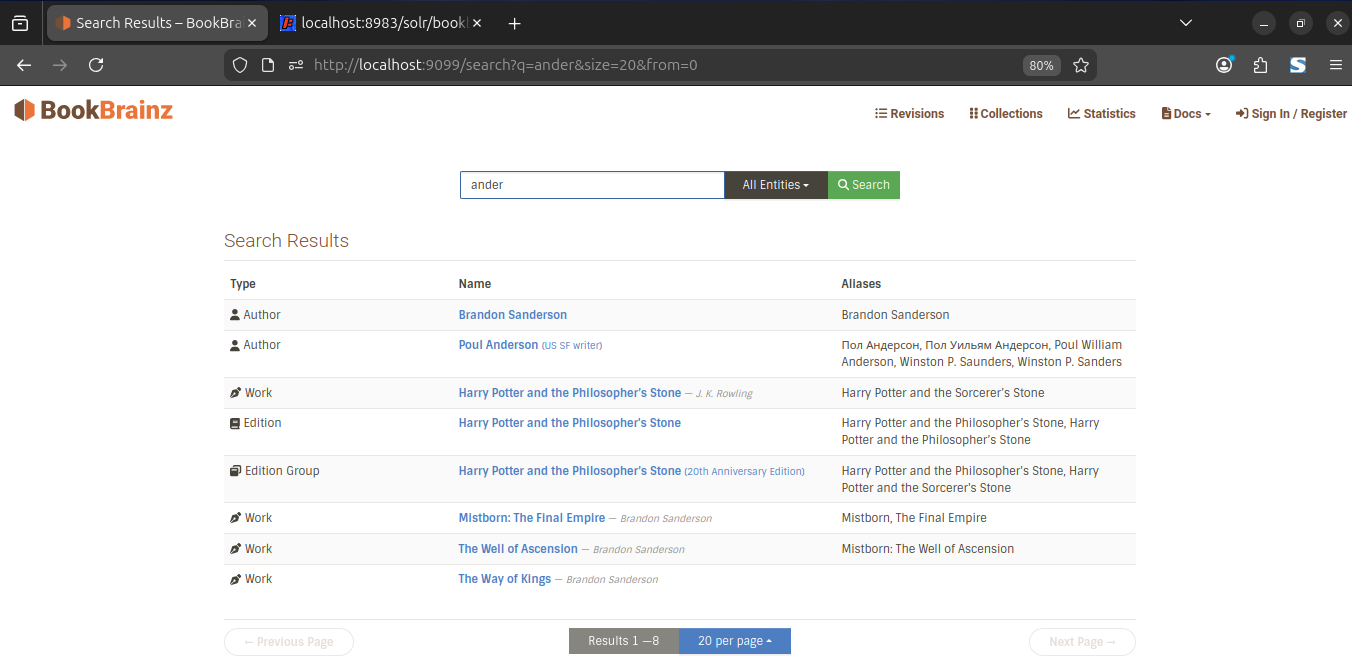
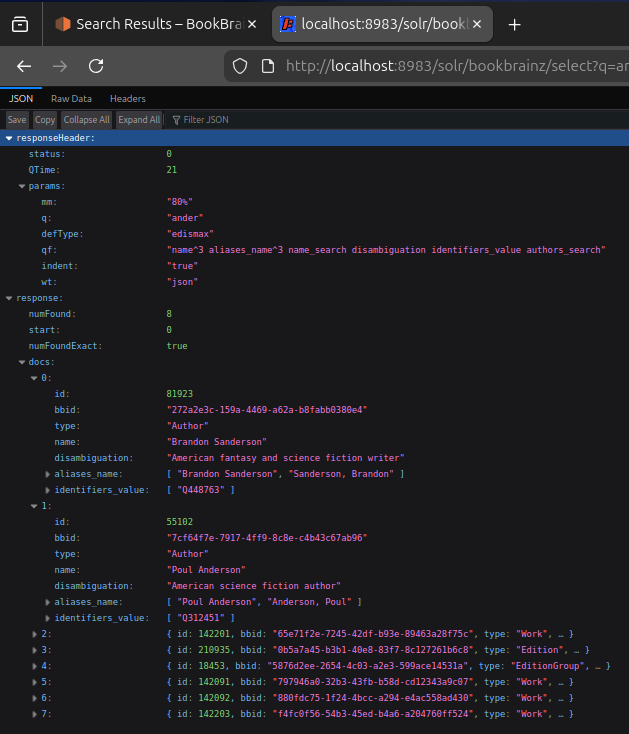
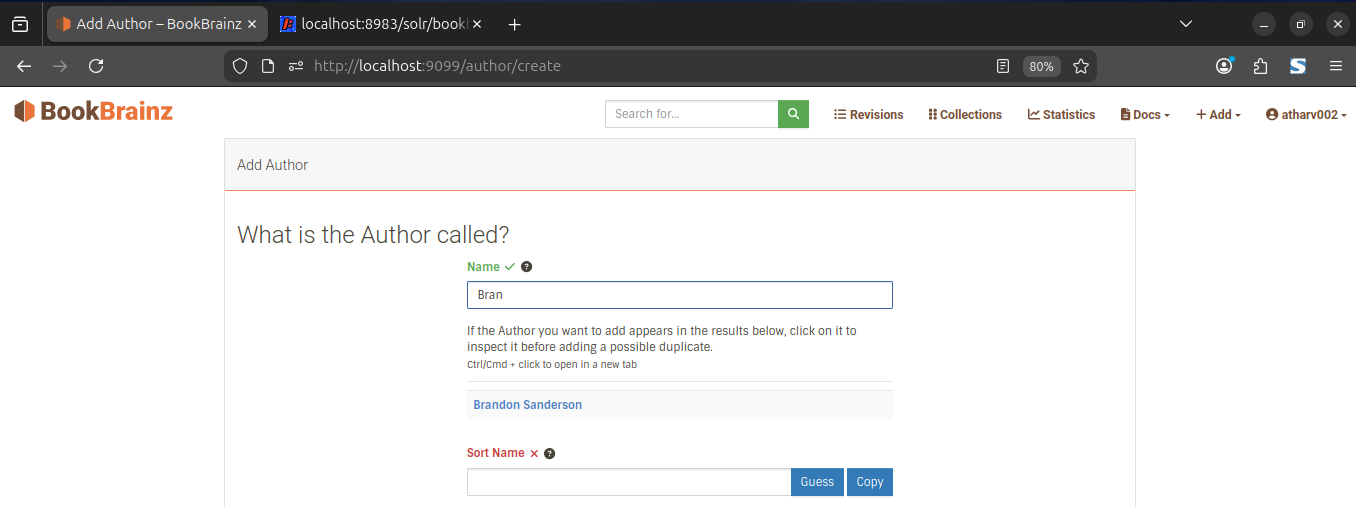
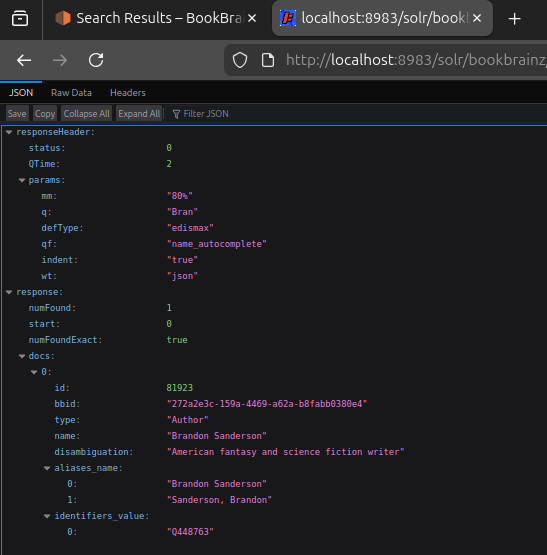
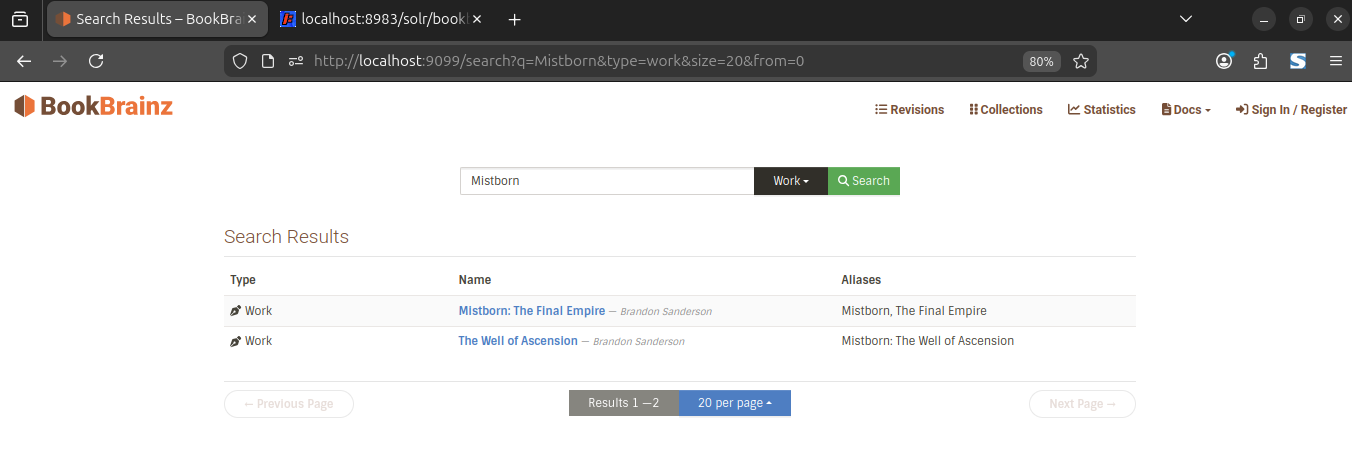
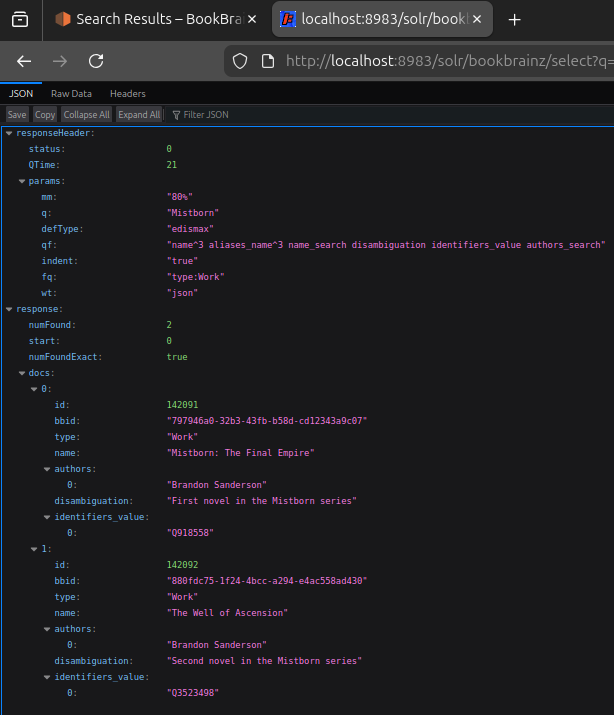
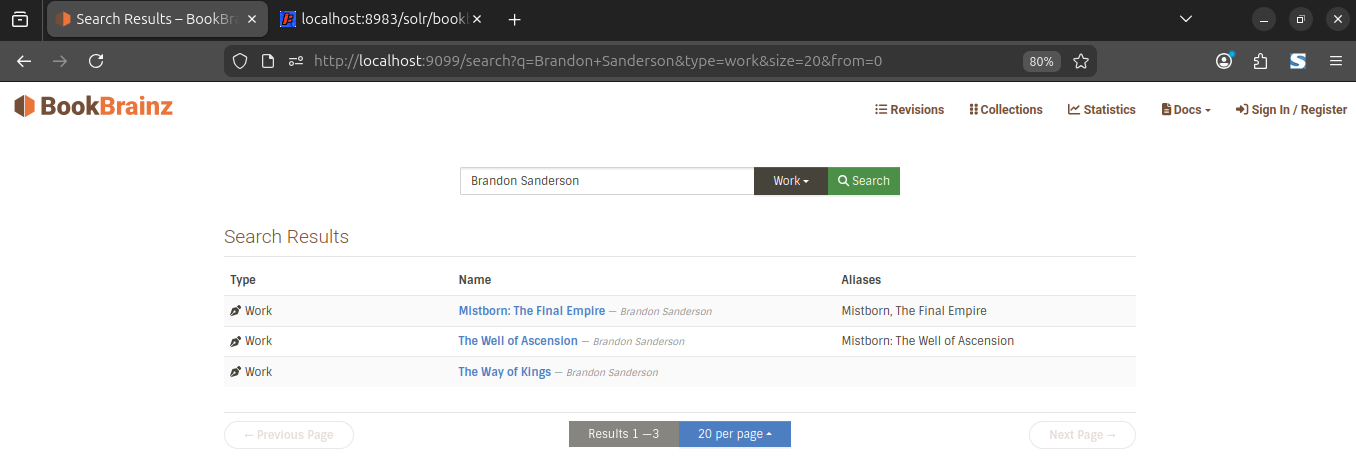
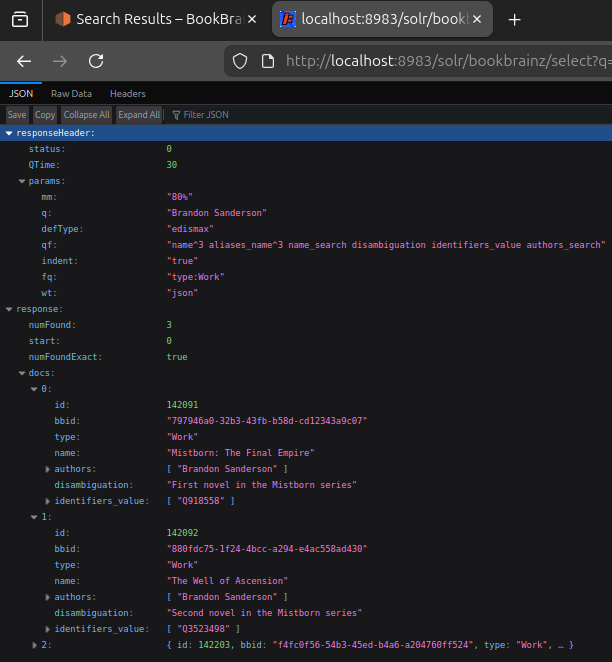
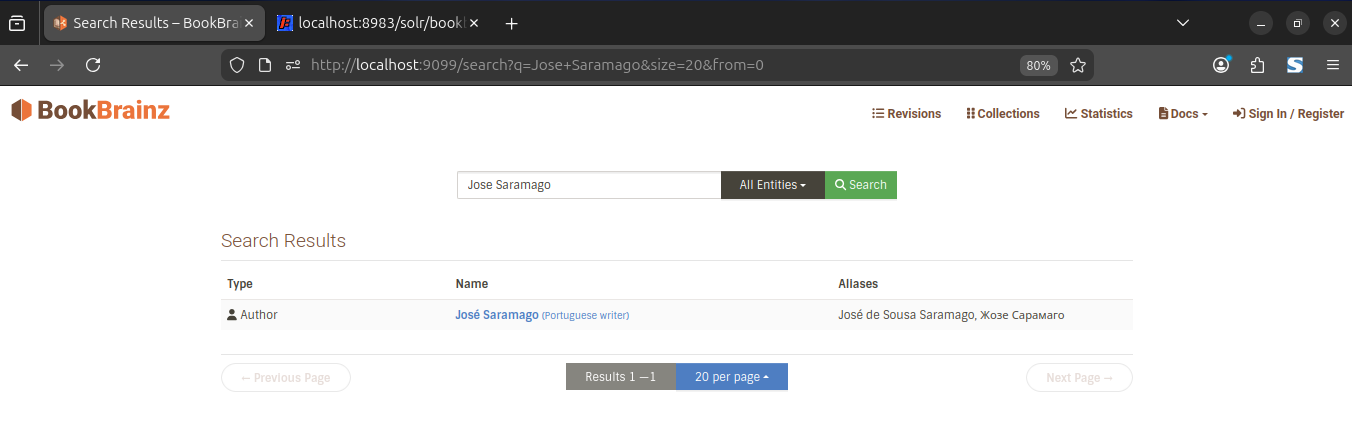
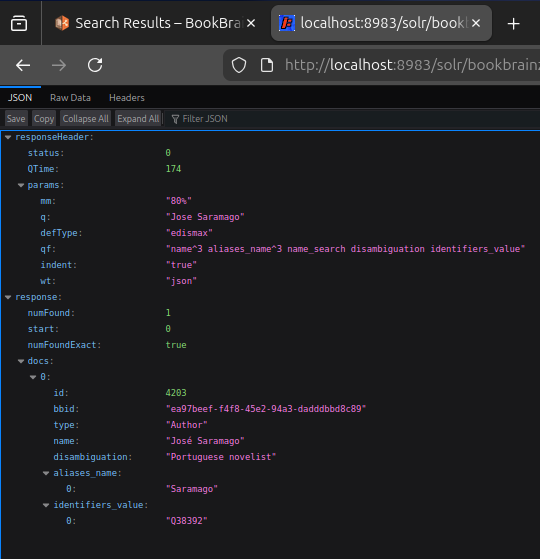
I set up Solr 9.7.0 (the same version MusicBrainz uses) locally with Docker, designed the schema, connected BookBrainz to it and indexed mock data. The search page works same as before, below are results with Solr queries:
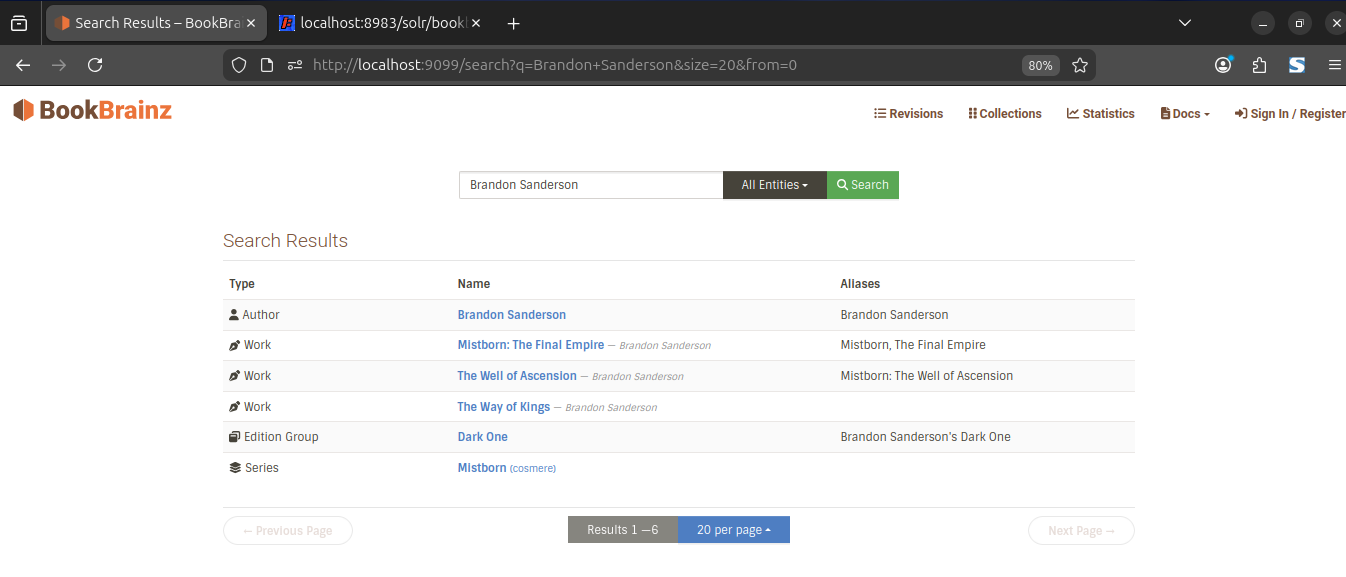
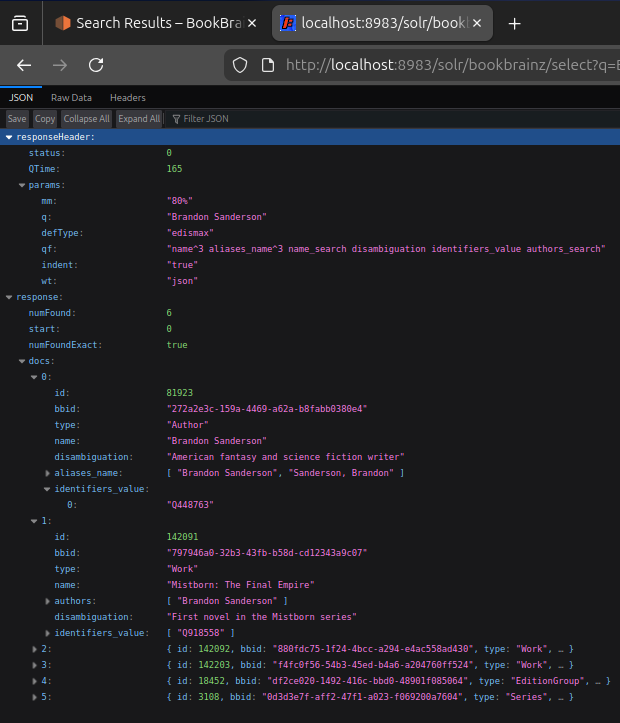
1. Multi entity search
Searching “Brandon Sanderson” returns all matching entity types
Solr query built by search.ts:
/select?q=Brandon+Sanderson&defType=edismax&qf=name^3 aliases_name^3 name_search disambiguation identifiers_value authors_search&mm=80%
| BookBrainz Search Page | Solr Admin UI |
2. Partial Search:
Searching “ander” matches “Sanderson” and “Poul Anderson” because the name_search field uses NGramTokenizer, which indexes every substring of every name.
Solr query built by search.ts:
/select?q=ander&defType=edismax&qf=name^3 aliases_name^3 name_search disambiguation identifiers_value authors_search&mm=80%
| BookBrainz Search Page | Solr Admin UI |