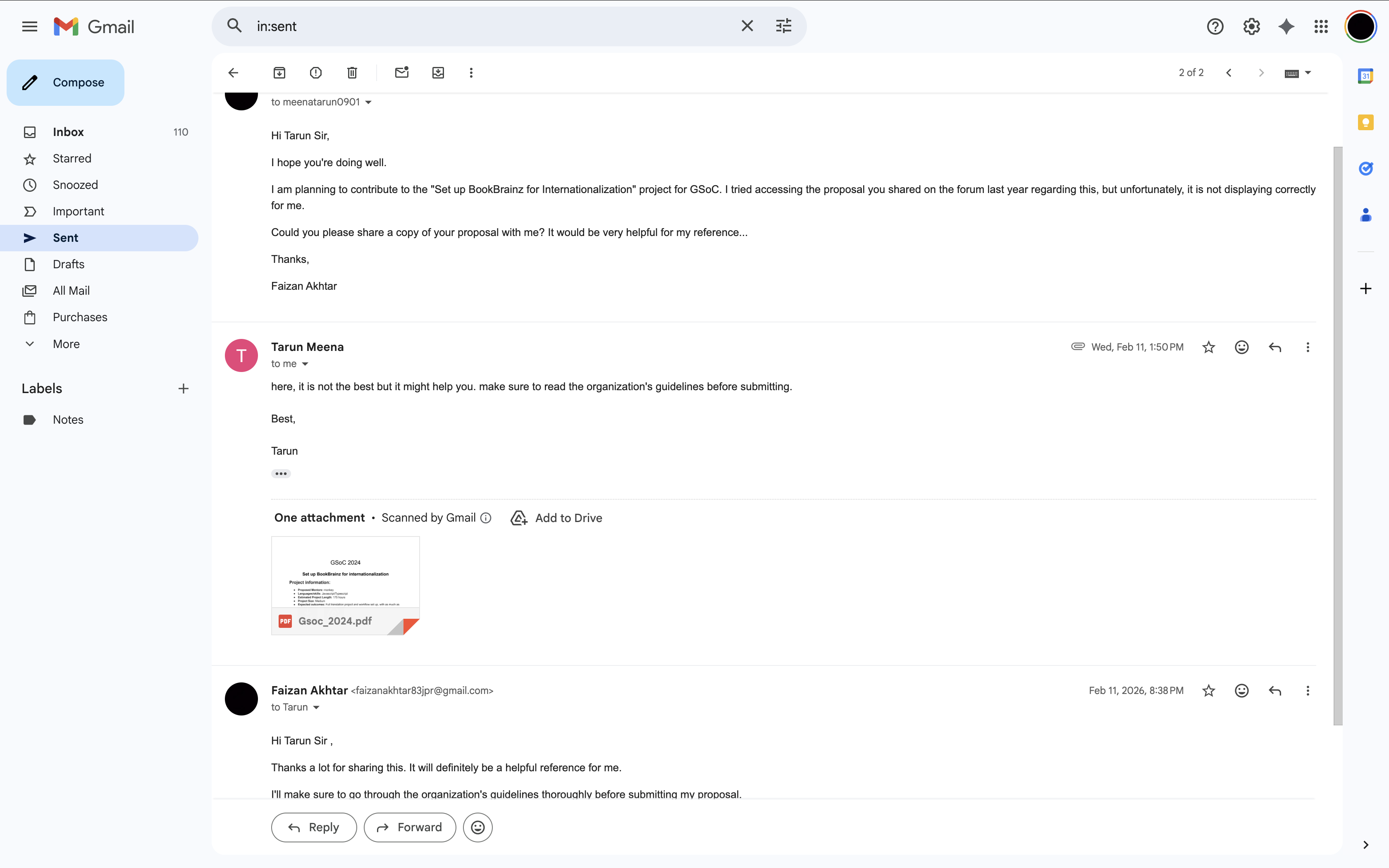
GSOC → 2026
Set up BookBrainz for Internationalization
Personal information
Name: Faizan Akhtar
Email: faizanakhtar83jpr@gmail.com
Matrix Handle: @faizan.akhtar123:matrix.org:matrix.org
IRC Nickname: @faizan.akhtar123
LinkedIn: https://www.linkedin.com/in/faizanakhtar123/
LeetCode: https://leetcode.com/u/faizan0123/
Kaggle: Faizan Akhtar | Kaggle
Mentor: @mr_monkey
Timezone: Indian Standard Time (GMT +5:30)
Languages: English, Hindi
Introduction
I am Faizan Akhtar, currently a sophomore (2nd-year) student pursuing Computer Science with a specialization in AI & ML at ABES Engineering College. My coding journey started during middle school (8th grade) just out of curiosity. By the time I joined college, I had a good grasp of C and Java. In my first year, I learned Python and practiced Data Structures & Algorithms (DSA) in Java to improve my problem-solving skills. Participating in my first college hackathon changed my perspective. I realized I wanted to build real-world applications, so I started learning Web Development. I began with HTML, CSS, Bootstrap and Tailwind, JavaScript , React and TypeScript , Now I work with React and TypeScript.
To apply what I learn , Some of my work includes :
ResumeGenius: A resume builder and ATS checker (Just UI and basic Feature) tool (View Project)
Bat-Ball-Stump-Game: A fun cricket game(View Project)
Rock-Paper-Scissors: A fun interactive game (View Project)
Basic Calculator: A functional utility app (View Project)
Currently, I spend most of my time competing in hackathons and improving my development skills.Apart from coding, I enjoy playing Chess, Cricket, and Football. I also read a lot of Manhwa in my free time.
Why Me?
I believe , I am the right fit for this project because this problem align perfectly with my current skill set and i am a quick learner and a creative problem solver. My biggest strength is my attention to detail , I genuinely enjoy working on the small details that others often miss or skip. I don’t just solve problems; I dive deep into them to make sure the solution is perfect. Furthermore, I have a strong ‘never give up’ attitude. I don’t stop at the first sign of difficulty; instead, I keep trying and learning until the problem is completely solved.
I have been actively exploring and contributing to both ListenBrainz and BookBrainz for the past few months. My interactions with the community and mentors have been a great learning experience. Their support has helped me understand the project standards, and I am eager to contribute even more.
During this time, I have gained hands-on experience in adding new features and working on detailed implementations beyond the basic scope. Some of my key contributions include:
- LB-1882: Added a completely new feature for keyboard interactions.
- LB-1846. Proactively worked on out-of-scope tasks to ensure the feature was complete and detailed.
- LB-1880 Implemented submission retry logic.
My Contributions
I have been an active contributor to the ListenBrainz and BookBrainz ecosystem since starting of December 2025. In this short period, I have moved beyond simple bug fixes to implementing core features and adding new capabilities to the platform.
Check out my full list of Pull Requests:
Project Overview
BookBrainz is built to be an open database for every book in the world, but right now, the website is only available in English. According to the MetaBrainz Wiki, BookBrainz is currently one of the few major projects that cannot be translated yet.
Being an English-only platform creates a few major problems for the community:
- Missing Out on Global Users: By staying English-only, we are leaving out almost 85% of the world’s population. This includes huge communities like the ~500 million Spanish speakers, and it ignores the active MusicBrainz translators who are already waiting to help in French, Nederlands, and Italian.
- Hard for Non-English Editors: Right now, only people who know English well can comfortably edit and add books. This makes it really difficult for readers and researchers from other countries to add data about their local and regional literature.
- Translation is Too Technical: Currently, there is no easy way for regular users to translate BookBrainz. Because the website’s text is mixed directly with the React code, passionate volunteers are completely blocked from contributing. We need a simple platform where translators can work on the text without ever touching the codebase.
Goals
The main goal of this project is to build a complete and automated translation system for BookBrainz.
- Smooth Loading (No UI Flicker): Setup i18next on the Express server so the website loads directly in the selected language. This prevents the screen from flashing English text before translating.
- Safe Code Updates (No Refactoring): Add translations to the existing code using standard wrappers (withTranslation and useTranslation). I will strictly avoid rewriting old Class components just for the sake of translation to prevent any new bugs.
- Automated Weblate Sync: Set up a GitHub Action with i18next-parser. This will automatically find any new text in the code and send it straight to the MetaBrainz Weblate server for volunteers to translate.
- Proper Grammar & Plurals: Configure rules to handle plurals correctly (like “1 book” vs “10 books”), because every language has different grammar rules for numbers.
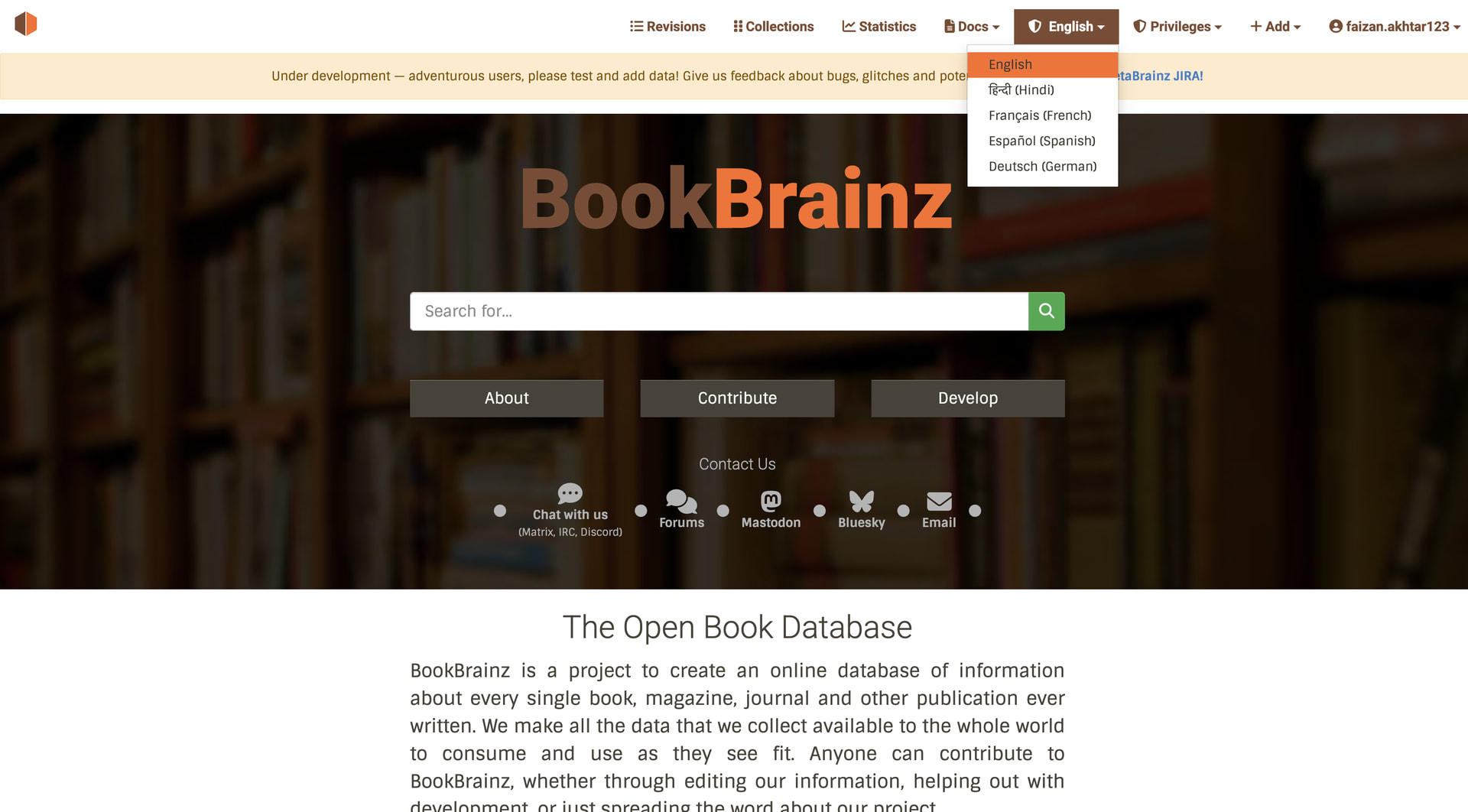
- Language Dropdown: Create a clean dropdown menu in the navigation bar using react-bootstrap. It will save the user’s choice in cookies so the site remembers their language for their next visit.
- Testing UI with Long Words: Test the website’s design using a language that has very long words (like German). This ensures that long translated text doesn’t break the CSS or push buttons out of place.
- Clear Documentation: Write simple, step-by-step guides so community volunteers know how to translate on Weblate, and future developers know how to add new text properly.
Relationship to the MetaBrainz Ecosystem
MusicBrainz Server uses Jed (gettext) with .po files via Weblate, but its setup is tightly coupled to a Perl backend and has no native React integration. BookBrainz is a pure JS/TypeScript + React 16 + Express codebase — a fundamentally different architecture.
I propose using i18next + react-i18next for BookBrainz. Weblate fully supports i18next’s JSON format, so the translator workflow on translations.metabrainz.org remains unchanged. I will discuss the final file format choice (JSON vs .po) with the mentor to ensure consistency across MetaBrainz projects.
Why i18next?
| Feature | i18next | Jed (gettext) | Fluent |
|---|---|---|---|
| React Support | Native hooks + HOC | Manual wiring | Needs wrapper |
| Express SSR | Built-in middleware | Manual setup | Manual setup |
| Weblate | JSON & PO | PO only | FTL format |
| Class Components | withTranslation — zero refactoring |
Manual prop threading | Custom wrapper needed |
| Ecosystem | ~25k GitHub stars | Small fork | Smaller community |
i18next is the right choice for BookBrainz’s pure JS/React + Express architecture, native React support for both class and function components, built-in SSR middleware, and Weblate compatibility, all without requiring a Perl backend.
Implementation Architecture
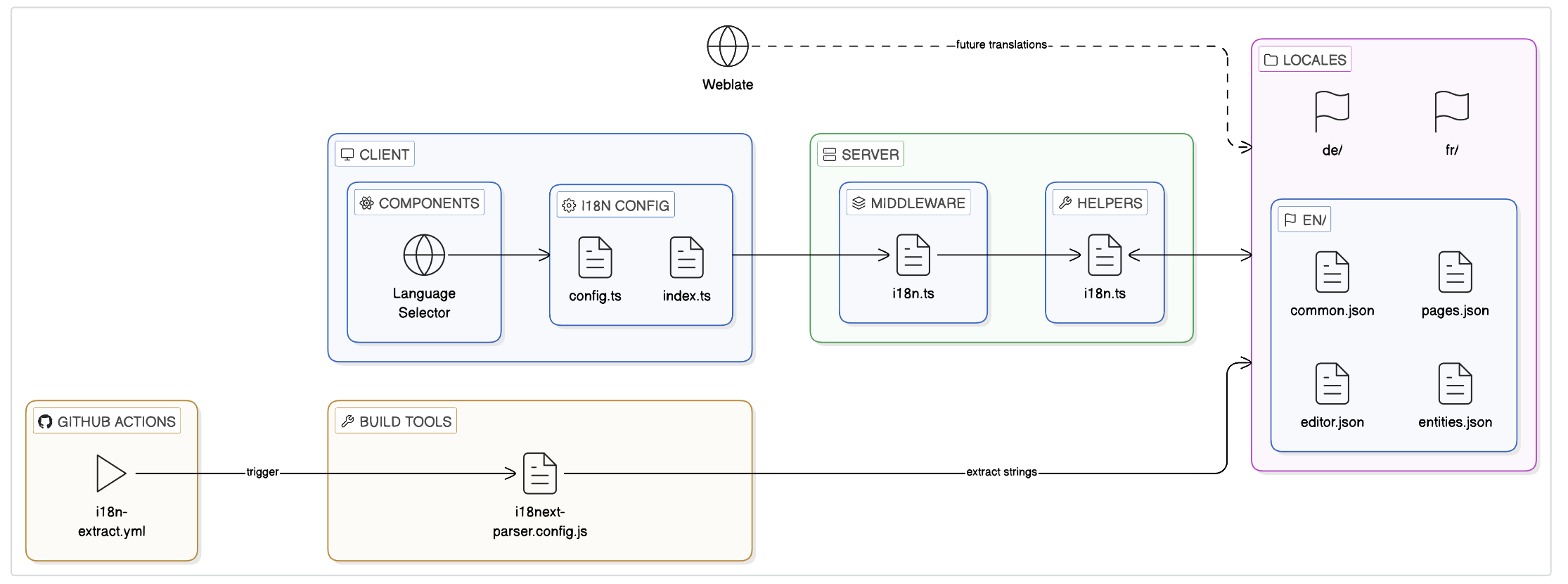
New Files & Directory Structure
├── src/
│   ├── client/
│   │   ├── i18n/
│   │   │   ├── config.ts              ← i18next client initialization
│   │   │   └── index.ts               ← Re-export for clean imports
│   │   └── components/
│   │       └── language-selector.tsx   ← New dropdown component
│   └── server/
│       ├── helpers/
│       │   └── i18n.ts                ← EXTEND existing file
│       └── middleware/
│           └── i18n.ts                ← Express i18next middleware
├── public/
│   └── locales/
│       ├── en/
│       │   ├── common.json            ← Nav, footer, shared UI
│       │   ├── pages.json             ← About, help, faq, contribute
│       │   ├── editor.json            ← Entity editor labels/tooltips
│       │   └── entities.json          ← Entity display pages
│       ├── fr/                        ← Seeded for testing
│       ├── de/                        ← Seeded for CSS stress-testing
│       └── (future languages via Weblate)
├── i18next-parser.config.js           ← String extraction config
└── .github/workflows/
    └── i18n-extract.yml               ← Auto-extraction GitHub Action
The Rendering Pipeline
BookBrainz uses SSR with client hydration. Every page follows this 4-step flow:
Step 1 → Server generates props
export function generateProps<T>(req: PassportRequest, res: Response, props?: T) {
    const baseObject: Record<string, unknown> = {};
    if (req.session && req.session.mergeQueue) {
        baseObject.mergeQueue = req.session.mergeQueue;
    }
    return Object.assign(baseObject, res.locals, props);
}
Step 2 → Server renders React component tree to HTML string
const markup = ReactDOMServer.renderToString(
    <Layout {...propHelpers.extractLayoutProps(props)}>
        <Index {...propHelpers.extractChildProps(props)}/>
    </Layout>
);
Step 3 → Server injects markup + props into HTML template
export default ({ title, markup, page, props, script }) => `
    <!doctype html><html>
        ...<div id='target'>${markup}</div>
        <script id='props' type='application/json'>${props}</script>
        <script src='${script}'></script>...
    </html>`;
Step 4 → Client reads props from DOM and hydrates
const props = JSON.parse(document.getElementById('props').innerHTML);
ReactDOM.hydrate(
    <Layout {...extractLayoutProps(props)}>
        <Index {...extractChildProps(props)}/>
    </Layout>, document.getElementById('target')
);
Why this matters for i18n: Server and client MUST produce byte-identical HTML. If server renders French but client initializes English, React throws hydration mismatch errors. My architecture ensures both share the exact same i18n state via props.
Component Patterns
Class components (Layout, IndexPage, CBReviewModal, RevisionsPage, EntityFooter, EntityDeletionForm, UserCollectionForm, PreviewPage): Use withTranslation HOC—zero refactoring.
Function components (AboutPage, Footer, PrivacyPage, ContributePage, HelpPage, FAQPage, etc.): Use useTranslation hook.
Existing i18n Infrastructure
BookBrainz already has helpers in src/server/helpers/i18n.ts 
export function parseAcceptLanguage(acceptLanguage: string): AcceptedLanguage[] {
    // Parses "Accept-Language: fr;q=0.9, en;q=0.8"
    // Returns: [{code: 'fr', weight: 0.9}, {code: 'en', weight: 0.8}]
}

export function getAcceptedLanguageCodes(request: Request): string[] {
    // Extracts codes in preference order
    // Returns: ['fr', 'en']
}
I will add (extending, not duplicating):
export function getPreferredLanguage(
    request: Request,
    supportedLngs: string[]
): string {
    const acceptedCodes = getAcceptedLanguageCodes(request);

    // Priority 1: Check cookie
    const cookieLng = request.cookies?.bb_lang;
    if (cookieLng && supportedLngs.includes(cookieLng)) {
        return cookieLng;
    }

    // Priority 2: Accept-Language header
    return acceptedCodes.find(code =>
        supportedLngs.includes(code)
    ) || 'en';
}
Already in package.json:
@cospired/i18n-iso-languages→ build language selector dropdown
New dependencies:
i18next(core)i18next-http-middleware(Express integration)i18next-fs-backend(file system backend)react-i18next(React hooks + HOC)i18next-parser(dev—string extraction)
Scope Quantification
| Area | Est. Strings |
|---|---|
| Layout, Nav & Footer | ~65 |
| Homepage & Static Pages | ~215+ |
| Entity Editor (all sections) | ~150+ |
| Entity Display & Reviews | ~80 |
| Registration, Search, Revisions, Collections, Stats | ~60 |
| Error, Admin & Server-Side Titles | ~50 |
| Total | ~600+ across ~50+ files |
Note on payload optimization: These estimates assume namespace-based filtering (Week 1 optimization). Only page-specific namespaces are sent in initial HTML payload:
- Homepage: ~50KB → 5KB (90% reduction)
- Entity page: ~100KB → 15KB (85% reduction)
Client lazy-loads other namespaces on-demand.
Discovery & Prioritization Framework
Discovery : I’ll run i18next-parser on the entire codebase for accurate baseline count.
If actual count significantly exceeds 600:
TIER 1 —> MUST TRANSLATE (~430 strings)
- Layout, Nav, Footer (~65) —> visible on every page
- Entity Editor (~150) —> highest user interaction (daily use)
- Static Pages (~215) —> first impression for new users
TIER 2 — SHOULD TRANSLATE (~140 strings)
- Entity Display & Reviews (~80)
- Search, Revisions, Collections (~60)
TIER 3 — NICE-TO-HAVE (~50 strings)
- Error pages, Admin panels, Tooltips
Guarantee: Try All Tier 1-3 will be 100% complete and production-ready.
Server-Side Rendering Strategy
1. Server middleware—detect locale and initialize i18next:
import i18next from 'i18next';
import i18nextMiddleware from 'i18next-http-middleware';
import Backend from 'i18next-fs-backend';

i18next
  .use(Backend)
  .use(i18nextMiddleware.LanguageDetector)
  .init({
    fallbackLng: 'en',
    supportedLngs: ['en', 'fr', 'de', 'es', 'hi'],
    ns: ['common', 'pages', 'editor', 'entities'],
    defaultNS: 'common',
    backend: {
      loadPath: path.join(__dirname, '../../public/locales/{{lng}}/{{ns}}.json')
    },
    detection: {
      order: ['cookie', 'header'],
      caches: ['cookie'],
      cookieName: 'bb_lang'
    }
  });

// Applied in app.js: app.use(i18nextMiddleware.handle(i18next));
- Inject i18n state into the existing props pipeline:
export function generateProps<T>(req: PassportRequest, res: Response, props?: T) {
    const baseObject: Record<string, unknown> = {};
    if (req.session && req.session.mergeQueue) {
        baseObject.mergeQueue = req.session.mergeQueue;
    }

    // OPTIMIZED: Only load namespaces this page needs
    const ROUTE_NAMESPACES: Record<string, string[]> = {
        '/about': ['common', 'pages'],
        '/editor': ['common', 'editor'],
        '/work/:bbid': ['common', 'entities'],
        '/': ['common', 'pages']
    };

    const requiredNamespaces = ROUTE_NAMESPACES[req.path] || ['common'];

    const filteredResources: Record<string, any> = {};
    Object.keys(req.i18n.store.data).forEach(lng => {
        filteredResources[lng] = {};
        requiredNamespaces.forEach(ns => {
            filteredResources[lng][ns] = req.i18n.store.data[lng][ns];
        });
    });

    baseObject.i18n = {
        language: req.language,
        resources: filteredResources,  // ONLY needed namespaces
        namespaces: requiredNamespaces
    };

    return Object.assign(baseObject, res.locals, props);
}
- Add lang attribute to HTML template:
export default ({ title, markup, page, props, script, language }) => {
    return `
    <!doctype html>
    <html lang='${language || 'en'}'>
        <head>
            <title>${title ? `${title} – BookBrainz` :
                'BookBrainz – The Open Book Database'}</title>
        </head>
        <body>
            <div id='target'>${markup}</div>
            <script id='props' type='application/json'>${props}</script>
            <script src='${script}'></script>
        </body>
    </html>`;
};
4. Client-side—initialize i18next BEFORE hydration:
import i18next from 'i18next';
import { initReactI18next } from 'react-i18next';

const propsTarget = document.getElementById('props');
const props = propsTarget ? JSON.parse(propsTarget.innerHTML) : {};
const { language, resources } = props.i18n || { language: 'en', resources: {} };

i18next
  .use(initReactI18next)
  .init({
    lng: language,
    resources,
    fallbackLng: 'en',
    ns: ['common', 'pages', 'editor', 'entities'],
    defaultNS: 'common',
    interpolation: { escapeValue: false }
  });

export default i18next;
5. Import i18n config FIRST in every client controller:
import '../i18n/config'; // MUST be first!
// ...rest of code...
ReactDOM.hydrate(markup, document.getElementById('target'));
Language Selector Component
const handleLanguageChange = async (langCode: string) => {
    // Step 1: Save preference to cookie
    document.cookie = `bb_lang=${langCode};path=/;max-age=31536000`;

    try {
        // Step 2: Check if language already loaded (common.json always loaded)
        if (i18n.hasResourceBundle(langCode, 'common')) {
            //  Instant switch for navbar/footer (no reload)
            await i18n.changeLanguage(langCode);
            return;
        }

        // Step 3: Lazy-load language then switch (no full reload)
        await i18n.loadLanguage(langCode);
        await i18n.changeLanguage(langCode);
    } catch (err) {
        console.error(`Failed to switch to ${langCode}:`, err);
        // Fallback: full page reload if something fails
        window.location.reload();
    }
};
Locale File Storage: public/locales/ Decision
| Aspect | public/locales/ |
src/client/i18n/locales |
|---|---|---|
| Server SSR access | Sync file read | Bundled only |
| Weblate integration | Direct commits | Rebuild needed |
| i18next-parser | Natural output | Mixed source |
| Static serving | Express.static() | Bundled asset |
| Bundle size | External | +500KB/language |
| Zero-downtime updates | Anytime | Full redeploy |
Why this matters for Weblate workflow:
1. Developer commits code with new strings
2. GitHub Action runs i18next-parser
3. Updates public/locales/en/*.json
4. Weblate auto-detects changes
5. Translators work on translations.metabrainz.org
6. Weblate commits translations back to public/locales/
7. NO rebuild—server reads updated files
8. Next deployment picks up translations automatically
Aligns with MetaBrainz standards (MusicBrainz uses po/ directory, also externalized).
Concrete Before/After Transformations
Function components → useTranslation hook:
// BEFORE
function AboutPage(): JSX.Element {
    return <h1>About BookBrainz</h1>;
}

// AFTER
import { useTranslation } from 'react-i18next';

function AboutPage(): JSX.Element {
    const { t } = useTranslation('pages');
    return <h1>{t('about.title')}</h1>;
}
Class components → withTranslation HOC
// BEFORE
class Layout extends React.Component {
    render() {
        return <NavDropdown.Item href="/help">{' Help '}</NavDropdown.Item>;
    }
}

// AFTER
import { withTranslation } from 'react-i18next';

class Layout extends React.Component {
    render() {
        const { t } = this.props;
        return <NavDropdown.Item href="/help">{t('nav.help')}</NavDropdown.Item>;
    }
}
export default withTranslation('common')(Layout);
Pluralization:
{
  "revision_count": "{{count}} revision",
  "revision_count_plural": "{{count}} revisions"
}
t('revision_count', { count: 42 })  // → "42 revisions"
t('revision_count', { count: 1 })   // → "1 revision"
Weblate Integration & CI/CD
i18next-parser config:
module.exports = {
    locales: ['en'],
    output: 'public/locales/$LOCALE/$NAMESPACE.json',
    input: ['src/**/*.{js,jsx,ts,tsx}'],
    defaultNamespace: 'common',
    keySeparator: '.',
    namespaceSeparator: ':',
    useKeysAsDefaultValue: true,
    sort: true
};
GitHub Action for automatic extraction:
name: Extract i18n Strings
on:
  push:
    branches: [master]
    paths: ['src/**']

jobs:
  extract:
    runs-on: ubuntu-latest
    steps:
      - uses: actions/checkout@v4
      - uses: actions/setup-node@v4
        with: { node-version: '18' }
      - run: npm ci
      - run: npx i18next-parser
      - name: Commit updated source strings
        run: |
          git config user.name "github-actions[bot]"
          git config user.email "github-actions[bot]@users.noreply.github.com"
          git add public/locales/
          git diff --cached --quiet || git commit -m "chore(i18n): update translation strings"
          git push
Risks & Mitigations
| Risk | Mitigation |
|---|---|
| SSR/hydration mismatch | Both sides share identical language + resources via props pipeline. Test every page in non-English locale. |
| Breaking existing tests | Update snapshots incrementally per batch. Enzyme fully compatible. |
| Translation keys out of sync | i18next-parser GitHub Action auto-extracts on every push to master. |
| Long translations breaking CSS | German stress-testing in Week 12. Apply overflow-wrap: break-word. |
| Large bundle size | Namespace-based filtering loads ONLY page-specific resources. Payload reduction: 50KB → 5KB. |
| React 16 compatibility | react-i18next v11+ supports React ≥ 16.8. withTranslation HOC works with any version. |
Community Bonding
- Set up dev environment locally
- Study codebase:
props.ts,app.js,middleware.ts,target.js - Trace SSR pipeline:
generateProps()→renderToString()→hydrate() - Discuss namespace structure
- Run i18next-parser for baseline string count
Week 1–2: Infrastructure
- Install i18next stack
- Create
src/common/i18n/i18n.ts(server + client initializer) - Add
i18nMiddleware()for locale detection (cookie + Accept-Language) - Wire i18n into
generateProps() - Update HTML template with
langattribute - Unit tests + GitHub Action setup
Checkpoint: Server detects language, props pipeline working
Week 3: Pipeline Verification
- Migrate
alias-editor.jsas proof-of-concept - Test in English + French + German
- Verify Weblate ↔ GitHub sync works end-to-end
- Register BookBrainz project on translations.metabrainz.org
Checkpoint: Weblate pipeline verified, zero hydration errors
Week 4: Language Selector
- Build language dropdown component (React-Bootstrap)
- Cookie-based persistence
- Instant + lazy-load language switching
- Run full i18next-parser scan for baseline count
- Create string migration priority map
Checkpoint: Language selector working, exact string count documented
Week 5–7: Entity Editors
- Migrate all editor components (name, alias, relationship, disambiguation, annotation, publishing)
- Populate
editor.json(~150 strings) - Use
useTranslation()for function components,withTranslation()for class components - Test in English + French
MIDTERM: ~50% complete (all editors done)
Week 8: Static Pages + Nav
- Migrate
Layout.tsx,Footer.tsx,AboutPage.tsx,HelpPage.tsx,FAQPage.tsx - Migrate
ContributePage.tsx,PrivacyPage.tsx, error pages - Populate
common.json(~65 strings) +pages.json(~215 strings) - Server-side route titles via
req.t()
Checkpoint: All static pages translated
Week 9: Entity Display + Search
- Migrate entity pages (Work, Edition, Author, Series, Publication)
- Migrate
CBReviewModal.tsx,RevisionsPage.tsx,CollectionsPage.tsx,SearchPage.tsx - Populate
entities.json(~80 strings)
Checkpoint: ~80% complete
Week 10–11: Testing + Edge Cases
- Configure pluralization (1 book vs 10 books)
- Date/number formatting for locales
- French seed translations (full UI test)
- German seed translations (CSS stress-test with long words)
- Pseudo-locale testing (catch hardcoded strings)
- Hydration testing in all languages
Checkpoint: Zero hardcoded strings, zero hydration errors, French + German working
Week 12–13: Final Polish
- Zero-key sweep (run parser one final time)
- Code review + cleanup
- Translator Guide (Weblate usage + guidelines)
- Developer Guide (CONTRIBUTING.md: 4-step process for adding strings)
- Update MetaBrainz Wiki
- Demo video (5 min)
- Final report
Community Affinities
What type of books do you read?
I enjoy reading a variety of genres, especially manhwa, manga, and fantasy fiction some examples on BookBrainz
I also enjoy listening to a wide range of music:
What aspects of BookBrainz interest you the most?
The open data philosophy and the vision of a truly global literary database. This i18n project is the key , removing the English-only barrier opens BookBrainz to the entire world.
Have you ever used MusicBrainz Picard or any MetaBrainz projects?
Yes. I have been actively using and contributing to both BookBrainz and ListenBrainz since December 2025. I use ListenBrainz to track my music listening habits and BookBrainz to explore and add book data.
When did you first start programming?
I started coding in 8th grade (middle school) out of curiosity, beginning with C and Java.
Have you contributed to other open source projects? Can we see your code?
Yes. I have been actively contributing to MetaBrainz open source projects since December 2025:
What sorts of programming projects have you done on your own time?
Personal projects: ResumeGenius, Bat-Ball-Stump Game, Rock-Paper-Scissors, Basic Calculator
What computer(s) do you have available?
MacBook Air M1, 8GB RAM , 256GB SSD
How much time do you have available per week, and how would you plan to use it?
15–22 hours/week , no other internships or commitments. Fully available for GSoC.
Do you plan to have a job or study during the summer in conjunction with Summer of Code?
No. I will be fully available for GSoC with no competing obligations.

 Sync file read
 Bundled only