Title: GSOC 2026: Playlists Sorting and Organization
Contact Information
Name: Gopal Tengle
Matrix/IRC: @gopu0106:matrix.org
GitHub: Gopal7387 (Gopal) · GitHub
Email: gopalrtengale0106@gmail.com
LinkedIn: https://www.linkedin.com/in/gopal-tengle-6996b7216/
Timezone: UTC+05:30
Mentors: @anshgoyal31 , @mr_monkey
Languages : English, Hindi, Marathi, Kannada
Personal Introduction
I’m Gopal , a student of second year B.Tech IT , contributing to ListenBrainz since February 2026.
I listen to a lot of Indian hip-hop. I track everything I listen, in every late-night session that makes the following playlists named “late night KRSNA”, “seedhe maut gym”, and “post-exam chaos”; finding any of them means scrolling through all of them. One night, I opened the codebase expecting a quick fix and found something more interesting which was a search endpoint that already existed at /1/playlist/search made up of trigram similarity. It gives scope to all public playlists platform instead of the user’s own library; that’s not a missing feature, it’s a bug in an existing one. I’m proposing the same to fix first.
My favourite tracks with MBIDs:
-
It’s About Time by Naam Sujal —
dcaaa8f5-3315-4c6a-819e-b0a5ff5c5a11 -
Iss Tarah by Chaar Diwaari —
1d03f02d-d726-4dfc-a52f-89f3e163d052 -
Bure Din by Seedhe Maut —
85ec5e69-b1f0-412d-a9e7-4d82019f9b71
My Contributions
Five PRs since February, three merged, two open, across the Art Creator, ArtistPage, and the Listens dashboard.
-
* PR #3635 (merged)
Fixed!importantincompatibility with Canvg in Art Creator SVG templates by removing the property fromstopColorinPreview.tsx(LB-1951 + LB-1955) -
* PR #3624 (merged as part of a combined PR)
Fixed CORS / dirty canvas issue in the “LPs-on-the-floor” template by embedding the floor texture as a base64 data URI inart_api.py(LB-1952) -
* PR #3651 (merged)
Hid the Advanced Settings panel for image-type templates in Art Creator (LB-1954) -
* PR #3604 (open)
RefactoredHorizontalScrollContainerto support vertical direction, and constrained the album grid to 2.5 rows with a gradient overlay inArtistPage.tsx(LB-1942) -
* PR #3634 (open)
Added text overlays (Rank, Release, Artist, Listen Count) to the Album Grid Art Creator template (LB-1651)The contribution that defines how I work is LB-1959. It was not assigned to me. I found it by using the Listens page and noticing the date filter was producing wrong results. I traced it to a single wrong parameter name ;
min_tsinstead ofmax_tsinonChangeDateTimePickerin Dashboard.tsx. I filed the ticket with the root cause already in the description, wrote the fix, added a regression test in Dashboard.test.tsx, and had the PR open the same day. Not to build a GSoC application, because that is how I think when I am using software I care about.
Project Overview
ListenBrainz is built for people who take their music seriously, exactly the kind of person who ends up with 50, 100, 200 playlists and no way to find any of them. The feature that should reward engagement ends up punishing it.
This project fixes that with four features in order of priority:
-
Playlist Search: per-user scoped search with private playlist support
-
Playlist Folders and Tags (LB-1302): personal organization combining both mechanisms
-
In-Playlist Track Sorting (LB-1374): view-only sort by title, artist, date added, shuffle
-
MusicBrainz Collections (LB-961 + LB-1231): live read-only view with optional import
Implementation Plan
Feature 1: Per-User Playlist Search
What exists today:
search_playlist already exists at /1/playlist/search in listenbrainz/webserver/views/playlist_api.py. The frontend will call it via /1/user/<username>/playlists/search with the user-scoped fix applied. PostgreSQL trigram similarity (pg_trgm) already powers the backend. Two bugs prevent it from working correctly for a user’s own library:
Bug 1 — listenbrainz/db/playlist.py (line ~375): search_playlists_for_user() passes include_global=True by default, which adds OR pl.public = true to the WHERE clause and returns all public playlists platform-wide instead of just the user’s own.
Bug 2 — playlist_api.py: The endpoint never calls validate_auth_header(), so private playlists are invisible even to their owner.
Nobody needs a new search system. The existing one just needs its WHERE clause corrected and an auth check added.
Backend fix listenbrainz/db/playlist.py:
python
def search_playlists_for_user(db_conn, ts_conn, user_id, query,
playlist_type=“playlists”, include_private=False, count=25, offset=0):
if playlist_type == “collaborations”:
where_clause = “playlist_collaborator.collaborator_id = :user_id”
elif include_private:
where_clause = “pl.creator_id = :user_id”
else:
where_clause = “pl.creator_id = :user_id AND pl.public = true”
Backend fix playlist_api.py:
python
user = validate_auth_header(optional=True) include_private = True if user and user["id"] == playlist_user["id"] else False
Collaborative playlists are handled via the existing /user/<username>/playlists/collaborator route so, no new routing needed.
Frontend APIService.ts (near line 2292):
typescript
searchPlaylistsForUser = async (
searchQuery: string,
musicbrainzID: string,
count = 25,
offset = 0,
userToken?: string,
) => {
const url = ${this.APIBaseURI}/user/${encodeURIComponent(musicbrainzID)}
+ /playlists/search?query=${encodeURIComponent(searchQuery)}
+ &count=${count}&offset=${offset};
const headers: HeadersInit = userToken
? { Authorization: Token ${userToken} } : {};
const response = await fetch(url, { headers });
await this.checkStatus(response);
return response.json();
};
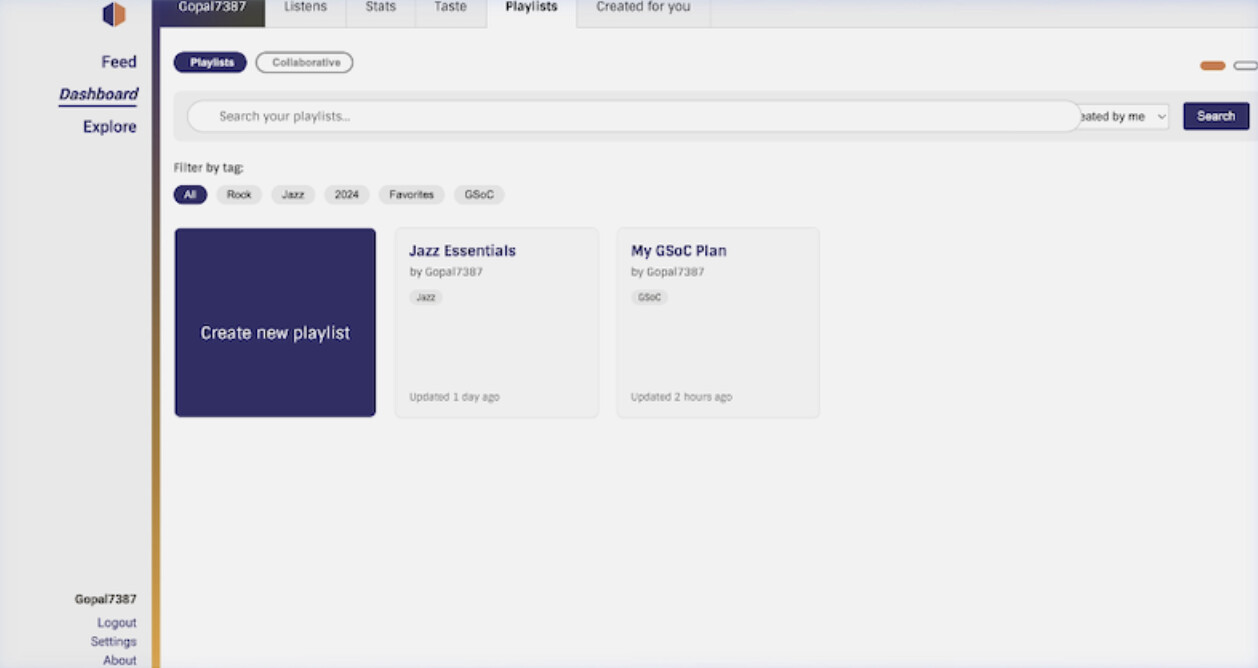
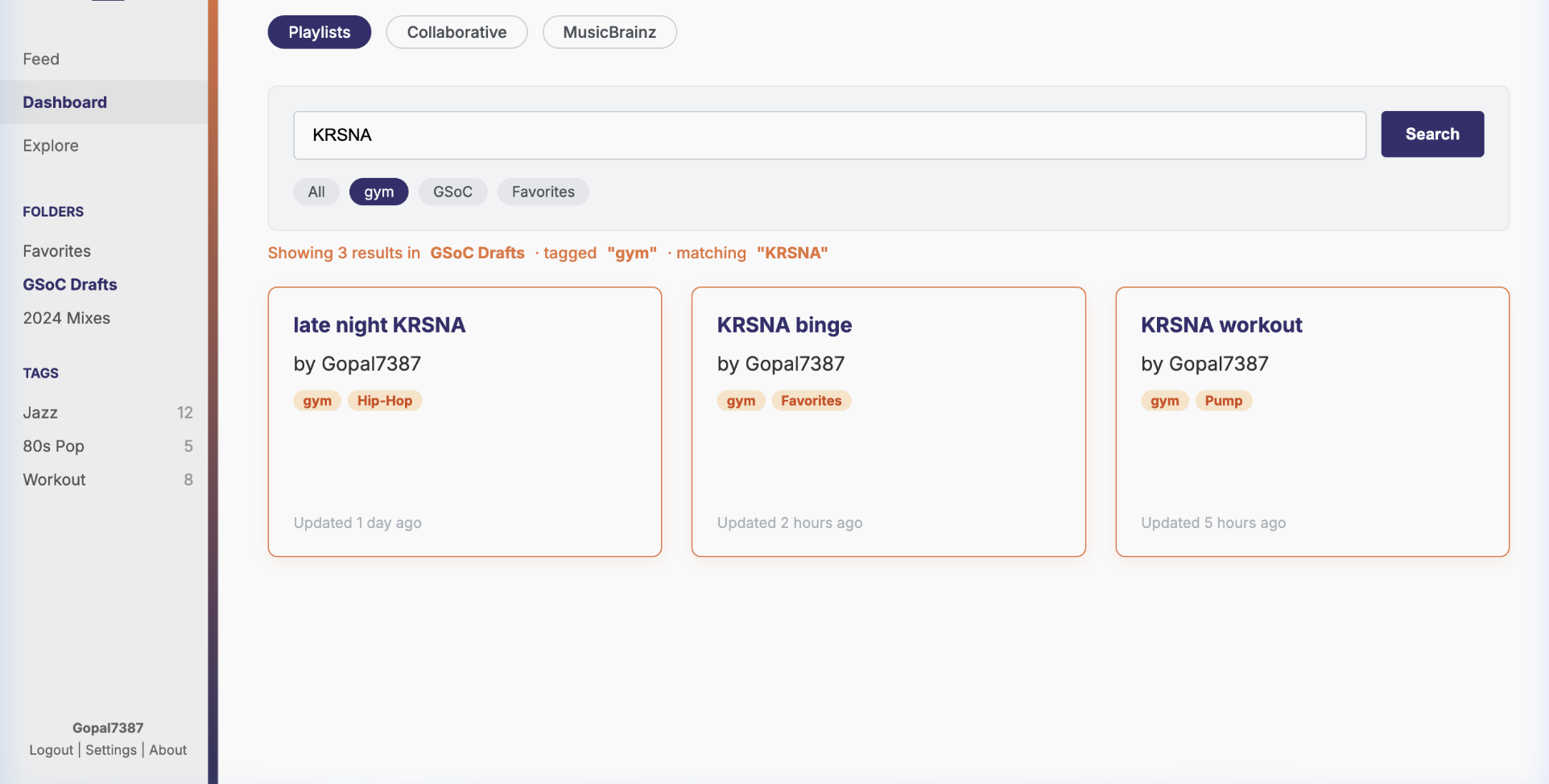
A debounced search input (300ms) added directly to frontend/js/src/playlists/Playlists.tsx, rendering results using the existing playlist list components. No new component needed. When a search query is active, pagination resets to page 1 using isolated component-level state so it does not conflict with the URL-parameter-based pagination of the main list view.
Feature 2: Playlist Folders and Tags (LB-1302)
The design decision that matters:
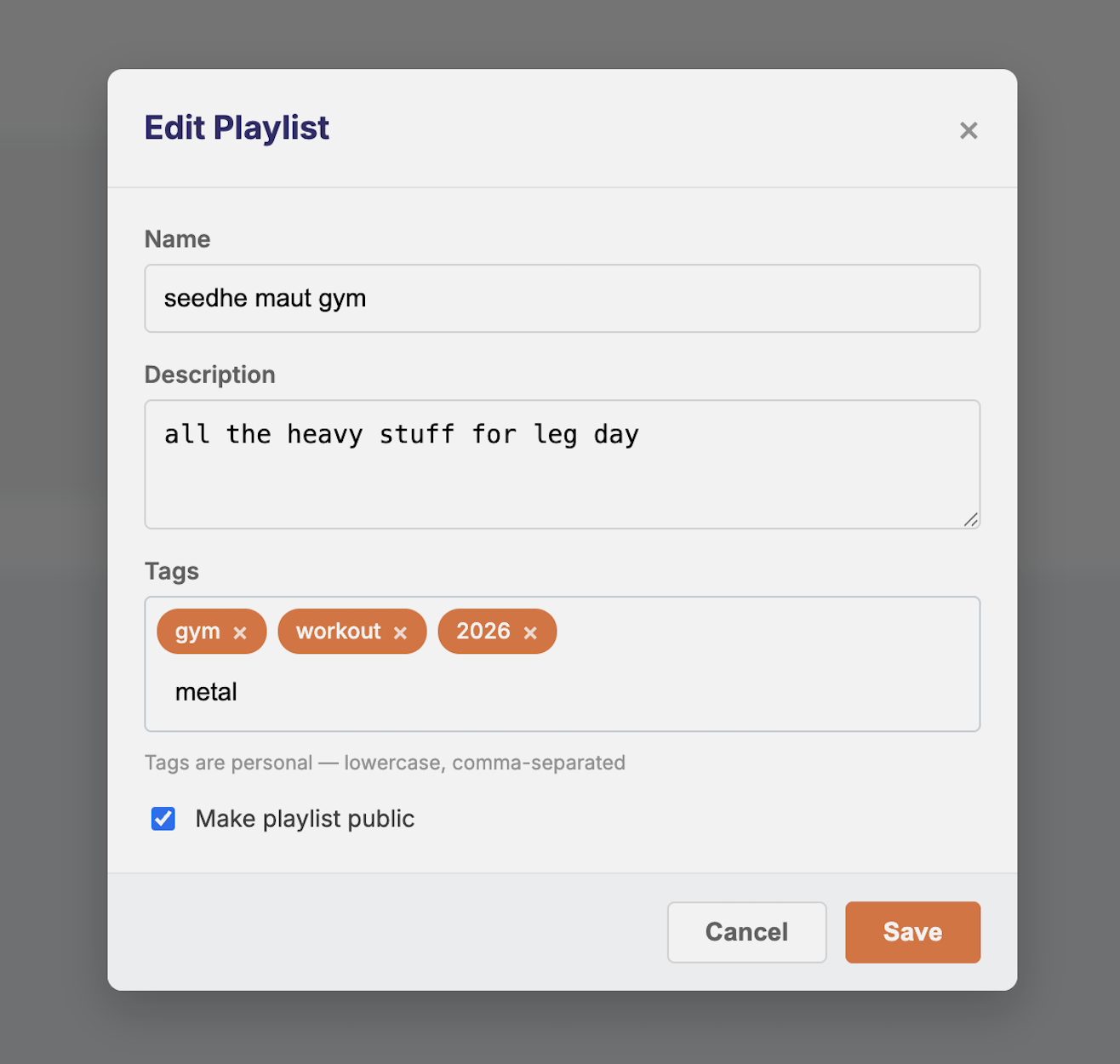
Playlists can be collaborative. This means organizational metadata must be personal to each user a tag I apply to a collaborative playlist must not appear for my collaborator. This is the core constraint from the LB-1302 ticket and shapes the entire schema.
Why both folders and tags:
Tags are flexible but flat, a playlist can belong to “chill”, “2026”, and “gym” simultaneously, but navigation becomes difficult at scale with no visual hierarchy. Folders provide clear hierarchy and visual grouping but are mutually exclusive, a playlist lives in only one. The right answer is both: folders for structure, tags for cross-cutting categorization. LB-1302 itself leaves room for both.
Tags; stored as TEXT[] in the playlist row
Rather than a separate junction table (which requires a JOIN on every playlist fetch) or nesting inside the existing additional_metadata JSONB column (which cannot use standard array indexes), I will add a dedicated TEXT[] column to playlist.playlist. This keeps tags in the same row as the playlist with no join cost, while enabling efficient GIN-indexed filtering via PostgreSQL’s native array containment operator (@>).
sql
ALTER TABLE playlist.playlist
ADD COLUMN tags TEXT
 NOT NULL DEFAULT ‘{}’;

CREATE INDEX idx_playlist_tags_gin
ON playlist.playlist
USING GIN (tags);
Tags are normalized to lowercase before storage. “Chill”, “CHILL”, and “chill” all become “chill” enforced at the API layer before any write.
New functions in listenbrainz/db/playlist.py:
python
def update_playlist_tags(db_conn, playlist_id: int, tags: list[str]):
db_conn.execute(text(“”"
UPDATE playlist.playlist
SET tags = :tags
WHERE id = :playlist_id
“”"), {“tags”: tags, “playlist_id”: playlist_id})

def get_all_tags_for_user(db_conn, user_id: int) → list[str]:
result = db_conn.execute(text(“”"
SELECT DISTINCT unnest(tags) AS tag
FROM playlist.playlist
WHERE creator_id = :user_id AND tags != ‘{}’
ORDER BY tag
“”"), {“user_id”: user_id})
return [row[0] for row in result]

def get_playlists_by_tag(db_conn, user_id: int, tags: list[str]) → list:
result = db_conn.execute(text(“”"
SELECT * FROM playlist.playlist
WHERE creator_id = :user_id
AND tags @> :tags
“”"), {“user_id”: user_id, “tags”: tags})
return result.fetchall()
The @> containment operator is fully supported by the GIN index with no additional configuration a multi-tag filter (AND logic) resolves as a single bitmap index scan regardless of playlist count.
New API endpoints:
-
GET /1/user/<user_name>/playlists/tagsall tags the user has applied across their playlists -
GET /1/user/<user_name>/playlists?tag=<tag>playlists filtered by tag, with full privacy handling
Folders: dedicated relational tables
Tags handle cross-cutting categorization. Folders handle hierarchy. A migration following the FK and naming convention from admin/timescale/updates/2020-11-21-playlists.sql:
sql
BEGIN;

CREATE TABLE playlist.playlist_folder (
id           SERIAL PRIMARY KEY,
creator_id   INT NOT NULL,
name         TEXT NOT NULL CHECK (char_length(name) <= 100),
created      TIMESTAMPTZ NOT NULL DEFAULT now(),
last_updated TIMESTAMPTZ NOT NULL DEFAULT now(),
FOREIGN KEY (creator_id) REFERENCES “user” (id) ON DELETE CASCADE
);

CREATE TABLE playlist.playlist_folder_item (
folder_id   INT NOT NULL
REFERENCES playlist.playlist_folder(id) ON DELETE CASCADE,
playlist_id INT NOT NULL
REFERENCES playlist.playlist(id) ON DELETE CASCADE,
position    INT NOT NULL DEFAULT 0,
PRIMARY KEY (folder_id, playlist_id)
);

CREATE INDEX pf_creator_idx  ON playlist.playlist_folder (creator_id);
CREATE INDEX pfi_folder_idx  ON playlist.playlist_folder_item (folder_id);
CREATE INDEX pfi_playlist_idx ON playlist.playlist_folder_item (playlist_id);

COMMIT;
The position column follows the same pattern as playlist.playlist_recording and supports drag-and-drop reordering of playlists within a folder.
CRUD endpoints in playlist_api.py, all protected by validate_auth_header(optional=False).
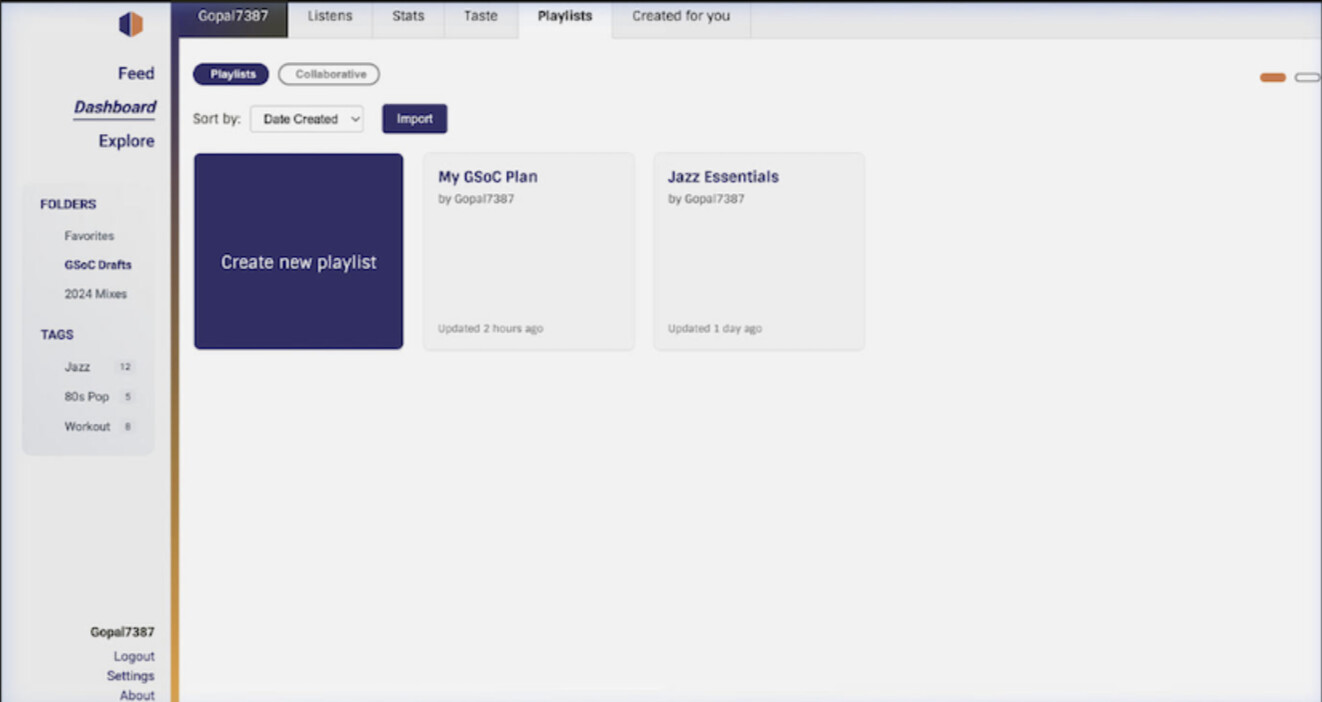
Frontend: Sidebar on the playlists page listing folder names (collapsible) and tag pills below a horizontal filter bar. Tags editable via the existing CreateOrEditPlaylistModal.tsx. Tag pills on playlist cards. Clicking a tag pill in the filter bar isolates the grid to matching playlists and composes cleanly with the Feature 1 search bar, both update the same playlists state, no new state management needed.
Feature 3: In-Playlist Track Sorting (LB-1374)
Design decision: view-only sorting only:
The current playlist.playlist_recording table stores track order in a position column, manipulated by the existing move_recordings() function via drag-and-drop. Introducing a persistent sort-by-artist or sort-by-title endpoint would require rewriting all position values in a single transaction creating race conditions for collaborative playlists and silently undoing manual curation the user spent time on.
The correct approach is view-only sorting: the displayed order changes in the frontend, the database order never changes except through manual drag-and-drop (which already works and is already tested). This keeps the existing drag-and-drop system completely intact as the sole mechanism for persisting order.
Frontend: sort dropdown in Playlist.tsx:
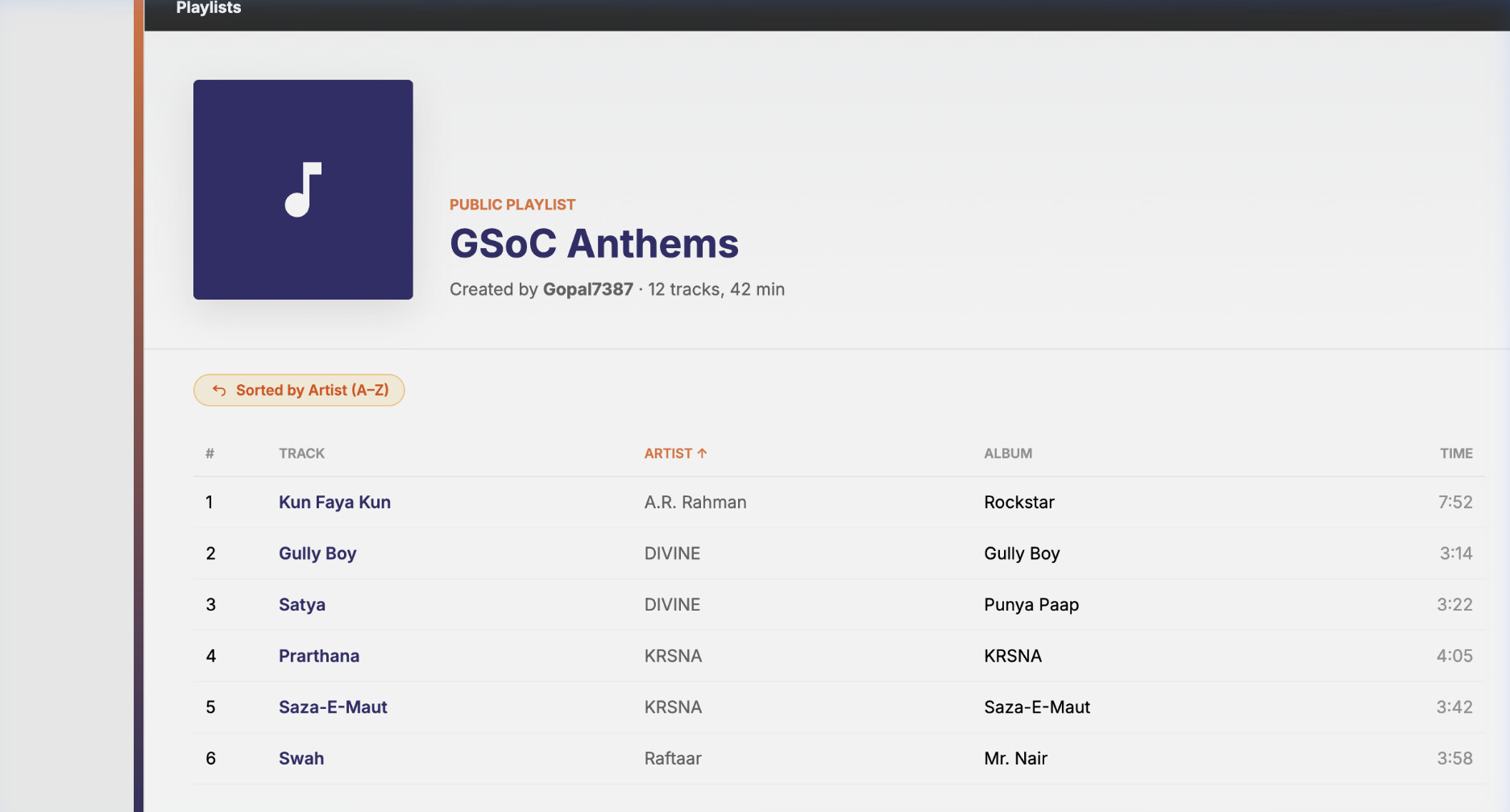
A “Sort by” <select> placed next to the existing “Play all” button, with five options: Manual Order (default), Title (A–Z), Artist (A–Z), Date Added, Shuffle.
typescript
type SortKey = “manual” | “title” | “artist” | “date_added” | “shuffle”;

const sortedTracks = React.useMemo(() => {
if (sortKey === “manual”) return tracks;
const copy = […tracks];
if (sortKey === “title”)
return copy.sort((a, b) => a.title.localeCompare(b.title));
if (sortKey === “artist”)
return copy.sort((a, b) =>
(a.creator ?? “”).localeCompare(b.creator ?? “”));
if (sortKey === “date_added”)
return copy.sort((a, b) =>
new Date(a.created).getTime() - new Date(b.created).getTime());
if (sortKey === “shuffle”)
return copy.sort(() => Math.random() - 0.5);
return copy;
}, [tracks, sortKey]);
When any non-manual sort is active, the ReactSortable component receives disabled={sortKey !== "manual"} so, preventing accidental position rewrites through drag-and-drop while a temporary sort view is active.
Backend : pagination-aware sort:
Playlist.tsx paginates tracks server-side. Sorting only the currently loaded page would give incorrect results (page 1 of an artist-sorted list is not the same as artist-sorting page 1 of a position-sorted list). To make sorting work correctly across all pages, I will extend the existing GET /1/playlist/<playlist_mbid> endpoint with an optional sort query parameter that modifies the ORDER BY clause in db_playlist.get_by_mbid().
python
sort_by = request.args.get(“sort”, “position”)
valid_sorts = {
“position”: “pr.position ASC”,
“title”: “lower(pr.additional_metadata->>‘title’) ASC”,
“artist”: “lower(pr.additional_metadata->>‘artist_name’) ASC”,
“created”: “pr.created ASC”,
}
order_clause = valid_sorts.get(sort_by, “pr.position ASC”)
Shuffle is handled client-side only i.e no backend state needed, and each page refresh produces a new random order which is the expected behaviour. The frontend passes the selected sort key as a query param on each paginated fetch, so the sort is consistent across all pages for all other modes.
Feature 4: MusicBrainz Collections (LB-961 + LB-1231)
Architecture : direct MB database, not the external REST API:
The public MusicBrainz REST API ( MusicBrainz API - MusicBrainz ) enforces a 1 request/second rate limit. A user with a 500-recording collection requires 20+ sequential paginated API calls completely unsuitable for interactive browsing and guaranteed to time out for any serious collector.
ListenBrainz already maintains a live, read-only connection to the MusicBrainz replica database via app.config["MB_DATABASE_URI"], visible in listenbrainz/webserver/__init__.py. This same connection powers artist and recording pages (see entity_pages.py). Collections will use the same pattern: query the MB replica directly, return JSPF, store nothing in LB until explicit import.
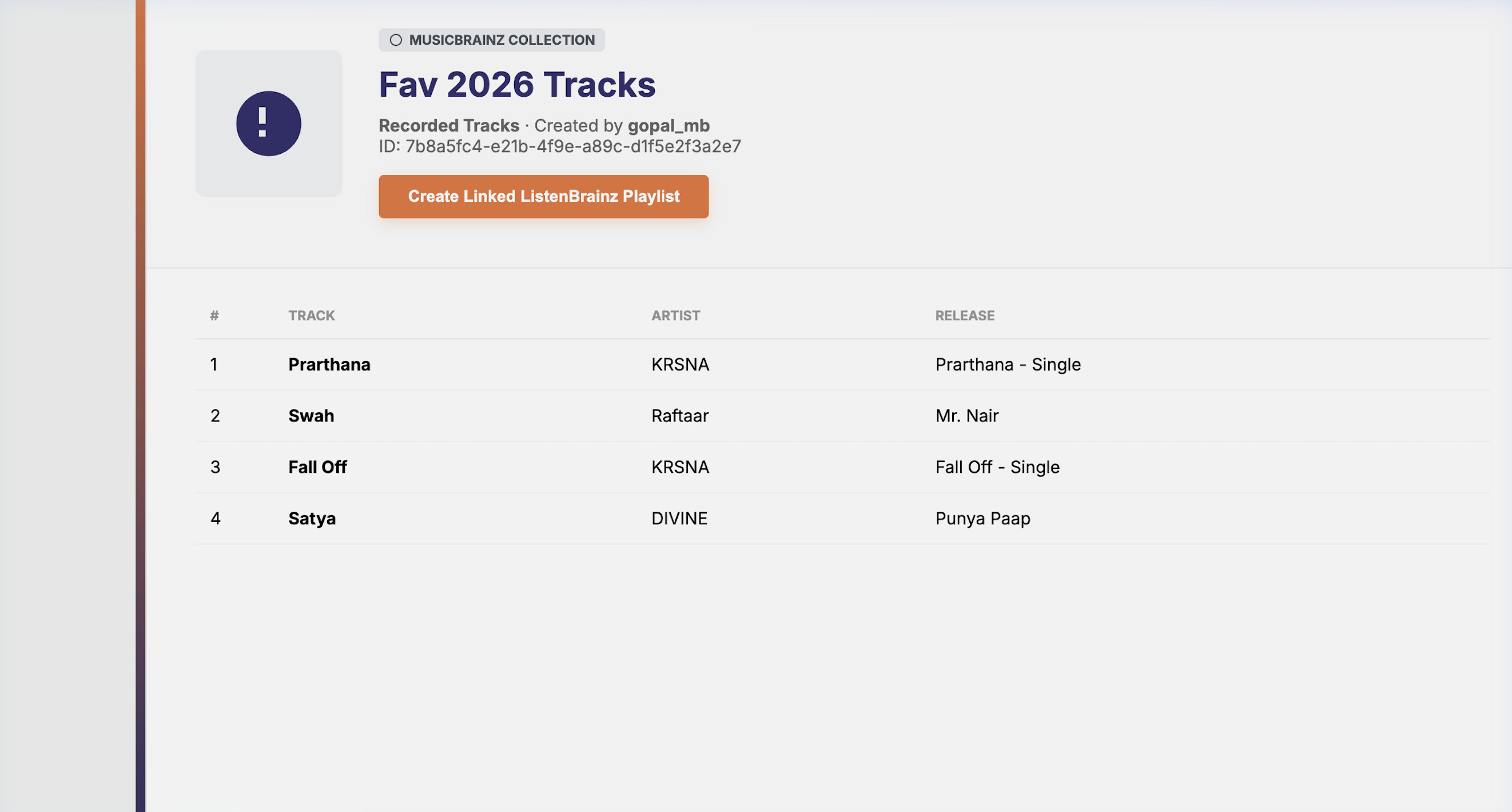
This follows the listenbrainz.org/artist/$UUID model exactly, a dedicated LB route reads from the MB DB and renders. Nothing is written to LB until the user clicks “Save as Playlist”.
Route design:
/user/<username>/musicbrainz-collections collection list page (fetches from MB REST API directly from frontend, safe for this call, it is a single small request) /collection/<collection_mbid> collection detail page, backed by LB backend endpoint that reads from MB DB
This is a separate route from the LB playlist routes, because MB collection data does not live in playlist.playlist reusing the playlist routes would require importing first, which defeats the purpose of a live read-only view.
New blueprint mb_collection_api.py:
python
@mb_collection_api_bp.get(“/collection/<collection_mbid>”)
def get_mb_collection(collection_mbid):
“”"
Reads directly from the MB replica database.
Nothing is stored in LB. Returns JSPF.
“”"
count = request.args.get(“count”, 25, type=int)
offset = request.args.get(“offset”, 0, type=int)
with mb_engine.connect() as mb_conn:
    meta = mb_conn.execute(text("""
        SELECT ec.name, ect.entity_type
        FROM editor_collection ec
        JOIN editor_collection_type ect ON ec.type = ect.id
        WHERE ec.gid = :mbid
    """), {"mbid": collection_mbid}).fetchone()

    if not meta:
        raise APIError("Collection not found", 404)

    recordings = mb_conn.execute(text("""
        SELECT r.gid::text AS mbid,
               r.name      AS title,
               ac.name     AS artist,
               r.length    AS duration
        FROM editor_collection_recording ecr
        JOIN recording r      ON ecr.recording = r.id
        JOIN artist_credit ac ON r.artist_credit = ac.id
        WHERE ecr.collection = (
            SELECT id FROM editor_collection WHERE gid = :mbid
        )
        ORDER BY ecr.id
        LIMIT :lim OFFSET :off
    """), {"mbid": collection_mbid, "lim": count, "off": offset}).fetchall()

tracks = [mb_recording_to_jspf(r) for r in recordings]
return jsonify({"playlist": {"title": meta.name, "track": tracks}})
def mb_recording_to_jspf(recording) → dict:
return {
“title”: recording.title,
“creator”: recording.artist,
“identifier”: [f"``https://musicbrainz.org/recording/{recording.mbid}``"],
“duration”: recording.duration or 0,
}
OAuth: The MB OAuth token is already stored in external_service_oauth under service='musicbrainz', retrieved via db_oauth.get_token(db_conn, user_id, ExternalService.MUSICBRAINZ). The refreshMusicbrainzToken helper already exists in APIService.ts (line ~354). No new auth flow needed.
Frontend:
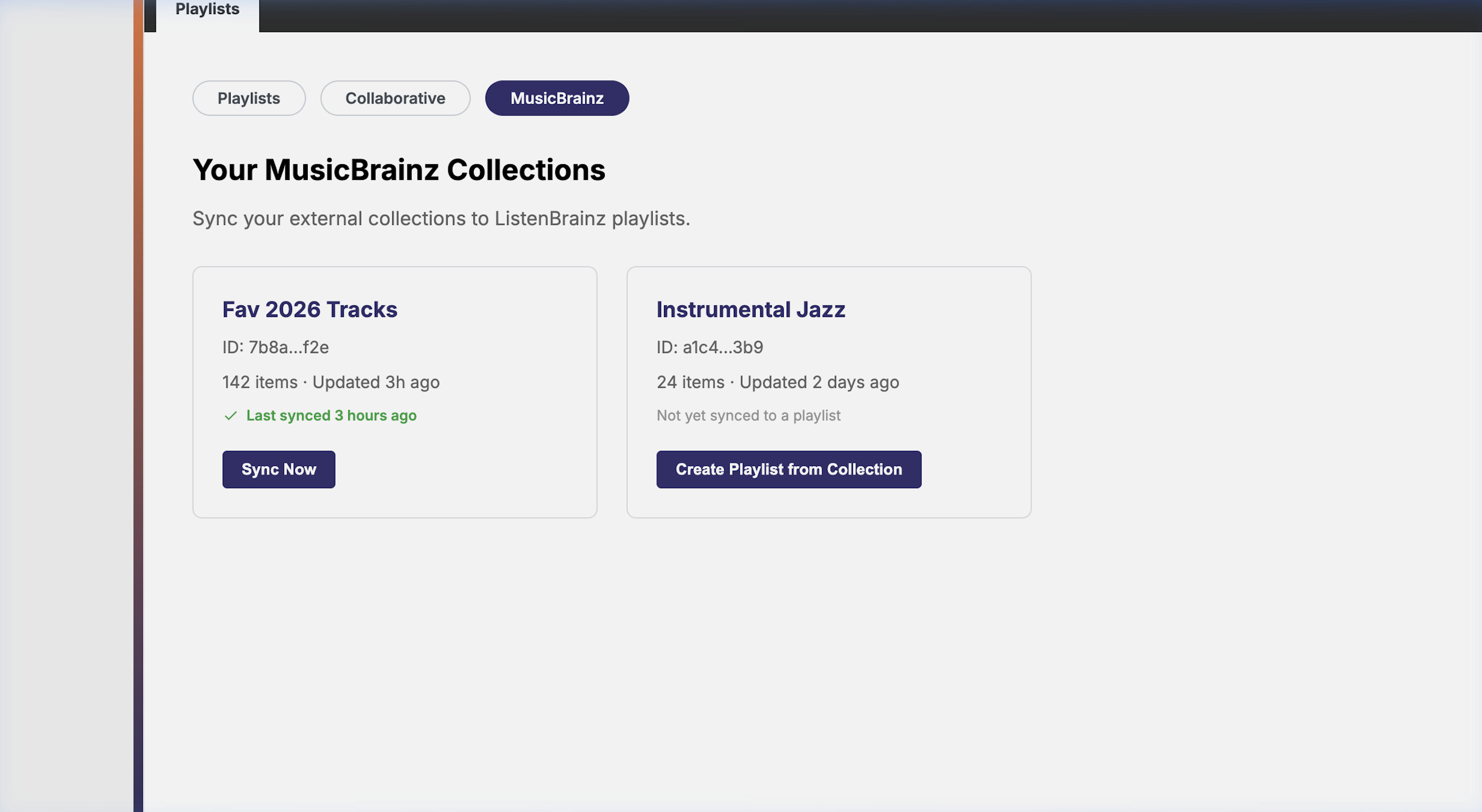
New “MusicBrainz Collections” tab alongside Playlists and Collaborative. The collection list page calls the MB REST API directly from the browser for listing (one small authenticated call). Clicking a collection calls GET /1/collection/<mbid> on the LB backend (which executes the MB DB query server-side). The detail page renders tracks using the existing PlaylistItemCard with canEdit={false} — disabling drag-and-drop and delete actions natively. An explicit “Save as Playlist” button converts the JSPF payload into a real editable LB playlist via the existing POST /1/playlist/create pipeline.
Edge cases:
-
Large collections (10,000+ recordings): Paginated via
LIMIT/OFFSETon the MB DB query. Frontend renders pages progressively — no single blocking request. -
Release collections: Join path
editor_collection_release → release → medium → track → recording, preservingtrack.positionordering so the original album sequencing is respected. -
MB DB unavailable: Returns 503 with a user-facing message. The LB database is never touched in this failure path.
-
Expired OAuth token: Caught on the
refreshMusicbrainzTokenpath already in place for Spotify inplaylist_api.py.
Stretch Goal: Playlist Cover Art
Playlist cards currently show no image. The playlist.playlist_recording table already stores a created timestamp per recording and the recording MBID. I will investigate what additional metadata (the release MBID linked to that recording) needs to be available to resolve one Cover Art Archive lookup per playlist card showing the most recently added track’s album art as the playlist thumbnail without loading hundreds of images.
This is a Week 12 task, contingent on all four core features being merged and buffer remaining.
Timeline (175 hours)
Community Bonding (May 1–26): Finalize tag/folder schema with mentors. Confirm collaborative tab routing. Review search endpoint end-to-end. Set up local test data with realistic playlist counts.
| Week | Hours | Focus | Deliverables |
|---|---|---|---|
| 1 | 15 | Search backend | Fix search_playlists_for_user() WHERE clause, validate_auth_header() integration, unit tests in tests/db/test_playlist.py |
| 2 | 15 | Search frontend | Search bar in Playlist.tsx, 300ms debounce, result rendering, end-to-end test |
| 3 | 15 | Tags backend | GIN index migration, update_playlist_tags(), get_all_tags_for_user(), get_playlists_by_tag(), unit tests |
| 4 | 15 | Tags API + validation | Tag endpoints, privacy handling, lowercase enforcement, integration tests |
| 5 | 15 | Tags frontend | Tag editor in CreateOrEditPlaylistModal.tsx, tag pills on playlist cards |
| 6 | 12 | Tag filter bar | Sidebar tag filter in Playlist.tsx, connect to backend |
| Midterm | Review + PR | PR for Features 1 and 2, mentor feedback, fixes | |
| 7 | 15 | Folders backend | Migration, CRUD functions, folder endpoints in playlist_api.py, unit tests |
| 8 | 12 | Folders frontend | Folder sidebar, drag-and-drop reordering |
| 9 | 15 | MB Collections backend | mb_collection_api.py, fetch_collection_tracks(), JSPF conversion, listing + recording endpoints |
| 10 | 12 | MB Collections frontend | MBCollectionsList.tsx, Collections tab, PlaylistItemCard canEdit={false}, Import button |
| 11 | 12 | Track Sorting | Frontend sort modes (useMemo), sort dropdown in PlaylistPage.tsx, bulk reorder endpoint for Shuffle save |
| 12 | 12 | Testing + stretch | Full test coverage across all features; playlist cover art if on track |
| Final | Submission | Final evaluation, handover notes, API docs |
Why Me
I’ve contributed to ListenBrainz since February 2026, three merged PR, multiple open, across the Art Creator, ArtistPage, and the Listens dashboard.
But the contribution that defines how I work isn’t the flashiest one.
LB-1959 wasn’t assigned to me. I found it by actually using the Listens page; the date filter was broken and I noticed. I traced it to a single wrong parameter name, min_ts instead of max_ts, in onChangeDateTimePicker in Dashboard.tsx. I filed the ticket with the root cause already in the description, wrote the fix, added a regression test in Dashboard.test.tsx, and had the PR open the same day.
I didn’t do that to build my GSoC application. I did it because that’s how I think when I’m using software I care about. And I use ListenBrainz every day i.e 500+ listens tracked, playlists I actually can’t find anymore. The problem I’m proposing to fix is one I live with.
Other Information
Computer: MacBook Air M4, 16GB RAM , runs the full ListenBrainz Docker stack without issues. Time commitment: 30–35 hours per week. No academic commitments during the GSoC coding period.
What I listen to: Indian hip-hop and independent music. Naam Sujal, KRSNA, Seedhe Maut, Chaar Diwaari, Diljit Dosanjh.
