- Name : Uzma Nayab
- IRC Nickname : uzman2406
- Matrix Handle : @uzman2406:matrix.org
- Email : anushauzma@gmail.com
- LinkedIn : uzma-nayab
- Leetcode : uzman2406
- Timezone : UTC+05:30 (Indian Standard Time)
- Location : India
- Mentor : @mr_monkey @anshgoyal31
- Languages : English, Hindi
- CV : Uzma_Nayab.pdf
Introduction :
I am Uzma Nayab, a pre-final year B.Tech student in Computer Science and Engineering at Kanpur Institute of Technology. I began programming in 2021 after being introduced to Python during high school. Since then, I have explored languages like C, C++, Java, and JavaScript, though Python remains my preferred choice. During college, I practiced competitive programming using C++ and Python and built my first web project, Women Protection Analytics, using React, which sparked my interest in software development and full-stack technologies.s.
Beyond academics, I actively contribute to open source and currently serve as Co-Head of the KIT-FOSS Club, where I help organize events and promote Free and Open Source Software among students.
Outside of programming and open-source activities, I enjoy sketching, reading fiction, and playing MOBA esports.
Some of my work includes :
Women Protection Analytics : Basic web-application using react (Just UI and basic feature) GitHub | Live
InternSarthi – Internship Recommender : (Python, React.js, Django, Scikit-learn) GitHub
SysPulse – Real-time system monitoring desktop application : (Python, CustomTkinter, psutil, Matplotlib) GitHub
Weather App : (Django, Bootstrap, OpenWeather API, Render) GitHub | Live
Why me?
I believe I am a strong candidate for this project because of my background in Python development, my interest in open-source software, and my prior involvement with the MetaBrainz community.
Over the past few years, I have developed strong programming skills in Python, and web technologies including Django, React, and REST APIs. Python has been my primary language for both academic work and personal projects.
I have also been actively exploring the ListenBrainz codebase and contributing to the project by understanding its architecture, fixing issues, and engaging with the community. This experience has helped me become familiar with the repository structure, development workflow, and coding standards used in the project.
LB-1843 : Fixed: ERROR “500:Failed to fetch additional metadata of playlist”.
LB-1945 : Fixed: [UI/Bug] Stats legend is overlapping with the numbers.
PR-3518 : Make ConfirmationModal more reusable and accessible
LB-1933 : Working on the styles for the artwork container to manage overflow and word wrapping.
Project Overview
This project aims to significantly improve playlist usability in ListenBrainz by introducing advanced playlist search, flexible organization tools, improved track ordering, and integration with MusicBrainz collections.
First, a dedicated playlist search feature will allow users to quickly locate playlists using indexed search and filter options.
Second, a hybrid playlist organization system using folders and tags will allow users to group playlists hierarchically while also supporting flexible categorization.
Third, track ordering functionality will enable users to reorder tracks within playlists based on criteria such as date added, track title, artist name, or randomized order, while preserving manual ordering when desired.
Finally, users will be able to preview and import their MusicBrainz collections directly into ListenBrainz as playlists.
Existing Architecture
The playlist backend is mainly organized across three files. listenbrainz/db/playlist.py handles all database operations related to playlists. The API endpoints for playlist actions such as creation and import are implemented in listenbrainz/webserver/views/playlist_api.py, which is registered under /1/playlist/. User playlist listing and search endpoints are implemented in listenbrainz/webserver/views/api.py under /1/.
On the frontend, playlist functionality is implemented in frontend/js/src/user/playlists/.
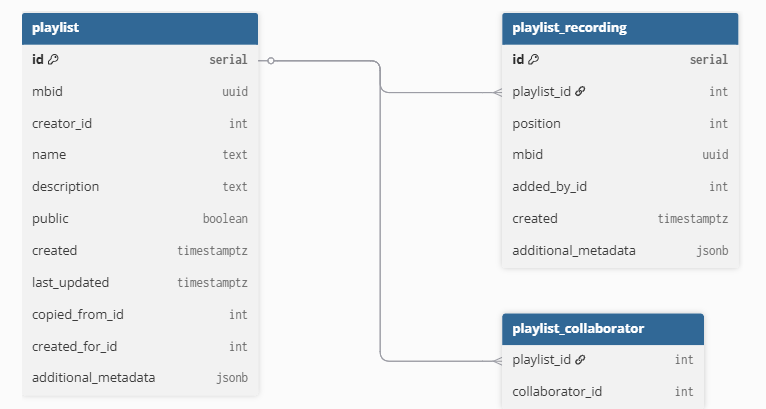
Proposed Solution:
Feature 1: Search playlists
Current Scenario :
ListenBrainz already exposes an endpoint to search playlists through search_user_playlist() in listenbrainz/webserver/views/api.py, which internally calls search_playlists_for_user() in listenbrainz/db/playlist.py. The database layer performs trigram similarity search on playlist name and description and returns ranked results.
Due to which it has following limitations:-
- Playlist search is not integrated directly into the user playlist page, making it difficult for users with many playlists to quickly locate one.
- Search functionality is limited to playlist name and description, with no support for other useful filters.
- Users cannot search separately within their own playlists vs collaborative playlists.
Solution:
I propose implementing an enhanced scoped playlist search system that integrates directly into the playlist interface and improves both usability and performance.
Backend Implementation:-
My plan is to extend search_user_playlist() function to read search filter parameter and pass it to database layer and update search_playlists_for_user() function by adding filter_type parameter.
New Function : I will add a function build_playlist_search_query() to keep SQL logic modular.
def build_playlist_search_query(filter_type):

    if filter_type == "name":
        return "similarity(pl.name, :query)"

    if filter_type == "description":
        return "similarity(pl.description, :query)"

    if filter_type == "both":
        return """
        GREATEST(
            similarity(pl.name, :query),
            similarity(COALESCE(pl.description,''), :query)
        )
        """
In SQL Search Logic , my improvemnt introduces ranking .
For Example:-
ORDER BY
GREATEST(name_similarity, description_similarity) DESC
And for suring the scalability and speed , I will use PostgreSQL trigram index.
CREATE EXTENSION pg_trgm;

CREATE INDEX playlist_name_trgm
ON playlist.playlist
USING gin(name gin_trgm_ops);
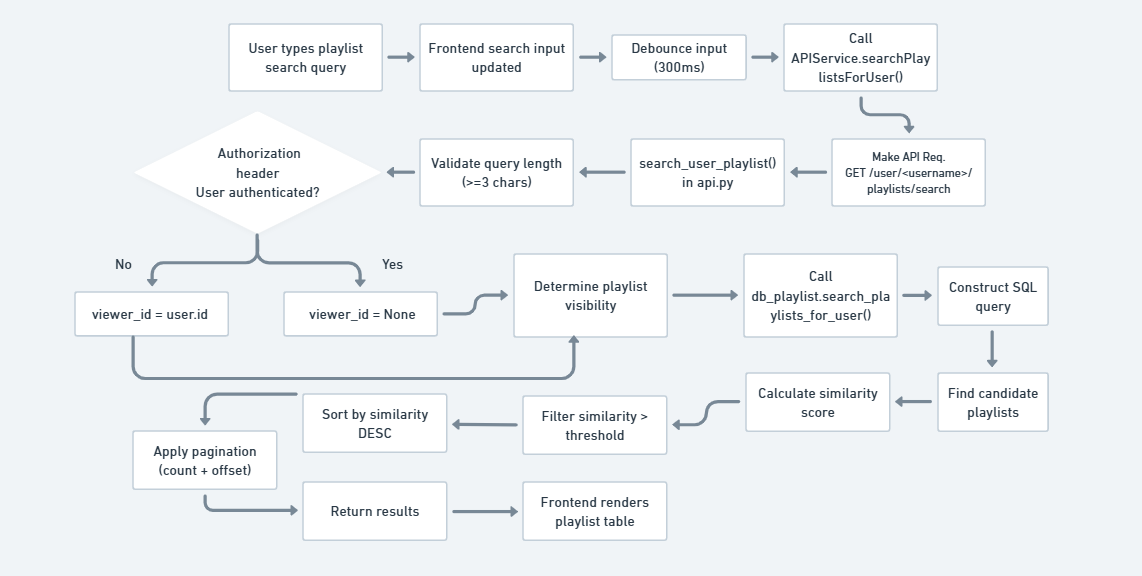
Frontend Implementation:-
For frontend ,I will make following implementations:
- an inline search bar within the playlist page and a dropdown filter allowing users to search by:
→ Playlist Name
→ Description
→ Folder
→ Tags - Implement a debounced search mechanism (~300ms) to prevent excessive API request.
const handleSearch = useDebouncedCallback(async (query) => {
  if (!query.trim()) return;
  const result = await APIService.searchPlaylistsForUser(
      query,
      currentUser.name,
      count,
      offset
  );
  setSearchResults(result.playlists);
}, 300);
UI Mockups:-

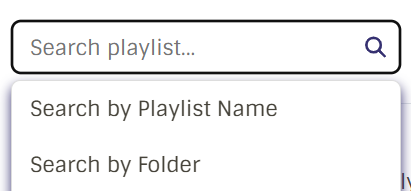
Feature 2: Playlist Organization (Folder+Tags)
Current Scenario :
Currently, According to my investigation , ListenBrainz provides very limited support for organizing playlists. Playlists are displayed as a simple paginated list, which becomes difficult to navigate as the number of playlists grows. Users are not be able to -
- Organize playlists into folders or hierarchical groups.
- Categorize playlists using labels or tags.
- Efficiently navigate large collections of playlists .
As a result, users with dozens or hundreds of playlists face poor discoverability and management challenge
Solution:
To address these issues, I propose implementing a hybrid playlist organization system combining folders and tags.
This system provides two organizational mechanisms:
-
Folders – hierarchical organization
-
Tags – flexible categorization and filtering
Why not only folders or tags?
After reviewing the ticket discussion and mentor feedback, I observed that the proposed solution primarily favors folder-based organization butt I think a pure folder based system provides hierarchical organization which have the limitations like a playlist can belong to only one folder which restricts categorization .
And tags allow flexible categorization where playlist can belong to multiple categories but limits hierarchical structure . Navigation becomes difficult when users have many playlists and tags . Tags alone do not provide a clear visual grouping of playlists.
A hybrid system combines the strengths of both approaches.
Backend Implementation:
New helper functions will be added to the file listenbrainz/db/playlist.py.
Create Folder
def create_playlist_folder(ts_conn, creator_id, name, parent_folder=None):

    query = text("""
        INSERT INTO playlist.playlist_folder
        (creator_id, name, parent_folder_id, created)
        VALUES (:creator_id, :name, :parent_folder, now())
        RETURNING id
    """)

    result = ts_conn.execute(query, {
        "creator_id": creator_id,
        "name": name,
        "parent_folder": parent_folder
    })

    return result.fetchone()[0]
Assign Playlist to folder.
def assign_playlist_to_folder(ts_conn, playlist_id, folder_id):

    query = text("""
        INSERT INTO playlist.playlist_folder_map
        (playlist_id, folder_id)
        VALUES (:playlist_id, :folder_id)
        ON CONFLICT (playlist_id)
        DO UPDATE SET folder_id = :folder_id
    """)

    ts_conn.execute(query, {
        "playlist_id": playlist_id,
        "folder_id": folder_id
    })
Add Tag to playlist
def add_tag_to_playlist(ts_conn, playlist_id, tag_id):

    query = text("""
        INSERT INTO playlist.playlist_tag_map
        (playlist_id, tag_id, user_id)
        VALUES (:playlist_id, :tag_id, :user_id)
    """)

    ts_conn.execute(query, {
        "playlist_id": playlist_id,
        "tag_id": tag_id,
        "user_id": user_id
})
user_id - represents the MusicBrainz user identity and is not enforced as a foreign key as LB does not maitain any local user table.
The folders organize the playlists in hierarchical structure and tags will be user-specific organizational tags that means they apply only to playlists created by the user.
API Endpoints:
New endpoints will be added in playlist_api.py are listed below:
Create Folder : POST /playlist/folder/create
List Folders : GET /user//playlist-folders
Assign Playlist to Folder : POST /playlist/<playlist_mbid>/folder
Create Tag : POST /playlist/tag/create
Add Tag to Playlist : POST /playlist/<playlist_mbid>/tag
Database Schema Design :
I will introduce new tables without modifying existing playlist tables that will ensure backward compatibility.
Key additions:
playlist_folderplaylist_folder_mapplaylist_tagplaylist_tag_map (with user_id)
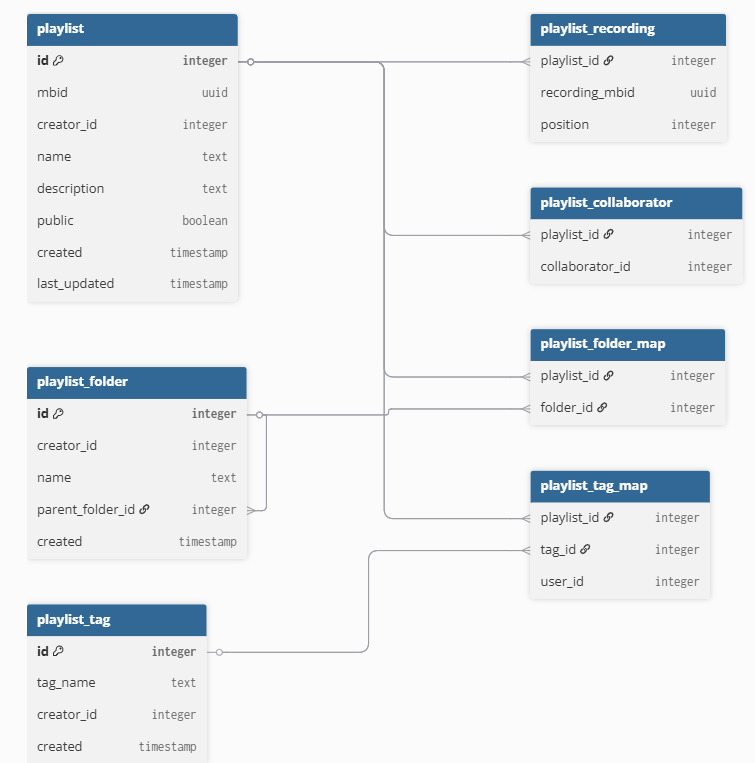
Due to word limit I am removing the SQL queries for creating the above tables in ER diagram but I will definitely attach them in my proposal pdf.
Frontend Implementation
I am going to integrate playlist organization features directly into the existing playlist page without disrupting the current workflow.
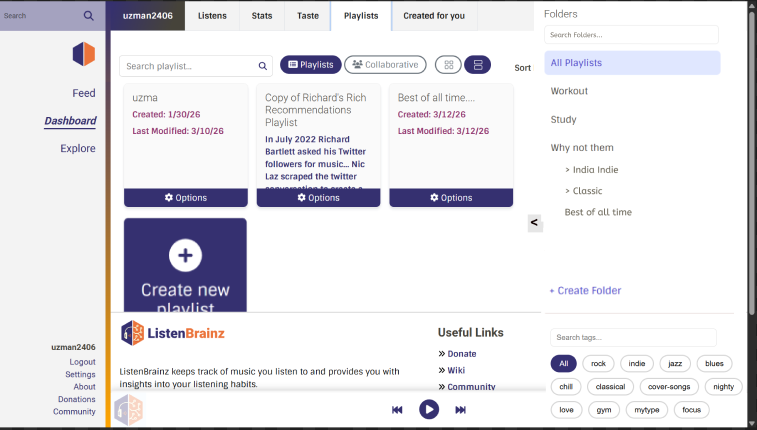
- Center Panel: Displays playlist grid (existing UI)
- Right Sidebar (Slider): with a scrollbar- Contains:
- Folder search input
- Folder navigation (hierarchical)
- Tag search input
- Tag filters (chips)
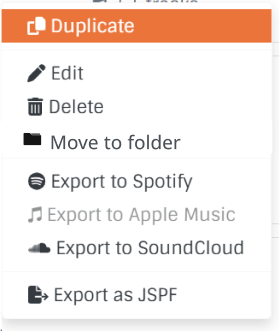
Assigning Playlists to Folders :-To maintain a clean UI, folder assignment is handled through the existing playlist card actions.
- User clicks “Options” on a playlist card
- Selects “Move to Folder”
- A dropdown/modal appears with folder list
- User selects a folder
- Backend request is triggered:
POST /playlist/<playlist_mbid>/folder
- Playlist is reassigned and UI updates instantly
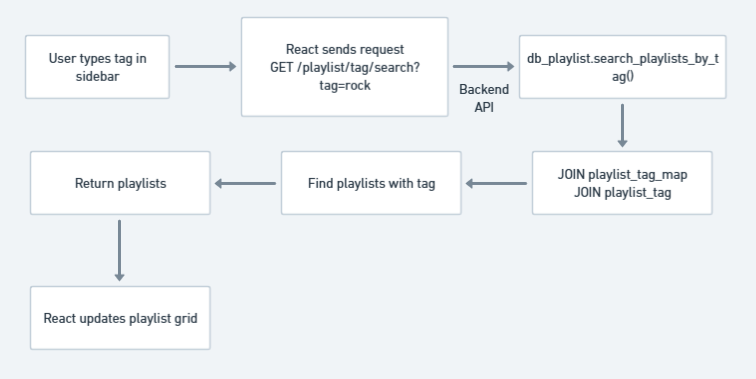
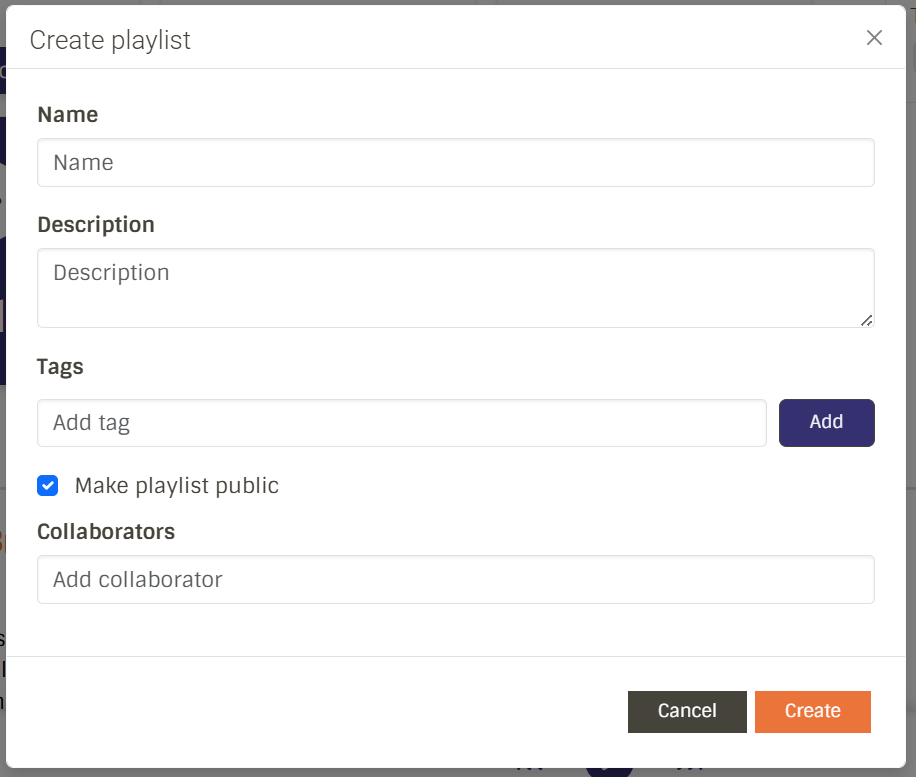
Assigning tags to playlist:- We can assign tags to a playlist at the time of creating or editing from the create or edit playlist panel. (See UI Mockup)
When a folder is selected , it will trigger GET /user//playlists?folder_id=12 and the SQL queries for folder navigation will be performed and when a tag is selected then Tag SQL query will filter out the playlists and also the indexes will be added for efficient filtering .
--Indexes For performance--
CREATE INDEX playlist_folder_idx
ON playlist.playlist_folder_map(folder_id);

CREATE INDEX playlist_tag_idx
ON playlist.playlist_tag_map(tag_id);

CREATE INDEX playlist_tag_user_idx
ON playlist.playlist_tag_map(user_id);
Scalability Considerations
To handle large numbers of tags:
- Show recent/frequently used tags by default.
- Provide a search-first tag interface.
- Allow users to expand and view all tags when needed
Why Not Store Tags in Playlist Metadata?
Efficient querying: Filtering playlists by tag requires indexed joins, which is not efficient with JSON/metadata fields
User-specific tags: Since playlists support collaborators, tags must be scoped per user (
user_id), which is difficult to model cleanly in metadataExtensibility: Enables future features such as tag search, suggestions, and public playlist discovery.
UI Mockup:

Feature 3: Playlist Track Ordering
Current Scenario :
In the current ListenBrainz implementation, tracks inside a playlist are stored in the table playlist.playlist_recording where the order of tracks is determined by the position column.
Tracks are retrieved in order using: ORDER BY playlist_id, position.
Users can manually reorder tracks through drag-and-drop in the UI, but this process relies on the existing backend function move_recordings(). This function performs reordering by:
- deleting tracks from the playlist
- recalculating positions
There is no support for:
- Sorting tracks by metadata (title, artist, date added)
- Quickly switching between different views
Solution:
I propose a simplified track ordering system with two clearly defined modes:
- Manual Ordering (Persistent).
- View-based Sorting (Temporary, UI-only)
This separation ensures clarity and avoids confusion about what is saved.
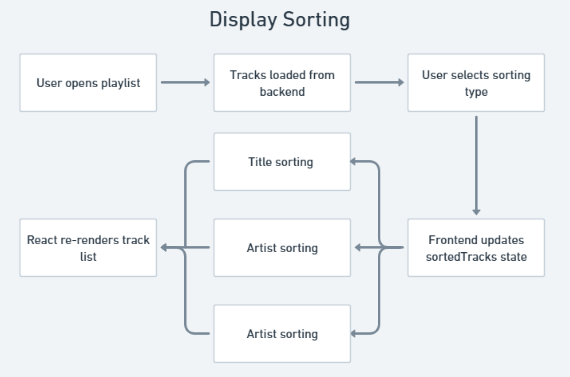
1. Display Sorting (Frontend Only)
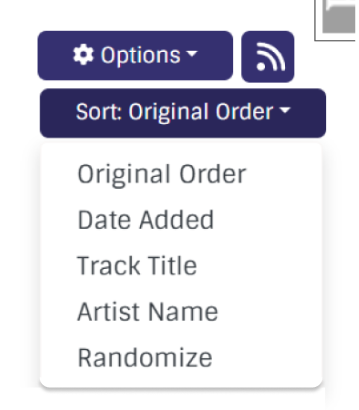
Users can temporarily sort tracks in the UI using:
- Date added
- Track title
- Artist name
- Randomize
This sorting:
- Does not modify the database
- Runs entirely on the frontend
- Uses metadata already available in the JSPF payload
const sortedTracks = React.useMemo(() => {
  const tracksCopy = [...tracks];
  switch (sortType) {
    case "title":
      tracksCopy.sort((a, b) =>
        a.title.localeCompare(b.title)
      );
      break;
     //Same for other cases as well

  }
  return tracksCopy;
}, [tracks, sortType]);
2. Manual Ordering (Persistent)
- Users can reorder tracks using drag-and-drop
- This is only enabled in Original Order mode
- Changes are persisted immediately using the existing backend logic
UI Mockup:
Feature 4: MusicBrainz collections as playlists
Current Scenario
Many MusicBrainz users maintain carefully curated collections of recordings, releases, or release groups on MusicBrainz. These collections represent years of organization and curation by users, but currently there is no direct way to use these collections inside ListenBrainz for listening or playlist management.
Solution :
I propose introducing MusicBrainz collection import support, allowing users to preview and import their MusicBrainz collections directly into ListenBrainz as playlists.
System Design Overview
- Collections are fetched directly from MusicBrainz
- Tracks are resolved using MusicBrainz database queries
- The frontend handles collection listing
- The backend handles track resolution + playlist creation
Backend Implementation
A new function will be implemented in:
listenbrainz/db/mb_collection.py
1. Wrapper Function
def fetch_collection_tracks(mb_conn, collection_id, limit=100, offset=0):

    with mb_conn.cursor(cursor_factory=DictCursor) as cur:

        cur.execute("""
            SELECT ec.id, ec.name, ect.entity_type
            FROM editor_collection ec
            JOIN editor_collection_type ect ON ec.type = ect.id
            WHERE ec.gid = %s
        """, (collection_id,))

        meta = cur.fetchone()

        if not meta:
            return {"title": "", "track": []}

        entity_type = meta["entity_type"]

        if entity_type == "recording":
            rows = fetch_recording_collection_tracks(cur, meta["id"], limit, offset)
        else:
            rows = fetch_release_collection_tracks(cur, meta["id"], entity_type, limit, offset)

        tracks = [
            {
                "identifier": [f"https://musicbrainz.org/recording/{r['recording_mbid']}"]
            }
            for r in rows
        ]

        return {
            "title": meta["name"],
            "track": tracks
        }
2. Recording Collections
def fetch_recording_collection_tracks(mb_conn, collection_id, limit, offset):

    query = """
        SELECT r.gid AS recording_mbid
        FROM editor_collection_recording ecr
        JOIN recording r ON r.id = ecr.recording
        WHERE ecr.collection = %s
        ORDER BY ecr.position
        LIMIT %s OFFSET %s
    """

    mb_conn.execute(query, (collection_id, limit, offset))
    return mb_conn.fetchall()
3. Release / Release Group Collections
def fetch_release_collection_tracks(mb_conn, collection_id, entity_type, limit, offset):

    join_table = "editor_collection_release" if entity_type == "release" else "editor_collection_release_group"
    id_col = "release" if entity_type == "release" else "release_group"

    query = f"""
        SELECT rec.gid AS recording_mbid
        FROM {join_table} ec
        JOIN release rel ON rel.id = ec.{id_col} OR rel.release_group = ec.{id_col}
        JOIN medium m ON m.release = rel.id
        JOIN track t ON t.medium = m.id
        JOIN recording rec ON rec.id = t.recording
        WHERE ec.collection = %s
        ORDER BY m.position, t.position
        LIMIT %s OFFSET %s
    """

    mb_conn.execute(query, (collection_id, limit, offset))
    return mb_conn.fetchall()
Endpoints:,
Only a single backend endpoint is required:
@playlist_api_bp.post("/musicbrainz/collection/<collection_id>/import")
def import_collection(collection_id):

    user = validate_auth_header()

    with psycopg2.connect(current_app.config["MB_DATABASE_URI"]) as mb_conn:
        data = fetch_collection_tracks(mb_conn, collection_id)

    jspf_playlist = {
        "playlist": {
            "title": data["title"],
            "extension": {
                PLAYLIST_EXTENSION_URI: {
                    "public": False
                }
            },
            "track": data["track"]
        }
    }


    playlist = create_playlist_from_jspf(user, jspf_playlist)

    return jsonify({
        "status": "ok",
        "playlist_mbid": playlist.mbid
    })
Database Impact :
No new database schema changes are required. Imported playlists will use the existing tables playlist.playlist and playlist.playlist_recording.
Frontend Implementation
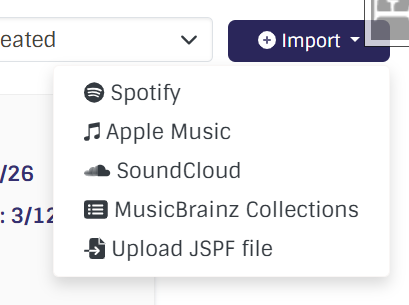
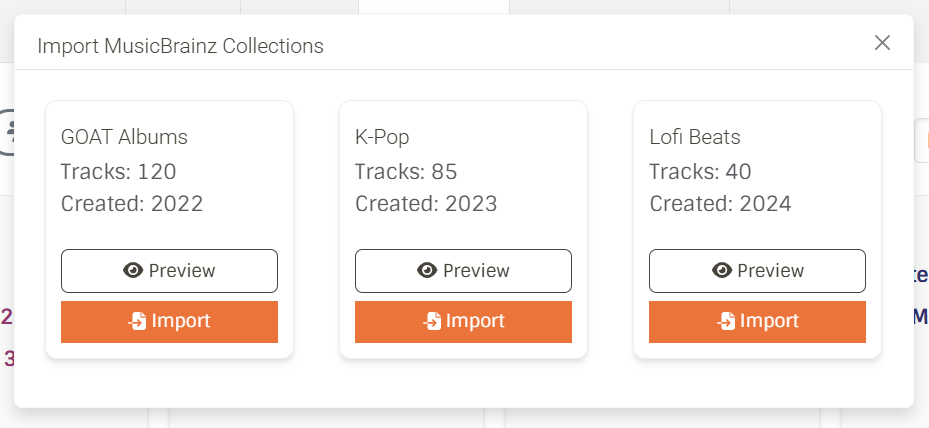
The import interface will be integrated into the existing playlist import modal.
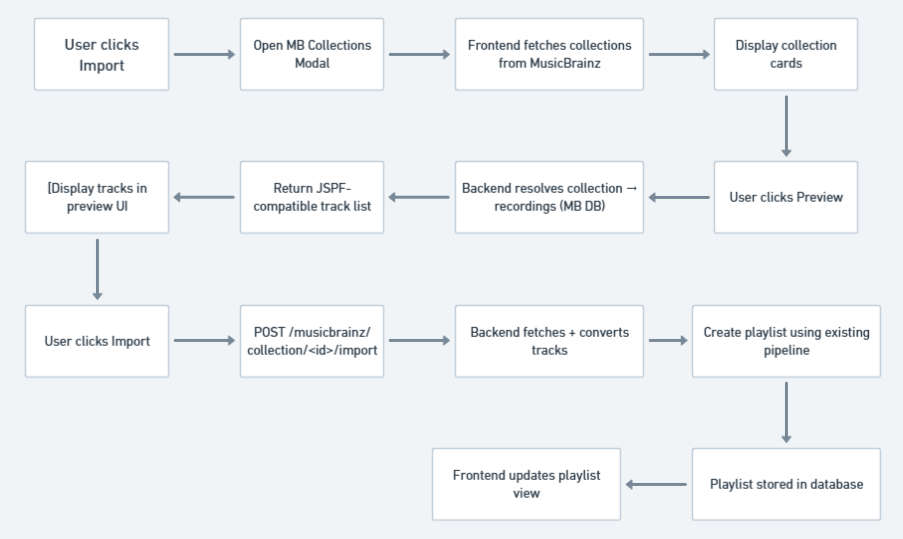
- User selects “Import → MusicBrainz Collections”
Clicking Import sends:
POST /musicbrainz/collection/<collection_id>/import - Collections are fetched directly from MusicBrainz (frontend)
- Collections are displayed as cards
- User clicks Preview
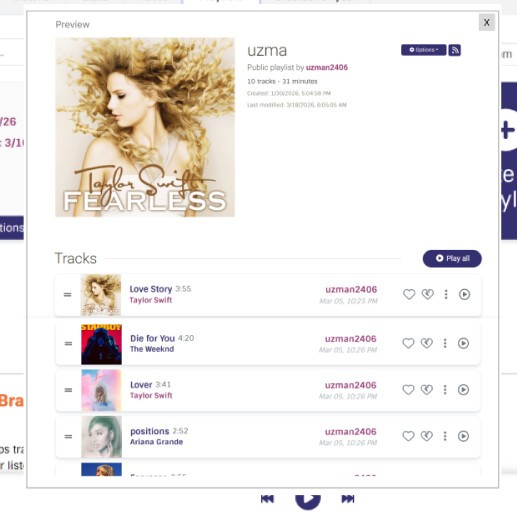
The preview screen will:
- Display collection tracks using existing playlist UI
- Show track metadata (title, artist)
- Pagination for large collections
Data Flow:
UI Mockups:
Additional Feature
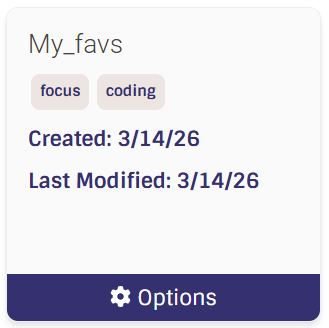
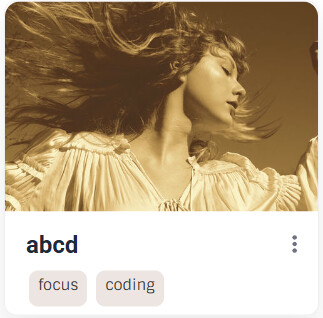
Currently, playlist cards in ListenBrainz display only textual metadata such as title, creation date, and last modified date. There is no visual representation of playlist content.
Playlists internally store tracks in: playlist.playlist_recording
Each track contains:
mbid(recording MBID)created(timestamp when track was added)
Additionally, track metadata (including release_mbid) is fetched dynamically using the existing metadata pipeline (fetch_playlist_recording_metadata()), but this data is not persisted.
After investigating the codebase , I found out the missing pieces are:
- No persistent mapping from playlist → cover image
- No stored
release_mbidin playlist tables - No UI integration for cover images
And also The correct way to determine the “latest track” is: ORDER BY created DESC
Not position, since position reflects manual ordering, not recency.
Solution:
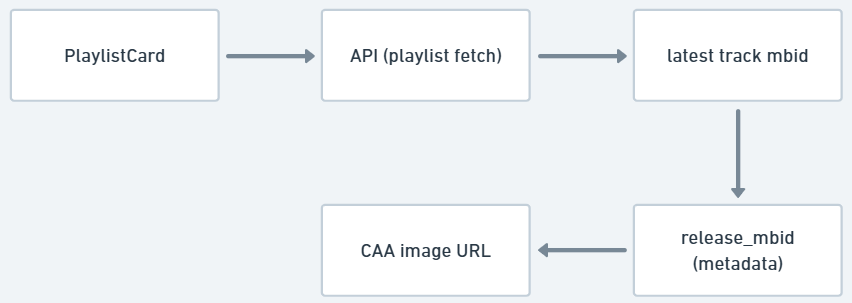
I propose introducing dynamic playlist cover images, generated using the most recently added track in the playlist. The cover image will be derived as:
Latest Track → Recording MBID → Release MBID → Cover Art Archive
Backend Implementation:
Fetch Latest Track
def get_latest_playlist_recording(ts_conn, playlist_id):

    query = """
        SELECT mbid
        FROM playlist.playlist_recording
        WHERE playlist_id = %s
        ORDER BY created DESC
        LIMIT 1
    """

    ts_conn.execute(query, (playlist_id,))
    return ts_conn.fetchone()
Resolve Release MBID
Instead of introducing new joins, I will reuse the existing metadata pipeline:
fetch_playlist_recording_metadata(playlist)

#It already enriches each recording with

rec.release_mbid
Generate Cover Image URL
def get_cover_art_url(release_mbid):
    return f"https://coverartarchive.org/release/{release_mbid}/front"
For Scalability:
ALTER TABLE playlist.playlist
ADD COLUMN cover_release_mbid uuid;
This value will be updated whenever:
- A new track is added
- A track is removed
- Playlist is reordered
This avoids repeated joins and improves performance for large playlist lists.
Frontend Implementation:
I will integrate tis feature into : PlaylistCard.tsx
UI Changes
- Add cover image at top of playlist card
- Maintain existing layout (title, tags, metadata below image)
//Example
<img
  src={coverImageUrl}
  className="playlist-cover"
  alt="Playlist cover"
/>
If no track is available then it will show default placeholder design and if no cover image is available then a fallback image will be shown.
Data Flow:
UI Mockup :
Timeline (12 weeks , 175 hours)
Community Bonding (May 1 – May 26) :- I will read playlist_api.py, db/playlist.py, PlaylistPage.tsx thoroughly and sketch UI mockups and get mentor approval before coding begins .
| Week | Hours | Planned Work |
|---|---|---|
| Week 1 | 15 | Search backend — extend search_user_playlist() with filters, update search_playlists_for_user(), add trigram indexes, basic tests |
| Week 2 | 15 | Search frontend — PlaylistSearch.tsx component, search bar UI, filter dropdown (name/description), debounce logic, connect to existing API endpoint, test end-to-end |
| Week 3 | 15 | Folder+Tag schema — write migration scripts for all 4 new tables (playlist_folder, playlist_folder_map, playlist_tag, playlist_tag_map), add indexes, verify migrations run cleanly, write schema-level tests |
| Week 4 | 15 | Folder backend — create_folder(), assign_playlist_to_folder(), all folder endpoints in playlist_api.py, unit tests |
| Week 5 | 15 | Tag backend — add_tag_to_playlist(), remove_tag_from_playlist(), tag endpoints in playlist_api.py, indexing, unit tests |
| Week 6 | 15 | Folder+Tag frontend — sidebar panel in Playlists.tsx, folder tree navigation, tag list, filtering behavior, connect everything to backend endpoints |
| Week 7 | 15 | Track ordering frontend — sorting dropdown (title, artist, date added, randomize), client-side sort logic using useMemo, disable drag-drop when not in Original Order mode. (Submit midterm) |
| Week 8 | 15 | Track ordering backend refinement — reuse existing move_recordings(), enforce manual vs view-only modes, edge cases + tests |
| Week 9 | 14 | MB Collections backend — implement fetch_collection_tracks() (MB DB queries), handle recording/release types, pagination, error handling |
| Week 10 | 14 | MB Collections integration — JSPF conversion, import endpoint using existing playlist pipeline, backend validation/tests |
| Week 11 | 14 | MB Collections frontend — collection list UI, preview step (playlist-style view), import flow integration |
| Week 12 | 13 | Playlist cover images + polish — latest-track logic (ORDER BY created), metadata integration, UI update in PlaylistCard.tsx, bug fixes, docs, final PR |
Community Affinities
What type of music do you listen to?
I mostly listen to pop music, particularly artists such as Taylor Swift, Selena Gomez, Bella Poarch, and Charlie Puth. I enjoy melodic pop music and often explore different albums and playlists from these artists while studying or working.
Some of my favourite MBIDs are :
- Love Story by Taylor Swift : 9086b742-358b-4f73-9a14-84cb1a9ce4ce
- Who Says by Selena Gomez : 39f38b5e-45d6-410c-b3f2-324667ab09f1
- Heart Attack by Demi Lovato : 97e60b31-439f-4596-b596-efda64477d3c
What aspects of MusicBrainz / ListenBrainz interest you the most?
The aspects of ListenBrainz that interest me the most are its commitment to open music data, user-controlled listening history, community-driven music discovery, integration with external music services such as Spotify . Unlike many proprietary music platforms, ListenBrainz allows users to store and analyze their listening data in an open ecosystem.
Programming Precedents
When did you first start programming?
I started programming in 2021 shortly after completing high school. My first exposure to programming was through Python during my Computer Applications coursework. As I continued my studies in Computer Science, I explored several programming languages including C, C++, Java, and JavaScript.
Over time, Python became my preferred language due to its simplicity and versatility. I also practiced competitive programming using C++ and Python, which helped strengthen my problem-solving skills and understanding of algorithms and data structures. Later, I expanded my focus to software development and started building web applications using frameworks such as Django and React.
Have you contributed to other open source projects?
Yes. I have contributed to the ListenBrainz Server project, where I worked on understanding the codebase, fixing issues, and contributing improvements to playlist-related functionality.
What sorts of programming projects have you done on your own time?
I have worked on several personal projects to improve my skills in full-stack development, machine learning, and desktop application development.
InternSarthi – Internship Recommender
Python, React.js, Django, Scikit-learn (December 2025)
- Developed a full-stack internship discovery platform with a React frontend and Django REST backend. Implemented a ML–based recommendation system using Scikit-learn to suggest relevant internships to students.
SysPulse – System Monitoring Application
Python, CustomTkinter, psutil, Matplotlib (October 2025)
- Built a desktop application that monitors CPU, memory, and disk usage in real time. And packaged it as a standalone executable using Pyinstaller for easy distribution
Weather App
Django, Bootstrap, OpenWeather API, Render (June 2025)
- Developed a web application that displays real-time weather data using the OpenWeather API.
Practical requirements
What computer do you have available for working on your GSoC project?
I will be working on an HP EliteBook 830 G6 laptop equipped with an Intel Core i7‑8665U processor, 16 GB RAM, and 238 GB SSD storage. The system uses Intel UHD Graphics 620 and supports a 64-bit operating system. I have WSL2 (Ubuntu) for development. The ListenBrainz dev environment runs inside WSL Ubuntu
How much time do you have available per week, and how would you plan to use it?
I can work 25–30 hours per week, as I do not have other commitments during the upcoming summer due to Summer break .
Benefits to the Community
This project will significantly improve playlist usability in ListenBrainz and seamless integration with MusicBrainz collections. Users with large playlist libraries will benefit from advanced search and organization tools, while the MusicBrainz collection import feature will strengthen integration between the MetaBrainz ecosystem.
