| Name | Yateen |
| IRC / Matrix | @yateen:matrix.org |
| yateendogra2109@gmail.com | |
| GitHub | yateendogra2109 · GitHub |
| Time Zone | UTC+05:30 (IST) |
| Location | India |
Hello!
My name is Yateen and I am currently in 3rd year of college at Indian Institute of Technology Jodhpur , India . I am pursuing a Computer Science degree . I had a strong interest in building full stack projects . I like to work with React, Python,Javascript/Typescript and have a strong foundation in core CS concepts and I like solving DSA problems . Through various projects I have strengthened my skills in the above mentioned fields . I like to hit Gym and spend free time listening to music which both refreshes me and makes me happy!
I am interested to be part of GSOC-2026 and would like to work with Metabrainz with full dedication.
Proposed Project
Playlists sorting and organization
Proposed mentors: Ansh @anshgoyal31 , Monkey @mr_monkey
Languages/skills: React, Python
Estimated Project Length: 175 hours
Difficulty: Easy
Expected outcomes
-
Playlist search on the user’s own playlists page
-
Playlist organization via tags
-
In-playlist track sorting — sorting by date added, title, artist name, and shuffle, plus a new backend endpoint to persist a chosen order
-
MusicBrainz collections as playlists
Architecture Background
- The backend is split across these files
listenbrainz/db/playlist.pyhandles all database operations for playlistslistenbrainz/webserver/views/playlist_api.py— registered at /1/playlist/ and handles endpoints like /1/playlist/create, /1/playlist/import/ and more , new endpoints will also be placed here.listenbrainz/webserver/views/api.py— registered at /1/ and has the user playlist listing endpoints like /1/user/<mb_username>/playlists , /1/user//playlists/search
-
The frontend playlists page lives in
frontend/js/src/user/playlists/. It has separate components for the playlist grid , individual playlist cards, and import modals — one modal per service (Spotify, Apple Music, SoundCloud, JSPF). -
I have been working directly in this codebase for my open playlist search PR, so I am already familiar with how a change flows from the database layer through the API into the React frontend.
The actual schema from admin/timescale/create_tables.sql is:
CREATE TABLE playlist.playlist (

id                  SERIAL,

mbid                UUID NOT NULL DEFAULT gen_random_uuid(),

creator_id          INT  NOT NULL,  – links to user.id, no FK (diff DB)

name                TEXT NOT NULL,

description         TEXT,

public              BOOLEAN NOT NULL,

created             TIMESTAMP WITH TIME ZONE DEFAULT NOW() NOT NULL,

last_updated        TIMESTAMP WITH TIME ZONE DEFAULT NOW() NOT NULL,

copied_from_id      INT,            – id of the source playlist if copied

created_for_id      INT,            – user this playlist was generated for

additional_metadata JSONB

);
CREATE TABLE playlist.playlist_recording (

id                  SERIAL,

playlist_id         INT  NOT NULL,  – FK playlist.playlist.id

position            INT  NOT NULL,

mbid                UUID NOT NULL,

added_by_id         INT  NOT NULL,  – links to user.id, no FK (diff DB)

created             TIMESTAMP WITH TIME ZONE DEFAULT NOW() NOT NULL,

additional_metadata JSONB

);
CREATE TABLE playlist.playlist_collaborator (

playlist_id         INT  NOT NULL,  – FK playlist.playlist.id

collaborator_id     INT  NOT NULL   – links to user.id, no FK (diff DB)

);
Feature 1 — Playlist Search on User Playlists Page
Current state
The backend endpoint GET /1/user/<playlist_user_name>/playlists/search
already exists in api.py and calls search_playlists_for_user() . But there is no dedicated search bar in the playlist page for the users to search directly. There is only a global search tab but it lists the playlists of all the users ,which doesn’t leads to meaningful output .
What my PR already does
Added a simple search functionality to the user playlists page with the help of existing user playlist search API
-
Disabled submit while a search is in progress to avoid duplicate requests.
-
Shows the initial full playlists when the search input/query is too short ( < 3 chars).
-
Existing sorting options are preserved when search results are loaded.
-
Pagination works correctly even on the search results . The number of pages are recalculated based on the API response.
-
If the search fails then a Error toast is shown.
Remaining work
The PR needs mentor review, a loading spinner could be added while the API call is in-flight, and integration tests. This is targeted for the Community Bonded Period , maybe extended to week 1.
Additional task:
When searched from global search , the playlists of the user is randomly placed between the playlists of other users having same playlist name .I would also work on this feature to place the playlists of the user above the playlists of other users .
Not a big change, though it might provide better UX .
Feature 2 — Playlist Organization with Tags LB 1302
Tags over folders
LB-1302 proposes “tags or folder structure”. Tags are strictly more powerful: a single playlist can belong to multiple tags simultaneously (e.g., both “chill” and “2024”), whereas a folder structure is mutually exclusive. Tags also compose naturally with the existing search — a user can search within a tag. They require no deep restructuring.. I will implement tags as the primary organization mechanism.
Why a new table rather than the existing additional_metadata column of existing table
The playlist.playlist table already has an additional_metadata JSONB column, so why not just store tags as a JSON array inside it? The answer is that we will face difficulties in filtering. When a user clicks a tag to see all their playlists with that tag, the backend needs to query across every playlist the user owns and return only the matching ones.
Doing that against a JSONB array is possible but it cannot use a standard index , PostgreSQL would have to scan every row and inspect the JSON on each one. With a dedicated playlist_tag table, the same query becomes a simple indexed JOIN, which is fast regardless of how many playlists the user has.
Why Tag+Folder structure would be a Overkill?
Adding folders on top of tags would mean having two separate systems that overlap in purpose. It would also confuse the user (“should I use a folder or a tag for this?”). The additional complexity is not justified when tags alone fully cover the use case.A folder works exactly like a tag that can only be applied once . Tags already do everything folders do and more — a tag called “gym” is exactly like a folder called “gym”, except a playlist can also have a second tag “punjabi” at the same time.
Handling collaborative playlists
What happens when multiple users collaborate on the same playlist? Suppose User A tags a playlist “Gym”, User B removes it because they think of it as “Workout”. There is no clean way to resolve this without one user overriding the other.
We will go with the same solution as already used for editing details and deleting in collaborative playlists— only the playlist owner can add or remove tags. Collaborators can view tags but cannot modify them.Tags represent the playlist’s identity.
Database schema
A new playlist_tag table will be added via a migration, following the same conventions as the rest of the playlist schema:
CREATE TABLE playlist.playlist_tag (

id           SERIAL,

playlist_id  INT  NOT NULL,  -– references playlist.playlist.id

tag          TEXT NOT NULL,

created      TIMESTAMP WITH TIME ZONE DEFAULT NOW()  NOT NULL,

UNIQUE (playlist_id, tag)

);
The UNIQUE constraint on ( playlist_id, tag ) ensures the same tag cannot be applied to the same playlist twice — duplicates are silently ignored, so no error handling is needed in the application layer for that case.
Backend
Four new functions will be added to db/playlist.py, following the same style as the existing playlist DB functions:
- Add tags — accepts an array of tags and inserts all of them in one call. The UNIQUE constraint make sure if the tag already exists on that playlist, the insert is silently ignored:
# pseudocode for adding tag

def add_tags_to_playlist(db_conn, playlist_id, tags: list):

INSERT INTO playlist.playlist_tag (playlist_id, tag)

For each tag in tags:
   VALUES (playlist_id, tag)

   ON CONFLICT DO NOTHING
-
Remove a tag — deletes the matching (playlist_id, tag) row.
-
Get all tags for a user — returns every distinct tag the user has applied across all their playlists which will be used to produce the sidebar on page load.
-
Get playlists by tag — a JOIN between playlist and playlist_tag filtered by tag returns only the playlists with the given tag,enabling both personal filtering and global search.
On the API side, three new endpoints will be added:
- POST /1/playlist//tags — Lets the owner add their own personal tags to a playlist they have access to.
# pseudocode

POST /1/playlist/<mbid>/tags

body: { tags: [‘happy’, ‘road trip’] }

→ verify user is playlist_owner

→ for each tag: call add_tags_to_playlist()
- DELETE /1/playlist//tags/ — verify user is the playlist owner → removes the tag from the playlist
- GET /1/user//playlists/tags — returns all tags the user has used, so the frontend can build the sidebar without making one call per playlist.
Frontend
The tag feature touches two pages: the user playlists page (where playlists are listed and organized) and the individual playlist card (where tags are displayed and edited).
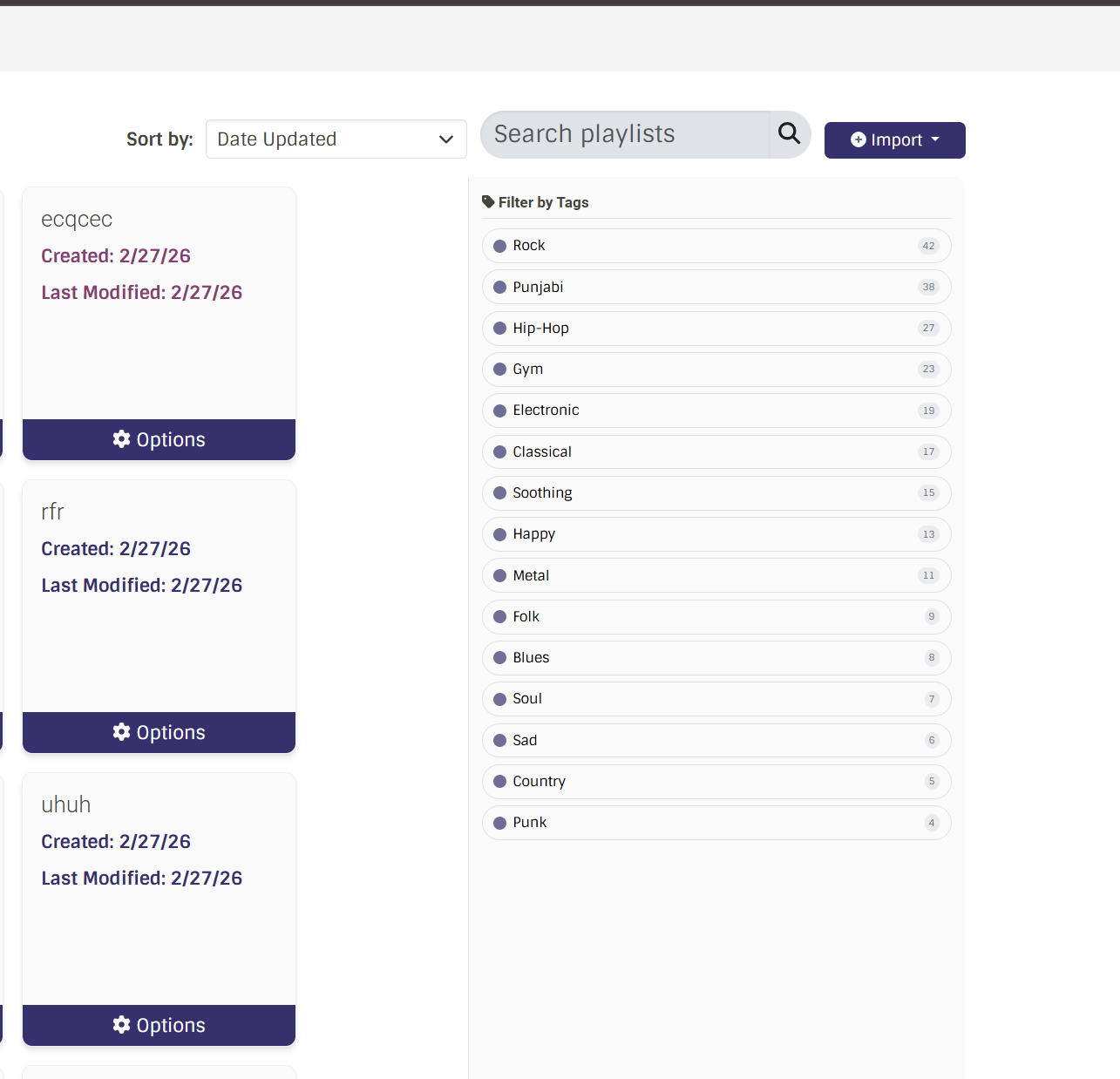
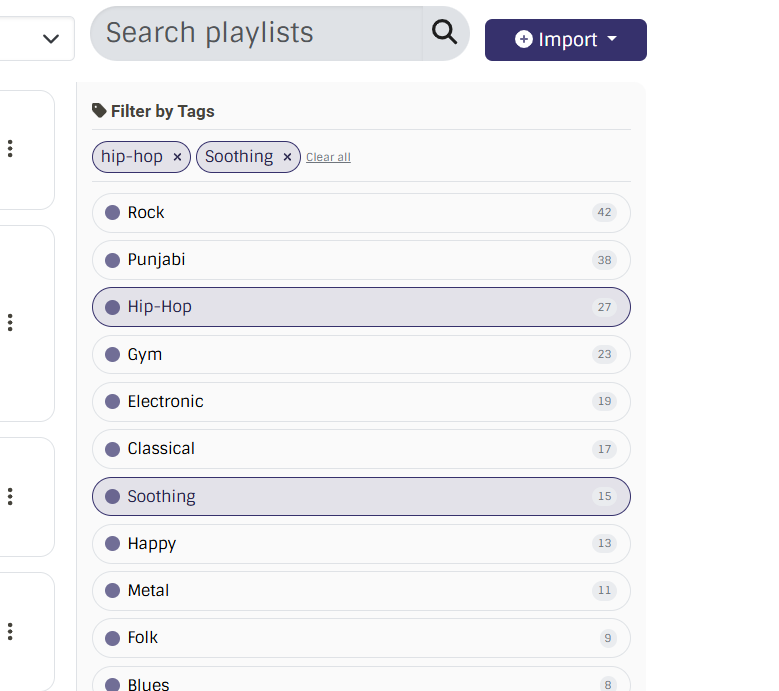
On the playlists page, the existing layout shows a grid of playlist cards under tabs —Playlists, Collaborative. A permanent sidebar to the right of this page is added , listing the tags the user had used across playlists. Clicking a tag highlights it and filters the playlist grid to show only playlists with that tag — this calls the extended GET playlists endpoint with tag= rather than re-rendering everything client-side. Clicking the same tag again clears the filter and restores the full list.
If a user has the “gym” tag active and then types in the search bar, the search runs only within that tagged subset. This works because both the tag filter and the search bar update the same playlists state.
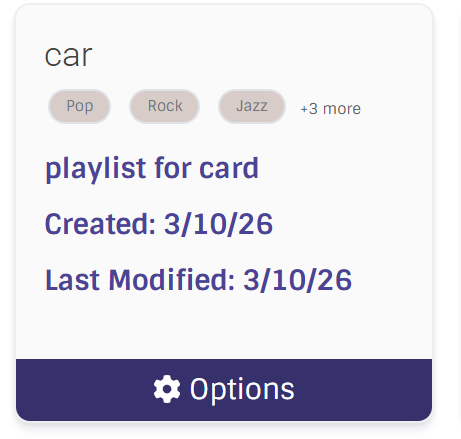
Each playlist card shows tags as small badges below the title. These are loaded as part of the playlist data when the page fetches playlists, so there is no extra per-card API call. If a playlist has many tags, only the first few are shown and we can add ”+n more“ option.
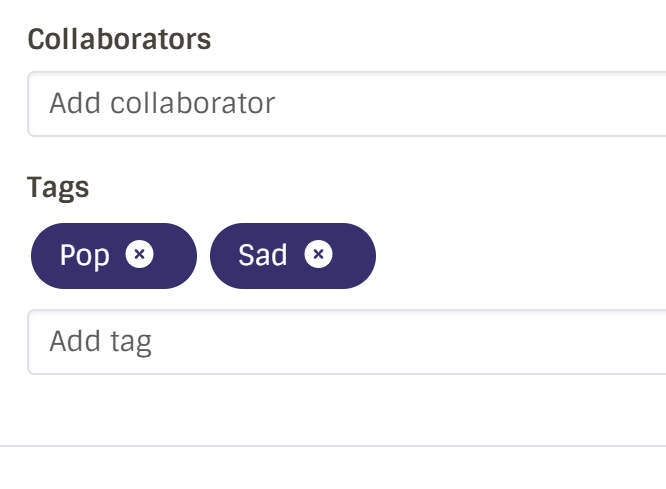
To edit tags, the user opens the existing playlist card (the three-dot menu → Edit → Edit tags ) .
Rather than building a new tag input component from scratch, I will reuse the existing tags component already used on the artist and album pages in LB. This component already supports autocomplete, loading suggestions from an API endpoint, and adding/removing tags — so the same behaviour can be used .
UI MOCKUPS:
NAVBAR

TAGS PANEL
Creating/Editing Playlist Card
GRID VIEW OF CARD
LIST VIEW OF CARD

Feature 3 — In-Playlist Track Sorting LB-1374
Design
When a user opens a playlist, a sort toolbar appears above the track list with five options: Default, Date Added, Title (A–Z), Artist (A–Z), and Shuffle (Random).
The core design principle is simple: drag-to-reorder is only enabled in Manual Order (Default) view. When the user switches to any other sort view — Title, Artist, Date Added, or Shuffle — the drag handle is disabled. This makes the behaviour intuitive , the sorted views are purely for listening and browsing, not for restructuring the playlist.
Frontend approach
The sort toolbar will be added to the existing PlaylistPage.tsx component. The component already holds the playlist’s track list in state, so the sorting can be done purely in React without any structural changes to how the page fetches data.
Each sort option maps to a field already present in the track data.
// Pseudocode — sorting

SortKey = ‘default’ | ‘date_added’ | ‘title’ | ‘artist’ | ‘shuffle’;

function handleSort(SortKey) {

  if (SortKey === ‘default’)  → restore original order from saved ref

  if (SortKey === ‘title’)   → sort displayedTracks by title

  if (SortKey === ‘artist’)  → sort displayedTracks by creator

  if (SortKey === ‘date_added’) → sort by ‘created’ timestamp

  if (SortKey === ‘shuffle’) → randomize order

setDisplayedTracks(sorted);
setDragEnabled(SortKey === 'default'); // drag only active in default view

}
The original default ordering is always preserved in a useRef so the user can return to it at any point without any API call.
The drag handle component receives a prop dragEnabled — when false, the handle is visually dimmed and non-interactive, giving the user a clear signal that reordering is not available in the current view.
Backend approach
No new backend endpoints are needed at all. When the user is in Default Order view and drags a track, the existing reorder endpoints already handle it and persist the new position automatically. All other sort views are purely frontend state .
The “Save this order” button and the proposed POST /1/playlist/<mbid>/recordings/order endpoint are both dropped now , the existing infrastructure already covers everything needed.
Feature 4 — MusicBrainz Collections as Playlists LB-1231, LB-961
Collection Types
MB collections can be of different types ,most relevant for LB are recording collections and release collections.
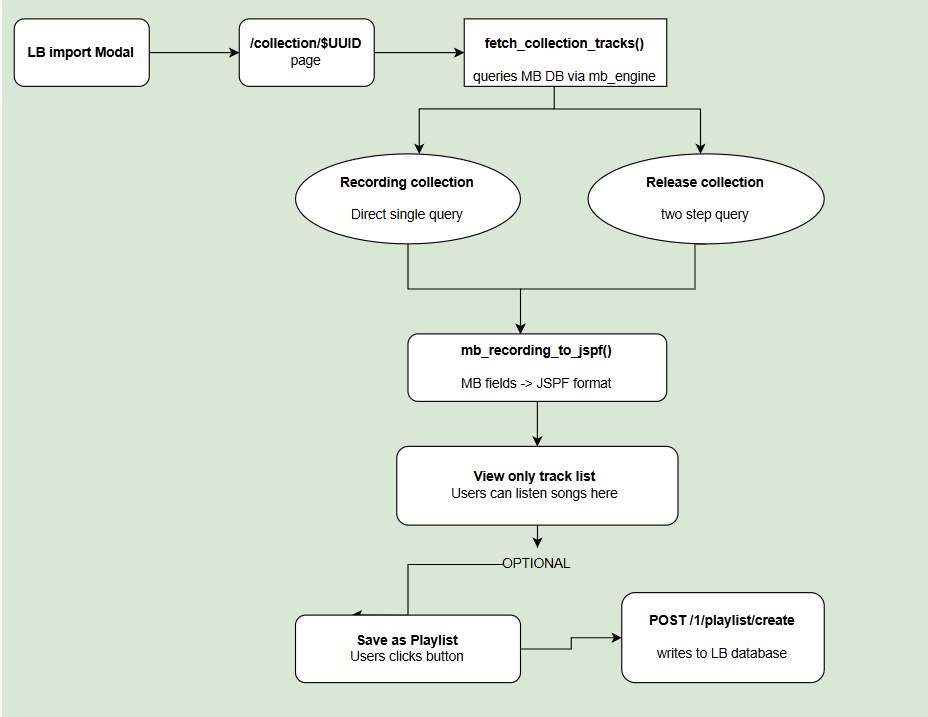
For recording collections, each item is already a recording — it has a title, artist, duration and MB identifier, so the conversion to JSPF is direct and straightforward.
For release collections, each item is an album. To get playable tracks, a second query is needed to fetch all recordings inside each release.The fetch_collection_tracks() method will accept a collection_type parameter so both types are handled cleanly within the same method.
Why a new /collection/$UUID page
The straightforward question is — why not just reuse the existing playlist page?
The reason is that MB collection data doesn’t live in LB’s database at all. The existing playlist routes are built around LB’s own playlist.playlist table, so they simply can’t work with data that isn’t there.
So the pattern we will be following is the same as the one LB already uses for artists — listenbrainz/artist/$UUID reads directly from MB’s database and displays the data without storing anything in LB. The /collection/$UUID page works exactly the same way.
User Flow
-
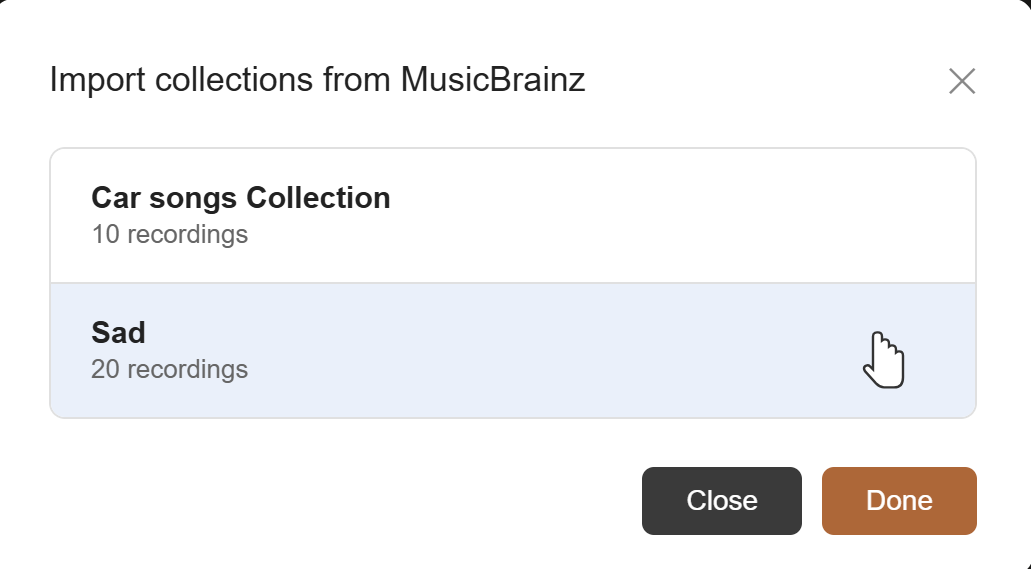
User clicks Import → selects MusicBrainz → sees their MB recording and release collections as a list of cards
-
Clicks one →
/collection/$UUID -
Page fetches the collection directly from MB’s database and shows it as a read-only track list — user can listen right there, no importing needed.
-
If they want an editable copy to work with inside LB, they click “Save as Playlist” — only at that point does anything get written to LB’s database, via the existing POST /1/playlist/create endpoint. The saved playlist then shows up in their My Playlists tab like any other playlist.
Backend
The frontend can’t directly query MB’s database, so two backend endpoints are needed. Both use mb_engine with raw SQL queries on MB’s database directly.
-
GET /1/user//mb-collections — queries MB database via mb_engine and returns the user’s recording and release collections as a list of name, MBID, collection type and recording count. Called when the user opens the import modal and picks MusicBrainz.
-
GET /collection/<collection_mbid> — queries MB database via mb_engine, fetches all recordings in that collection and renders the collection page.
The core of the backend is fetch_collection_tracks(collection_mbid, collection_type) — this method handles the raw query directly against MB’s schema using mb_engine.
The logic differs slightly depending on collection type:
// For recording collections — single query:

FROM recording

JOIN through editor_collection_recording  -- the link table

WHERE collection uuid = <collection_mbid>

→ return track title, artist name, duration, recording uuid
// For release collections  — two queries:

Step 1: Get all albums in this collection

           GET all releases WHERE collection = <collection_mbid>

         → gives a list of albums


Step 2: For each album, get all its songs in order

          FOR each album from Step 1:

          GET all recordings inside this album by

              JOIN through track and medium

              WHERE release = <each release from Step 1>

              ORDER BY disc number, then track number

         → gives a flat list of songs
Both steps combined give the same result as a recording collection would have done individually.
Both paths feed into the same mb_recording_to_jspf() helper which converts each MB recording into the JSPF format LB uses internally:
MB title → JSPF title

MB artist_credit.name → JSPF creator

MB recording URL (built from recording MBID) → JSPF identifier

MB length → JSPF duration
For listing a user’s collections when they open the import modal:
Nothing gets stored in LB’s database just for viewing a collection. The only write happens when the user explicitly saves it as a playlist.
Frontend
Two new components will be added:
ImportMBCollectionModal.tsx — present alongside other import modals in frontend/js/src/user/playlists/components/. Shows up when the user picks MusicBrainz from the import dropdown . It displays one card per collection with the collection name, track count. Clicking a card navigates to /collection/$UUID.
CollectionPage.tsx — the actual /collection/$UUID page, shows a list of tracks where users can listen to songs and optionally click on Save as Playlist button at the top.
Database impact
No new tables needed. If the user saves a collection as a playlist, it uses the existing playlist.playlist and playlist.playlist_recording tables .
UI Mockup for the Collections card list
Flow Diagram for this feature:
Timeline (12 Weeks, 175 Hours)
I would like to complete this project in 175 hours , I would start implementing Features from least to most complex.
Community Bonding Period (May 1 – May 26):
- Finalize the playlist search PR based on mentor feedback. Study playlist_api.py, db/playlist.py, and the PlaylistPage React component in detail.
- Discuss different UI and tag UX mockup with mentors.
- Study the existing tags component used on artist/album pages to understand how autocomplete and API endpoint integration works before implementing playlist tags.
- Study the MB database schema directly to understand the exact tables and review existing mb_engine queries in the LB codebase to follow the same patterns before implementing the collections feature.
| WEEK | PHASE | DELIVERABLES | |
|---|---|---|---|
| Week 1 | Playlist Search — Remaining work | Since PR is already open , I will finalize this functionality by week1.Also plan to look into prioritizing the user’s own playlists in global search results. | |
| Week 2 | Track Sorting — sort toolbar | Add a sort toolbar to the playlist view with Title and Artist modes. This task won’t be backend heavy. | |
| Week 3 | Track Sorting — remaining modes and tests | Add Date Added (reads from the existing JSPF timestamp) and Shuffle. Also covers the drag handle disable logic for other sorting views, writing tests, and merging the sorting PR.. | |
| Week 4 | Tags — database and backend functions | I will set up the playlist_tag table via migration as discussed before and write the four backend functions — add tags, remove tag, get all tags for a user, get playlists by tag. | |
| Week 5 | Tags — API endpoints | Add the three new tag endpoints and write the required tests. | |
| Week 6 | Tags — frontend display | Build the tag filter sidebar on the playlists page and add tag badges to each playlist card. | |
| Week 7 | Tags — editing and compose with search | Build edit tags inside the playlist options menu(visible to playlist owner only) with auto-save . Also link up tag to work with search. Submit midterm evaluation. | |
| Week 8 | Tags — polish and merge | Handle the edge cases and then do the final testing,full tag feature done end-to-end,mentor feedback and merge the tag PR. | |
| Week 9 | MB Collections — backend | I will add two endpoints , write fetch_collection_tracks(collection_mbid, collection_type) and mb_recording_to_jspf()functions. | |
| Week 10 | MB Collections — collections list UI | Will add the MusicBrainz as a new option in the existing import dropdown. Build ImportMBCollectionModal.tsx showing one card per collection.Start building the CollectionPage.tsx | |
| Week 11 | MB Collections — collection page,save as playlist and tests | Build CollectionPage.tsx — the read-only collection page with a “Save as Playlist” button. Write tests for both endpoints and the full end-to-end flow. | |
| Week 12 | Wrapping up | Final end to end testing across all four features,update API docs and write the final GSoC report. |
Post Gsoc :
I plan to stay involved with ListenBrainz and contribute by solving other issues and try to enhance the Listenbrainz application . I would also contribute to MusicBrainz and BookBrainz and be a part of Metabrainz as a long term contributor.
Community Affinities
Music I listen to
I listen primarily to Bollywood and Punjabi music. My favourite artists are Prem Dhillon, AP Dhillon, and Amrinder Gill . Some of my most-played recordings on ListenBrainz, with their MBIDs:
-
AP Dhillon — Feels — MBID: 462b5eaf-8afa-4cfa-9229-27ff15f2ea81
-
Prem Dhillon —MoonBound — MBID: 1ebae61a-7ee4-4522-bcc8-f8050723e08f]
-
Prem Dhillon— Heer— MBID: 531698fa-cc67-49cb-836e-0657183d8ff0
.
What draws me to MetaBrainz
I spend a significant amount of time listening to music . I explored listenbrainz about a few months ago and I find it really interesting and helpful as it tracks my listens , I could easily import my playlists from other music services whereas I can share and collaborate with others. I started contributing in Listenbrainz as it matches my skills which are React and other programming domains . I interacted with the mentors through PR’s and learned a lot about open source and professionalism . Spending my time listening to music and coding together makes it a good experience for me to work with MetaBrainz.
Have you used MetaBrainz projects?
Yes I have been using Listenbrainz for a fairly good time now , I had also explored BookBrainz a little. I would also like to explore other Metabrainz Services.
Programming Precedents
When did I first start programming?
I was introduced to programming when I was in class 6th . Java was my primary language then .I had learned important and basic concepts of programming and build moderate programs till the end of my school time . Then I followed my passion for coding and opted for CS degree at IIT Jodhpur . There I strengthened my programming concepts and became well aware with React , DSA , Databases , DL/ML ,Python and other core CS concepts and I also love Solving CP problems .
Contributions to ListenBrainz
I started contributing to Listenbrainz-server repository around the starting of January this year . My initial contributions were code refactoring and enhancing the already present code . After I became well aware with the project structure and code understanding , I started solving real issues .
Below is the attached link to all of my contributions till now .
I have tried to maintain quality and honesty in my PR’s and would like to continue contributing in the same way .
Other open source contributions
My primary open source contributions so far have been to Listenbrainz . Though I had explored other repositories and set up development environments in organizations like Palisadoes Foundation and AsyncAPI to understand how open source works
Personal projects
-
Scene-Text to Scene-Text Translation (Visual Translation) Github
Jan 2025 – Apr 2025
Tools: IndicPhotoOCR, Python, Flask, UI Design
-
Developed an end-to-end Scene-Text Translation system that extracts text from images using IndicPhotoOCR, processes it, and translates it into Indian languages using IndicTrans Transformer models.
-
Designed and developed the User Interface for accessible image input and result rendering
Feb 2025 – Apr 2025
Tools: HTML, CSS, JavaScript
-
Built a web-based real-time animated text generator for stylized visual effects.
-
Focused on responsive layout, frontend polish, and user interaction.
May 2025 – Sept 2025
Tools: Scikit-learn, Python, SVM, Naive Bayes
-
Built sentiment classifiers using IMDB and Twitter datasets to predict polarity.
-
Compared model performance using F1 Score and Confusion Matrices.
-
SYNTAXIA – Compiler Github
Jan 2025 – Apr 2025
Tools: C++, Data Structures, Compiler Design Concepts
-
Implemented a compiler pipeline in C++ with lexical analysis, recursive-descent parsing, and semantic checks.
-
Developed tokenization logic for identifiers, literals, operators, and keywords.
-
Built parsing and validation modules to verify program structure, expression correctness, and type consistency
Practical Requirements And Other Details
| Column 1 | Column2 | |
|---|---|---|
| Computer | Asus VivoBook 14X OLED — 16 GB RAM, 512 GB storage, Windows 11 with WSL2 (Ubuntu) for development. The ListenBrainz dev environment runs inside WSL Ubuntu. | |
| Hours per week | ~15 hours/week across the 12-week coding period (175 hrs total) | |
| University | Summer break — no academic commitments during the coding period | |
| Job | No other employment during the coding period | |
| Timezone | UTC+05:30 |
I’ll stay active on the MetaBrainz IRC channel to ask questions and share updates. I will continuously share updates regarding my work and can also open a draft PR , so that mentors can see my progress.