Name: Shreshth Sharma
IRC / Matrix handle: shreshtthh:matrix.org
Email: shreshth013@gmail.com
GitHub: Shreshtthh · GitHub
LinkedIn: Shreshth Sharma | LinkedIn
Resumé: https://drive.google.com/file/d/1qDSJL-_4_3021P9G6nndamLn_86tlgQu/view?usp=sharing
Due to Discourse word limits, this version of the proposal has been condensed. The full, detailed proposal (including extended explanations and design considerations) is available here:
[Edited and improved proposal added]
https://docs.google.com/document/d/1j9pJnkpbmdHEWSq4CIK8psWKnErupzW5VGc900HYF2o/edit?usp=sharing
GSoC 2026 Proposal: Playlists Sorting and Organization
Project: ListenBrainz - Playlists Sorting and Organization
Estimated Length: 175 hours
Mentors: Ansh, Monkey
Applicant: Shreshth Sharma
1. Synopsis
ListenBrainz users who rely heavily on playlists currently face significant friction: they can’t search their playlists from their own page, can’t organize them beyond a flat paginated list, can’t sort tracks within a playlist, and can’t access their curated MusicBrainz collections. This project addresses these issues through four sub-projects.
What I will build:
| # | Feature | Ticket(s) | Hours |
|---|---|---|---|
| 1 | User-level playlist search | - | ~20h |
| 2 | Playlist organizing with tags | LB-1302 | ~60h |
| 3 | Track ordering within playlists | LB-1374 | ~35h |
| 4 | MusicBrainz collections as playlists | LB-1231, LB-961 | ~60h |
I have planned the execution timeline strategically (1 → 3 → 2 → 4). Sub-projects 1 & 3 are tightly scoped features that establish early momentum via quick PRs. Sub-project 2 benefits from having search infrastructure already in place. Sub-project 4 is an independent feature loop that can safely parallelize while the massive Tag PR undergoes review cycles.
Codebase Familiarity
-
DB Layer:
listenbrainz/db/playlist.py(search_playlists_for_user(), recording CRUD). -
Models & API: Pydantic
model/playlist.py, endpoints inwebserver/views/playlist_api.py. -
Frontend & App State:
Playlists.tsx(lodashorderBy,jotai),Playlist.tsx(ReactSortable). -
Schema: TimescaleDB
playlistschema (playlist,playlist_recording,playlist_collaborator).
2. Detailed Deliverables
Sub-Project 1: User-Level Playlist Search
Goal: Allow users to search within their own playlists directly from /user/<username>/playlists.
Current state: The global search at listenbrainz.org/search/ works well, and the backend function search_playlists_for_user() already exists in listenbrainz/db/playlist.py (using PostgreSQL’s pg_trgm extension). We simply need to wire these existing pieces to the user profile page.
What needs to change
Backend Implementation:
The existing GET /1/playlist/search endpoint will be extended to accept an optional user_name query parameter. To avoid unintended side effects, the default behavior of /search remains unchanged when user_name is absent.
-
Fixing Scope: Currently,
search_playlists_for_user()includes all public playlists. I will modify this (via aninclude_public=Falseparameter) to strictly scope results to playlists owned, collaborated on, or created for that user. -
Handling Authentication: The API will wrap results via
playlist.is_visible_by(user_id)so unauthenticated users see public results, while owners securely access private playlists. -
API Edge Cases & Pagination: Since the database treats count=0 as
LIMIT NULL, I will enforce pagination bounds at the API layer. Empty results cleanly return[], invalid users return404. -
Rate Limiting: I will add a 300ms debounce on the frontend to respect the
@ratelimit()middleware.
Frontend Integration:
Instead of building a search interface from scratch, I will add a reusable search hook in Playlists.tsx. Since the current implementation relies on server-loaded data via React Router loaders (useLoaderData) and local component state, I will extend this by adding a debounced search input and an async fetch flow for search results.
Implementation Details & UX Behavior:
-
Debouncing: Add a search input to
Playlist.tsxwith a discretesearchQuerystate and a 300ms debounce to respect the API limits. -
State Control & UI Consistency: The moment a search query becomes active, the component will trigger the async search fetch layer. To keep the UX smooth, I will explicitly manage a loading state that preserves the previous results on screen until the new search data arrives, taking care not to overwrite the original props-derived playlist state.
-
Pagination Isolation: The main playlist view uses URL parameters (
?page=...) for server reloads. To prevent state conflicts, the active search will use isolated, component-level pagination (resetting to page 1) that applies only to the search results and avoids any URL mutations. -
Sorting Logic: Sorting on the search results will be applied client-side, only to the current page of results (mirroring the existing
orderBylogic onthis.state.playlists). -
Clear Reversions: Clearing the search input will drop the async search state and instantly restore the original playlist layout by pulling from the initial loader data and preserving its pagination.
Testing & Validation:
-
Query Performance: Use
EXPLAIN ANALYZEto ensurepg_trgmGIN/GIST indexes prevent sequential scans. -
Backend Tests: Add tests to
test_playlist_api.pyasserting visibility boundaries (owners retrieve private/collaborative lists; guests see only public). -
Frontend Tests: Write Jest tests to verify the 300ms debounce, loading state rendering, and pagination isolation.
Sub-Project 2: Playlist Organization with Tags
Goal: Allow users to organize their growing collections of playlists using creator managed, playlist-specific tags. A playlist can belong to multiple tags.
Design Decision: Playlist Tags vs. MusicBrainz Tags
Unlike MusicBrainz tags which are crowd-sourced globally and publicly editable by any user, playlist tags in ListenBrainz will follow a strict ownership model. LB tags are for personal organization. As a result:
-
Only the playlist creator or collaborators will be able to modify tags, enforced via the existing
playlist.is_modifiable_by(user_id)checks. -
Tags are stored directly in the internal ListenBrainz database, completely bypassing the external MusicBrainz API sync.
-
Tags are visible to others (if the playlist is public) but not globally editable.
Architectural Implementation-
I will implement this using native Postgres array types and a GIN index to keep reads quick. Since this is a high-read, low-write operation, avoiding aggregation queries improves performance.
1. Database Layer Models & Migrations (TEXT[] vs Junction Table): I chose to use a native PostgreSQL TEXT[] column rather than a normalized playlist_tag junction table. These are creator-managed personal tags, not a shared global taxonomy. Since playlist.is_modifiable_by() restricts tags to owners and collaborators, there is no shared tag entity to normalize. While a junction table would require the database to scan, group, and count (HAVING COUNT(DISTINCT tag)) to find a playlist with multiple tags, a TEXT[] array paired with a GIN index resolves set-intersection queries instantly via a single bitmap index scan.
(Note on Future Extensibility: If ListenBrainz later requires global shared tags or tag descriptions, this TEXT[] array acts as a denormalized cache, which can then be safely backed by a new playlist_tag_definition metadata table without breaking existing query patterns).
ALTER TABLE playlist.playlist ADD COLUMN tags TEXT[] DEFAULT '{}';

-- Creating a GIN index (using default array operators for strict AND containment)
CREATE INDEX idx_playlist_tags ON playlist.playlist USING GIN (tags);
Tags will be normalized to lowercase via the API. A strict maximum limit of 20 tags per playlist will be enforced at the API level. This limit prevents GIN index bloat (which increases VACUUM costs and hurts performance) and ensures the frontend UI pill-bar remains usable at a glance without complex overflow scrolling.
2. Query Modification (The Core Filtering Logic): To support searching for playlists via multiple tags (e.g., /user/<username>/playlists?tags=workout,chill), I will modify get_playlists_for_user() to use PostgreSQL’s native array containment operator (@>).
By default, filtering multiple tags assumes intersection (AND logic). However, OR logic filtering is also supported via the overlap operator:
  -- Identifies playlists that contain ALL specified tags (AND logic)
  AND pl.tags @> :tags::text[]

  -- Identifies playlists that contain ANY of the tags (OR logic)
  AND pl.tags && :tags::text[]
Both @> and && operators are supported by the GIN index without any schema changes. Tags will be passed as a parameterized array to avoid SQL injection and ensure optimal query plan reuse.
3. Pydantic Model & JSPF Serialization (listenbrainz/db/model/playlist.py): The base Playlist model will be updated to explicitly map the new column: tags: List[str] = []. I will extend the serialize_jspf() method so that self.tags is injected into the JSPF extension dictionary, exposing the data to the frontend API without requiring secondary database fetches.
4. The API Endpoints & Race Condition Handling (listenbrainz/webserver/views/playlist_api.py): I will implement the following synchronous endpoints to support the frontend:
-
POST /1/playlist/<mbid>/tags(Accepts an array of incoming tags. Since this is a partial update, the backend must read the current tags, merge them via a Pythonset(), and write them back. To prevent race conditions where concurrent users editing a collaborative playlist overwrite each other’s tags, this read-modify-write cycle will be wrapped in aSELECT ... FOR UPDATEtransaction. This row-level lock ensures that updates don’t overwrite each other). -
DELETE /1/playlist/<mbid>/tags/<tag>(Usesarray_removeto strip a specific tag. The endpoint will be idempotent). -
Extend
GET /user/<username>/playlists(To parse the?tags=query parameters and apply the appropriate@>or&&filters).
Frontend UI & UX Integration
UI Components & API Replacement: I will reuse the existing autocomplete AddTagSelect component structure (from TagsComponent.tsx) currently utilized on Artist pages. However, I will strip out its external submitTagToMusicBrainz() logic and tag-voting UI states. Instead, I will wire the component to point to the newly created internal /1/playlist/<mbid>/tags API.
Playlist Dashboard: For the main Playlists view, a permanent, horizontally scrolling pill-filter bar below the search input will be implemented (See below in UI mockups). It will manage its own selectedTags state, pushing the actively selected filters into the /user/<user>/playlists?tags= API call to isolate the rendered playlist grid. Selecting or deselecting a tag will immediately trigger a refetch via React Query, keeping the UI responsive without full page reloads.
Sub-Project 3: Track Ordering Within Playlists
Goal: Allow users to sort tracks within a playlist by date added, track title, artist name, release date, or randomly, in addition to the existing manual drag-and-drop reordering.
Current state: Right now, the individual playlist page Playlist.tsx relies completely on ReactSortable for manual drag-and-drop reordering. If a user has a massive playlist and just wants to view it alphabetically or see their most recently added tracks first, they are out of luck. Furthermore, when a track is moved, the movePlaylistItem function triggers APIService.movePlaylistItem() to persist the change one-by-one. If a user is drastically reorganizing a playlist, this approach creates unnecessary network overhead.
Architecture: View-Only Sorting
Based on recent community discussions regarding UI complexity, I will keep track sorting as a frontend, view-only feature, keeping the existing manual drag-and-drop system as the sole thing that actually changes the database order.
-
Temporary UI Sorting (Frontend): I will introduce a “Sort By” dropdown (See Mockups for details) above the tracklist (Manual, Date Added, Title, Artist, Release Date, Random). React’s
useMemohook will handle the sorting logic, returning the sorted track list based on the selected criteria without hitting the database. -
Preserving Manual Order: “Manual Order” will remain the default state. When a user is in Manual mode, the existing
ReactSortabledrag-and-drop UI and its associatedAPIService.movePlaylistItem()persistence will function exactly as they do today. -
Disabling Conflicts: When a user selects any dynamic sort (e.g., Artist, Date Added), the view becomes read-only and the drag-and-drop handles are disabled. This prevents race conditions and avoids building unnecessary, complex backend reordering endpoints.
I will add a useMemo-backed <select> dropdown (Manual, Date Added, Title, Artist, Release Date, Randomize) above the tracklist. Selecting a dynamic sort instantly renders the derived list in O(NlogN) time and safely locks the drag-and-drop UI to prevent accidental reordering.
Testing:
- Frontend: Jest tests verifying the sort dropdown component, the
useMemoReact state logic for accurate sorting, and the locking/unlocking states of the drag-and-drop UI when in read-only mode.
Performance Considerations & Limitations: Currently, the Playlist.tsx view renders tracklists without DOM virtualization. Because of this, sorting massive playlists (e.g., 2,000+ tracks) client-side might slow down the browser for very large playlists during React’s re-render cycle. While my useMemo sorting logic executes in O(NlogN) time and is highly performant at the data layer, the UI will inherit this existing DOM constraint. Implementing chunked rendering or a virtualization library like react-virtuoso alongside react-sortablejs is a substantial architectural shift that falls outside the 175-hour scope of this GSoC project. However, isolating this view-only sorting logic will make it easier for when that broader virtualization refactor occurs in the future.
Sub-Project 4: MusicBrainz Collections as Playlists
Goal: Allow users to view, play, and import their MusicBrainz collections directly within ListenBrainz.
User Flow:
-
User navigates to
/musicbrainz-collectionsto view their synced MB collections. -
User can toggle a “Hide” state for utility collections (e.g., Audiobooks).
-
User clicks a collection to view a read-only tracklist fetched live from MB.
-
User clicks “Import” to clone the tracks into a native, editable ListenBrainz playlist.
Technical Implementation: Direct Database Integration via MB_DATABASE_URI
Important Distinction: Live View vs Imported Playlist MusicBrainz collections will not be stored in the ListenBrainz database by default. The collection endpoint only serves as a live, read-only view backed directly by the MusicBrainz database. By maintaining separate database connections and eliminating shared primary keys with the playlist.playlist table, a clean boundary between the two data models is established and this avoids accidental coupling. The “Import to ListenBrainz Playlist” action is completely optional and creates a separate, independent copy using the existing playlist creation pipeline.
Note on Caching: Caching collection metadata locally would introduce staleness and go against the goal of serving collections as live views. I am intentionally following the existing ListenBrainz pattern (e.g., entity_pages.py), which queries the MusicBrainz replica directly. If needed, short-lived caching can be added later to address performance issues.
Initial designs for this feature assumed fetching data via the public MusicBrainz REST API. However, the public API enforces a strict 1 request/second rate limit, which would cause severe throttling when users browse massive collections.
By inspecting the codebase (specifically listenbrainz/webserver/__init__.py), I verified that ListenBrainz already maintains a direct, read-only connection to the MusicBrainz database via app.config["MB_DATABASE_URI"].
I will bypass the REST API entirely and execute direct SQL queries against this specific connection. Because the queries are isolated to the musicbrainz schema, we avoid cross-database (FDW) bottlenecks. While this introduces a dependency on the MB schema, this approach aligns with existing LB features that already rely on the same schema. Since the schema is quite stable, this should be safe, though the query layer will remain isolated to simplify future adaptations if needed.
1. The Endpoints: I’ll introduce a new blueprint (musicbrainz_collection_api.py) with the following routes:
-
GET /1/user/<user_name>/musicbrainz-collections: Queries theeditor_collectiontable to list a user’s available collections. -
GET /1/musicbrainz-collection/<collection_mbid>: Fetches the items within a collection. (Note: Route naming can be easily aligned with existing LB patterns, e.g.,/1/collection/<mbid>, depending on mentor preference).-
For Recording Collections: A direct query against
editor_collection_recording. -
For Release Collections: Due to the strict structural constraints of the MusicBrainz schema (which intentionally lacks a direct release-to-recording mapping), the backend will execute an index-backed SQL
JOINtraversingeditor_collection_release→release→medium→track→recording. This resolves playable recordings while mirroring the logic inlistenbrainz/db/recording.py. Track ordering will be preserved usingtrack.position, ensuring the original release sequencing is respected. -
Pagination & Scale: Even for massive collections (e.g., 50,000 recordings), the index-backed SQL queries remain highly performant. The actual bottleneck for massive tracklists is the frontend main thread lacking DOM virtualization. To safely handle scale without freezing the browser client, results will be paginated using
LIMIT/OFFSET. WhileOFFSET-based pagination can degrade for very deep pages, I will follow existing LB patterns for consistency and consider keyset pagination as a future optimization if needed. -
Performance: Queries will be optimized using existing MB indexes on collection and recording tables.
-
2. The Frontend View (Read-Only Rendering): When a user navigates to /user/:username/musicbrainz-collections/:collectionMbid, the frontend will hit the GET endpoint. The backend will serialize the SQL results into the standard ListenBrainz JSPF playlist format. The frontend will render this using a new MBCollectionPage.tsx component, a read-only variant of the standard Playlist view (disabling drag-and-drop and track deletion, as the source of truth remains MusicBrainz).
3. The “Save as LB Playlist” Pipeline: The MBCollectionPage will feature an “Import to ListenBrainz” button. This leverages the existing frontend pipeline (similar to the current “Play on LB” functionality found on MusicBrainz), taking the populated JSPF data and POSTing it to the standard LB playlist creation endpoint to create an editable, independent copy for the user. This approach mirrors existing ‘Play on ListenBrainz’ data flow, ensuring consistency with current architecture.
Handling Unwanted Collections (The “Hide” Flow): Because MusicBrainz is a vast database, users may have utility collections (e.g., “Audiobooks”) that they do not want cluttering their ListenBrainz dashboard.
-
Database: I will create a lightweight
playlist.mb_collection_prefstable in the LB database containing(user_id, collection_mbid, is_hidden). -
UX: Users can click a “Hide” icon on a collection card to flip this boolean, filtering it from their LB dashboard without altering their actual MusicBrainz data.
3. UI Mockups
Sub-Projects 1 & 2: Playlist Tags & Search
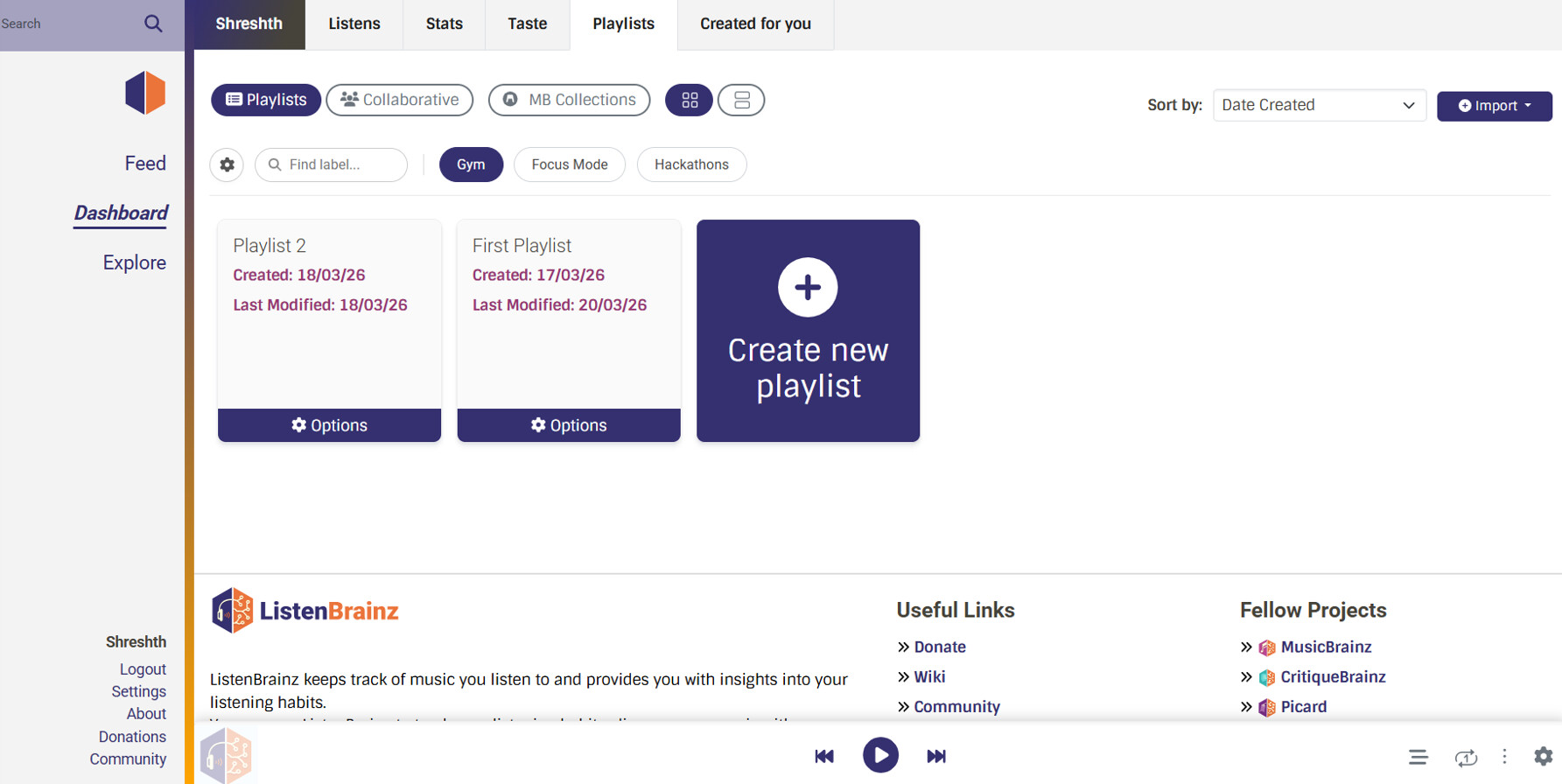
Entire Page with tags and search
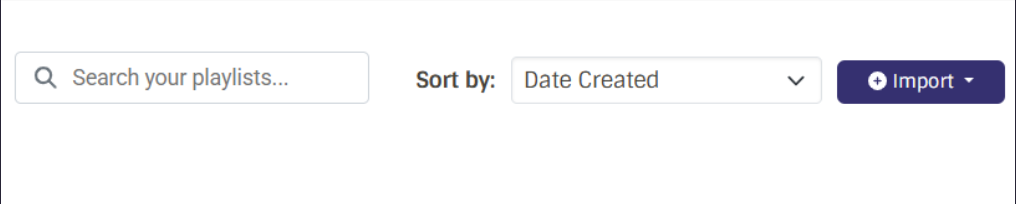
Search
Tags (Labels) and Search Labels


Key UI Elements:
-
Search Bar: Integrated cleanly into the top controls, enabling debounced user-level playlist search without leaving the dashboard (Sub-Project 1).
-
Horizontal Tag Filter Bar: A horizontal, scrollable strip of tags replacing the traditional sidebar. Preserves the main grid width while keeping tags immediately discoverable.
-
Interactive Tag Pills: Displayed at the bottom of playlist cards, alongside a fast-action “+” icon to instantly assign new tags without digging into dropdown menus.
-
Instant Filtering: Clicking a tag pill in the top filter bar will instantly isolate the grid to match that tag.
Tag Manager Modal
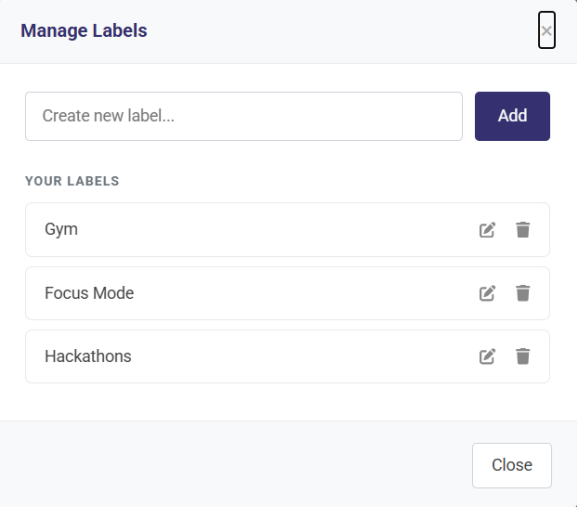
- Management: Accessed via the
 gear icon in the filter bar, allowing users to create, rename, or delete their creator-managed tags globally.
Sub-Project 3: Track Ordering
View-Only Sorting Dropdown

Key UI Elements:
-
Sort Dropdown: Positioned ]next to the “Play all” button, providing clear dynamic sort options (Date Added, Track Title, Artist Name, Release Date, Randomize).
-
State Management: When a dynamic sort is selected, the view becomes read-only, safely disabling the drag-and-drop handles.
-
Manual Order Preservation: Users can easily return to the “Manual Order” state to re-enable the standard
ReactSortabledrag-and-drop workflow.
Sub-Project 4: MusicBrainz Collections as Playlists
Collections Dashboard & Detail Views
- Collections Dashboard
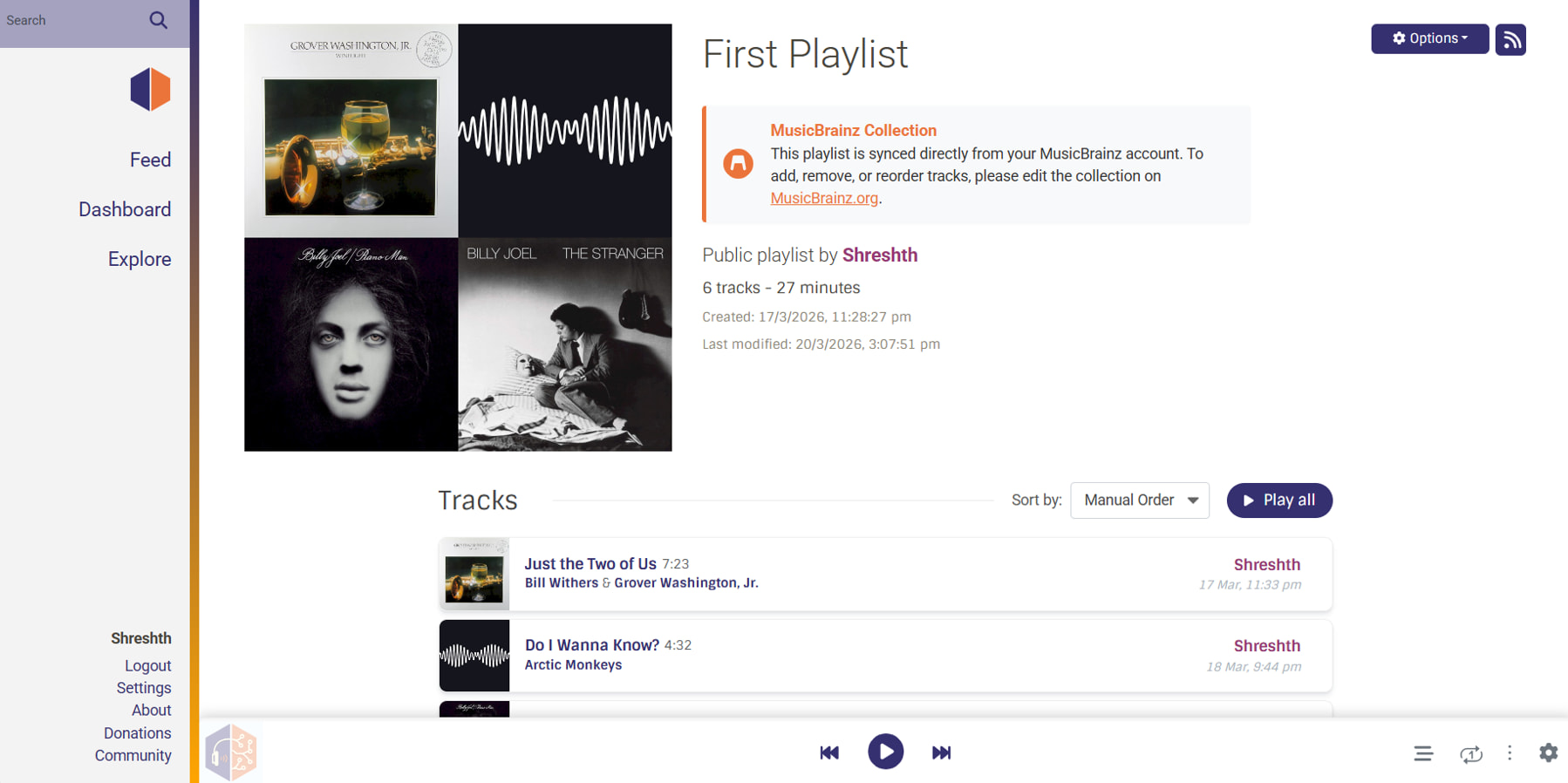
- Collection Detail View
Key UI Elements:
-
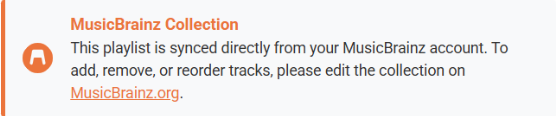
UI Isolation: A dedicated “MusicBrainz Collections” tab keeps live, read-only external collections conceptually separated from standard, editable ListenBrainz playlists.
-
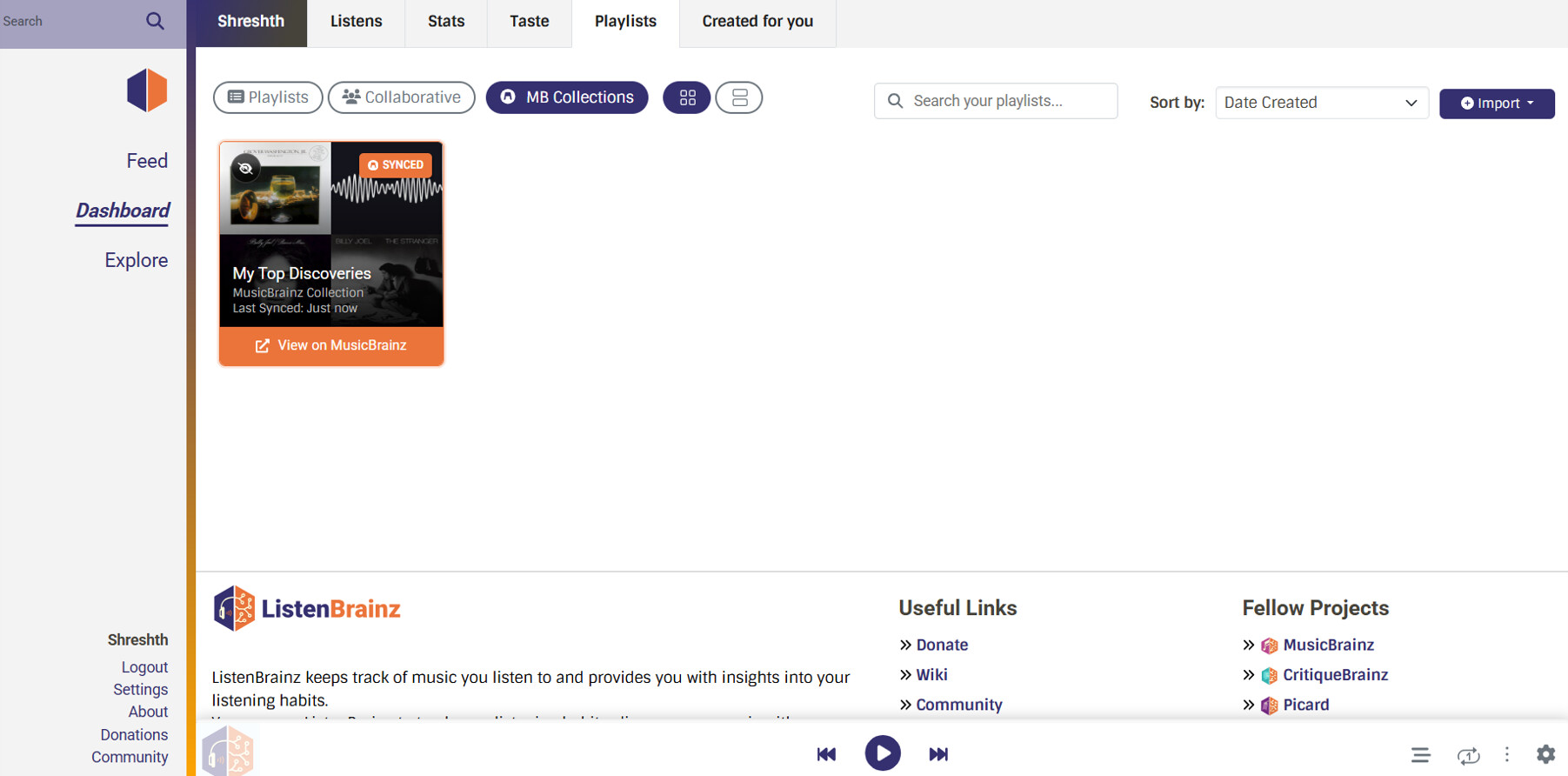
Actionable Cards: Collection cards display vital metadata (item count, entity type) and feature a direct “Hide” toggle to allow users to filter out unwanted utility collections (e.g., audiobooks) from their dashboard.
-
Read-Only Rendering: The collection detail page renders exactly like a standard playlist, but safely removes the drag-and-drop hooks and delete actions, reinforcing that the source of truth remains MusicBrainz.
Final Layout Vision: The mockup below represents the unified Playlists dashboard integrating these features. (One thing to note: Following mentor discussions regarding frontend performance, the 4-grid SVG cover art shown on these cards is explicitly excluded from this project. As ListenBrainz returns SVGs that individually load album art, attempting to render hundreds of these images synchronously would bottleneck the client and cause a severely degraded user experience).
4. Timeline
The timeline is structured to deliver smaller, reviewable features early, while reserving sufficient buffer for iteration and integration. The goal is to target the smaller, isolated features first (Search and Sorting), so that I can keep getting them reviewed and merged consistently before diving into the complex database migrations required for Labels and Collections.
Community Bonding (Weeks 0–1)
-
Set up full local development environment (Docker, TimescaleDB, NodeJS)
-
Meet with mentors to confirm design decisions:
-
Finalize any minor edge-case UI behaviors with mentors before coding begins
For code familiarization and getting my hands in, I’ll also begin Sub-Project 1 (search) as a warm-up
Week 1–2: Sub-Project 1 - User-Level Playlist Search (20h)
| Week | Tasks |
|---|---|
| 1 | Modify playlist_api.py search endpoint to accept user_name param. Write backend tests for owner vs guest viewing. |
| 2 | Build usePlaylistSearch hook. Add debounced search bar to Playlists.tsx. Implement isolated pagination logic. Write Jest tests and open PR. |
Deliverable: PR for user-level playlist search - under review / merged.
Weeks 3–4: Sub-Project 3 - Track Ordering (35h)
| Week | Tasks |
|---|---|
| 3 | Focus on frontend React state. Build “Sort By” dropdown components and integrate useMemo hooks for client-side sorting logic. |
| 4 | Implement view-only lock for drag-and-drop handles during active dynamic sorts. Write Jest tests for component behaviors and open a PR for review. |
Deliverable: PR for track sorting - under review / merged.
Weeks 5–8: Sub-Project 2 - Playlist Tags (60h)
| Week | Tasks |
|---|---|
| 5 | Write DB migration to add tags TEXT[] column and GIN index to the playlist table. Implement backend array-mutation functions. |
| 6 | Implement add_tags_to_playlist batch API endpoint and other required endpoints. Write API tests. |
| 7 | Integrate existing autocomplete Tags component for Playlist view. Build horizontal tag-filter bar. |
| 8 | Add tag pills to PlaylistCard.tsx. Styling. Add frontend tests and open a PR for review. |
Deliverable: PR for playlist tags - under review / merged.
Weeks 9–12: Sub-Project 4 - MB Collections (60h)
| Week | Tasks |
|---|---|
| 9 | Investigate MB database schema mapping. Implement direct SQL queries in LB backend to fetch editor_collection metadata and resolve editor_collection_recording and editor_collection_release items. |
| 10 | Build musicbrainz_collection_api.py endpoints. Implement the playlist.mb_collection_prefs table for the “Hide Collection” functionality. |
| 11 | Build MBCollections.tsx tab and MBCollectionPage.tsx read-only views. Wire up the “Import to LB Playlist” action using existing JSPF pipelines. |
| 12 | Integration testing for direct MB replica queries. Final PR and dedicated buffer time for mentor review iteration cycles across all features. |
Deliverable: PR for MB collections - under review / merged.
I will maintain a rolling buffer across weeks, allowing spillover of tasks (especially Sub-Project 2 and 4) without blocking overall progress.
Communication: I will maintain regular communication with mentors through weekly updates, sharing progress, blockers, and design decisions.
Stretch Goals (Buffer Permitting)
- Unified Playlist Search: Extend the global pg_trgm search to include custom playlist tags from the TEXT[] column to improve discoverability.
- Nested Tag Trees: Extend tags into a structured model using parent-child relationships queried via recursive CTEs if hierarchical organization is required.
- In-Playlist Filtering: Add a client-side search bar inside Playlist.tsx to instantly filter tracks without additional API calls.
- Collection Auto-Refresh: Implement a periodic background refresh mechanism to maintain data freshness if collection caching is introduced.
5. About Me
Other Information
-
I have an Acer Nitro V15 (16 GB RAM, i5-13420H (2.10 GHz), 64-bit operating system, x64-based processor) for the purpose of the SOC.
-
I started programming first in high school, with the classic “Hello World” program. At the time, we were mostly taught algorithmic questions and OOP principles. My actual journey of building projects began in college where-in I’ve participated and built in a lot of hackathons!
-
I love listening to all kinds of music. If I had to be more specific, I think pop is something I consistently enjoy but calm music is always appreciated as well. Here are some tracks I frequently visit with MBIDs
- Do I Wanna Know? (Arctic Monkeys) - aa5db513-c948-4ed1-a86c-58c58d456af7
- Piano Man (Billy Joel) - ad703ade-23fd-4314-911e-eefd1db59743
- Thinkin Bout You (Frank Ocean) - 198cee24-a93c-4565-a5ca-48d9265a5f17
-
Applying for LB but I’ve always been interested in reading Sci-fi, Tech, Fantasy.
Relevant Experience
-
Frontend (React & TypeScript): Built a custom game engine in TypeScript resolving complex state synchronization (WebRTC) with sub-100ms latency. I’m highly comfortable using strict TS to keep data models predictable. Recently refactored LB React components (PR #3553).
-
Backend (Python, Node.js, PostgreSQL): Designed REST APIs capable of batching 500+ concurrent state updates. Comfortable abstracting Python services (PR #3587), writing performant SQL, and handling complex edge cases (N+1 queries, race conditions).
-
Prototyping: Won 6 hackathons (Somnia AI, ADK-TS) requiring rapid full-stack execution under 48-hour deadlines. I am now focused on applying this execution speed to production-grade open-source codebases.
-
Community (GitHub Campus Expert): Deeply passionate about open-source developer ecosystems, event organization, and mentoring which is why I really appreciate MetaBrainz’s culture.
ListenBrainz Contributions
My time contributing has given me a deep understanding of the full stack:
Merged PRs:
-
PR #3587: LB-1889: Import loved tracks from LibreFM. Abstracted shared API logic into a new
AudioscrobblerServicebase class to eliminate code duplication. -
PR #3553: LB-1928: UX improvements for Listen timestamps. Redesigned UX in React/SCSS by replacing clunky toggles with an always-enabled DateTimePicker grid.
Open/Reviewed PRs:
-
PR #3611: LB-1941: Show playlist track collage as opengraph image. Built a dynamic endpoint using Pillow to compose 1280x630 PNG grids on the fly from cover art.
-
PR #3621: LB-1836: Fix JSPF spec violations. A full-stack serialization update to enforce strict JSPF array compliance while implementing defensive client unwrapping.
Why This Project
To be honest, I haven’t always been a die-hard music fan, but being involved in campus and developer communities over the last few years has really shifted my perspective. Seeing how people bond over shared tracks has made me realize how deeply personal digital music curation is. For many, music isn’t just audio; it’s identity. Playlists and collections are how people map out their memories and share them with the world. The philosophy of open-sourcing these listening habits and taking control of that data away from walled gardens and giving it back to the listeners, is what originally drew me to ListenBrainz. I want to help build the tools that make that curation experience as seamless as possible.
Availability
-
I can commit approximately 25–30 hours per week during the coding period.
-
I have no planned vacations; I will be available on Matrix/IRC daily.
-
Note on AI Tools: I aim to avoid relying on generative AI for core logic (features, queries, architecture) during this project to ensure deep, authentic learning. Every line I submit will be solely owned and understood by me.