Contact information
Nickname: teayah
IRC nick/Matrix handle: @teayahx:matrix.org
Email: guitarratia@gmail.com
GitHub: teayahx · GitHub
I’m teayahx, a second year B. Tech student with strong interests in music and technology - which is why this project stood out to me immediately as an opportunity to bridge my interests. I have a solid foundation in programming with experience primarily in Python, and especially data analysis since I have worked (and am working) with music-related datasets as a part of my coursework. Additionally, my experience in cybersecurity has strengthened other technical aspects such as working with diverse data, analysing and extracting meaningful information and problem solving. I’m eager to apply these skills into the open-source environment and to continue learning more.
Proposed project
Proposed mentors: Ansh, Monkey
Languages/skills: Python, React, PostgreSQL
Estimated Project Length: 175 hours
Difficulty: Medium
Expected outcomes: Integration of MusicBrainz events into ListenBrainz
Short Description: Add MusicBrainz events into ListenBrainz with the addition of features such as following artists for event updates and playing event setlists
As someone who closely follows news on events of my favourite artists - whether it be big festivals in another continent or shows near my city - I’m keenly interested to contribute to a proper implementation of MusicBrainz events into ListenBrainz.
I’ve included features that I would personally use such as the ability to follow artists I’d be interested to attend events of, get the latest updates of shows in my area and especially, the ability to listen to setlists of events. The latter would be really useful in my opinion as I often find myself checking setlist.fm to see the songs an artist has been playing on their recent shows to familiarize myself with songs I may not know.
Certain events can also be suggested to users according to 2 parameters:
i) events of an artist followed by the user
ii) events in the user’s set area.
There currently aren’t features to view the above two but once they are implemented, it would improve the UX making it easy to find events to attend. The general features for events can also be implemented if one or the other parameter isn’t present though.
Proposed Features (with mock UI):
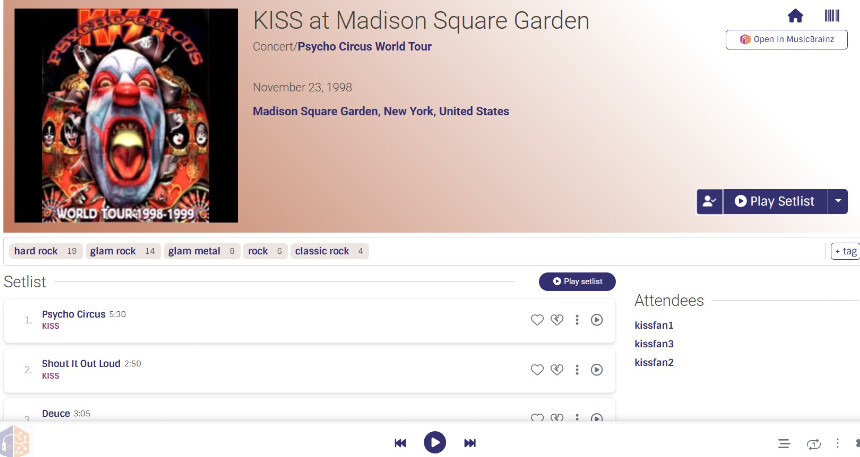
1) Event page
UI features:
- Event art, Artist, Event type, Venue, Date
- Attending/Attended event button
- Event genre tags derived from artist
- Lineup including supporting acts with setlist of each which contains
- Setlist of each performer, with playable listen cards
- Play setlist option
Caching:
- To cache the events,
mb_event_metadata_cache.pywill be similar tomb_metadata_cache.pyandmb_artist_metadata_cache.pywhere it uses its ownget_create_table_columns()to define columns for event MBID, event data, artist data, tag dataget_metadata_cache_query()to joineventwith:l_artist_event,artistfor the lineupl_event_place,place,areafor the venueartist,artist_tag,tagfor genre tags
- The cache is rebuilt periodically with
create_mb_event_metadata_cache()called frommanage.pyalong with incremental updates usingincremental_update_mb_event_metadata_cache(). entity_pages.pyconsists of the route which reads from this cache and the pydantic EventMetadata model to be inlistenbrainz/db/model/metadata.py
Setlist playback:
-
formatSetlist.tsx, which is taken frommusicbrainz-server/root/static/scripts/common/utility/formatSetlist.js, parses rawevent.setlistdata into work & artist MBID pairs as a work is represented by*and artist by@. -
The new cache table,
mapping.mb_event_metadata_cacheis populated with a query that joinsl_recording_work(work-recording relationship),recording,
artist_creditandartist_credit_name(join path for recording to artist) & finallyartist, and picks recording MBIDs where performing artist is the recording’s artist. -
canonical_recording_release_redirectis used to select a recording with a canonical mapping, filtering out other instances of recordings in its works such as bootlegs. If multiple instances exist here as well,recording_first_release_datetable would be used to pick the recording with the earliest release. -
The work to recording MBID resolution is needed to pass recording MBID into
ListenCard.tsxso that the song can be played from the event’s setlist. -
In case there isn’t a valid mapping, the setlist listen card is still shown with artist & song names as plaintext.
Attending events:
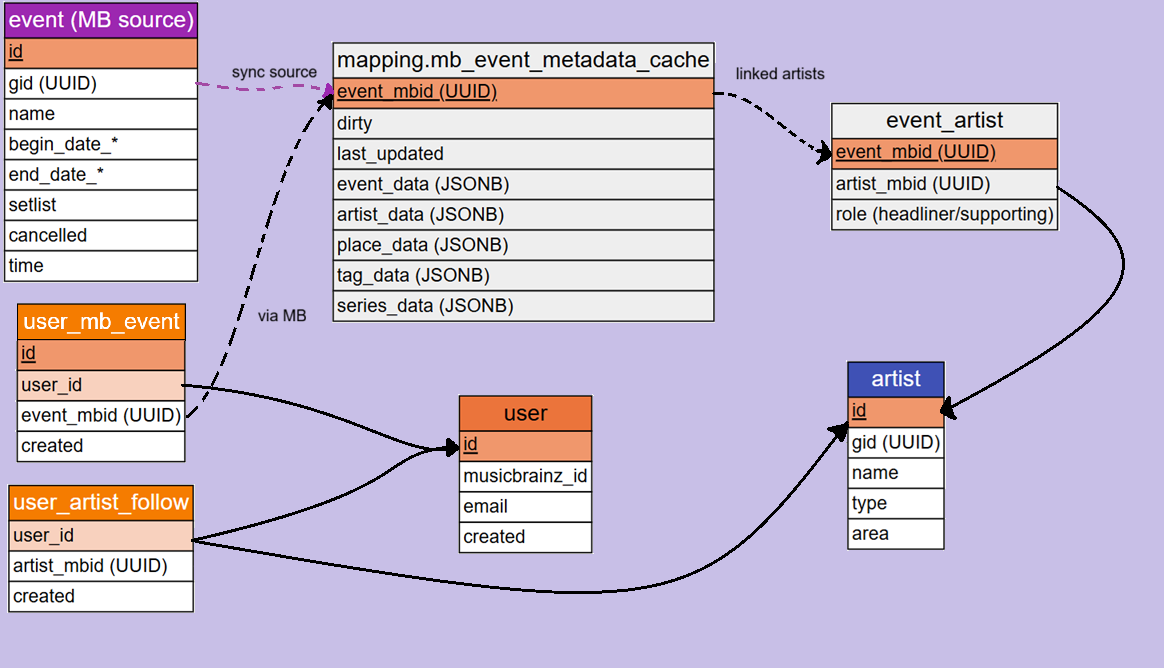
A user_mb_event table stores user - event relationships with a constraint to prevent duplicates.
Database operations for this come under mb_event.py too.
CREATE TABLE user_mb_event (
	id                  INTEGER GENERATED ALWAYS AS IDENTITY NOT NULL,
	user_id             INTEGER NOT NULL, -- FK to "user".id
	event_mbid          UUID NOT NULL,
	created             TIMESTAMP WITH TIME ZONE NOT NULL DEFAULT NOW(),
	UNIQUE(user_id, event_mbid)
);
Backend:
- source:
listenbrainz/db/mb_event.py - metadata caching:
mbid_mapping/mapping/mb_event_metadata_cache.py - for routes:
listenbrainz/webserver/views/entity_pages.py - for pydantic model:
listenbrainz/db/model/metadata.py - populate cache:
mbid_mapping/manage.py
Frontend:
- source:
frontend/js/src/mb-event/EventPage.tsx - setlist formatting (from
/musicbrainz-server/root/static/scripts/common/utility):frontend/js/src/mb-event/formatSetlist.tsx - attending users:
frontend/js/src/mb-event/components/Attendees.tsx
API endpoints:
GET /event/{event_MBID}- returns event metadata from the cacheGET /event/{event_MBID}/attendees- queriesuser_mb_eventto list outAttendees.tsxPOST /user/{user_id}/event- inserts a row intouser_mb_eventto ‘attend’DELETE /user/{user_id}/event/{event_MBID}- removes the row to ‘unattend’
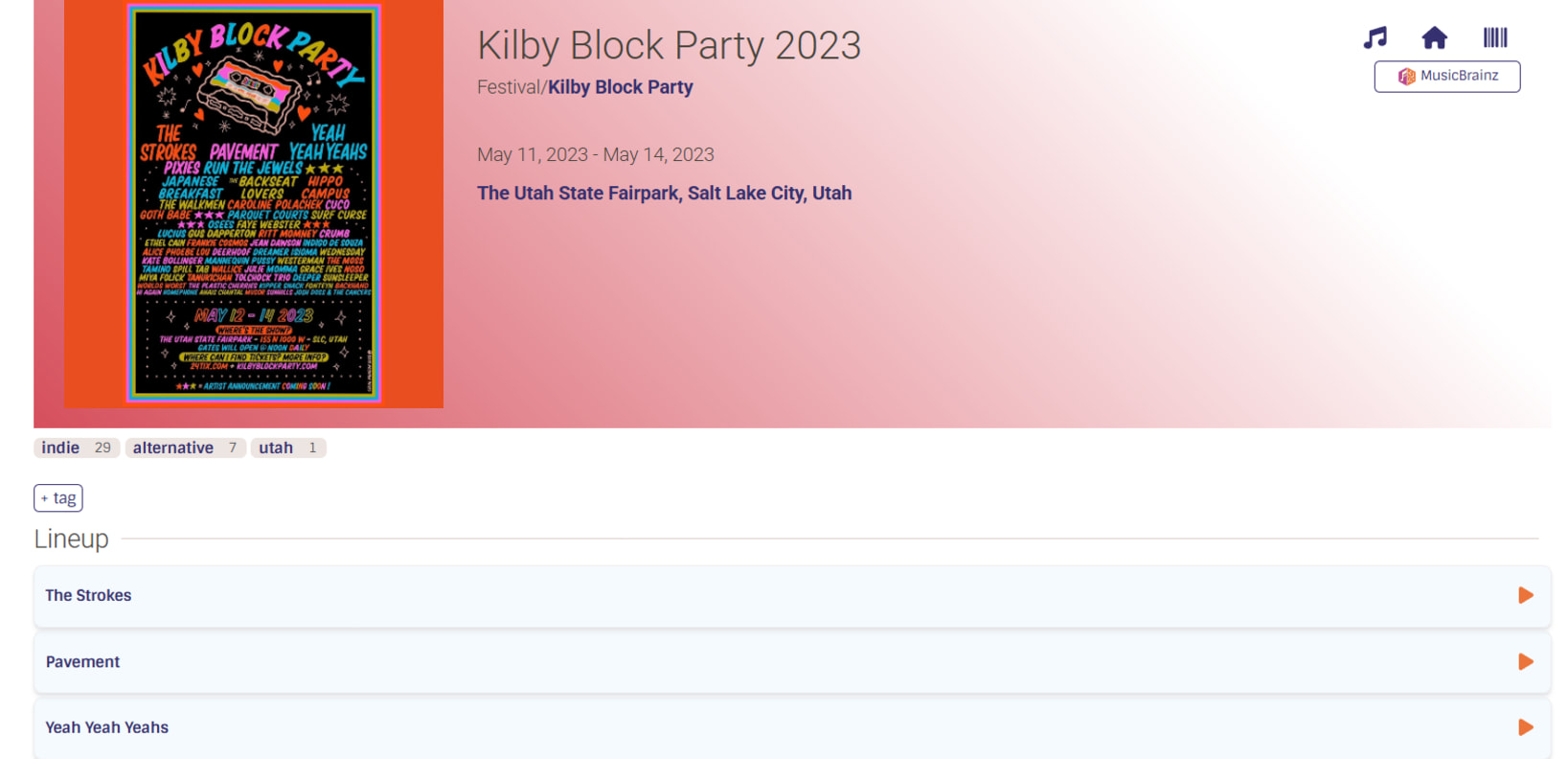
- Festival/tour page
UI features:
- Festival/Tour art, Name, Festival/Tour, Venues/Locations, Dates
- Festival/Tour genre tags derived from artists
- Festival lineup with links to “{Artist} at {Festival}” for each performer
or Tour dates with links to “{Artist} at {Venue}” for each show
Backend:
- source:
listenbrainz/db/series.py
Frontend:
- source:
frontend/js/src/series/SeriesPage.tsx
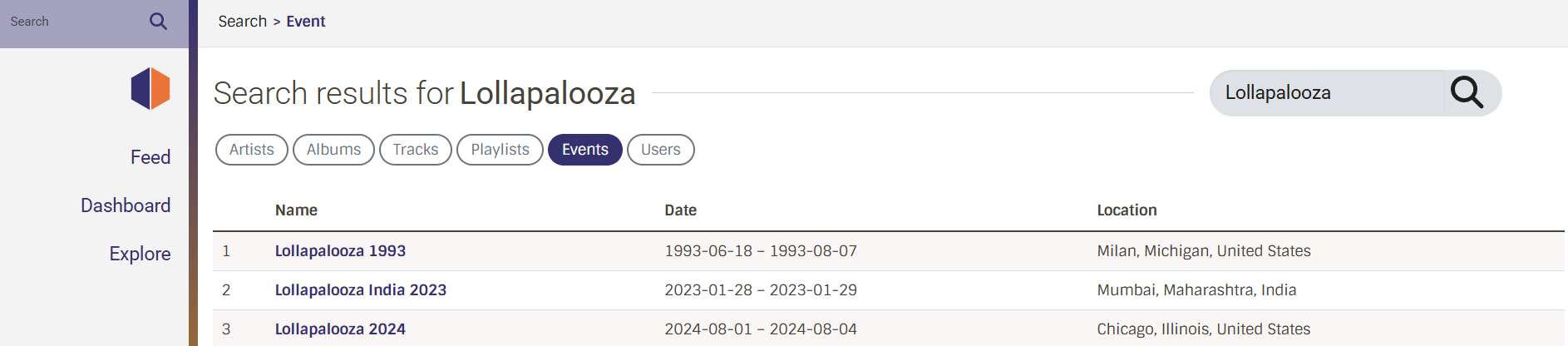
- Search events option
UI features:
- The search would rank out by the event name first, then location/venue, then artist
Frontend:
- source:
frontend/js/src/search/EventSearch.tsx - modified:
frontend/js/src/search/Search.tsx
frontend/js/src/search/types.d.ts
frontend/js/src/utils/APIService.ts
API endpoints:
GET /search/?search_term={query}&search_type=event
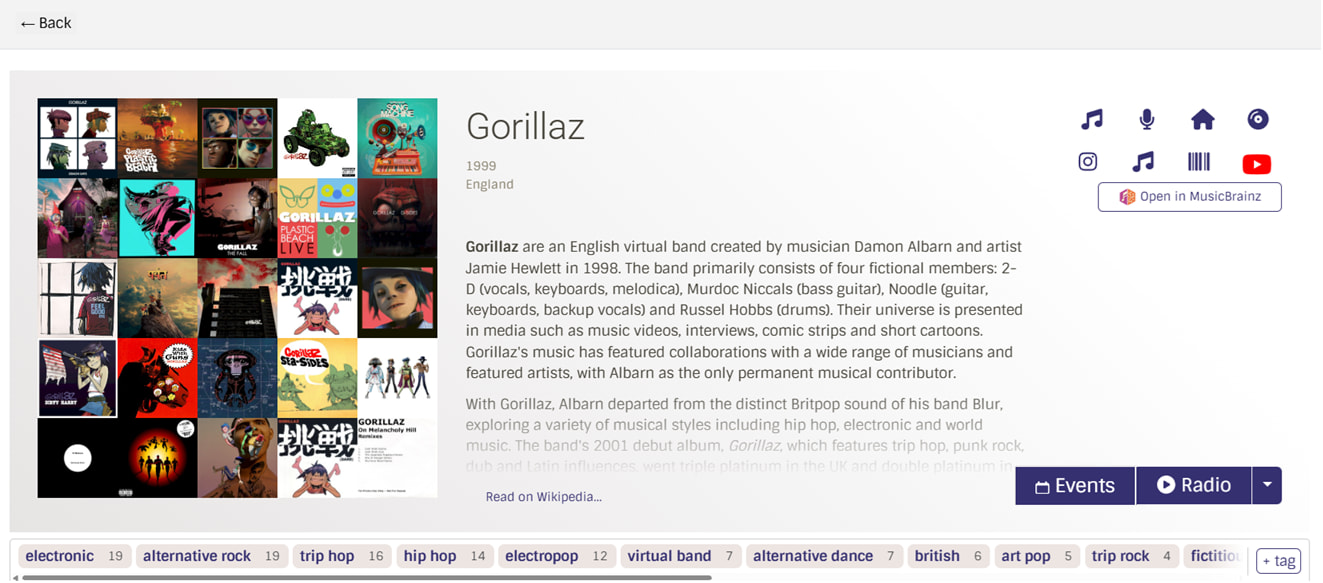
- Artist page ‘Events’ button
UI features:
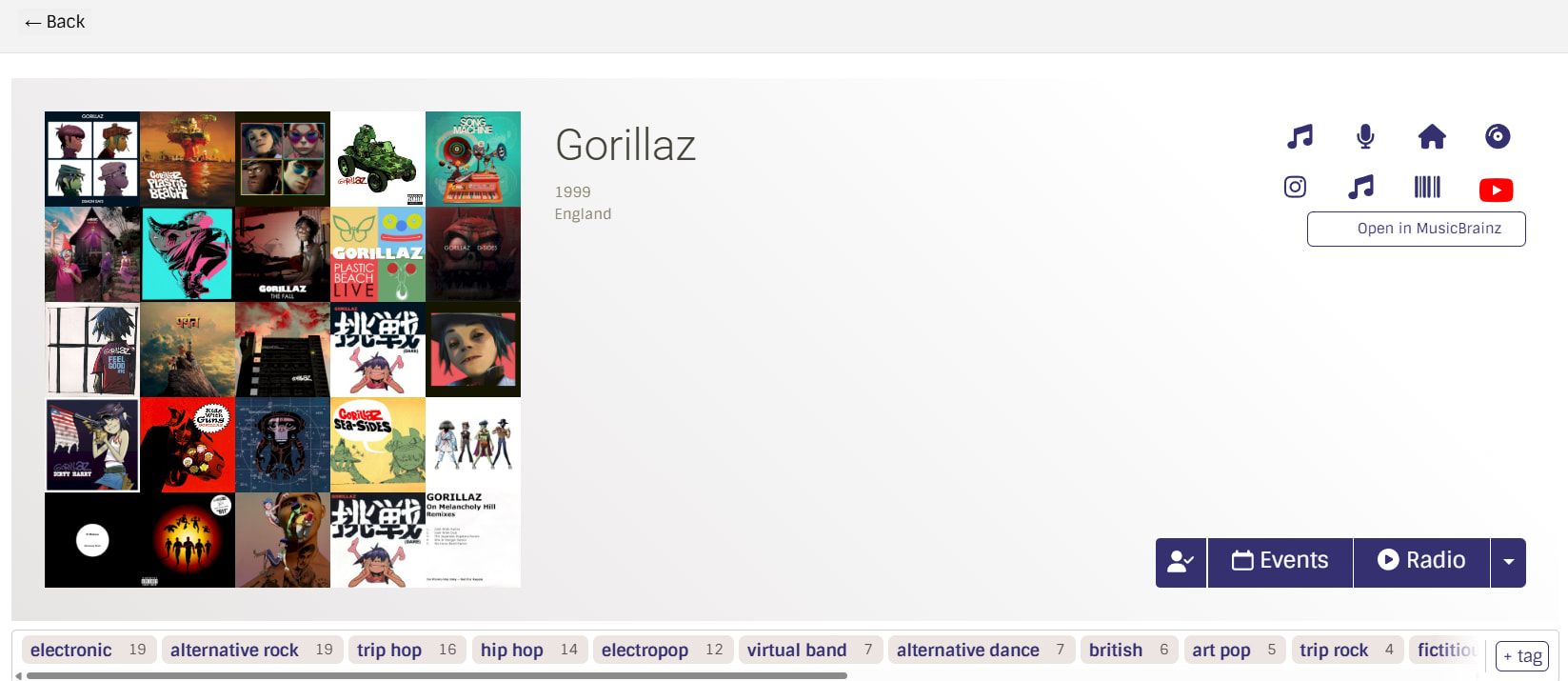
- The ‘Events’ button will be placed next to the radio button
Frontend:
- modified source:
frontend/js/src/artist/ArtistPage.tsx
- Artist’s events page:
UI features:
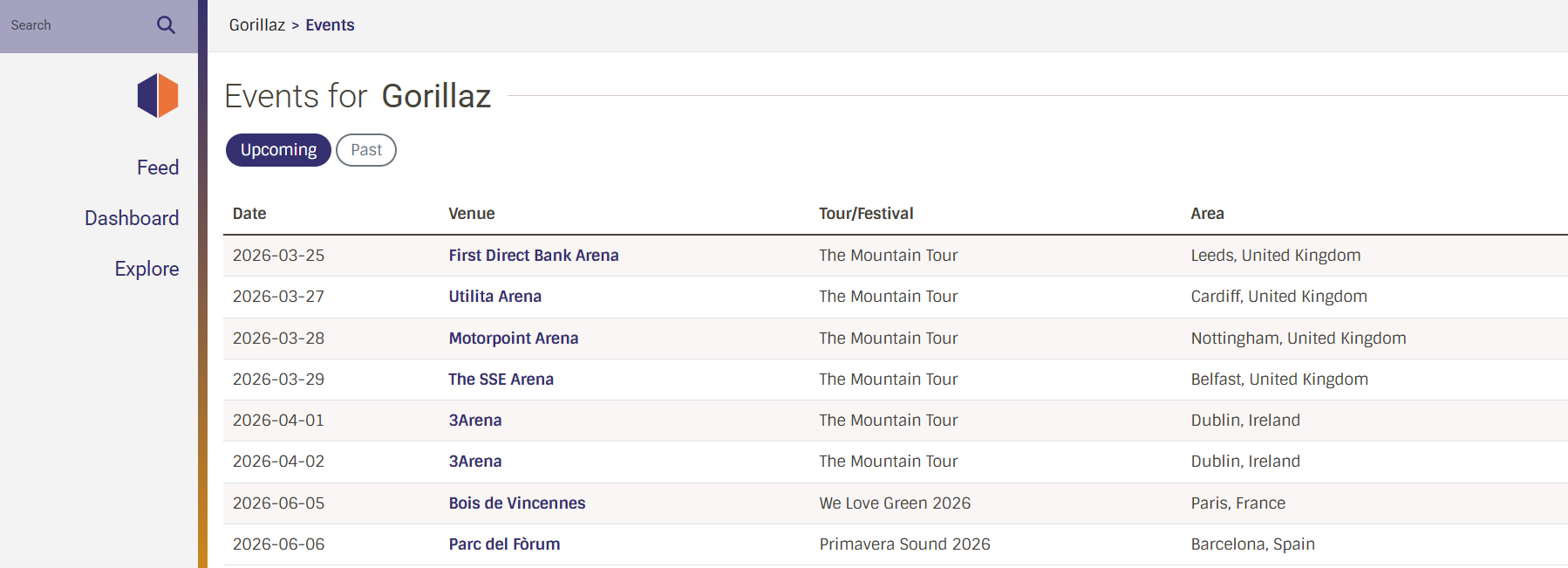
- List of upcoming events or past events with date, venue, tour/festival name, area
Frontend:
- source:
frontend/js/src/artist/ArtistEvents.tsx
API endpoints:
GET /artist/{artist_mbid}/events
- User’s events page:
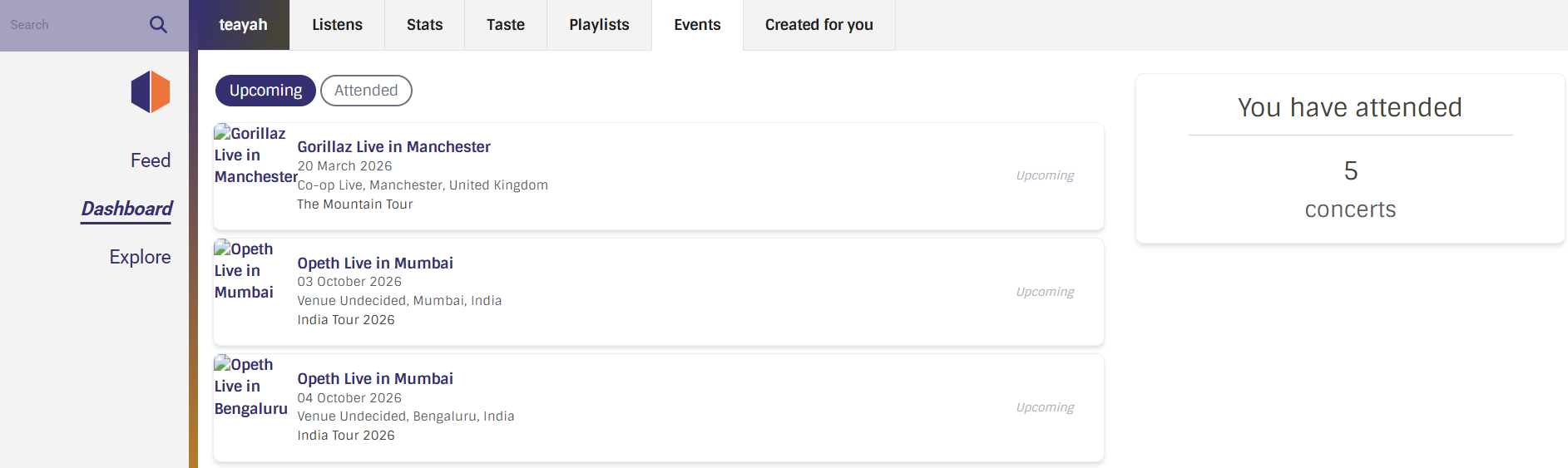
UI features:
- Upcoming events (attending)
- Past events (attended)
- Count of events attended
Frontend:
- source:
frontend/js/src/user/events/UserEvents.tsx - modified:
frontend/js/src/user/layout.tsx
- Global events page:
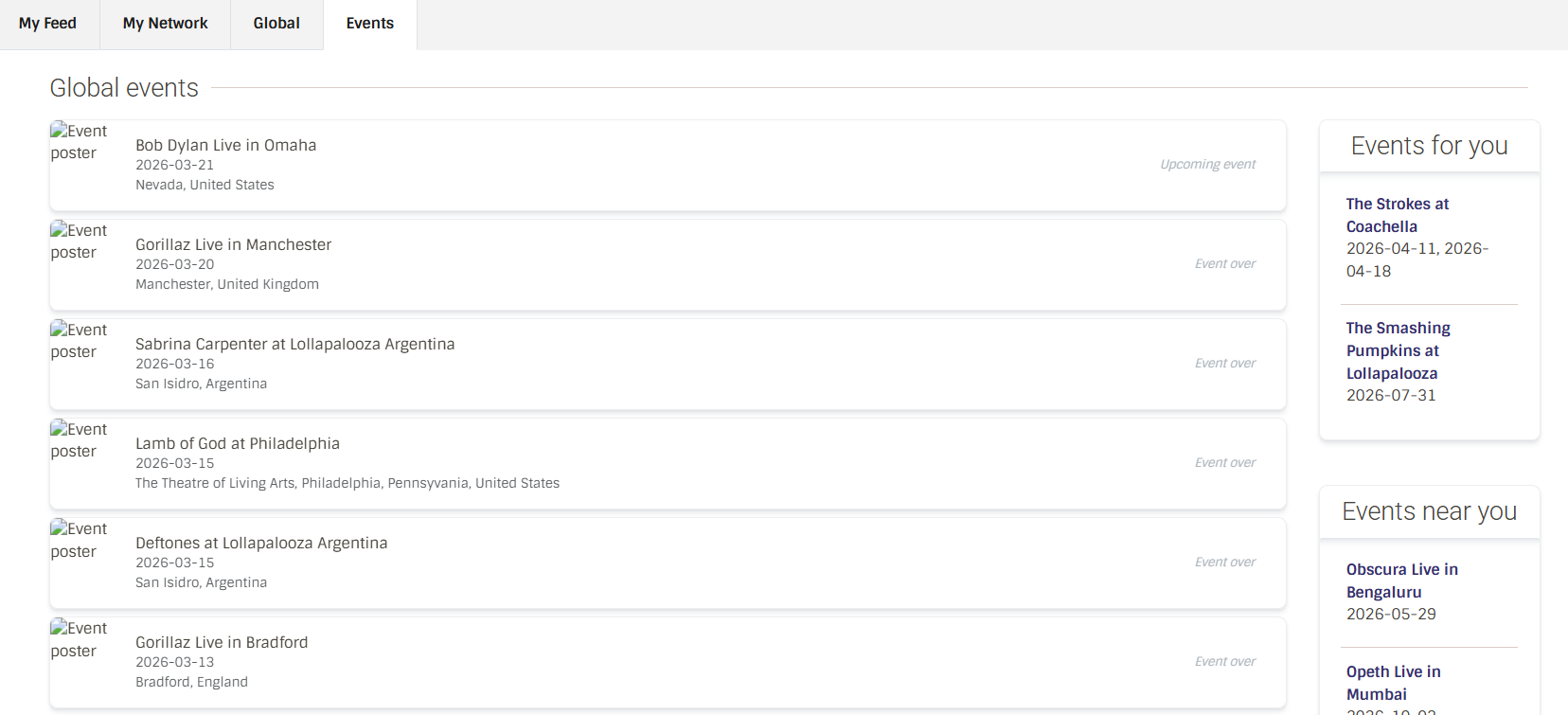
UI features:
- details of upcoming & past events of the week
- components ‘Events for you’ and ‘Events near you’ can be implemented once followed artists and user area features are implemented
Frontend:
- source:
frontend/js/src/event-feed/EventFeed.tsx - components:
frontend/js/src/event-feed/components/EventsNearYou.tsx
andfrontend/js/src/event-feed/components/EventsForYou.tsx
- Features considering the 2 metrics mentioned above i.e. artist follows & user area
8.1) Following artists
UI feature:
- Follow button on the artist page, besides the events button:
- Hence, once an artist is followed, it will be listed on the user’s Taste as Following:
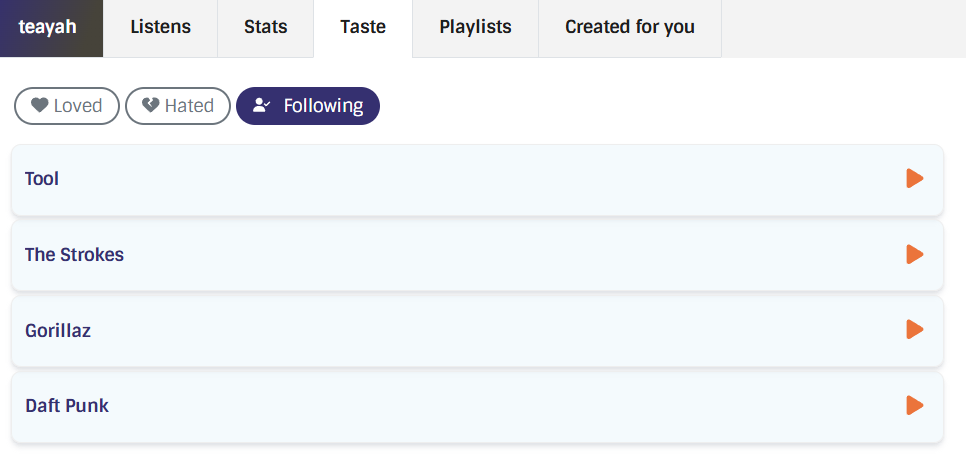
- A
user_artist_followtable stores user-artist relationships andartist_follow.pyhandles database operations for the same.
CREATE TABLE user_artist_follow (
    user_id             INTEGER NOT NULL, -- FK to "user".id
    artist_mbid         UUID NOT NULL,
    created             TIMESTAMP WITH TIME ZONE NOT NULL DEFAULT NOW()
);
Backend:
- relationship between user_id & artist_mbid:
listenbrainz/db/artist_follow.py - artist follow action:
listenbrainz/webserver/views/social_api.py
Frontend:
- source:
frontend/js/src/user/taste/components/FollowedArtists.tsx - modified:
frontend/js/src/user/taste/UserTaste.tsx
API endpoints: (similar to follow/unfollow endpoints in social_api.py)
POST /1/user/{user_name}/follow/artist/{artist_mbid}- insert a row intouser_artist_followDELETE /1/user/{user_name}/follow/artist/{artist_mbid}- delete the rowGET /1/user/{user_name}/following/artists- returns the list of followed artists
8.2) Settings adjustment for area:
The area feature would be implemented once MusicBrainz area data is in MetaBrainz OAuth.
UI features:
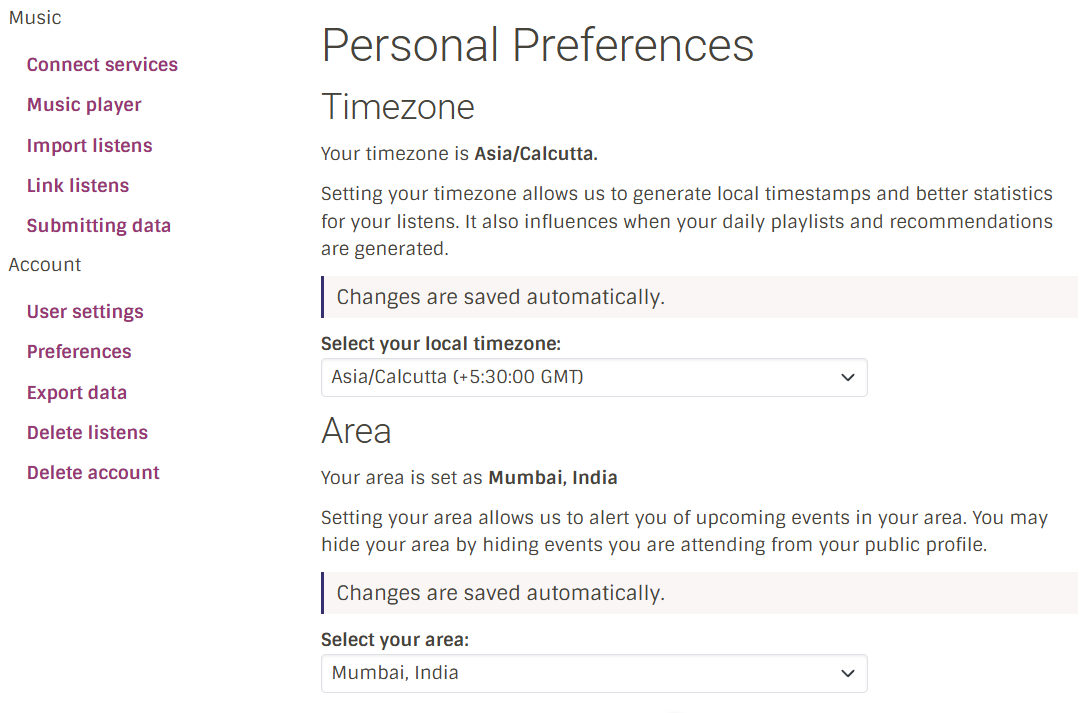
The user’s area can be stored similar to the way the timezone is stored. So additionally, the settings page could be modified as follows:
- Timezone and Area settings in a ‘Preferences’ page
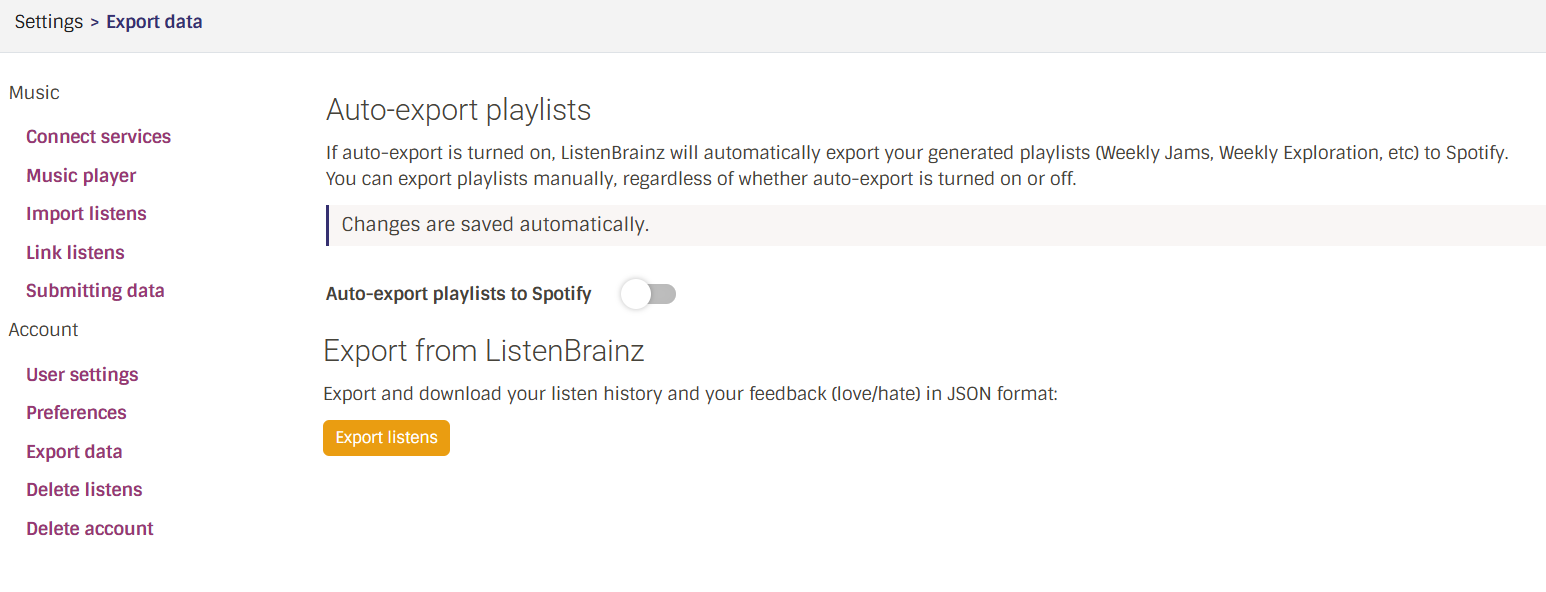
- The previous ‘Playlist preferences’ page merged with “Export data”
- Additionally, a note mentioning that choosing an area and marking events as attended could potentially reveal the user’s area
Backend:
- to include area:
listenbrainz/db/user_setting.py - settings API:
listenbrainz/webserver/views/user_settings_api.py
Frontend:
- timezone + area in
frontend/js/src/settings/preferences/PersonalPreferences.tsx - export data + troi in
frontend/js/src/settings/export/ExportData.tsx
8.3) Events in user feed
UI feature:
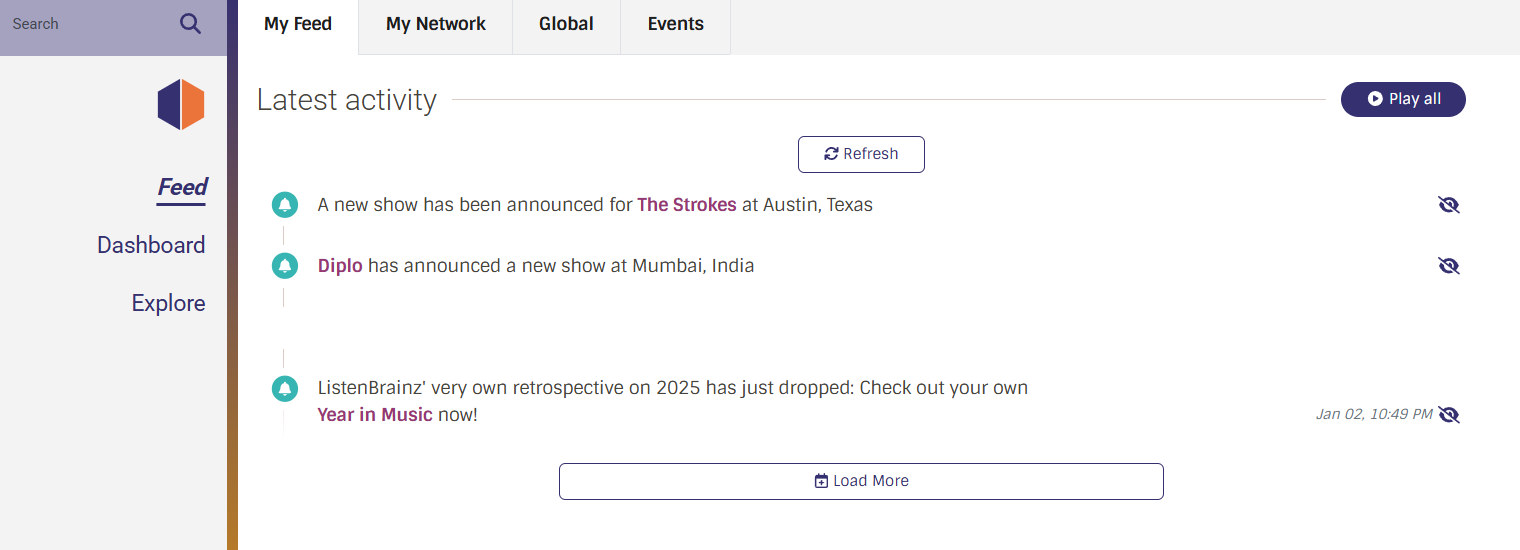
These 2 features would also lead to an additional feature that is notifying user’s in the feed when:
- followed artist announces any event
- an event is announced in the user’s area.
Backend:
- fetch area & artist event notifs:
listenbrainz/db/user_timeline_event.py - handle area & artist event notifs:
listenbrainz/db/model/user_timeline_event.py
Frontend:
- source:
frontend/js/src/user-feed/UserFeed.tsx - modified:
frontend/js/src/user-feed/UserFeedLayout.tsx
Schema update:
Timeline
Week 1 (May 25 - 31):
- Implement artist following feature: create the user_artist_follow table
- Create follow button on artist page
- Create page for artists followed by user in taste
Week 2 (June 1 - 7):
- Create the ‘Event’ page which can now be linked from artist’s events page & festival/tour page
- Populate mb_event_metadata_cache
Week 3 (June 8 - 14):
- Create button on the artist page for ‘Events’
- Create artist’s events page which opens on clicking the Events button on artist page
Week 4 (June 15 - 21):
- Create festival page with line-up of artists in place of setlists
- Create tours page & festival main page (as part of ‘series’) containing their relevant information
Week 5 (June 22 - 28):
- Integration of users with events: create the user_mb_event table
- Create a button to mark events as attend/attending
Week 6 (June 29 - July 5):
- Create Events page on user page
- Display event attendees/attending users on event page
- Display attended or planning to attend events on user
Week 7 (July 6 - 12): Midterm evaluation submission (July 6-10, 2026)
Week 8 (July 13 - 19):
- Make the event setlist playable utilizing ListenBrainz listen cards
Week 9 (July 20 - 26):
- Create global events page with all events of the week
- Enable searching of events through the search option
Week 10 (July 27 - August 2):
with area implementation:
- Integrate user area into DB
- Adjust settings layout to include the area setting
- Merge playlist preferences into export data
- This sets the base for curating events according to user’s area
Week 11 (August 3 - 9):
- Display notifications of events in user area or by artist followed by user in ‘My Feed’
- Create ‘Events near you’ & ‘Events for you’ based on artist following / area features
Week 12 - Final week (August 10 - 24):
- Cross check API calls & UI
- Testing with events, follow, unfollow, attendance, notifications and area implementation
- Final bug fixes
Community affinities
What type of music do you listen to?
My music taste is spread all across the genre of rock and also more recently, electronic.
A few of my favourite artists to name include:
A few of my favourite songs of all time would be:
What aspects of MusicBrainz/ListenBrainz/BookBrainz/Picard interest you the most?
To begin with, I was quite intrigued to find out about MetaBrainz and how much there is about music and metadata in general that’s stored here. Given that, I was really interested to find out about the projects that came with it too such as MusicBrainz and its extent of data in storing information about album releases including its formats and all the technical information of tracks/recordings that one doesn’t normally find in music streaming platforms. I’m also particularly fascinated by the unique statistics in ListenBrainz and the potential to include a lot more which makes me more excited to contribute to this project.
Have you ever used MusicBrainz Picard to tag your files or used any of our projects in the past?
Yes, I used Picard to edit the artist name and add cover art to my digital copy of Boris - flood and it worked perfectly and made it easier to track listens.
Programming precedents
I’ve been working with various programming languages since the age of 10 through academic exposure which covered Python, HTML, Java & C for me. Among these, I’m most familiar with Python and use it regularly for scripting.
I’m also working with SQL as a part of my coursework where my ongoing project deals with music databases too and have previously had another data analysis project dealing with music popularity trends using Python.
Practical requirements
What computer(s) do you have available for working on your SoC project?
I have access to a Lenovo LOQ with a 12th Gen Intel i5-12450HX processor, 16GB RAM (6GB VRAM), an NVIDIA GeForce RTX 3050 GPU and a 512 GB SSD. I use Ubuntu 24.04 on WSL with Windows as my main OS.
How much time do you have available per week, and how would you plan to use it?
I can invest about 25-30 hours per week initially (weeks 1-8), where I would actively work on the major features, dealing with the more intensive tasks in this period. In the last 4 weeks I would be working about 10-15 hours per week. I’ve structured work in my timeline considering my work hours.