Contact information
Name: Md Waqib Sk
Matrix/nick: waqib2992
Mail: waqibsk.2006@gmail.com
Github: Waqibsk (Md Waqib Sk) · GitHub
LinkedIn: https://www.linkedin.com/in/md-waqib-sk-0619232a2/
Project Size : 175 Hours (medium)
Proposed project
My goal is to make a Calibre plugin for BookBrainz . The UI will contain 3 different tabs, each serving different purpose.
- Update Metadata
- Browse BookBrainz
- Add Collection
File Structure :
calibbre/
 |---images/
 |    |--- logo.png
 |--- config.py
 |--- __init__.py
 |--- main.py
 |--- plugin.py
 |--- workers.py
 |--- api.py
 |--- ui.py
 |--- plugin-import-name-calibbre.txt
UI Development
I will be using PyQt5 and Qt Designer to develop the UI . It will generate a *.ui file then i will convert it to a .*.py file using pyuic5 for further development
Features :
api.py
import requests

class BookBrainzAPI:
    BASE_URL = "https://api.bookbrainz.org/1"

    @staticmethod
    def search_editions(query, size=10):
        search_url = f"{BookBrainzAPI.BASE_URL}/search?q={query}&type=edition&size={size}&from=0"
        response = requests.get(search_url)
        response.raise_for_status()
        search_data = response.json()
        return search_data.get("searchResult", [])

    @staticmethod
    def get_edition_details(bbid):
        detail_url = f"{BookBrainzAPI.BASE_URL}/edition/{bbid}"
        response = requests.get(detail_url)
        response.raise_for_status()
        return response.json()

    # /collection/{collectionId} will also be added here
    # def get_collection_details(collectionId):
Update MetaData Tab
Get the book that the user selected in Calibre. In case no book is selected this option will be disabled
Search book by name
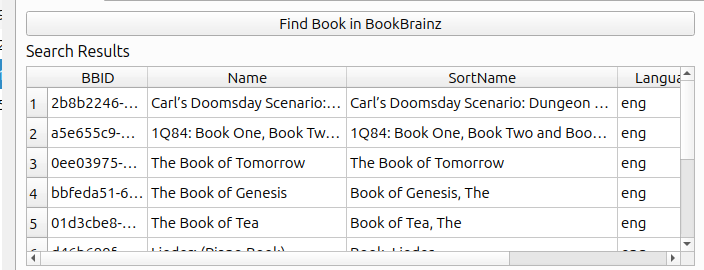
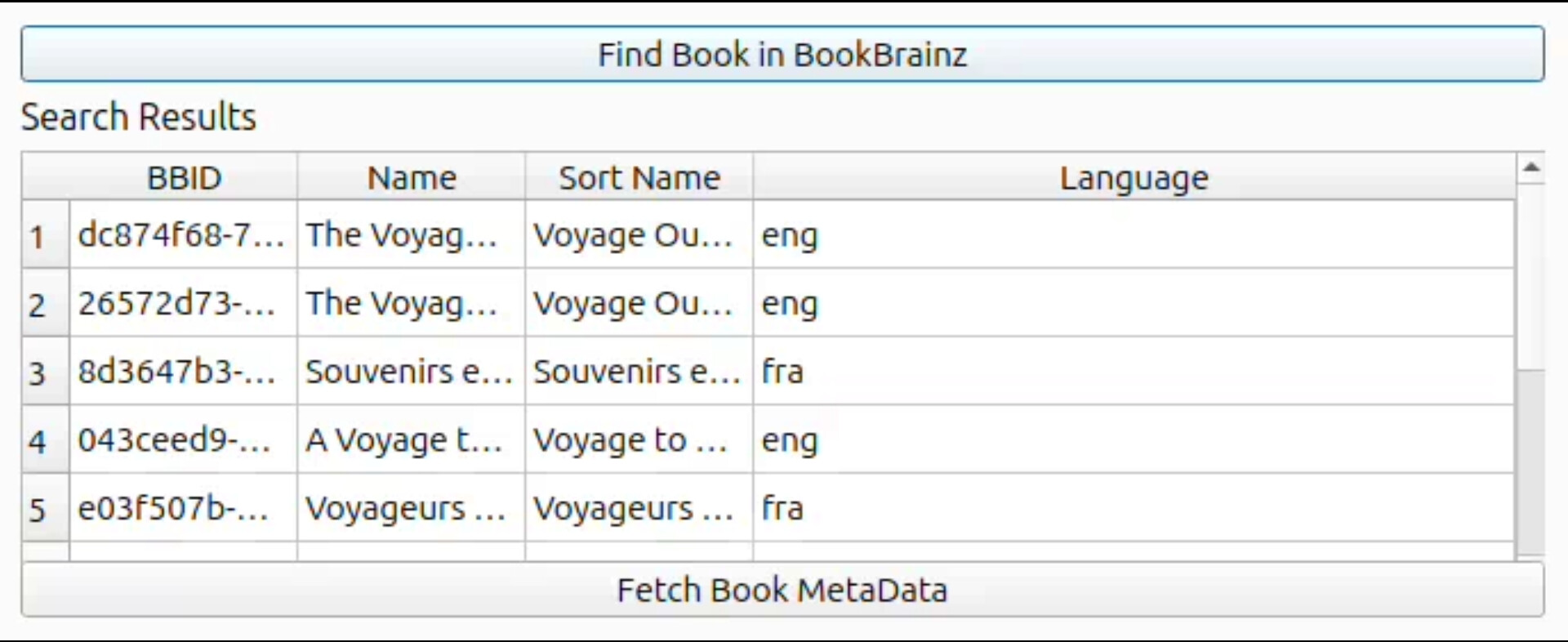
First we will search the selected book by its name in bookbrainz and show the search results in a tabular format using QtTableWidget
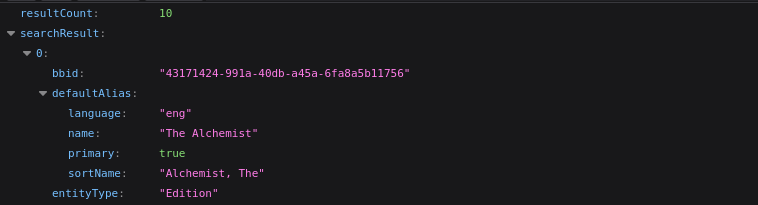
Api Endpoint : https://api.bookbrainz.org/1/search?q=Alchemist&type=edition&size=10&from=0
Response :
Worker :
class BookSearchWorker(QThread):
    # signals to send data back to the UI
    results_found = pyqtSignal(list)
    error_occurred = pyqtSignal(str)
    finished = pyqtSignal()

    def __init__(self, search_query):
        super().__init__()
        self.search_query = search_query

    def run(self):
        try:
            results = BookBrainzAPI.search_editions(self.search_query)
            self.results_found.emit(results)
        except Exception as e:
            self.error_occurred.emit(str(e))
        finally:
            self.finished.emit()
Functions :
   def search_book(self):
        book_name = self.mi.title # the mi will be set while initializing the plugin, it will contain the metadata from calibre
        if not book_name:
            QMessageBox.warning(self, "Input Error", "The book should have a valid Name.")
            return


        self.tableWidget.setRowCount(0)

        # initialize the thread
        self.search_thread = BookSearchWorker(book_name)

        # connect signals to UI slots
        self.search_thread.results_found.connect(self.on_search_results_ready)
        self.search_thread.error_occurred.connect(self.on_search_error)

        # start the thread
        self.search_thread.start()
 def on_search_results_ready(self, results):
        for item in results:
            bbid = item.get("bbid")
            if not bbid:
                continue

            bookTitle = item.get("defaultAlias", {}).get("name", "Unknown")
            bookLang = item.get("defaultAlias", {}).get("language", "eng")
            // get remaining fields

            row_position = self.tableWidget.rowCount()
            self.tableWidget.insertRow(row_position)

            self.tableWidget.setItem(row_position, 0, QTableWidgetItem(bbid))
            self.tableWidget.setItem(row_position, 1, QTableWidgetItem(bookTitle))
           // set the other items
def on_search_error(self, error_msg):
        QMessageBox.critical(self, "Error", f"An error occurred:\n{error_msg}")
The table will display the following items to the user
- Book Name
- Book BBID
- Sorted book name
- Book Language
- Book author
-
Screenshot :
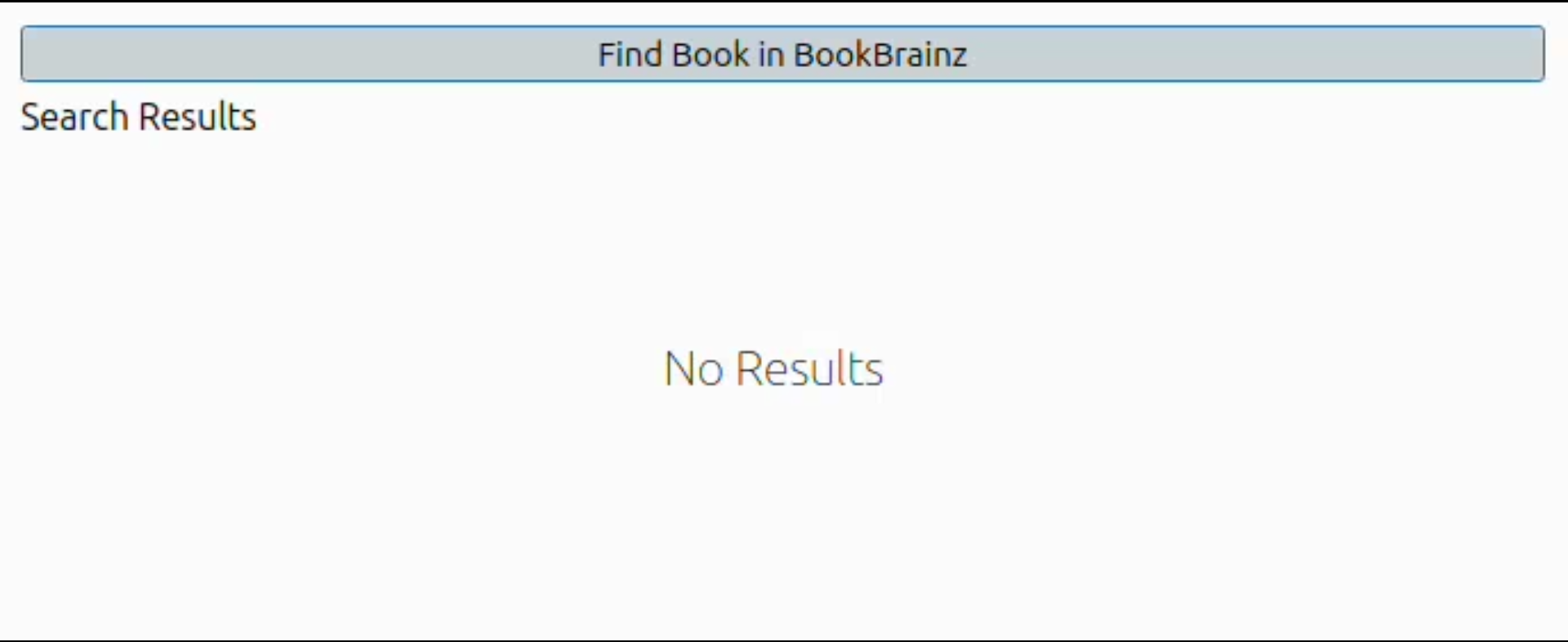
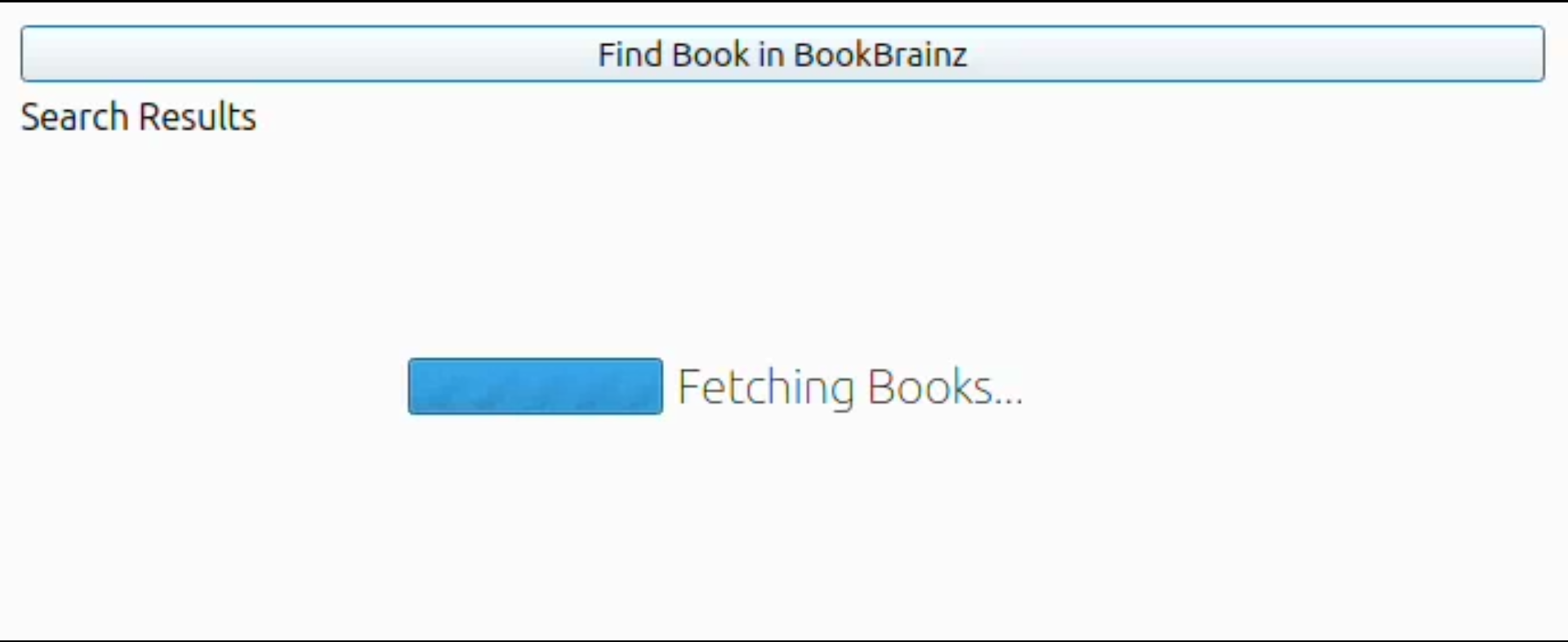
We will also handle different states in the UI while calling the API using stacked QtWidget.
The shown states will be :
- Initial state
- Loading state
- All results fetched
Screenshots :
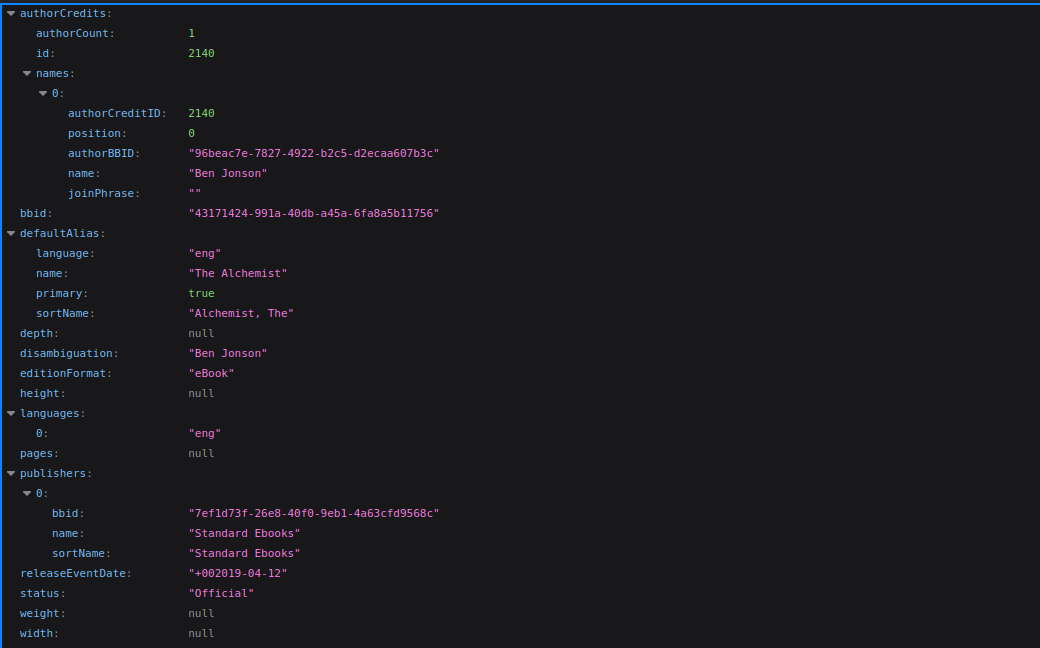
Fetch Book’s metadata from BookBrainz by BBID
Api Endpoint : https://api.bookbrainz.org/1/edition/{selected_bbid}"
Response :
Worker :
class GetEditionDetailsByBBID(QThread):
    result_found=pyqtSignal(list)
    error_occurred = pyqtSignal(str)
    finished = pyqtSignal()

    def __init__(self, bbid):
        super().__init__()
        self.bbid = bbid

    def run(self):
        try:
            result = BookBrainzAPI.get_edition_details(self.bbid)
            self.results_found.emit(result)
        except Exception as e:
            self.error_occurred.emit(str(e))
        finally:
            self.finished.emit()
Functions :
  def fetch_metadata(self):

# getting the selected book's bbid from the table

     selected_row = self.tableWidget.currentRow()

     if selected_row == -1:
          selected_row = 0
      selected_bbid = self.tableWidget.item(selected_row, 0).text()

 # starting the worker to get book's metadata details

      self.fetch_edition_data_thread= GetEditionDetailsByBBID(selected_bbid)

      self.fetch_edition_data_thread.error_occurred.connect(self.on_fetch_edition_data_error)
      self.fetch_edtition_data_thread.result_found.connect(self.on_fetch_edition_data_result_ready)

      self.fetch_edition_data_thread.start()
 def on_fetch_edition_data_results_ready(self,edition_data):

        # show the fetched data in the ui

        self.cached_metadata = self.create_metadata_object(edition_data, book_name)
 def on_fetch_edition_data_error(self, error_msg):

        QMessageBox.critical(self, "Error", f" An Error occured \n{error_msg}")
Update Book’s metadata in Calibre
A function to create metadata object from data. This object will be used while updating the book metadata in calibre
from calibre.ebooks.metadata.book.base import Metadata

 def create_metadata_object(self, bb_data,book_name):

      # getting the details

      title = book_name

      authors = []

      if 'authorCredits' in bb_data:
          for credit in bb_data['authorCredits']:
              if 'name' in credit and isinstance(credit['name'], dict):
                   authors.append(credit['name'].get('name', 'Unknown'))
              elif 'name' in credit:
                   authors.append(credit['name'])

      if not authors:
          authors = ["Unknown Author"]

      # metadata object

      mi = Metadata(title,authors)

     # set publisher and date and other details also to mi

      return mi
    def update_metadata():

        db = self.gui.current_db.new_api

        db.set_metadata(book_id, self.cached_metadata, set_title=True, set_authors=True)

        QMessageBox.information(self, "Success", "Book updated successfully!")

        # clear cache after update
        self.cached_metadata = None
Browse BookBrainz Tab
Search Editions by Name
There will be a search bar where user will be able to search edition in bookbrainz by name
( The search result will be limited maybe 20-30)
Worker :
class BookSearchByNameWorker(QThread):

    results_found = pyqtSignal(list)
    error_occurred = pyqtSignal(str)
    finished = pyqtSignal()

    def __init__(self, search_query):
        super().__init__()
        self.search_query = search_query

    def run(self):
        try:
            results = BookBrainzAPI.search_editions(self.search_query)
            self.results_found.emit(results)
        except Exception as e:
            self.error_occurred.emit(str(e))
        finally:
            self.finished.emit()
Functions :
  def search_book_by_name(self):
        search_query = self.lineEdit.text()
        if not search_query:
            QMessageBox.warning(self, "Input Error", "Please enter a search query.")
            return


        self.search_by_name_thread = BookSearchByNameWorker(search_query)

        self.search_by_name_thread.results_found.connect(self.on_search_by_name_results_ready)
        self.search_by_name_thread.error_occurred.connect(self.on_search_by_name_error)
        self.search_by_name_thread.finished.connect(self.search_by_name_thread.deleteLater)

        # start the thread
        self.search_by_name_thread.start()
def on_search_by_name_results_ready(self, results):
        # get the required fields and set it in the table
        # similar to previous on_search_results_ready function in metadata tab
def on_search_by_name_error(self, error_msg):
        QMessageBox.critical(self, "Error", f"An error occurred:\n{error_msg}")
This will contain two features :
Add book to calibre
We will be adding the books in calibre as empty books (will buy/read later) because we will only provide metadata not the actual readable book
Functions :
 def get_selected_books_data():

 results=[] # list of tuple ( format <mi,format_map> )

  # fetch the selected books metadata by bbid from BB api
  # create metadata object
  # append result as <mi,{}> (as we are adding empty book the file path should be empty)
 self.books_data_to_add=results
def add_book_to_calibre():

 if not self.books_data_to_add:
        return

# use the db.add_books() endpoint with books_data_to_add

ids = self.gui.current_db.add_books(self.books_data_to_add, add_duplicates=True)
print(f"Successfully added {len(ids)} empty books.")
Download Book MetaData as Json file (single or multiple)
	def download_book_metadata(self):

	 save_path = choose_save_file(self.gui, 'save-json', 'books.json', filters= [('JSON Files', ['json'])]) # choose where to save

     export_data = {} # array of selected books metadata

     if save_path:
         with open(save_path, 'w', encoding='utf-8') as json_file:
             json.dump(export_data, json_file, indent=4, ensure_ascii=False)

             print(f"Successfully exported {len(export_data)} books to                        {save_path}")
Add Collection Tab
Users will be able to search public collections of EntityType Edition (because this tab will be used to add books) and select the books that they want to add in calibre . The amount of collection items will be restricted to 20-30
Note: The API is not currently present ( working on it in PR-1252)
Api Endpoint : /collection/{collection_id}
Fetch Collection By ID
Worker :
class CollectionDetailsWorker(QThread):

    results_found = pyqtSignal(list)
    error_occurred = pyqtSignal(str)
    finished = pyqtSignal()

    def __init__(self, collectionId):
        super().__init__()
        self.collectionId = collectionId

    def run(self):
        try:
            results = BookBrainzAPI.get_collection_details(self.collectionId)
            self.results_found.emit(results)
        except Exception as e:
            self.error_occurred.emit(str(e))
        finally:
            self.finished.emit()
Functions :
 def fetch_collection(self):
      collectionId=self.lineEdit.text()
      if not collectionId:
          QMessageBox.warning(self,"Input Error","Please provide a collectionId")
      self.get_collection_details_thread=CollectionDetailsWorker(collectionId)

      # connect signals
      # collection found
      # error occurred

      self.get_collection_details_thread.start()
    def on_fetch_collection_result_ready(self,collection):

        collectionItems=collection.get("items");

        # iterate through collection items and set corresponding metadata in table
    def on_fetch_collection_error(self,error_msg):
        QMessageBox.critical(self, "Error", f"An error occurred:\n{error_msg}")
Add Collection to Calibre
def add_collection():
	# it will be almost similar to add_book_to_calibre function in Browse tab
Timeline
Phase 1: (Before Mid-Evals)
Expected outcome :
- A working Update Metadata tab
- Start working on Browse tab
Week 1 (May 25 - May 31):
- Create & finalize Qt ui design for Metadata tab
- Create & finalize Qt ui design for Browse tab
Week 2 (June 1 - June 7):
- Write & test function for searching selected book in Bookbrainz
- Show the books in the ui and handle different states (loading etc)
Week 3 (June 8 - June 14):
- Implement & test Fetch Metadata from BB function and display it in the UI
- Handle different states in the ui while fetching
Week 4-5 (June 15 - June 28):
- Make and test the Update book Metadata function
- (Work on update metadata tab will be finished )
- Test entire update metadata feature and fix any existing bugs
- Write documentation on how to use it
Week 6 (June 29 - July 5):
- ( Work on Browse BB tab starts )
- Implement & test search Edition ( by name ) in calibre function
Phase 2: (After Mid-Evals)
Expected outcome :
- A Working installable calibre plugin with 3 different tabs/features
Week 7-8 (July 6 - July 19):
- Write and test Download Metadata function
- Write and test Add Book to Calibre function
- Test entire Browse tab
- Write documentation on how to use it
- (Work on Browse tab will be finished )
Week 9 (July 20 - July 26):
- (Start working on Collection tab )
- Finish work on
collectionIdroute - Create & finalize Qt ui design for Collection tab
Week 10 (July 27 - Aug 2):
- Implement & test function to fetch public collection( using bbid) from BB
- Show the results in tabular format & handle different states
- Write and test add collection to calibre function (it will be almost simillar to add book to calibre in browse tab)
- Write docs for Collection tab and test the entire tab
- (Work on Add Collections tab will be finished )
Week 11-12 (Aug 3 - Aug 16):
- This is buffer time if any of the fixed deadlines are not met i will cover it here
- This also takes into account the time for UI polishes and bug fixing in between
- Test the entire plugin
Week 13 (Aug 17 - Aug 23):
- Wrap up and make video describing all the features of the plugin
- Final Report
In all the functions i will implement proper error handling with QtMessageBox (eg: Network error , No books found etc )
Extended/Future Goals
( All the features mentioned below will require Authentication )
-
Add Books To BookBrainz : Add calibre books directly to BookBrainz
- I think This would be a good feature to grow the books in Book Brainz as users will just have to press one click to add the book ( the calibre books will be stored as editions in book brainz)
-
Add Private Collection :
- It will be an Extension of the Collection tab
-
CritiqueBrainz integration ( future feature ) : Write reviews of a selected book directly from the plugin
- In this case first we have to check if the selected book exists in BB or not , then get the corresponding BBID after that we can make the request
Community affinities
What type of music do you listen to?
I listen to mostly soft music , listing some of my favourite songs :
- Lego House : Release group “Lego House” by Ed Sheeran - MusicBrainz
- Perfect : Release group “Perfect” by Ed Sheeran - MusicBrainz
- Photograph : Release group “Photograph” by Ed Sheeran - MusicBrainz
- Circles : Release group “Circles” by Post Malone - MusicBrainz
- Gul : Release group “Gul” by Anuv Jain - MusicBrainz
- Alag Aasmaan : Release group “Alag Aasmaan” by Anuv Jain - MusicBrainz
What type of books do you read?
Some of my favourite books are :
- The Alchemist : The Alchemist (Work) – BookBrainz
- The Da Vinci Code : The Da Vinci Code (Edition) – BookBrainz
- Harry Potter : Harry Potter (Series) – BookBrainz
What aspects of MusicBrainz/ListenBrainz/BookBrainz/Picard interest you the most?
I always liked the classic vibe of Wikipedia and thats exactly what i get when i look at Metabrainz projects . I also like how detailed the databases are ( i mean i never thought a single book can have so much info before looking at bookbrainz).
Programming precedents
When did you first start programming?
I started programming in the first year of my college . And the initial motivation for programming was i can make games through it . Although my interest has changed over the time but that was how i started .
Have you contributed to other open source projects? If so, which projects and can we see some of your code?
Yes i have contributed to OpenStreetMap
You can check out the PRs here:
- https://github.com/openstreetmap/iD/pull/11316
- Feat: Click to switch features that are crossing ways by Waqibsk · Pull Request #11346 · openstreetmap/iD · GitHub
- fix: allow 0 as input value in layer tag by Waqibsk · Pull Request #11300 · openstreetmap/iD · GitHub
And some no-code (docs) contribution include :
- Next-cloudinary : add: guide for delivering remote images by Waqibsk · Pull Request #600 · cloudinary-community/next-cloudinary · GitHub
- LocalStack : [ Docs]: Normalize structure: Build & deploy Lambda container images (ECR) by Waqibsk · Pull Request #260 · localstack/localstack-docs · GitHub
You can also checkout some of my personal projects :
- GitHub - Waqibsk/Darklash: 2d fighting game · GitHub
- GitHub - Waqibsk/delta: A Go script to delete your emails based on their subjects :) · GitHub
Practical requirements
What computer(s) do you have available for working on your SoC project?
I have Asus Vivobook 14
Specifications:
- Processor: AMD Ryzen™ 5 7520U with Radeon™ Graphics × 8
- Os: Ubuntu 24.04.1 LTS
- Ram: 8.0 GB
- Disk Space: 512 GB
How much time do you have available per week, and how would you plan to use it?
I have no other commitments during the summer and can dedicate 20-25 hours a week.
I am also planning to close this ticket before the coding period .
 ..
..