Introduction
Contact Information
Name: Aman Nishad
IRC nick: javaman97
GitHub: javaman97
Email: javaman0512@gmail.com
LinkedIn: Aman Nishad | LinkedIn
Time Zone: UTC+05:30
I am a first-year student at Sikkim Manipal University, currently pursuing a Master of Computer Applications (MCA). I developed an interest in Android development during my Bachelor of Computer Applications and have since built applications that address real-world problems and deliver meaningful user experiences. I also enjoy listening to motivational hip-hop music, which keeps me focused and driven.
Project Overview
ListenBrainz App is an open-source, privacy-focused platform that allows users to track and analyze their music listening habits. Currently, it’s available as native Android app. IOS previously started using Swift and Swift UI but maintaining two separate codebases has resulted in duplicated effort, architectural inconsistencies, and increased long-term maintenance overhead.
This project proposes migrating the existing Android app to Compose Multiplatform using Kotlin Multiplatform. The goal is to establish a shared codebase that supports both Android and iOS while preserving a high-quality native experience.
My Contributions
I have been a contributor to ListenBrainz since January 2026 and have worked on implementing the migration of compose-rating bar, android logger to Kermit, compatible with Compose Multiplatform along with reporting and fixing some bugs.
-
My PRs till date: Check here
-
My commits till date: Check here
Implementation Architecture in 5 simple steps →
-
Migrate Core App Shell to Compose Multiplatform
-
Navigation Migration
-
Replace or Isolate Android-only Libraries
-
Platform-specific (expect/actual)
-
Testing

Referring to Compose Multiplatform (epic issue), the migration progress is as follows →

1. Migrate Core App Shell to Compose Multiplatform
implementation(compose.runtime)
implementation(compose.foundation)
implementation(compose.material3)
implementation(compose.components.resources)
-
Move Core UI to
commonMain-
Migrate the app theme (
Theme.kt, colors, typography, shapes) tocommonMain. -
Move the root UI structure (
Scaffold, top-level composables) into the shared module.
-
-
Adapt UI Components for Multiplatform
-
Replace Android-specific
androidx.compose.*APIs with their equivalents from JetBrains Compose Multiplatform where required. -
Remove usages of Android-only features such as
LocalContext,Activity, or platform-specific window APIs from shared UI.
-
-
Adopt KMP-Compatible ViewModels
-
Replace Android-only AndroidX Lifecycle ViewModel usage with a KMP-compatible ViewModel approach.
-
Move top-level ViewModels used by the app shell to
commonMain.
-
-
Update Resource Handling
- Replace Android resource usage (
R.string,R.drawable) with Compose Multiplatform resource APIs
- Replace Android resource usage (
Remove Android-only Dependencies
- Remove unsupported
androidx.compose.*dependencies tied to Android-only functionality.
2. Navigation Migration
Replace Navigation Compose
-
implementation("cafe.adriel.voyager:voyager-navigator:1.0.0")
-
Convert existing navigation graph to Voyager
-
Update screen navigation calls
-
Test navigation flow
3. Replace or Isolate Android-only Libraries
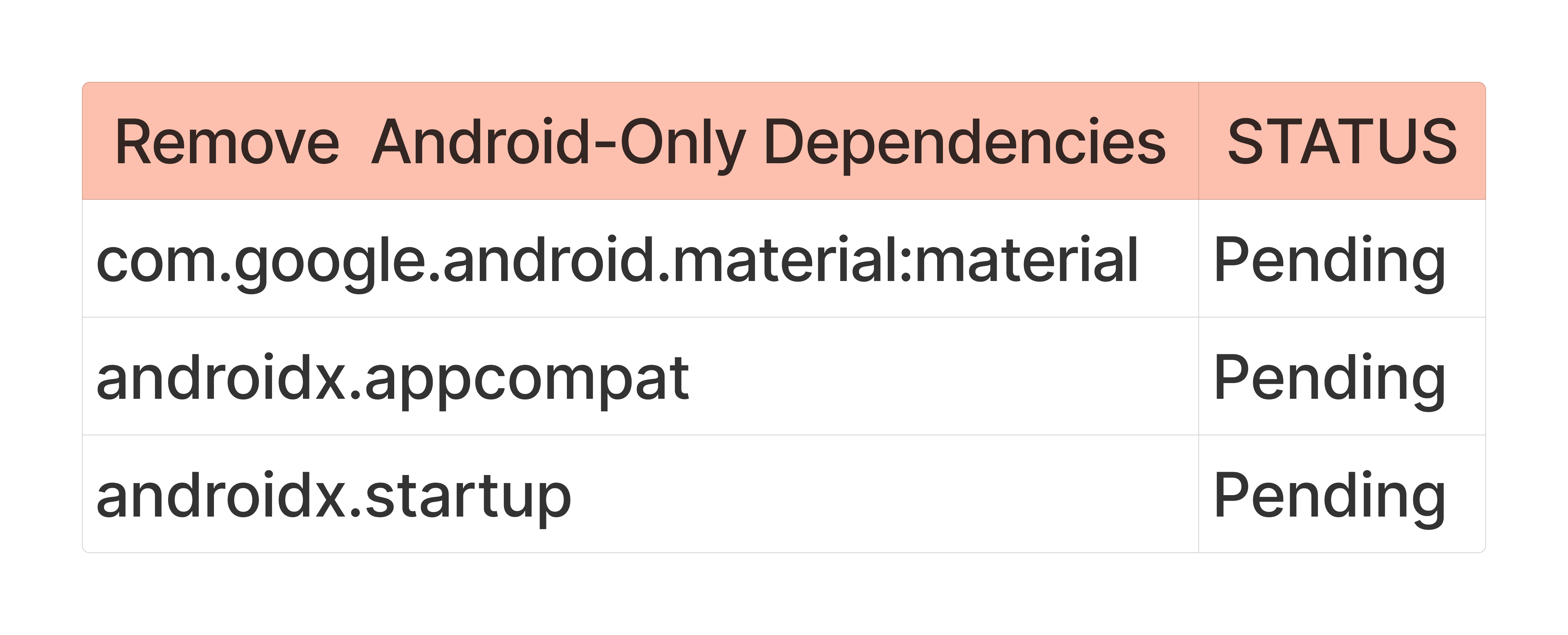
Android-specific dependencies will be replaced with multiplatform alternatives or isolated using platform abstractions.
Animation ( Lottie to Compottie)
implementation("io.github.alexzhirkevich:compottie:<version>")
-
Replace Android-only Lottie implementations with Compottie, which provides a multiplatform renderer compatible with JetBrains Compose Multiplatform.
-
Move animation composables to
commonMain.
Example:
val composition by rememberLottieComposition(
LottieCompositionSpec.Asset("animation.json")
)

LottieAnimation(
composition=composition,
iterations=LottieConstants.IterateForever
)
Permissions Handling
- Implement platform-specific logic in
androidMainandiosMain.
class AndroidPermissionManager :PermissionManager {
override suspend fun requestPermission(permission:String):Boolean {
// Android permission request logic
    }
}
class IOSPermissionManager :PermissionManager {
override suspend fun requestPermission(permission:String):Boolean {
// iOS permission request logic
returntrue
    }
}
System UI Control
Remove Accompanist System UI Controller, which depends on Jetpack Compose and works only on Android.
Example in commonMain:
interface SystemUiController {
fun setStatusBarColor(color:Long,darkIcons:Boolean)
}
Implement system UI control in androidMain using Android window APIs.
class AndroidSystemUiController :SystemUiController {
overridefunsetStatusBarColor(color:Long,darkIcons:Boolean) {
// Window status bar configuration
    }
}
Provide a minimal implementation in iosMain using UIKit APIs.
class IOSSystemUiController :SystemUiController {
overridefunsetStatusBarColor(color:Long,darkIcons:Boolean) {
// iOS status bar configuration
    }
}
AppCompat Removal
-
Remove dependencies on AndroidX AppCompat where possible.
-
Replace AppCompat-based UI with Compose-based implementations.
App Startup
-
Replace usage of AndroidX Startup with multiplatform initialization logic.
-
Move initialization of shared services into
commonMain. -
Keep Android-specific startup hooks inside
androidMain.
System UI Control
-
Remove dependency on Accompanist System UI Controller.
-
Introduce an
expect/actualabstraction for system UI configuration (status bar, navigation bar).
Example:
expect fun configure SystemUi()
- Provide platform implementations in
androidMainandiosMain.
4. Platform-specific (expect/actual)

Create Platform Wrappers Using expect/actual
To support multiplatform development, shared abstractions will be created in commonMain, while platform-specific implementations will be provided in androidMain and iosMain.
1. Sharing
expect fun shareText(text:String)
Android implementation
Uses Android share intents.
actual fun shareText(text:String) {
// Android Intent.ACTION_SEND implementation
}
iOS implementation
Uses the native share sheet.
actual fun shareText(text:String) {
// UIActivityViewController implementation
}
2. Browser Handling
The app currently relies on Android browser mechanisms such as Chrome Custom Tabs.
Shared abstraction
expect fun openUrl(url:String)
Android implementation
- Open links using Custom Tabs.
iOS implementation
- Open links using the default system browser (
UIApplication.openURLor Safari view controller).
3. Splash Screen
Android may use AndroidX SplashScreen, which is not available in iOS.
Shared abstraction
expect fun configure SplashScreen()
Android implementation
- Integrate with Android SplashScreen API.
iOS implementation
- Use the default iOS launch screen configuration.
4. Onboarding Flow
The onboarding UI will be shared using Compose Multiplatform.
Shared abstraction
-
Move onboarding composables to
commonMain. -
Manage onboarding state using shared ViewModels.
Media Playback & Background Tasks (PHASE 2)
1. Introduce Media Playback Interface
Create a shared media playback abstraction in Kotlin Multiplatform.
Example interface in commonMain:
interface MediaPlayer {
fun play(url:String)
fun pause()
fun stop()
}
2. Android Implementation
Use ExoPlayer in androidMain.
class AndroidMediaPlayer :MediaPlayer {
override fun play(url:String) {/* ExoPlayer logic */ }
override fun pause() { }
override fun stop() { }
}
3. iOS Implementation
Provide a minimal implementation using AVPlayer.
class IOSMediaPlayer :MediaPlayer {
override fun play(url:String) {/* AVPlayer logic */ }
override fun pause() { }
override fun stop() { }
}
Background Task Abstractions
1. Shared Interface
interface BackgroundTaskScheduler {
fun scheduleSync()
}
2. Android Implementation
Use Android WorkManager.
class AndroidBackgroundScheduler :BackgroundTaskScheduler {
override fun scheduleSync() {
// WorkManager scheduling
    }
}
3. iOS Implementation
Provide an initial minimal implementation using BGTaskScheduler.
class IOSBackgroundScheduler :BackgroundTaskScheduler {
override fun scheduleSync() {
// BGTaskScheduler registration
    }
}
Handling Android-only SDKs
Some dependencies have no iOS equivalent.
Example: Spotify App Remote SDK
Approach:
-
Mark such dependencies as out-of-scope for iOS during the initial migration.
-
Provide stub implementations in
iosMainif required to keep the build working.
Example stub:
class IOS Spotify Remote Controller :SpotifyRemoteController {
override fun connect() {
// Not supported on iOS
    }
}
5. Testing Migration

-
Migrate unit tests from JUnit to Kotlin Test to support shared testing in Kotlin Multiplatform. This migration has been partially completed.
-
Move platform-independent tests to the
commonTestsource set so they can run across Android and iOS targets. -
Android-specific UI tests using Espresso and Jetpack Compose UI Test cannot run in shared modules.
Timeline
Phase 1 - Foundation: KMP Setup, UI Migration, Dependency Audit, Platform Abstractions (expect/actual)
In this phase, I will set up Compose Multiplatform in the project, migrate the core UI scaffolding, replace Android-only libraries with KMP-friendly alternatives, and introduce platform abstractions using expect/actual where required.
Phase 1 exit criteria (before Midterm)
-
Project builds and runs for Android using Compose Multiplatform.
-
iOS target compiles and reaches at least a basic “app shell” (launch + navigation scaffolding), even if many features are stubbed.
-
Most Android-only dependencies are either replaced with KMP alternatives or moved behind
expect/actual/ interfaces. -
A short migration doc exists module boundaries, platform-specific surfaces, and remaining high-risk items.
| Week | Focus area | Priority | Deliverables / Technical work |
|---|---|---|---|
| May 1 - May 24 | Community bonding + technical spike | Medium | Finalize scope with mentors. Identify the top “Android-only blockers” (navigation, DI, media, permissions, background work). Draft module split (shared vs platform). Set up a small proof-of-concept iOS target build. |
| May 25 - May 31 | CMP app shell + view model & business logic | High | Migrate the core app shell (theme, Scaffold, top-level). Replace androidx.compose.* usage with JetBrains Compose Multiplatform where needed and update androidx.lifecycle to KMP-compatible ViewModel (in progress) |
| June 1 - June 7 | DI + navigation+ shared runtime wiring | High | Move DI to KMP-friendly setup. Replace koin-androidx-compose with koin-compose. Replace androidx.navigation.compose with Voyager. Ensure shared modules can resolve dependencies in both Android and iOS entry points. |
| June 8 - June 14 | Dependency audit (KMP alternatives) | High | Replace or isolate Android-only libs: animations, permissions, material, appcompat ,startup, system UI control, paging etc. |
| June 15 - June 21 | Platform abstractions -1 (expect/actual) | Critical | Create expect/actual or interface wrappers for: sharing, browser handling (custom tabs vs iOS browser), splash screen, onboarding. Add a minimal iOS implementation for each wrapper (even if simplified). |
| June 22 - June 28 | Platform abstractions -2 (media + background) | Critical | Introduce media playback interface: Android → ExoPlayer, iOS → AVPlayer (initial minimal). Define background task abstractions: Android → WorkManager, iOS → BGTaskScheduler(initial minimal). Explicitly mark any “no iOS equivalent” dependencies (e.g., spotify-app-remote) as out-of-scope or stubbed for iOS. |
| June 29 - July 5 | Stabilization + pre-midterm QA | High | Fix regressions. Add basic smoke tests for shared code. Validate Android user flows still work. Ensure iOS app launches and navigation shell renders. Prepare midterm demo notes + list of known gaps. |
Midterm Evaluation (July 6 - July 10)
Focus on submitting midterm evaluation, bug fixes, and feedback from mentors.
Phase 2 - Testing Foundations, Feature Parity & iOS Stabilization
This phase focuses on adding test coverage for shared code, stabilizing the iOS target, and reaching feature parity for the most-used user flows.
| Week | Task | Priority | Technical Description |
|---|---|---|---|
| July 11 - July 17 | Midterm feedback → fixes + scope lock | Critical | Apply mentor feedback. Fix any regressions introduced in Phase 1. Lock the list of “must-have” flows for iOS (sign in, feed, profile, settings, playback entry points). Define acceptance criteria for “running iOS app”. |
| July 18 - July 24 | Shared test setup + first unit tests | High | Set up Kotlin Multiplatform test strategy for shared modules. Add unit tests for API client, serialization, and repository layer (mock engine / test server as applicable). Ensure tests run in CI for shared code. |
| July 25 - July 31 | ViewModel / business logic tests + navigation stability | High | Add tests for key view models (MVVM). Validate state restoration and navigation transitions (Voyager). Address iOS-specific issues (lifecycle, coroutine dispatchers, threading). |
| Aug 1 - Aug 7 | iOS QA week + bug fixing + performance pass | Critical | Run through all “must-have” flows on iOS simulator/device. Fix crashes and UI regressions. Improve startup time and scrolling performance where needed. Document known limitations + follow-up tasks. |
Final Evaluation - UI Tests, Polish & Documentation
Last phase to refine UX, add targeted UI tests, and prepare the final report and handover docs.
| Aug 8 - Aug 14 | UI consistency + targeted UI tests | High | Collect feedback from mentors and community on design consistency. Add targeted UI tests for the most critical screens and flows (smoke tests, navigation, basic rendering). Validate behavior across different screen sizes (phones, tablets) where supported. |
|---|---|---|---|
| Aug 15 - Aug 17 | Final submission + handover | Critical | Prepare final evaluation deliverables: a detailed technical report, migration notes (what is shared vs platform-specific), how to add new screens, how to run iOS locally, and a list of remaining work. Final cleanup: remove unused dependencies, address tech debt, and ensure CI is green. |
Extras (if time permits)
-
CI for KMP builds: Configure CI using GitHub Actions to run Android builds, shared tests, and an iOS compile check to prevent shared changes from breaking the iOS target.
-
Code quality tooling: Integrate ktlint for formatting and Detekt for static analysis, using a baseline so existing issues do not block development.
-
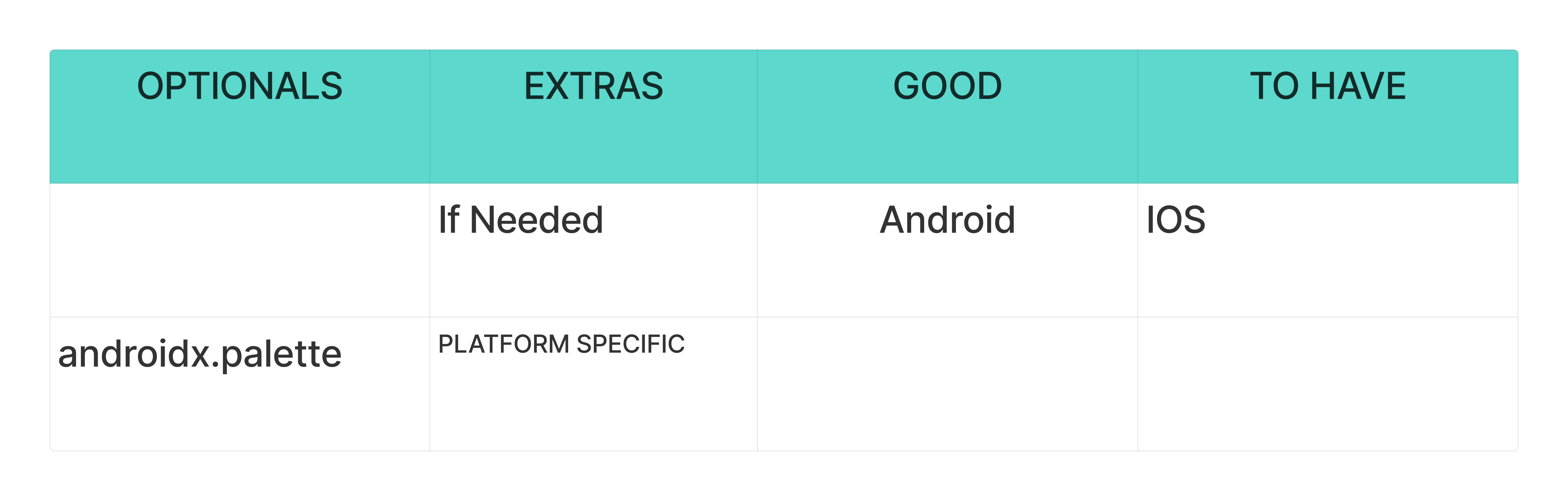
Dynamic theming: Use AndroidX Palette on Android and expose it through a multiplatform abstraction to extract colors from album artwork for UI theming.
Post-GSoC Plan
After the coding period, my first priority is to fulfil the extras and then I plan to continue contributing to the project and help stabilize the new Kotlin Multiplatform architecture. My focus will be on supporting future development and assisting other contributors working with the multiplatform codebase. Planned activities include:
-
Fixing bugs and addressing issues discovered after the migration.
-
Helping review and guide new contributions related to the multiplatform modules.
-
Supporting future enhancements and features built on top of the shared multiplatform modules.
Community affinities
What type of music do you listen to?
I mostly enjoy listening to Hip-hop song while coding and vibing on music. Some of my favorite artists include Panther, Raftaar, and Fotty Seven.
A few of my favorite MBIDs are:
● f49eebbf-2afe-4a61-91b5-79200c996a13
● 5d1d23d9-b4ca-4ab7-b917-259b74313d8c
● f2c6d65e-527a-4c99-9cfd-94e638d1057b
What aspects of projects interest you the most?
The ListenBrainz Android app stands out to me because of my strong interest in music and my prior contributions to the project. Working on the codebase has allowed me to understand its architecture, development process, and the collaborative workflow within the community. This experience has motivated me to continue contributing and take on more impactful improvements. I am enthusiastic about further enhancing the app by refining existing features, exploring new possibilities, and helping create a more reliable and enjoyable experience for its users.
When did you first start programming?
I first started programming in 9th grade, when I learned basics of Java. What hooked me early was seeing how a few lines of code could turn an idea into something real and useful.
Have you contributed to other open-source projects? If so, which projects and can we see some of your code?
ListenBrainz Android has been my first significant open-source experience, where I actively contributed to the project.
What sorts of programming projects have you done on your own time?
I have worked on several Android apps including migration of Screen Recorder Facecam Audio from legacy Java and Kotlin codebase to Compose following MVVM and integrating libraries like Koin, Firebase, Exoplayer 2.
What computer(s) do you have available for working on your SoC project?
MacBook Air M4, 16 GB RAM, 512GB SSD for handling our Compose Multiplatform migration smoothly.
How much time do you have available per week, and how would you plan to use it?
I can dedicate 30–35 hours per week exclusively to this project. As I will not have academic commitments during this period, I will be able to focus fully on development and project goals. If time permits beyond my planned tasks, I would be happy to take on additional work and contribute to other areas of the project to further support its progress.