MusicBrainz: Batch Remove Cover Art
Incorporated features of the ELEPHANT EDITOR script by @jesus2099
It uses the same storage keys so your saved edit notes will be accessible and synced.
4 Likes
Harmony: Title Language Detector
This new script now filters common English words before analyzing titles. I didn’t have many test samples handy. Please throw at it releases with complex language situations.
There is now also a toggle to always overwrite Harmony’s guess.
For example this one was previously detected as English by Chrome and as Polish by Harmony. Now it’s much closer to German with 56% confidence:
https://harmony.pulsewidth.org.uk/release?spotify=2fwhK2BnFQjreeFHUNPwIs>in=199330257014&deezer=&itunes=&tidal=®ion=US&ts=1753803766
Update (1.4.0)
Common ETI terms are now also filtered to give the actual titles more weigh.
Update (1.6.1)
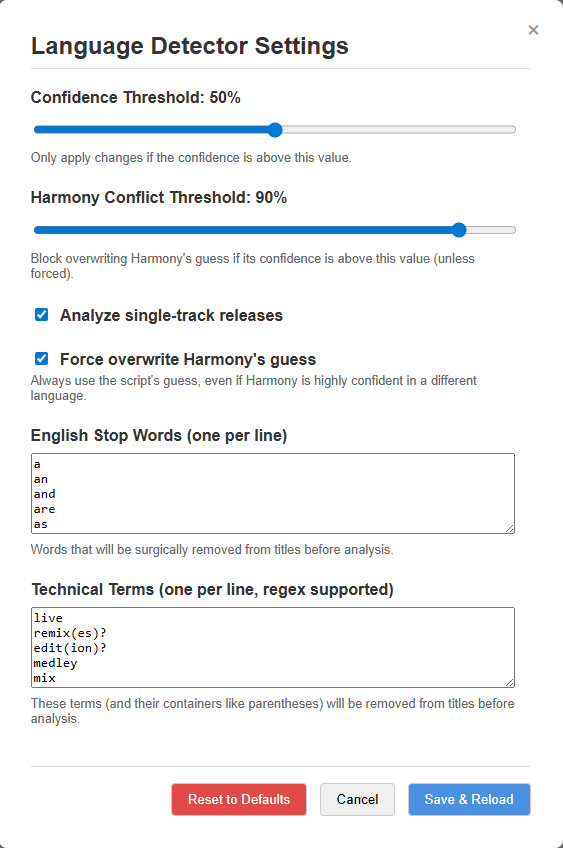
There is now a proper settings pane and I’ve further tried to tune the filtering. Debug messages should also be clearer and better positioned.
This should make testing with various parameters easier.
2 Likes
MusicBrainz: Artwork Uploader Turbo (formerly MusicBrainz: Cover Art Uploader Parallel Submissions)
Event art is now supported and the whole upload process was reworked. Hopefully there are no more script-induced errors and I adopted a retry mechanism inspired through “MB Auto-retry on upload to CAA error” by @Anakunda
1 Like
Harmony: Enhancements
Are you using my various Harmony userscripts? You can delete them now, yes all of them, because I merged them.
It also includes some small features of scripts I haven’t published before.
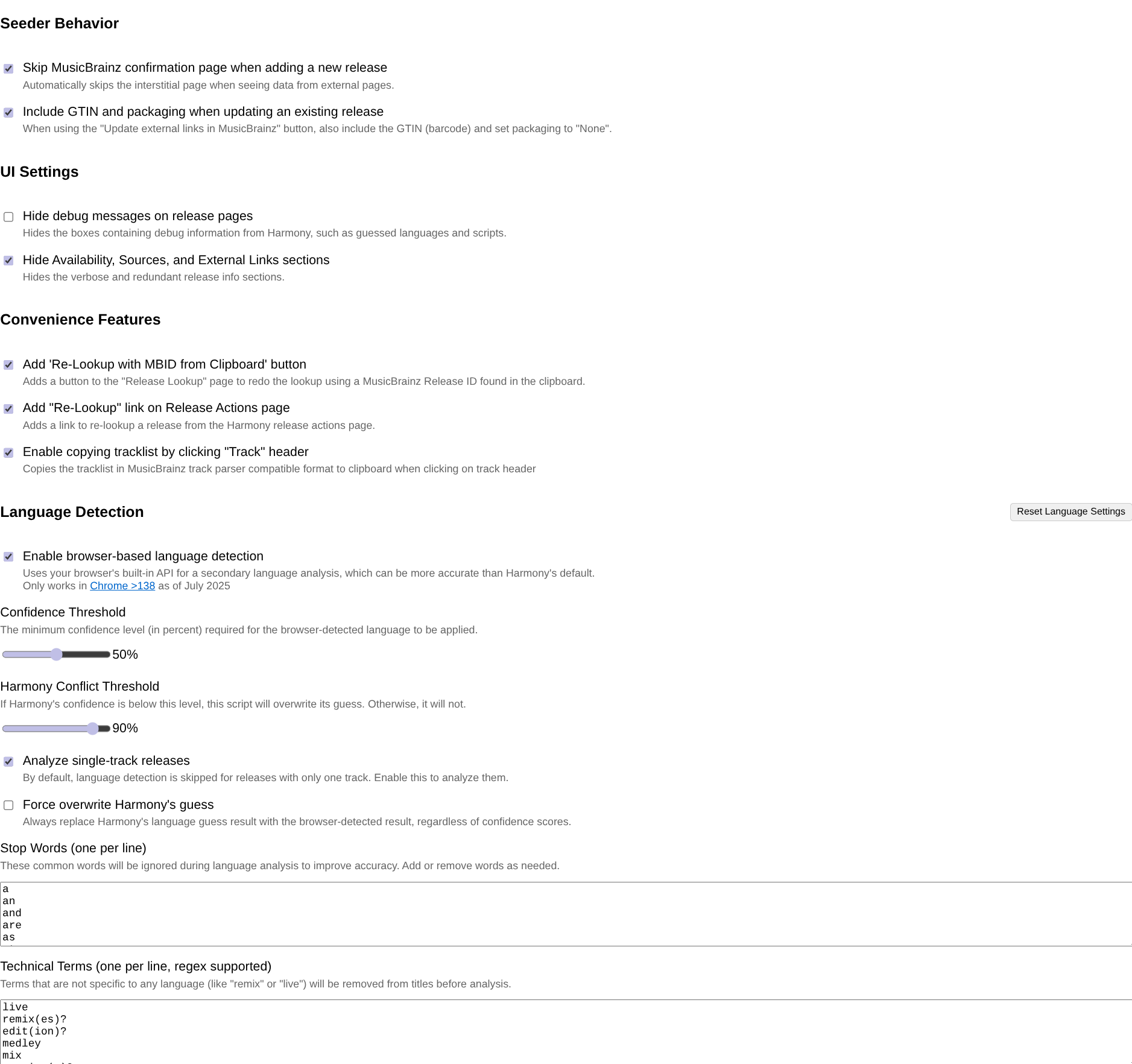
The script will stay unlisted for the time being as I’m not yet confident enough it won’t explode unexpectedly…
Hopefully I can give it some rougher testing soon.
Click buttons across tabs
Raise your hands, who has noticed I have sneakily added support for ISRC Hunt?
I guess no one because I didn’t receive any bug report that it was broken 
The selector for the button was not quite right. It should work now but it still has no proper error handling.
4 Likes
The ever-growing-popular Harmony enhancements script got another update (actually three).
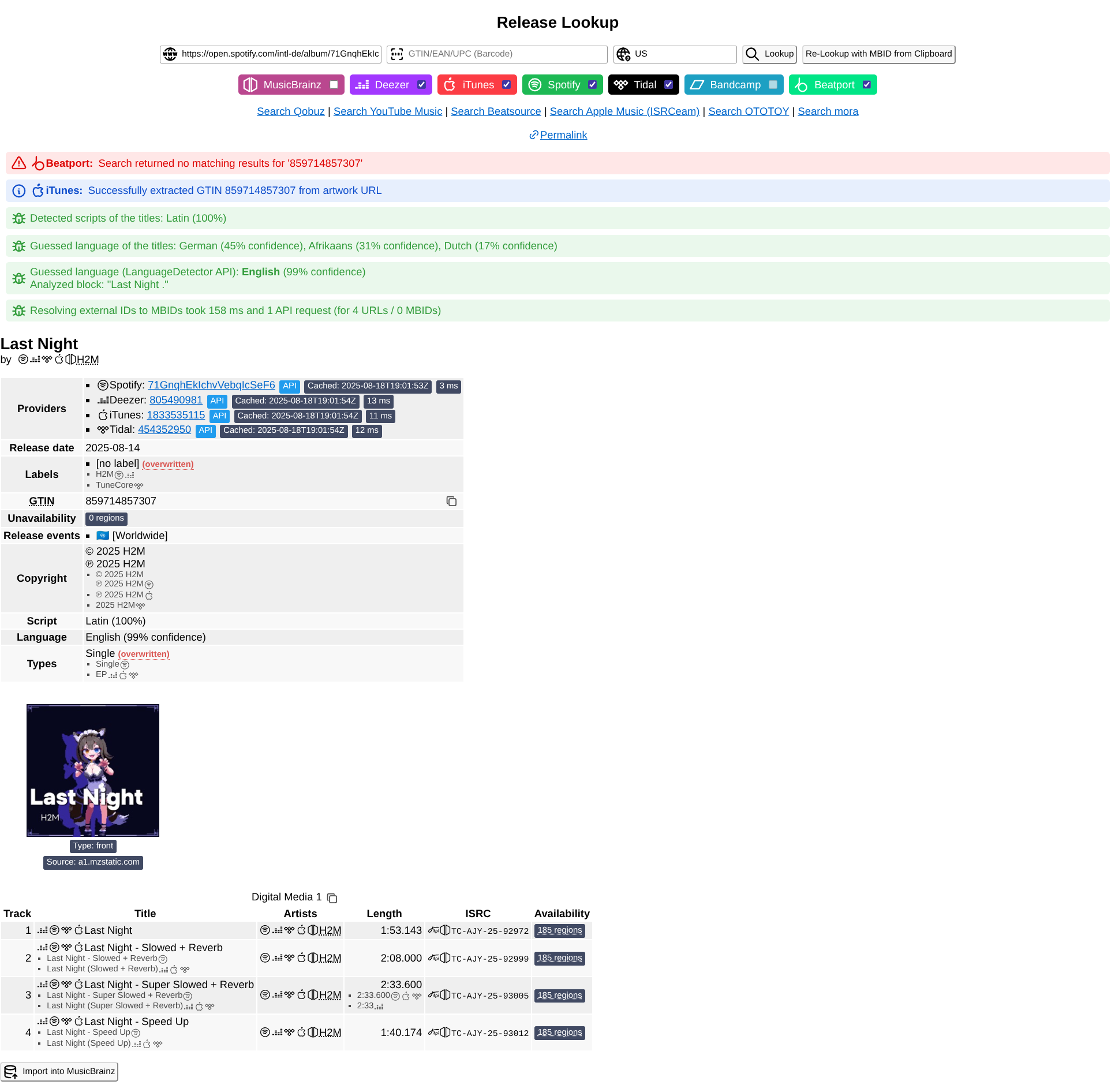
There is now an improved release type detection for singles, which are often mistakenly set as EPs, and a handler for self-releases where the label name matches the release artist.

(And I had to remove the tracklist copy feature because it’s now integrated in Harmony )
3 Likes
I’ve extended the “recording merge” columns alignment script to support other types of edits.
Non-release merges will look more like release merges, wasting less space and additionally completely collapsing columns when all cells of the merged entities are empty.




Besides that Harmony: Enhancements got a small update for a slightly better EP detection plus some cosmetic changes and refactor.
Lastly I modernized an old favorite of mine: CheckBoxMate
Might not be as useful on MusicBrainz (thus no formal announcement) since it already has a similar feature for checkboxes when holding Shift
1 Like
MusicBrainz: Artwork Uploader Turbo
I’ve decided to implement MBS-12452 so you can now upload whole directory trees. (Hold Shift when clicking the “Select images…” button)
3 Likes
I’ve now made a script that allows searching for recordings by ISRCs in the release editor:
Other than that:
-
I’ve revived a “secret” guess language script for the release editor by @ROpdebee
MusicBrainz: Guess release language and script -
Created a small script that allows resizing the secondary types inputs in the release editor
MusicBrainz: Resizable Secondary Types Forms -
Modified the AcoustID script by @joiletjake to fill my own request for highlighting common ISRCs
Musicbrainz: Compare AcoustIDs easier! -
Added a new feature to my Harmony enhancements script.
1-track releases will now sync track artists to the release artist. A common problem on Spotify -
Reworked the Spotify “importer” (rather a helper to open external importer tools) by @RustyNova
Notably it adds buttons for ISRC Hunt, ListenBrainz and SAMBL. a-tisket was removed.
Spotify: MusicBrainz importer


6 Likes
A small pre-weekend gift:
- Click buttons across tabs
Added a rule to automatically close tabs after submitting a merge edit. (Only when it was opened in a new tab) - Harmony: Enhancements
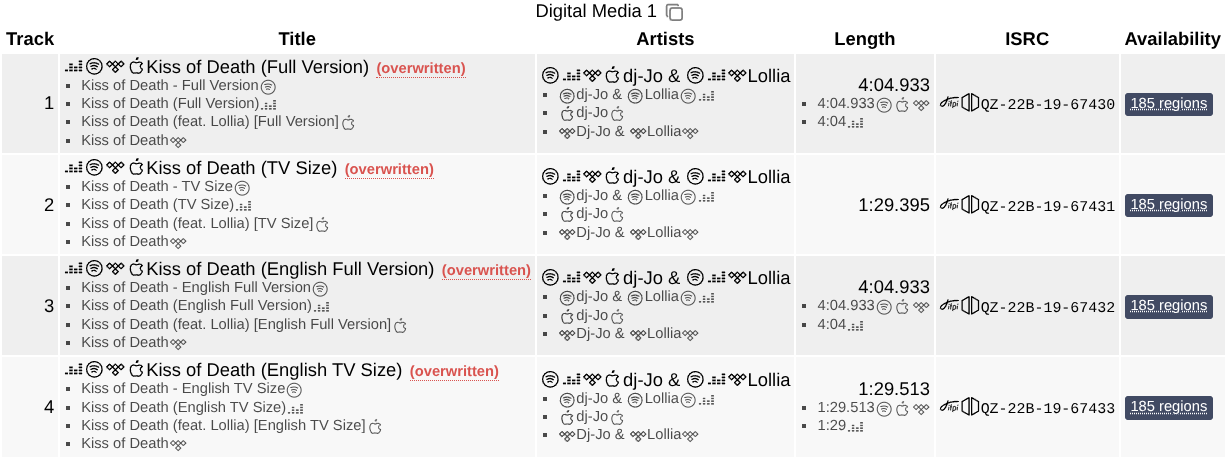
Added a new ETI normalization module for Spotify, which appends ETI with a hyphen
The regular expression was taken from the ListenBrainz matching tools
I’ve already been using it in the tracklist editor thanks to @jesus2099 TRACKLIST_TOOLS in SUPER MIND CONTROL Ⅱ X TURBO and it works very well in most cases.
PS: New Harmony enhancements modules are disabled by default, so make sure to check out the settings page after updating.

3 Likes
Spotify: MusicBrainz importer
It’s now possible to import releases from a track page or open the recording in MusicBrainz/ListenBrainz if the link is present.
I’ve also added importing Spotify playlists to ListenBrainz via the ListenBrainz API. This process can be quite slow, up to 20 seconds in the cases I tested.
Existing playlists are linked instead to prevent duplicates, for identification the Spotify playlist URL is added into the description.
There is no update or sync feature, the ListenBrainz API endpoint used for the import always creates a new playlist it seems.
YouTube: MusicBrainz Importer
You can now import videos as a playlist to ListenBrainz if the description contains a tracklist. It will automatically lookup the metadata needed to add the MBID and update existing playlists if a previous import was incomplete due to missing entries in MusicBrainz. For non-matched tracks a report will be generated and opened in a new tab to search the track in Google and MusicBrainz.
You can find a few playlists I created with it on my LB profile.
3 Likes
Harmony: Enhancements
Added a new module that allows creating custom label mappings to MBIDs. Especially useful if you add releases by labels that Harmony can’t resolve itself because they are not on Beatport.
2 Likes

1 Like
Apparently there’s an update on Harmony’s Release Actions page (the option to open the edit pages for all recordings in new tabs is now built into Harmony, previously it was served by one of the other usersciprts) which broke @YoGo ‘s script.
1 Like
@DenizC I fixed it already. Version 1.6 should work fine.
2 Likes
Thanks. I never add annotations through Harmony so I didn’t notice. I’ve located the root cause and released an easy fix in the meantime.
2 Likes
Ever since the “YouTube: MusicBrainz Importer” updated to version v2.7.3, it shows a “Processing Error” and is unusable.
e.x. https://www.youtube.com/watch?v=e8s-crxIvCs
Downgrading to v2.7.2 makes it work normally again.
Environment: Firefox/Violentmonkey
1 Like
It works for me. I assume you installed it from Greasy Fork? Which userscript manager are you using? If Tampermonkey check the settings for the externals update interval:

I had to make some change to the library. Likely it wasn’t updated in your case.
Still not understanding how exactly externals are updated in TM and how that setting affects it.
FWIW, I’ve bumped the version number for both the library and the script
Since I started using GitHub I’d recommend installing scripts from there.
Also, not all of my scripts are on Greasy Fork 
Edit
I figured it out. The URL for Greasy Fork libraries changes too with each code change. Now I have to update that one too manually each time. 
I’ve now bumped all affected scripts so with the next update it should be fixed for you and anyone else who installed from Greasy Fork.
5 Likes
It started working again with the update. Thanks 
Just to be safe, I’ll switch to installing it from GitHub.
1 Like
Hi. I try to use the MusicBrainz: Relationship Editor Batch Remove script. Is it just for Releases? If I change the url matcher to events, the highlighting works when pressing Ctrl, but when I then click to remove one relation just that one relation will be removed. Do I need to adjust something in the script? This is the first time I use a userscript.
It’s for the release relationship editor only.