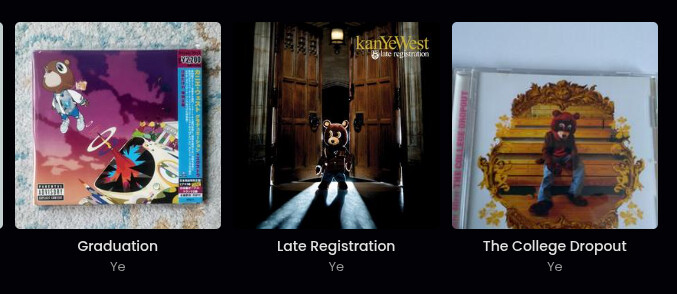
I know the cover art is just from cover art archive, but often the covers aren’t the actual cover and are just a picture of something with the album cover on it?
Is there a way to filter this out? Use a different source maybe?
See the images:
I know the cover art is just from cover art archive, but often the covers aren’t the actual cover and are just a picture of something with the album cover on it?
Is there a way to filter this out? Use a different source maybe?
See the images:
It may just be your bad luck to have releases that somebody uploaded crappy artwork for.
You could:
and upload it to MB, replacing the bad images.
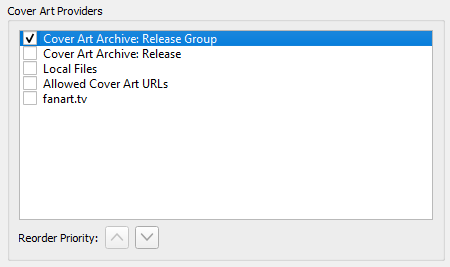
If you are interested in ‘clean’ images, over having version-specific images, you can prefer ‘release-group’ images in MusicBrainz Picard:
Options > Options > Cover Art
And make sure ‘Release Group’ is above ‘Release’
If you still see a bad quality image being pulled, you can go to the release group in MusicBrainz and set a better ‘release-group image’ - if no good images are available you may want to add a better cover, or import a digital release and its cover, to set as the release-group image.
It would help if you provided links to the releases so everyone can check.
Release group “Graduation” by Kanye West - MusicBrainz shows that exactly one isn’t good (the one you show), but all others are more than correct.
One way to avoid this is by excluding the “raw/unedited” image type in Options > Cover Art > Cover Art Archive by enabling “Download only cover art images matching the selected types” and editting the allowed types by clicking on “Select types”. See also Cover Art Archive — MusicBrainz Picard v2.13.3 documentation
This will work if the images are properly tagged with the correct types, but in this example they are. For reference, this is the affected release.
The other option is, as aerozol already mentioned, to enable the CAA Release Group provider. Either as primary or, if you generally prefer the exact cover for your version, as a fallback. In combination with the exclusion of raw image types Picard would have gotten no results for this specific release and would have tried the next provider.
Of course you can also download the raw photo used here, edit it by cutting the actual cover art and re-upload it to MB to improve the situation.
As another alternative there are also plugins for getting cover art from fanart.tv or TheAudioDB. Both focus on providing high quality clean artwork for the album (and not for a specific release version). Both services integrate with MusicBrainz, and hence are a great addition to the Cover Art Archive with a different focus.