I have several edit review/vote search bookmarks in my browser.
But usually the only one I use is my (release collection) subscription voting queue URL link with a few tweaks.
Recently I have more and more recording-URL edits in my queue, that I don’t care about, and simply want to ignore, to save some time to try to review the remaining edits.
But I was not able to filter them out.
I think it’s a bug, but I’m wondering if there is some explanation behind the problem, and maybe it’s not possible to fix?
No, maybe good idea, I don’t know this.
But your URL is same as my Relationship type is [all recording-URL relationship types checked] (231 edits) URL. A copy/paste mistake?
I would like all my subscription open unvoted edits of all types, minus the recording-URL relationship edits.
A workaround is to use that 231 recording-URL relationship search to vote Abstain on all of these recording stream/purchase/download links, and then review the remaining 165 edits I’m interested in, with the non filtered search.
But the problem is that Abstaining adds me as a watcher of those 231 recording stream/purchase/download edits.
@jesus2099 I was also close to asking this same question. Thank you for making this thread…
I am totally in the same boat. It is boring scrolling through page after page of “can be streamed on” links which I can’t\won’t check. If someone finds a way of blocking these you will save my sanity.
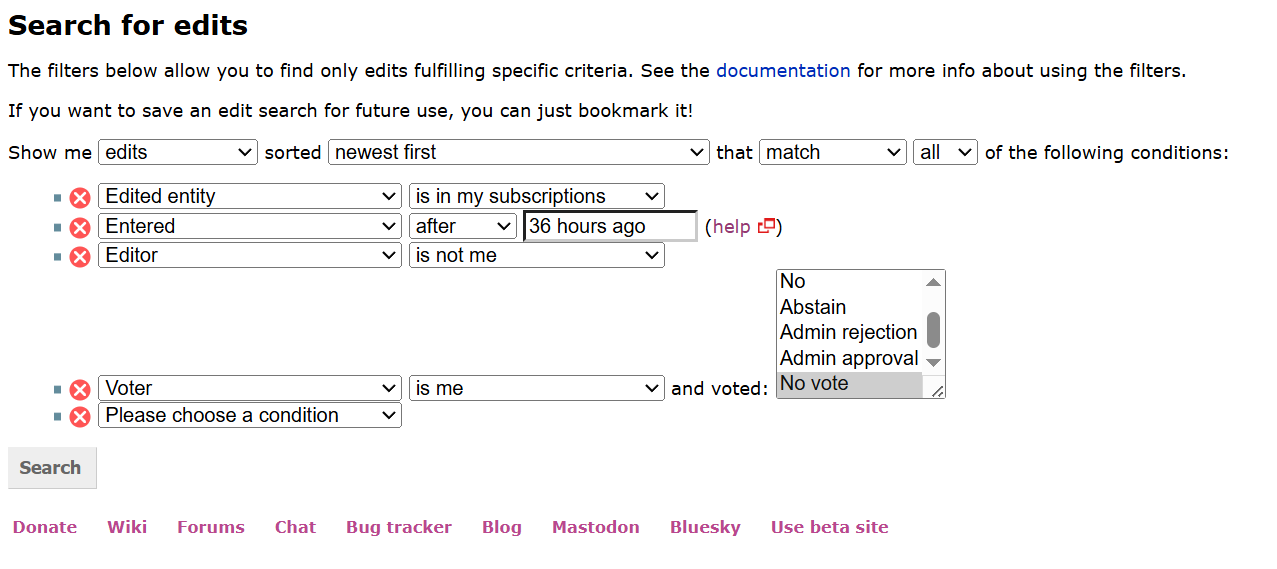
My morning search is “show me my subscribed edits in the last 36 hours”. In the past weeks these are so flooded with “stream from URLs” that I am close to giving up on bothering checking edits any more.
Most of these edits are supposed to be auto-edits precisely so you don’t have them appearing in the voting queue. If there are editors entering a high-volume of these as votable that’s the problem
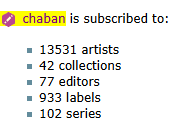
Like @jesus2099 I check all edits on my subscribed list, not just the voteable ones. It is not just about the stuff that is voteable, but data changes in general.
That is my morning scroll through. The streaming URLs, especially when added in with certain noisy scripts, lead to a lot of extra scrolling. I just want a way of dropping URL relationship from that search.
I cannot exclude Edit notes that contain ‘‘ISRC Scout’’ because I do want to see the ISRC edits in my owned release edit reviews.
But, wait! What!?
Added 255 streaming links: Apple Music (58), Deezer (41), Qobuz (66), Spotify (42), Tidal (48)
For just 1 release!?
Do we really need 255 streaming links for 1 release?
One can stream album recordings with the release streaming links already (5), no need for all bogus/redundant and cluttering recording links (255), that already can be discovered with release links.
And the remaining 99% (19,569) edits must be only those purchase/download/stream flood we’re talking about, that hinders us with @IvanDobsky from going on recording anything.
@reosarevok Do we even need streaming links on each recording, at all?
Couldn’t we remove these useless (IMO) relationships from MB structure?
We’re talking of millions relationships, at this rate.
Links at release level are more than enough, already.
There are already not many reviewers, so if our difficult task of checking our scope of recent edits (not only open edits) is flooded by these thousands of IMO irrelevant edits, no one can ever cope with the peer validation anymore.
Sorry, misunderstood that first reply. Adding that option now seems to do what I want. I guess this also drops all links including to Discogs etc. A small price to pay for sanity as that reduced the last 24 hours from 11 pages to 2.
Thank You.
Those Majkinetor edits notes are too cryptic to make sense of, but I think this is an edit note at Release level. So those 255 links are spready across 76 tracks on one release. Not as insane as it first looks. I assume the links are being added so some people can use MusicBrainz as a player to discover music in their online subscriptions.
I can see the logic of that, but this is data that will change over time. I fear the day a bot will come steaming through to update them all
As it is a compilation, the tracks appear on other compilations. Which is why they get the URLs applied at recording level too. Especially as those online stores just make up new compilations in a playlist style to promote the music for more plays. Compilations shuffle, recordings stay the same.
That release you linked is painful to look at. The photo has the Union Flag upside down, which is usually taken as a distress signal.
I think only the recordings from the official artists release should be entered. None from compilations (unless it’s the only place the recording appears). If maybe we could get this in the guidelines it might help.
It seems there is indeed a bug if AI analysis can be trusted:
Summary
Jesus’s suspicion is 100% correct: the search condition “Relationship type is not” strictly retains only relationship edits, completely discarding all non-relationship edits.





 She was waiting for this, so much.