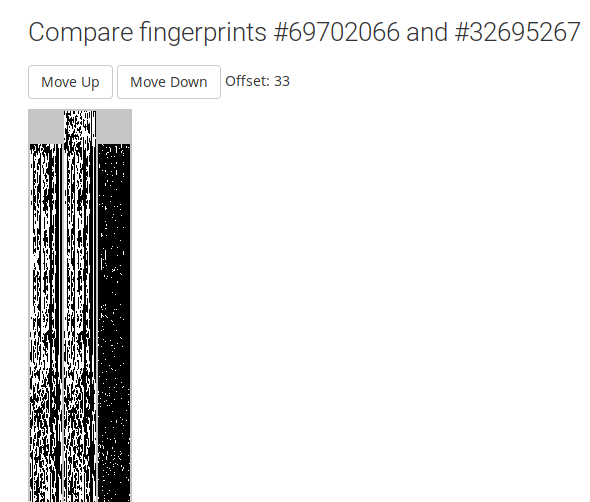
I’m not very familiar with how the acoustids work. I looked at this track: https://acoustid.org/track/f2aa76fe-1451-442b-83cb-7d3ba6a9590b . It has 2 recordings linked (there is certainly an error somewhere because they aren’t the same recording). It also has several IDs. If I try to compare these IDs to one another using the built-in tool, I see that one of them (69702066) is very different to the others. This one also only has one source (what does it mean by the way?). It is also very similar to some other fingerprints like 54573635 which are linked to one of the recordings (and not the other). So it seems pretty clear to me that an acoustid has been set incorrectly, but how do I fix it? On https://acoustid.org/track/f2aa76fe-1451-442b-83cb-7d3ba6a9590b , how do I remove an ID? I know how to remove a recording, but that’s not what I want to do. Is it that an ID is linked to a recording, and if I remove the recording, the ID will disappear? If so, how do I know which recording (linked to the track) this ID is linked to?
I tried to read the documentation, but there is very little informations about this I could find.
You can’t remove fingerprints from AcoustId, you can only unlink recordings from AcoustIds. The grouping of fingerprints into an AcoustId is done by the AcoustId server based on similarity. I don’t know if there is the possibility to manually split the fingerprints from an administrative side of AcoustId, but from outside this is definitely not possible. And actually this fingerprint 69702066 isn’t so different from the others. Go e.g. to:
It was only submitted one time. If the same fingerprint or the same AcoustId ↔ MB Recording ID link as been submitted multiple times this is a stronger indicator that it is correct.
I looked at it visually and tried to shift it down until it lined up. Really just visually comparing and experimenting with the shifting. The right comparison bar is a great help since once you get the fingerprint visualization close enough aligned it starts to become darker.