# Show your ListenBrainz listenings in your forum user profile
**URL:** https://community.metabrainz.org/t/show-your-listenbrainz-listenings-in-your-forum-user-profile/623140
**Category:** Site discussion
**Tags:** customization, translation, i18n, discourse-plugins, documentation, discourse, wiki, listenbrainz
**Created:** [February 10, 2023, 8:08am UTC](https://community.metabrainz.org/t/show-your-listenbrainz-listenings-in-your-forum-user-profile/623140 "2023-02-10T08:08:16Z")
**Posts on this page:** 6
**Page:** 1
### Author:  [@outsidecontext](https://community.metabrainz.org/u/outsidecontext)
#### Post date: [February 10, 2023, 8:08am UTC](https://community.metabrainz.org/t/show-your-listenbrainz-listenings-in-your-forum-user-profile/623140/1 "2023-02-10T08:08:16Z")
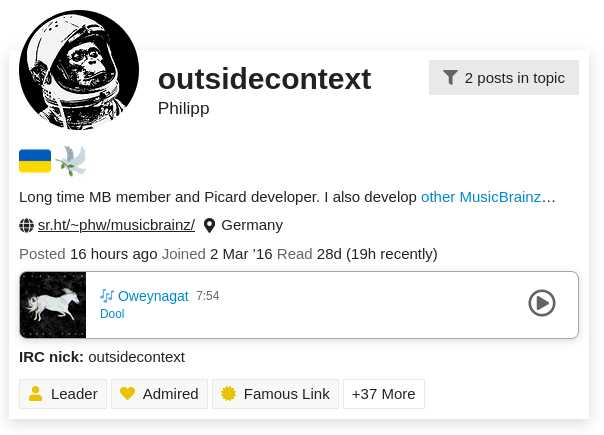
We have enabled a new ListenBrainz plugin for these Discourse forums. The plugin allows every user to display their most recent listen or a short summary of their ListenBrainz profile inside their user profile here in the forums. The screenshot below shows how it looks like. For a live view of this, you can also click on my user avatar at the top of this post or on my username @outsidecontext .
## Configuration
This functionality is completely opt-in, you can enable the ListenBrainz view in your user preferences.
1. Click on your user icon at the top, choose the person symbol and click on Preferences
2. Inside your preferences navigate to “Profile”
3. The ListenBrainz preferences are at the very end of this form.
You need to enable “Show ListenBrainz information in my user profile” and set your ListenBrainz username, which should be already prefilled with your MusicBrainz username used here on the forums.
There are a couple of options to customize the display. By default it will show your most recent listen, unless this is older than 24 hours, then it will instead show a short summary of your ListenBrainz profile. But you can also configure it to e.g. always show only the profile information. The available preferences are [documented here](https://git.sr.ht/~phw/discourse-listenbrainz#user-settings).
## Feedback and support
Please feel free to share your feedback and feature ideas below. This topic is supposed to be a central discussion point for this plugin. If you find a specific bug I would welcome if you could open a new ticket on the [issue tracker](https://todo.sr.ht/~phw/discourse-listenbrainz) directly.
## Help and contribute
The ListenBrainz plugin for Discourse is open source, the sources are available at [~phw/discourse-listenbrainz - Discourse plugin to show a user's ListenBrainz listening in their profile - sourcehut git](https://git.sr.ht/~phw/discourse-listenbrainz) . If you want to help you are very welcome to do so.
The user interface texts of this plugin also can be translated. I have setup a [Weblate project](https://translations.metabrainz.org/projects/discourse-listenbrainz/) for translation. Before a new translation can be started the base translation files need to be added to the repository. Please request new languages below.
Please be aware that translating on Weblate will commit your translations to the Git repository using your name and e-mail address as configured in your Weblate account. Please check your [Weblate account settings](https://translations.metabrainz.org/accounts/profile/#account) and make sure to provide a commit e-mail address you are comfortable with.
## Frequently Asked Questions
### What was the motivation for this plugin?
I have summarized my motivation to create this plugin in [this forum post](https://community.metabrainz.org/t/showing-a-users-listenbrainz-listens-in-their-discourse-community-profile/621375/7).
### I use a different username on ListenBrainz then I use on [MusicBrainz.org](http://MusicBrainz.org) and here in the forums. Can I use this ListenBrainz user for my forum profile?
While the ListenBrainz username in the MetaBrainz Community forums is pre-configured to be your Discourse username, you can change it to another ListenBrainz user in your user preferences.
### Can I use this plugin on my own Discourse instance?
Yes, this is a regular Discourse plugin and not specific to the MetaBrainz Community. To install this plugin in your Discourse instance please follow this official [plugin installation how-to](https://meta.discourse.org/t/install-a-plugin/19157). Use `https://git.sr.ht/~phw/discourse-listenbrainz` as the git clone URL.
---
### Author:  [@aerozol](https://community.metabrainz.org/u/aerozol)
#### Post date: [February 11, 2023, 5:45am UTC](https://community.metabrainz.org/t/show-your-listenbrainz-listenings-in-your-forum-user-profile/623140/2 "2023-02-11T05:45:04Z")
Love it!! Thank you @outsidecontext!
---
### Author:  [@outsidecontext](https://community.metabrainz.org/u/outsidecontext)
#### Post date: [February 27, 2023, 11:03pm UTC](https://community.metabrainz.org/t/show-your-listenbrainz-listenings-in-your-forum-user-profile/623140/3 "2023-02-27T23:03:24Z")
There have been a couple of improvements and fixes to the plugin. Mostly some display details have been improved:
- the correct cover art will be shown in more cases
- cover art loads without flickering
- artist names will be linked also for multi-artist credits if possible
- cover art placeholder improvements for dark themes
- cover art gets linked to MusicBrainz release
- fixed wrong rounding of recording duration minutes
---
### Author:  [@outsidecontext](https://community.metabrainz.org/u/outsidecontext)
#### Post date: [September 6, 2023, 12:44pm UTC](https://community.metabrainz.org/t/show-your-listenbrainz-listenings-in-your-forum-user-profile/623140/4 "2023-09-06T12:44:50Z")
The translations for Discourse ListenBrainz have been moved over to the new MetaBrainz Weblate instance, see the [Discourse ListenBrainz](https://translations.metabrainz.org/projects/discourse-listenbrainz/) project there. I have updated the links in my original post.
There are two parts: client and server. The server translation is not that interesting, it only affects the Discourse administrative backend, and this is probably fine to have in English. But if you use this forum in your native language and you want to have the ListenBrainz info box and settings form also translated you can help with the translation of the [client](https://translations.metabrainz.org/projects/discourse-listenbrainz/client/) component.
Because there is some issue with Weblate automatically generating new language files for this project (due to some peculiarities of the translation file format used by Discourse) please ask for new languages to be enabled for translation here or use the [Start new translation](https://translations.metabrainz.org/new-lang/discourse-listenbrainz/client/) form in Weblate. I will then setup the language files appropriately. I would just ask you to only request a new language if you actually want to help with the translation into that language.
---
### Author:  [@outsidecontext](https://community.metabrainz.org/u/outsidecontext)
#### Post date: [February 7, 2024, 11:54am UTC](https://community.metabrainz.org/t/show-your-listenbrainz-listenings-in-your-forum-user-profile/623140/5 "2024-02-07T11:54:03Z")
The ListenBrainz plugin got some minor updates. In addition to some compatibility fixes for the latest Discourse version it now also links to the new ListenBrainz [artist](https://listenbrainz.org/artist/9c9f1380-2516-4fc9-a3e6-f9f61941d090/) and [release](https://listenbrainz.org/album/af2e8e23-e9c3-4e67-8ad8-66387c5898fd/) pages.
---
### Author:  [@outsidecontext](https://community.metabrainz.org/u/outsidecontext)
#### Post date: [August 13, 2025, 2:48pm UTC](https://community.metabrainz.org/t/show-your-listenbrainz-listenings-in-your-forum-user-profile/623140/6 "2025-08-13T14:48:44Z")
The latest version is now deployed here on the forums. Again compatibility fixes, but also it now links to ListenBrainz recording pages.