# JFYI: Be careful if Ubuntu is asking you to update to LTS 24.04
**URL:** https://community.metabrainz.org/t/jfyi-be-careful-if-ubuntu-is-asking-you-to-update-to-lts-24-04/711774
**Category:** Development
**Tags:** docker, ubuntu
**Created:** [August 30, 2024, 4:30pm UTC](https://community.metabrainz.org/t/jfyi-be-careful-if-ubuntu-is-asking-you-to-update-to-lts-24-04/711774 "2024-08-30T16:30:39Z")
**Posts on this page:** 4
**Page:** 2
### Author:  [@InvisibleMan78](https://community.metabrainz.org/u/InvisibleMan78)
#### Post date: [September 6, 2024, 4:06pm UTC](https://community.metabrainz.org/t/jfyi-be-careful-if-ubuntu-is-asking-you-to-update-to-lts-24-04/711774/21 "2024-09-06T16:06:27Z")
Unfortunately, my joy did not last long.
After hours of importing a new set of all the dump files, I’m not able to connect locally to the new running docker container.
Neither localhost:5000 nor the local IP VM adress let me connect inside the VM with a FireFox browser installed on Ubuntu 24.04.1 Desktop.
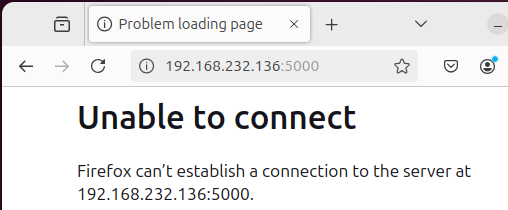
Are there any ideas what I could test or change?
Maybe this can help?
```auto
sudo docker images
REPOSITORY TAG IMAGE ID CREATED SIZE
musicbrainz-docker-indexer latest e25faa636e4b 8 hours ago 803MB
musicbrainz-docker-mq latest 708b2cca2e89 8 hours ago 149MB
musicbrainz-docker_search 3.4.2 1ead24097a35 8 hours ago 586MB
musicbrainz-docker-musicbrainz latest 81bd9a4889ca 4 days ago 2.5GB
musicbrainz-docker_db 16 abc0a3cc7ca6 3 months ago 1.44GB
```
```auto
echo MusicBrainz Docker: `git describe --always --broken --dirty --tags` && echo Docker Compose: `docker compose version --short` && sudo docker version -f 'Docker Client/Server: {{.Client.Version}}/{{.Server.Version}}'
MusicBrainz Docker: v-2024-09-02.0
Docker Compose: 2.24.6+ds1-0ubuntu2
Docker Client/Server: 24.0.7/24.0.7
```
---
### Author:  [@Nadim](https://community.metabrainz.org/u/Nadim)
#### Post date: [September 6, 2024, 6:18pm UTC](https://community.metabrainz.org/t/jfyi-be-careful-if-ubuntu-is-asking-you-to-update-to-lts-24-04/711774/22 "2024-09-06T18:18:08Z")
> [@InvisibleMan78](#):
>
> Neither localhost:5000 nor the local IP VM adress let me connect inside the VM with a FireFox browser installed on Ubuntu 24.04.1 Desktop.
Don’t post the output here (privacy), but does the command `sudo docker ps -a` show you a container with the name `musicbrainz-docker-musicbrainz`? If not, the container with the web server might not actually have started properly.
If you do get output, what’s given in the “STATUS” column for that container? Also, see if the “PORTS” column shows you entries such as `127.0.0.1:5000->5000`, `::1:5000->5000/tcp`, `0.0.0.0:5000->5000/tcp` and/or `:::5000->5000/tcp`. Are any of these present?
---
### Author:  [@InvisibleMan78](https://community.metabrainz.org/u/InvisibleMan78)
#### Post date: [September 6, 2024, 10:04pm UTC](https://community.metabrainz.org/t/jfyi-be-careful-if-ubuntu-is-asking-you-to-update-to-lts-24-04/711774/23 "2024-09-06T22:04:23Z")
Thanks again for your help!
> [@Nadim](#):
>
> Don’t post the output here (privacy)
No problem, my docker container isn’t reachable from outside my LAN.
```auto
CONTAINER ID IMAGE COMMAND CREATED STATUS PORTS NAMES
82c86da375ae musicbrainz-docker_search:3.4.2 "docker-entrypoint.s…" 24 seconds ago Up 24 seconds 8983/tcp musicbrainz-docker-search-run-a460ee932e18
ffcc1fc8c4c6 musicbrainz-docker-musicbrainz "docker-entrypoint.s…" 5 hours ago Exited (137) 5 hours ago musicbrainz-docker-musicbrainz-1
10f29027b714 musicbrainz-docker-indexer "/sbin/my_init" 5 hours ago Exited (137) 5 hours ago musicbrainz-docker-indexer-1
85b7f7bbf590 musicbrainz-docker-mq "/docker-entrypoint-…" 5 hours ago Up 5 hours 4369/tcp, 5671-5672/tcp, 15671-15672/tcp, 25672/tcp musicbrainz-docker-mq-1
6c7ca4c9f23b musicbrainz-docker_search:3.4.2 "docker-entrypoint.s…" 5 hours ago Up 5 hours 8983/tcp musicbrainz-docker-search-1
bc76714701df musicbrainz-docker_db:16 "docker-entrypoint.s…" 5 hours ago Up 5 hours 5432/tcp musicbrainz-docker-db-1
40a8ef1ba7c6 redis:3-alpine "docker-entrypoint.s…" 5 hours ago Up 5 hours 6379/tcp musicbrainz-docker-redis-1
```
> [@Nadim](#):
>
> Also, see if the “PORTS” column shows you entries such as `127.0.0.1:5000->5000`, `::1:5000->5000/tcp`, `0.0.0.0:5000->5000/tcp` and/or `:::5000->5000/tcp`
I can’t see any of this 5000 port variants in the above list.
In previous versions of Ubuntu, there was never any special handling for these ports.
What could I check or change?
---
### Author:  [@Nadim](https://community.metabrainz.org/u/Nadim)
#### Post date: [September 7, 2024, 6:02pm UTC](https://community.metabrainz.org/t/jfyi-be-careful-if-ubuntu-is-asking-you-to-update-to-lts-24-04/711774/24 "2024-09-07T18:02:32Z")
The ports would only show up if the container “musicbrainz-docker-musicbrainz-1” had started correctly, but we’ll need to figure out why it exited. Considering I don’t have MB running in Docker (and don’t have the time to set it up to test with right now), I’m not sure how much help I can be.
You can take a look at the logs and see if you can find lines that look like error messages for that container: `sudo docker compose logs --timestamps musicbrainz`
[Previous page](https://community.metabrainz.org/t/jfyi-be-careful-if-ubuntu-is-asking-you-to-update-to-lts-24-04/711774.md?page=1)