How to manage personal compilation?

My script works quite well

$set(_album,%album%)
$set(_album,$trim(%_album%))
$set(_album,$rreplace(%_album%, {2\,}, ))

$set(_albumartistname,$swapprefix(%albumartist%))
$set(_albumartistname,$trim(%_albumartistname%))
$set(_albumartistname,$rreplace(%_albumartistname%, {2\,}, ))

$set(_artistname,$swapprefix(%artist%))
$set(_artistname,$trim(%_artistname%))
$set(_artistname,$rreplace(%_artistname%, {2\,}, ))

$set(_year,$left($if2(%originaldate%,%date%,0000),4))
$set(_format,$upper(%_extension%))
$set(_audio,$if2(%_bits_per_sample%,0)-$div($if2(%_sample_rate%,0),1000))
$set(_catno,$if2(%catalognumber%,No Cat Number))
$set(_catno,$replace(%_catno%, ,_))
$set(_catno,$replace(%_catno%,-,_))
$set(_label,$if2(%label%,No Label))
$set(coverart,%coverart_url%)

$set(_disccount,$if($gt(%totaldiscs%,1),%totaldiscs%Discs))

$set(_basepath,$if2(%_albumartistname%,%_artistname%) - %_album% %_disccount% \(%_year%\) %_format% %_audio% %_catno% %_label%)
$set(_basepath,$rreplace(%_basepath%, {2\,}, ))

$if($gt(%totaldiscs%,1),
$set(_basepath,
$if(%discsubtitle%,%_basepath%/$num(%discnumber%,2) %discsubtitle%,%_basepath%/Disc $num(%discnumber%,2))))

$if($and(%albumartist%,$ne(%albumartist%,%artist%)),%_basepath%/$num(%tracknumber%,2) %title% - %artist%,%_basepath%/$num(%tracknumber%,2) %title%)

I was wondering how to manage personal compilation with many songs, many artists and, obviously, without “catalog number”, ISRC code, or Disc ID… but many of these!!!

Is it possible analyze or search fo metadata in Picard Database but save in a single directory like this:

Various artists - “to rename dir”

How do you manage this particular case?
are you talking about tagging a homemade compilation? as you might already know, these aren’t allowed in the MusicBrainz database, but I think it would be possible to tag these so they end up in the same folder despite that.

(haven’t thought about how to use a script, but could if that’s necessary)

there’s one setting change and a few tag changes

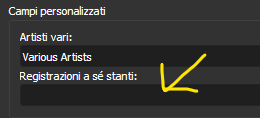
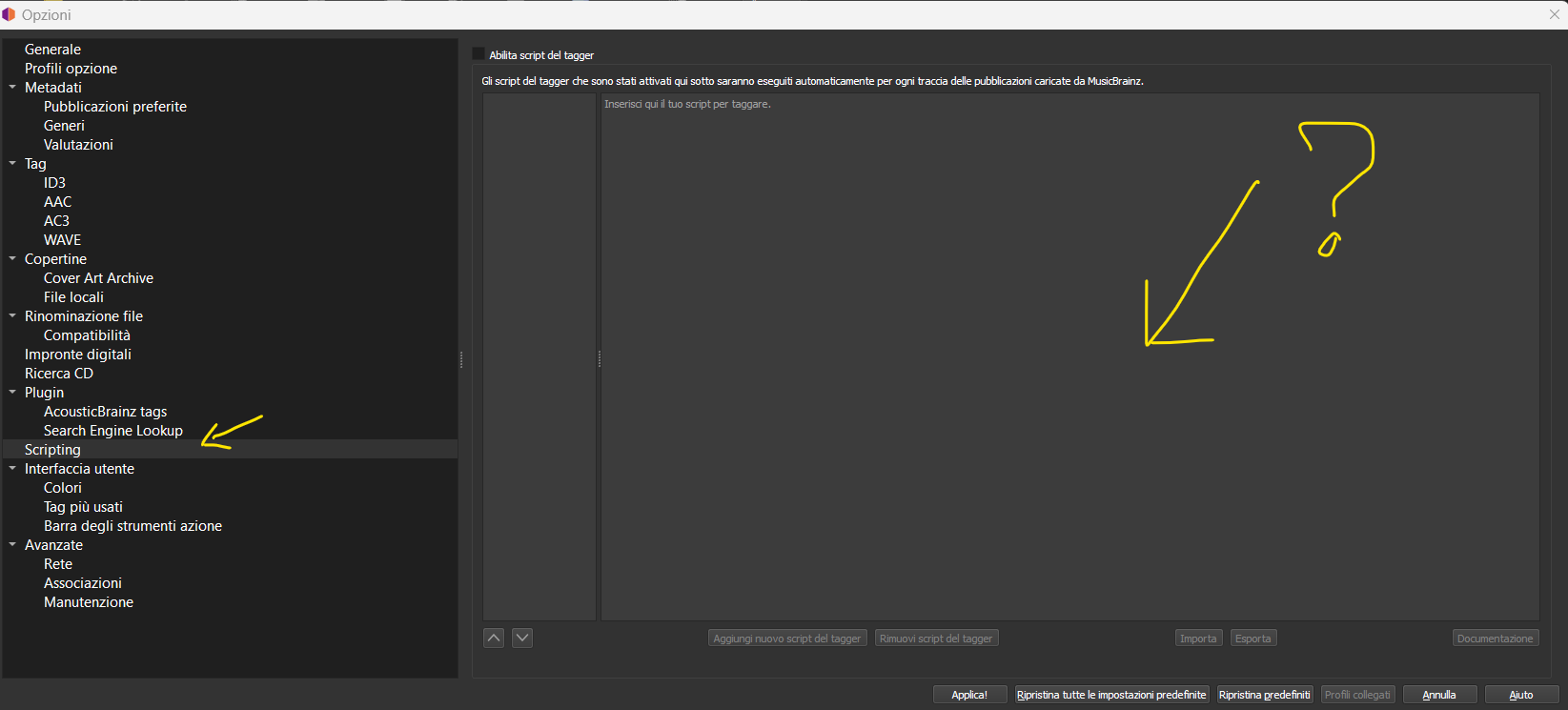
  1. go into Options → Options… → Metadata → Custom Fields and remove the text in Standalone Recordings. this will make it so it doesn’t set a new %album% tag for non-album recordings
  2. load up the files for a personal compilation and manually set the album title you want, as well as setting the album artist to “Various Artists” (or whatever you want the artist to be, as long as they’re all the same value). optionally set track and disc numbers, if those aren’t set. save those changes (you could alternatively use a different tagger for this step if you’d like)
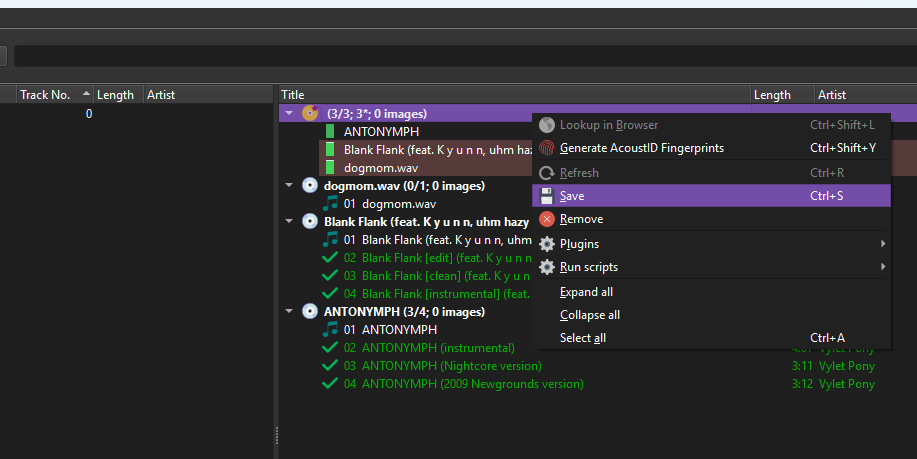
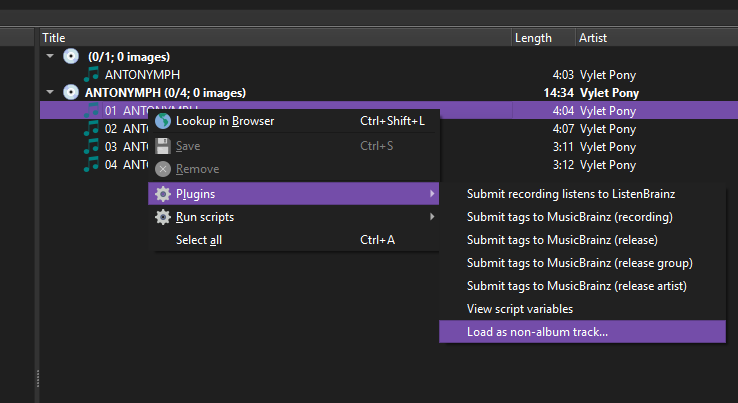
  3. load in all the recordings as standalone recordings. you can do this with either the green tagger button on the MusicBrainz website (most places a recording is shown apart from releases) or there’s also a plugin which lets you load a recording as a non-album track (screenshots below)
  4. hit save, and that should organize them all into folders how you like (provided I understand what you’re looking for), Various Artists/My Mix/04 ANTONYMPH.mp3, depending of course on your filenaming script

you can see in the above screenshot how the Standalone recordings “album” doesn’t have a title (the first one). that’s how it should look if you’re following these steps

hope this helps, and that I didn’t totally misunderstand what you’re trying to do, lol~ :sweat_smile:

3 Likes

@UltimateRiff
Absolutely yes!

I’ll red your comment very carefully… and I’ll try to apply your suggestion :slight_smile:

Thank you very much!

1 Like

sweet, lemme know how it goes, and also if you run into any issues~

1 Like

Ok let’s try step by step

Ok this is simple and I’ve done.

mmmhhh… how can do this? I have a scirpt i posted at the top of this topic which rename files and also directory…

Do you mean maybe here? How can I do that? is the same as scripting in
Options / open scripting renaming file editor?

Ok I’ve gone nuts :stuck_out_tongue:
Do you suggest of upload my files to musicbrainz?
I didnt know it was possible… O.o

But…what is the goal of this? …creates a new personal compilation on MusciBrainz Database???
in other words… every sinlge compilation I want to make… I shoudl send on musicbrainz database?

Or…I totally misunderstood what you’re trying to explain?

No. You can’t add personal compilations into MusicBrainz.

Easiest way is use MP3TAG and just make up your own albums and tag with your own made up album names. And set your own track numbers.

What you don’t want on those tracks are “Album IDs”, “Release IDs”, Release Group IDs”.

Maybe take from MusicBrainz Recording IDs and Work IDs, but really Picard is the wrong tool for you here. Picard’s biggest advantage is lining up your music with a release that exists. Something that is impossible with a home made compilation.

4 Likes

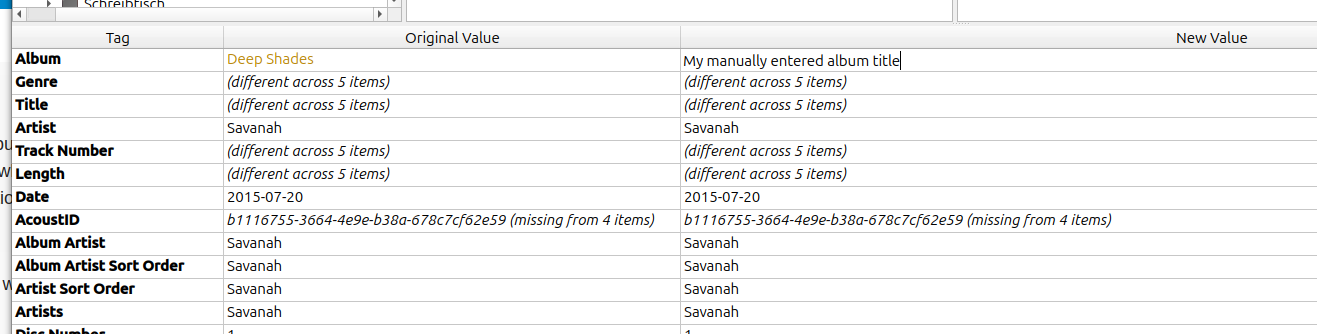
select the file(s) in Picard and edit the “album” tag in the metadata shown at the bottom of the screen:

2 Likes

it might be a bit complicated to write a script for this, unless you’ve already got the album names you want in the tags somewhere (if you do, I could prolly help with that). this is mostly working in the main window (apart from step 1, obviously)

that’s the save button here (also in the top bar, just highlight the “album” or the tracks first)

it doesn’t upload anything to MusicBrainz, Picard just works with the tags in your files and uses data from MusicBrainz to assist with that. working with non-album tracks just uses data from the recordings and not from any release (save for some variables, like %_recording_firstreleasedate%)

in other words, the right panel is all tracks that have been matched to an entry in MusicBrainz, most often releases (albums), but in this case, we’re matching to recordings

quite possibly, but I’ve got no experience with MP3Tag, so you might have to take over if we go that route

My lazy and not very automated method, when I’ve done this (for a ‘mix’ for a friend):

  • Run all the files through Picard, using ‘scan’, with ‘move files’ disabled in options.
  • Hit save on the results.
  • Select all and manually change or delete things as needed e.g. delete release/release group MBID, change album artist to ‘various artists’, change total discs to 1, type in your release name

What was annoying to do was the track numbers. I can’t remember if I just manually numbered everything in order or used Foobar2000 or something to do it a bit quicker…

Have fun :grinning_face_with_smiling_eyes:

3 Likes