# Help with file naming!
**URL:** https://community.metabrainz.org/t/help-with-file-naming/445343
**Category:** MusicBrainz Picard
**Tags:** filenaming
**Created:** [September 28, 2019, 8:33am UTC](https://community.metabrainz.org/t/help-with-file-naming/445343 "2019-09-28T08:33:18Z")
**Posts on this page:** 6
**Page:** 1
### Author:  [@dennis800121](https://community.metabrainz.org/u/dennis800121)
#### Post date: [September 28, 2019, 8:33am UTC](https://community.metabrainz.org/t/help-with-file-naming/445343/1 "2019-09-28T08:33:18Z")
Hello friends!
Im trying to figure ot how to make the file naming the way i want but i cant get it right!
Are there eny friendly users out there who can help me??
I want this pattern:
X:\musik\sorted\A\Artist, The\AlbumType\Year - Album (Label)\CD-Track - Artist - Title
Thank for helping!
---
### Author:  [@st3v3p](https://community.metabrainz.org/u/st3v3p)
#### Post date: [September 28, 2019, 11:08am UTC](https://community.metabrainz.org/t/help-with-file-naming/445343/2 "2019-09-28T11:08:10Z")
we are all friendly here 😉
to do it you will need to create a script in placard someone eles may be able to tell you what you need to put but the best i can do is give you this link
[https://picard.musicbrainz.org/docs/scripting/](https://picard.musicbrainz.org/docs/scripting/)
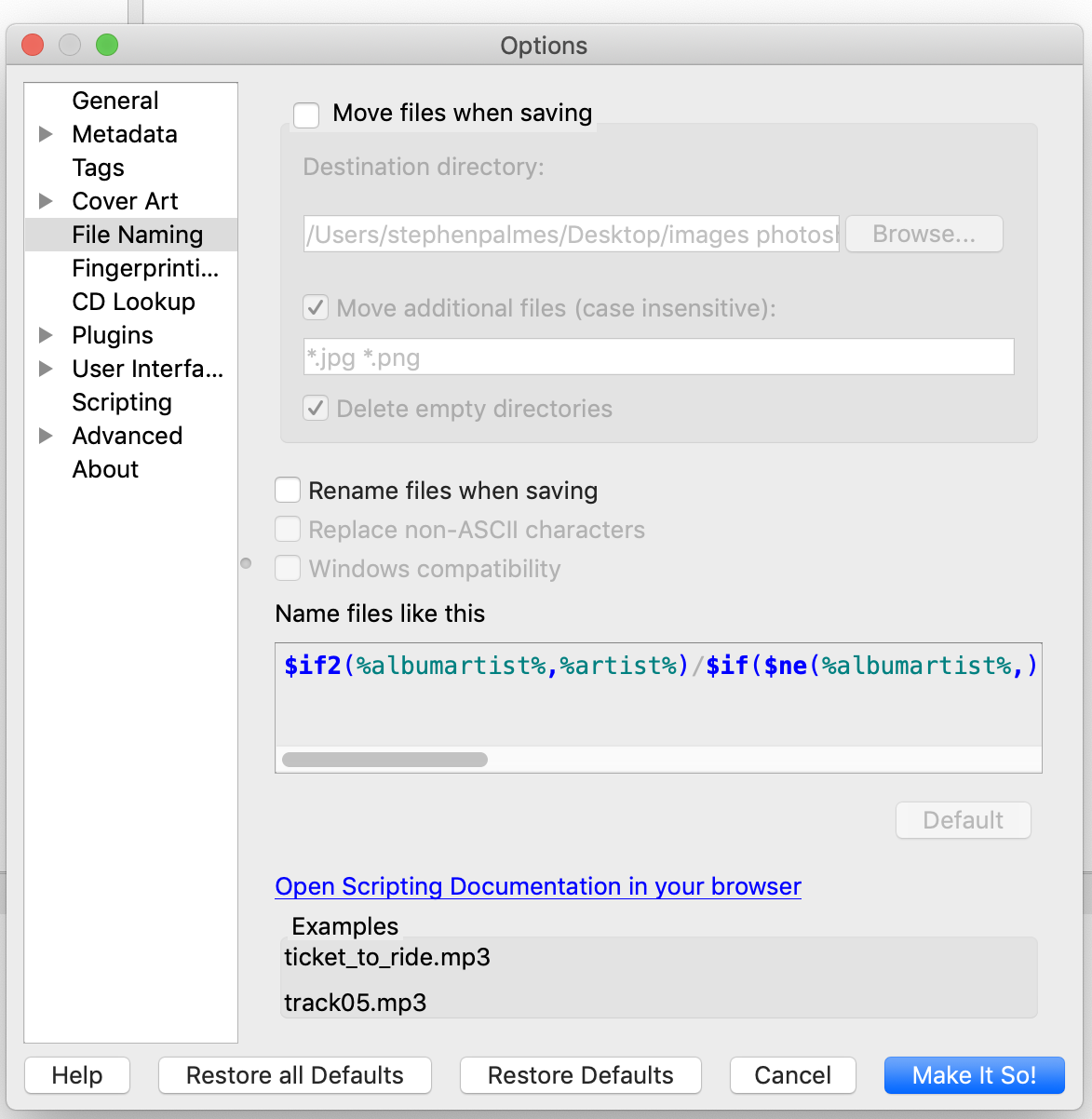
you will need to tick move files when saving then change what is in the box that is called name files like this to what you wont
---
### Author:  [@dennis800121](https://community.metabrainz.org/u/dennis800121)
#### Post date: [September 28, 2019, 11:11am UTC](https://community.metabrainz.org/t/help-with-file-naming/445343/3 "2019-09-28T11:11:08Z")
Yes, i know where to put the text. I have tried to alter the examples found here: [https://picard.musicbrainz.org/docs/scripting/#tagger\_script\_examples](https://picard.musicbrainz.org/docs/scripting/#tagger_script_examples)
But with no luck. Thank you for trying to help!
---
### Author:  [@st3v3p](https://community.metabrainz.org/u/st3v3p)
#### Post date: [September 28, 2019, 11:22am UTC](https://community.metabrainz.org/t/help-with-file-naming/445343/4 "2019-09-28T11:22:38Z")
all good 🙂 while you are waiting have a look in here you may find something that may help
> [@Repository for neat file name string patterns and tagger script snippets](https://community.metabrainz.org/t/repository-for-neat-file-name-string-patterns-and-tagger-script-snippets/2786/21):
>
> This is mine so far: You can customize it to your liking, which is located at the very bottom. The default output looks like this: -=A =-/Amy Winehouse/Back to Black [2007]/Disc 1/Amy Winehouse - Back to Black - 01 - Rehab.mp3 Disc folders are only created if it has more than 2 discs. If you still do not want to display the disc folders, then I recommend changing %Track1% to %Track2%. This will add the disc number 1- to the track number. Just like how it is displayed by default in MusicBee. …
---
### Author:  [@tdiaz](https://community.metabrainz.org/u/tdiaz)
#### Post date: [September 28, 2019, 12:03pm UTC](https://community.metabrainz.org/t/help-with-file-naming/445343/5 "2019-09-28T12:03:29Z")
The thing that helped me get past the How The Heck Does This Work?! curve …
Put letters, numbers, whatever, in between your stuff while you’re editing so you can see what is doing exactly what in your scripting.
… and it goes from top to bottom, everything is done in order, and the output being generated is a continuous line that you’ll see in the example text as you build it.
Put “X:\musik\sorted” in the Destination Directory entry.
Your scripting will be generating the rest of it and in the example at the bottom you’ll see the combined result.
Starting with something like this:
```
$noop(★ Artist with first letter of first name ★)
$noop(root/<*>/B/The B-52's)
$if($eq(%_orderTypeForArtist%,1),
$if2(%_artistSort%,%_albumartistForFilename%,%_artistForFilename%)
)/
```
Willl show your example as:
(however the Windows version shows the example with drive letters and back slashes. I’m not using Windows, but the idea is the same)
Example
/musik/sorted/B/The B-52’s … etc.
If you type some characters in up there after the / (e.g.: abc123)
The example will be:
/musik/sorted/B/The B-52’s/abc123
One part at a time, $if, $set, $eq …%label% %year% %artist%
Just type that stuff in and watch what the example does. Go from there.
Some of the tags you will NOT show anything on the example because they’re not hard coded into the routine that is generating the example, like %label%, but the basic stuff is.
In my example screen shot, you see where I typed aaaaaa in and it’s showing right before the track number. Thats how you can see what part of the script is affecting where in the output.
(and I also added extra stuff to the hard coded example stuff, so if you entered exactly what I have in the script box, you would NOT see the same example, but it would create the intended output on disk.
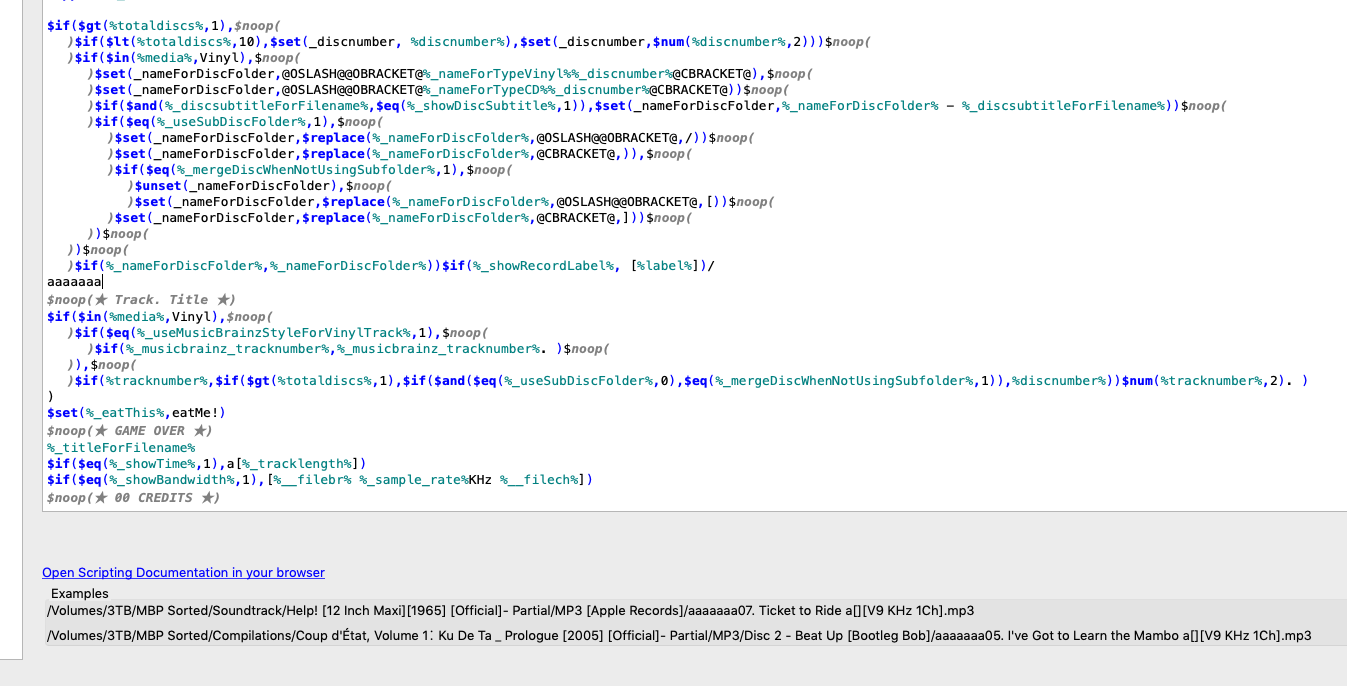
An earlier version of that script I’ve got going on there is in that thread referenced in the above post. As soon as I get one more thing unscrambled, I’m going to post the revised one. I posted a thread for the “one more thing” , too… (I want to see the track time in the filename with a ‘colon’, not underscore. That is, a unicode filesystem safe character that happens to look very close to a colon.)
---
### Author:  [@dennis800121](https://community.metabrainz.org/u/dennis800121)
#### Post date: [September 29, 2019, 4:19am UTC](https://community.metabrainz.org/t/help-with-file-naming/445343/6 "2019-09-29T04:19:54Z")
> [@dennis800121](#):
>
> X:\musik\sorted\A\Artist, The\AlbumType\Year - Album (Label)\CD-Track - Artist - Title
Thank you all! Think i got it right!
Heres the setup i use:
_$upper($firstalphachar($if2(%albumartistsort%, %artistsort%),#))_
_/$left($if2(%albumartistsort%, %artistsort%),18)/_
_%\_primaryreleasetype%/_
_%originalyear% - %album% (%label%)/_
_%discnumber%-$num(%tracknumber%,2) - $left(%artistsort%,30) - $left(%title%,30)_