### Author:  [@suvid](https://community.metabrainz.org/u/suvid)
#### Post date: [March 19, 2025, 8:03am UTC](https://community.metabrainz.org/t/gsoc-2025-importing-listening-history-files/750069/1 "2025-03-19T08:03:40Z")
## Importing listening history files
### General Information
**Name:** Suvid Singhal
**Nickname:** suvid
**Matrix handle:** suvid
**Email:** [redacted]
**Github:** [Suvid-Singhal (Suvid Singhal) · GitHub](https://github.com/Suvid-Singhal)
**Linkedin:** [https://www.linkedin.com/in/suvidsinghal/](https://www.linkedin.com/in/suvidsinghal/)
**X:** [https://x.com/SuvidSinghal](https://x.com/SuvidSinghal)
**Timezone:** IST (UTC+5:30)
### About Me
I’m Suvid Singhal, a sophomore at Birla Institute of Technology and Science (BITS), Pilani, India. I listen to music a lot - be it while studying, programming or doing any other work. I got to know about MetaBrainz through GSoC list of organizations and found it matching with my interests.
When I first set up ListenBrainz on my machine for development, I linked my Spotify account to it. I then began to explore the features of the platform but couldn’t find anything in my listening history as I hadn’t listened to anything immediately after linking my Spotify account. I was a bit disappointed and wished that my previous thousands of listens could be imported in ListenBrainz. Lucky for me, I found the perfect opportunity to implement it in GSoC so that people won’t face this issue anymore and it will be easier for them to move their listening history to ListenBrainz. Additionally, this should significantly increase ListenBrainz’s data, benefiting both users and the platform as a whole.
### Project Information
#### Proposed project: Importing listening history files
**Proposed mentor:** Lucifer/Mayhem
**Project length:** 350 hours
**Problem Statement:** Add the ability to import your listening history from ListenBrainz exports, Spotify and Apple Music streaming history, and other CSV file formats
**Expected Outcomes:** A full listening history importer feature with both backend and frontend
### Proposal
#### A brief walkthrough of the solution:
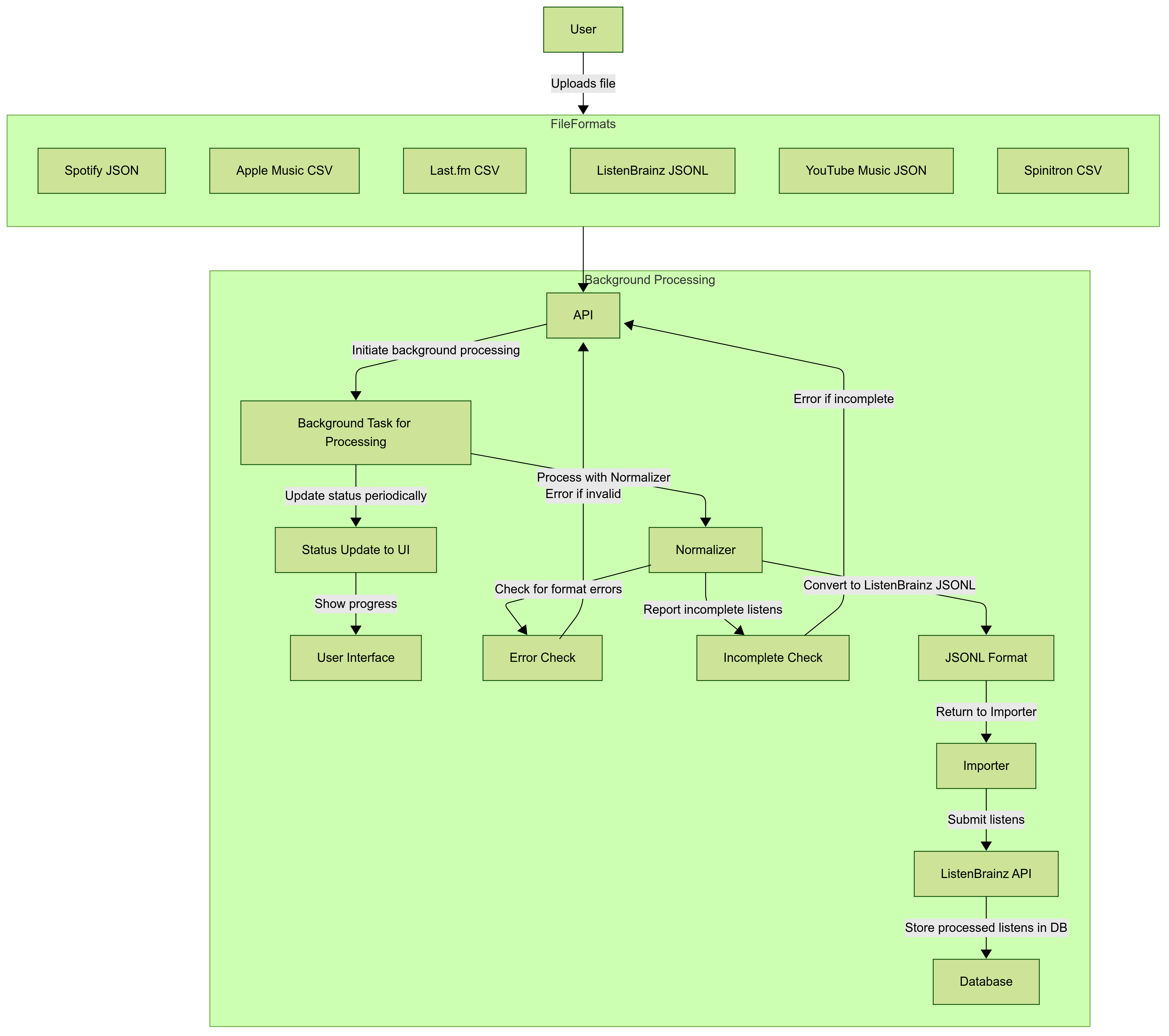
The user will first select the service and import start and end dates from the menu and upload the file. If it’s a zip file, it will be extracted and processed on the backend. The file upload will trigger a background task that processes everything in the background. The user will receive status updates in the UI as the task progresses. The files will be sent to the normalizer for the chosen service. The normalizer will check for format errors and incomplete listens and report them. It will throw an error if it finds such errors. The normalizer will then convert listens to the JSONL format. The converted listens will be submitted to the ListenBrainz API, which will then be stored in the database and reflected in the user’s listening history.
#### Listening History Schemas of the services:
**Spotify Listen History Example Schema:**
```json
[
{
"ts": "2024-07-05T18:15:54Z",
"platform": "windows",
"ms_played": 170044,
"conn_country": "IN",
"ip_addr": "",
"master_metadata_track_name": "Sajni (From \"Laapataa Ladies\")",
"master_metadata_album_artist_name": "Ram Sampath",
"master_metadata_album_album_name": "Sajni (From \"Laapataa Ladies\")",
"spotify_track_uri": "spotify:track:5zCnGtCl5Ac5zlFHXaZmhy",
"episode_name": null,
"episode_show_name": null,
"spotify_episode_uri": null,
"audiobook_title": null,
"audiobook_uri": null,
"audiobook_chapter_uri": null,
"audiobook_chapter_title": null,
"reason_start": "clickrow",
"reason_end": "trackdone",
"shuffle": true,
"skipped": false,
"offline": false,
"offline_timestamp": 1720200928,
"incognito_mode": false
}]
```
**Note:** There can be many edge cases based on `reason_start`, `reason_end`, `ms_played` etc. which will also be covered.
**Apple Music CSV Listen History Example Schema:**
```csv
Title,Artist,Album,Duration (ms),Play Date,Play Count,Is Complete,Source,Device,Genre,Explicit,Track ID,Album ID,Artist ID
"Blinding Lights","The Weeknd","After Hours",200040,"2024-03-18T14:32:00Z",1,TRUE,"Apple Music Streaming","iPhone 14","R&B",FALSE,"1458748324","1458748323","123456789"
"Levitating","Dua Lipa","Future Nostalgia",203500,"2024-03-18T15:10:30Z",2,TRUE,"Apple Music Streaming","MacBook Pro","Pop",FALSE,"1498745234","1498745200","987654321"
```
**ListenBrainz Listens Export (JSONL) Example Schema:**
```json
{
"inserted_at": 1738390008.396482,
"listened_at": 1738389838,
"track_metadata": {
"track_name": "Admirin' You (feat. Preston Pablo)",
"artist_name": "Karan Aujla, Ikky, Preston Pablo",
"mbid_mapping": {
"caa_id": 36478339379,
"artists": [
{
"artist_mbid": "4a779683-5404-4b90-a0d7-242495158265",
"join_phrase": " & ",
"artist_credit_name": "Karan Aujla"
},
{
"artist_mbid": "34561816-2208-41bc-b14a-90b3cb4deb09",
"join_phrase": "",
"artist_credit_name": "Preston Pablo"
}
],
"artist_mbids": [
"4a779683-5404-4b90-a0d7-242495158265",
"34561816-2208-41bc-b14a-90b3cb4deb09"
],
"release_mbid": "f0537077-e571-4fa2-a907-8f9168329423",
"recording_mbid": "99cafa8c-978f-4f70-9897-e021bf153d49",
"recording_name": "Admirin' You",
"caa_release_mbid": "f0537077-e571-4fa2-a907-8f9168329423"
},
"release_name": "Making Memories",
"recording_msid": "e4159ca9-1694-445d-b35b-f55909bd3458",
"additional_info": {
"isrc": "CAW112300241",
"discnumber": 1,
"origin_url": "https://open.spotify.com/track/6ygiy70ujkNOYXM1tQuMNe",
"spotify_id": "https://open.spotify.com/track/6ygiy70ujkNOYXM1tQuMNe",
"duration_ms": 214750,
"tracknumber": 3,
"artist_names": [
"Karan Aujla",
"Ikky",
"Preston Pablo"
],
"music_service": "spotify.com",
"spotify_album_id": "https://open.spotify.com/album/3BGU0BqGwBkYDHpfCWFm7I",
"submission_client": "listenbrainz",
"spotify_artist_ids": [
"https://open.spotify.com/artist/6DARBhWbfcS9E4yJzcliqQ",
"https://open.spotify.com/artist/3nqS8jzqmsPKFJTp0BOIel",
"https://open.spotify.com/artist/5TvdGhdmRObqOkU6eGfXb5"
],
"release_artist_name": "Karan Aujla, Ikky",
"release_artist_names": [
"Karan Aujla",
"Ikky"
],
"spotify_album_artist_ids": [
"https://open.spotify.com/artist/6DARBhWbfcS9E4yJzcliqQ",
"https://open.spotify.com/artist/3nqS8jzqmsPKFJTp0BOIel"
]
}
}
}
```
**Spinitron CSV Listen History Example Schema**
```csv
Start Time, Duration, Show, DJ, Title, Artist, Album, Label, Release Year, Format, Playlist ID, Explicit
"2024-03-18T14:32:00Z", "3:20", "Indie Hour", "DJ Alex", "Blinding Lights", "The Weeknd", "After Hours", "XO/Republic", "2020", "Digital", "123456", "FALSE"
"2024-03-18T15:10:30Z", "4:05", "Rock Classics", "DJ Mike", "Bohemian Rhapsody", "Queen", "A Night at the Opera", "EMI", "1975", "Vinyl", "123457", "FALSE"
```
**Last.fm CSV Listen History Example Schema [from here](https://benjaminbenben.com/lastfm-to-csv/)**
```csv
Kaj,Bara Bada Bastu,Bara Bada Bastu,18 Mar 2025 12:14
Vishal-Shekhar,Anjaana Anjaani,Tujhe Bhula Diya,18 Mar 2025 11:39
```
**Youtube Music Listen History Example Schema**
```json
[{
"header": "YouTube",
"title": "Watched Is Sad Music Actually Sad? | Idea Channel | PBS Digital Studios",
"titleUrl": "https://www.youtube.com/watch?v\u003dbWWYE4eLEfk",
"subtitles": [{
"name": "PBS Idea Channel",
"url": "https://www.youtube.com/channel/UC3LqW4ijMoENQ2Wv17ZrFJA"
}],
"time": "2021-02-18T14:03:12.780Z",
"products": ["YouTube"],
"activityControls": ["YouTube watch history"]
},{
"header": "YouTube Music",
"title": "Watched Killing In the Name",
"titleUrl": "https://www.youtube.com/watch?v\u003d2o9aoL0NWpw",
"subtitles": [{
"name": "Rage Against the Machine - Topic",
"url": "https://www.youtube.com/channel/UCg4nBubbzhYXjudOxPi9V7w"
}],
"time": "2021-12-18T09:13:36.211Z",
"products": ["YouTube"],
"activityControls": ["YouTube watch history"]
}]
```
These schemas will be the guiding principles to implement our normalizers.
**Phase 1: Creating the main importer**
The main importer will be an API endpoint `/1/import-files`. It will accept file uploads.
File uploads will be limited to 100MB as it should be enough for CSV, JSON and ZIP uploads.
It will be an authenticated endpoint only visible to logged in users.
The main importer will accept CSV, JSON and ZIP files. ZIP files for Spotify extended streaming history. It will help users import their entire extended history by extracting it and processing the audio JSON files in the background. Users will also be able to upload individual JSON files for Spotify listening history.
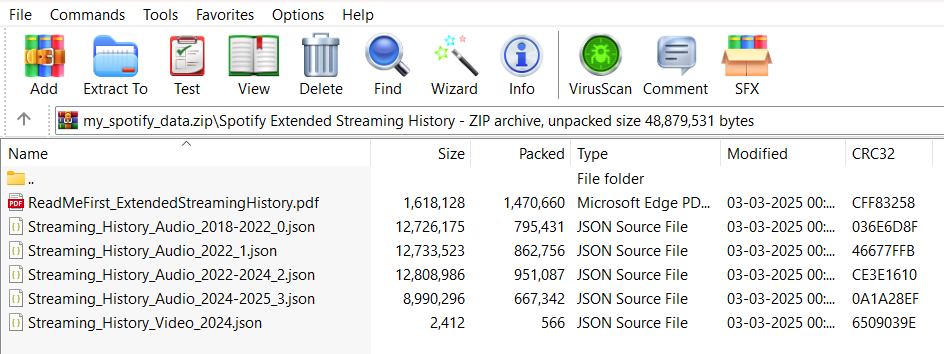
This is the file structure of the Spotify extended streaming history ZIP. We can extract and process files according to it.
The importer will be generic class `ListeningHistoryFileImporter` that extends the base class `ListensImporter` from `base.py` and then we can have separate classes like `SpotifyHistoryFileImporter` that extend `ListeningHistoryFileImporter`.
Classes can look like this:
```python
class ListeningHistoryFileImporter(ListensImporter):
# Base class for all history file importers
def submit_listens(self, listens: str):
# Finally submits validated listens in batches of 1000
```
This will extend the ListensImporter class, which contains the method `submit_listens_to_listenbrainz` which enques listens to RabbitMQ and submits them. We can use this method to submit the listens inside the `submit_listens`.
Will ensure that the endpoint returns a response as soon as the file upload completes.
**Phase 2: Making the import process a background task**
We can refer to webserver/views/export.py and can use a similar strategy. We will have to create a new table in the database `user_data_import`.
The file will be uploaded on the server and its filename will be included in the database and not the entire contents in order to prevent from SQL injection attacks.
The ZIP files will be extracted and JSON files from the audio history will be clubbed together and uploaded to the server in the background.
It can be created in this manner:
```sql
CREATE TABLE user_data_import (
id INTEGER GENERATED ALWAYS AS IDENTITY,
user_id INTEGER NOT NULL,
service user_data_import_service_type NOT NULL,
status user_data_import_status_type NOT NULL,
progress TEXT,
filename TEXT,
created TIMESTAMPTZ NOT NULL DEFAULT NOW()
);
```
We can then refer to code in export.py to make it a background task and process in the background.
**Phase 3: Create Normalizers**
Refer to the schemas above
Make Pydantic models containing the expected fields (both mandatory and optional)
Extract the relevant information from the files required for submission
Special attention to Spotify listening history as it can have many edge cases as it contains a lot of information.
Can take help from [GitHub - kellnerd/elbisaur: CLI to manage your ListenBrainz listens and process listen dumps · GitHub](https://github.com/kellnerd/elbisaur?tab=readme-ov-file#parsing-spotify-extended-streaming-history) for Spotify extended streaming history.
Example Pydantic model for Spotify:
```python
class SpotifyStreamRecord(BaseModel):
ts: datetime = Field(..., description="Timestamp of when the track was played")
platform: Optional[str] = Field(None, description="Platform used for playback")
ms_played: int = Field(..., description="Duration the track was played in milliseconds")
conn_country: Optional[str] = Field(None, description="Country code of the connection")
ip_addr: Optional[str] = Field(None, description="IP address during playback")
master_metadata_track_name: str = Field(..., description="Name of the track")
master_metadata_album_artist_name: str = Field(..., description="Name of the album artist")
master_metadata_album_album_name: Optional[str] = Field(None, description="Name of the album")
spotify_track_uri: Optional[str] = Field(None, description="Spotify URI of the track")
episode_name: Optional[str] = Field(None, description="Name of the episode (if applicable)")
episode_show_name: Optional[str] = Field(None, description="Name of the show (if applicable)")
spotify_episode_uri: Optional[str] = Field(None, description="Spotify URI of the episode (if applicable)")
reason_start: Optional[str] = Field(None, description="Reason for starting playback")
reason_end: Optional[str] = Field(None, description="Reason for ending playback")
shuffle: Optional[bool] = Field(None, description="Indicates if shuffle was enabled")
skipped: Optional[bool] = Field(None, description="Indicates if the track was skipped")
offline: Optional[bool] = Field(None, description="Indicates if playback was offline")
offline_timestamp: Optional[datetime] = Field(None, description="Timestamp when offline playback occurred")
incognito_mode: Optional[bool] = Field(None, description="Indicates if incognito mode was enabled")
```
The data can then be verified by the model in the following manner:
```python
# Example data
data = {
"ts": "2024-03-18T14:32:00Z",
"ms_played": 180000,
"master_metadata_track_name": "Blinding Lights",
"master_metadata_album_artist_name": "The Weeknd",
"master_metadata_album_album_name": "After Hours",
"spotify_track_uri": "spotify:track:0VjIjW4GlUZAMYd2vXMi3b",
"platform": "Android",
"conn_country": "US",
"reason_start": "clickrow",
"reason_end": "trackdone",
"shuffle": False,
"skipped": False,
"offline": False
}
try:
record = SpotifyStreamRecord(**data)
print("Data parsed successfully")
except ValidationError as e:
print("Listen format error or incomplete listen", e)
```
Similarly, will create validation rules for all the services according to the schemas above.
Will convert each listen to JSONL format (schema above) as it is the format used in ListenBrainz.
Will extract important information required according to the JSONL schema input data from the listens to make the JSONL.
The following is the example class for Spotify service:
```python
class SpotifyListeningHistoryFileImporter(ListeningHistoryFileImporter):
# Importer for Spotify listening history files
def check_file(self, file_content: str) -> List[Dict]:
print(f"Parsing Spotify file: {file_content}")
# Spotify parsing logic using Pydantic models
def convert_to_jsonl(self, listens: List[Dict]) -> str:
# Converts listens to JSONL format
# Keep required fields and as per JSONL naming convention
jsonl_lines = [json.dumps(listen) for listen in listens]
return "\n".join(jsonl_lines)
```
The `SpotifyHistoryFileImporter` and other classes can have `check_file` and `convert_to_jsonl` functions which parse the files, check for errors and incomplete listens. Then `convert_to_jsonl` will convert listens to JSONL format and the main `ListeningHistoryFileImporter` will continue to submit the listens in batches of 1000.
We can do it similarly for other file formats as well.
**Phase 4: Adding Submission and Batching functionality to the main Importer**
The importer will first validate listens and remove invalid listens. According to the ListenBrainz documentation, invalid listens are categorized as the listens that are at least 4 minutes long or half the length of track, whichever is minimum.
Also make sure that skipped songs or songs that have been played are not counted as listens.
In case, duration of track is not available or duration played is not available for some services, the listen can not be classified as valid or not. It will be submitted nonetheless.
This will give us the valid listens ready to be submitted.
Make sure the listens are submitted in batches of 1000 as specified in the constant `MAX_LISTENS_PER_REQUEST` in the ListenBrainz documentation.
Submit the listens using the existing `submit_listens_to_listenbrainz` method. It automatically tries to assign MBIDs and stores the listens in the database and user’s listening history.
**Phase 5: Make UI Components for the Importer**
The UI will look something like this:
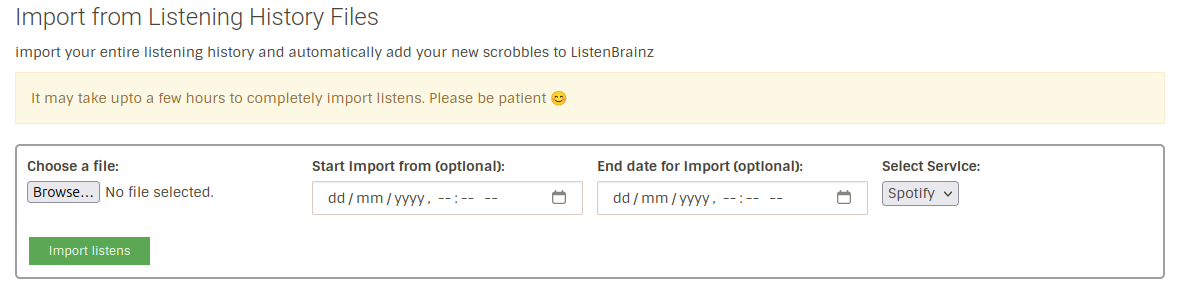
It will be improved further but it should give a rough idea as of now.
The UI components are:
- A file uploader which supports JSON, JSONL, CSV and ZIP files
- A date selector to select date from which the user wants to import the listens
- A date selector to select date till which the user wants to import the listens
- A select service dropdown which allows to select streaming service from which the user wants to import listens
- A button to start importing listens
Will integrate frontend with the backend to complete the feature.
**Phase 6: Testing and Bug Fixing**
This phase will include testing using all possible conditions.
Will try to fix all the edge cases and bugs. Will work on fixing them so that everything works smoothly.
**Phase 7: The Road Ahead**
Will add a feature to upload entire zip files that are generated when downloading the listening history from the services, if time permits. This will be more convenient for the users as they can directly drop the zip files and import their listening history to ListenBrainz.
### Project Timeline
#### Community Bonding Period (Pre-Coding Phase)
- Familiarize with the codebase, guidelines, and best practices
- Discuss the implementation plan with mentors and finalize the architecture
- Set up the development environment and explore relevant parts of the codebase
#### Coding Phase 1: Main Importer (2 Weeks)
- Implement the /1/import-files API endpoint for file uploads
- Add authentication and size restrictions (max 100MB)
- Test file upload, authentication, and error handling
- Prepare the file handling mechanism to trigger the background task (to be completed in Phase 2)
- Implement ZIP file uploads and ensure they are extracted and the JSON files are merged together and uploaded to the server
#### Coding Phase 2: Background Task (3 Weeks)
- Implement the background task for processing the file uploads
- Provide status updates to the user in the UI about the import progress
- Store file metadata (filename, user ID, status) in the `user_data_import database` table
- Trigger background tasks for ZIP file extraction and file processing
- Test the background task functionality with file uploads
#### Coding Phase 3: Normalizers (3 Weeks)
- Create Pydantic models for different streaming services (e.g., Spotify, Apple Music)
- Implement file parsing and validation for each service
- Add functions to convert listens to the ListenBrainz JSONL format
- Write tests for validation and conversion
- Handle edge cases, especially for Spotify listening history
#### Coding Phase 4: Batching and Submission (3 Weeks)
- Implement logic to filter invalid listens according to ListenBrainz guidelines.
- Handle edge cases where track duration or playback data is unavailable
- Implement batching of 1000 listens per submission
- Integrate with the existing submission method and perform end-to-end testing
- Implement robust error handling during background processing
#### Coding Phase 5: UI Components (2 Weeks)
- Develop the frontend for the importer:
- File uploader (supports JSON, JSONL, CSV)
- Date selectors for specifying import range
- Dropdown for selecting the streaming service
- Button to start the import process
- Progress indicator to show the status of background processing (once the processing is started)
- Integrate frontend with backend and test the UI
#### Coding Phase 6: Testing, Documentation, and Optimization (3 Weeks)
- Conduct comprehensive testing across different file types and streaming services
- Fix issues and optimize the importer for performance
- Write user documentation and a guide for using the importer
- Write a feature announcement blog 🙃
#### Post-GSoC (Future Enhancements)
- Add support for more streaming services like Deezer, Amazon Music etc.
- Improve the UI for a better user experience
- Enhance background task performance and error handling
- Add import analytics and graphs
### Why Me
I have been actively contributing to ListenBrainz since December, 2024 and have a good understanding of the codebase for both frontend and backend part.
I have extensive experience with Flask and Django. I have also worked extensively in Typescript and ReactJS while solving issues in ListenBrainz.
I have added many new features and implemented UI fixes as well. The main features added by me are:
- Implemented the Thanks feature enabling users to thank other users for pins, recordings and recommendations
- Implemented the volume slider feature for the BrainzPlayer allowing users to control the music volume on BrainzPlayer
- General UI improvements and bug fixes
More info about it can be found in [my PRs](https://github.com/metabrainz/listenbrainz-server/issues?q=is%3Apr%20author%3ASuvid-Singhal).
### Community affinities
#### What type of music do you listen to? (please list a series of [MBIDs](https://musicbrainz.org/doc/MusicBrainz_Identifier) as examples)
I mainly listen to Bollywood (pop and retro) and Punjabi music.
_**Some examples of my favourite Bollywood songs (recording MBIDs):**_
`740a9ba0-85bf-411f-ba57-a31edbf4a6f7`, `b77d8d18-a0ac-4eb3-862c-7d16465c5920`, `34fa4a16-dac7-4413-a59f-e6a8f021b19c`, `cbe07d47-c94b-4e6e-a637-34e4452d7008`, `65adc564-117b-4d8b-8627-77bbfb76a76f` etc.
**Some examples of my favourite Punjabi songs (recording MBIDs):**
`Ed1db45e-3174-4ef8-89ed-22e9e5b3ddd5`, `f884ca64-6781-4380-9c85-f6e00e7ef39d`, `3719064c-6154-4634-a7b9-4a1b9a0e459d`, `bbef3851-40a1-432a-af91-2cf9586eb07b`, `e2609ce2-ad27-4236-a72e-514716df7c30`, `57f5ea65-f0fd-4d2f-815a-eb8419c4dce9` etc.
**My favourite artists (artist MBIDs):**
`4a779683-5404-4b90-a0d7-242495158265`, `4586db61-284f-42dd-9b19-69111ea08149`, `ed3f4831-e3e0-4dc0-9381-f5649e9df221`, `a8740949-50a8-4e71-8133-17d31b7cf69c`, `ed29f721-0d40-4a90-9f25-a91c2ccccd5e`, `1dd28f27-4ab3-4a3f-8174-4ccd571a9dce`, `934cc2a7-822e-4117-8e82-8e663d7d2daf`, `172e980e-ba97-4adb-acb0-d59733c599b6` etc.
**What aspects of MusicBrainz/ListenBrainz/BookBrainz/Picard interest you the most?**
I am genuinely impressed by the data on MusicBrainz as it had almost all the songs I searched for, even the most niche ones. I could also find data for some Haryanvi songs as well, even though the Haryanvi music industry is really small and has a really small regional audience.
I like the BrainzPlayer on ListenBrainz as it’s very convenient. Also, I really like that it tracks my listening habits and I can easily export it to analyze it.
I have not used Picard that much but when I used it to add metadata to an MP3 file, I found the process really smooth and I was able to add correct metadata within seconds!
**Have you ever used MusicBrainz Picard to tag your files or used any of our projects in the past?**
Yes, I have used Picard once to add metadata to a Punjabi song I downloaded from a website as an MP3 file 😜
I also use BrainzPlayer on ListenBrainz regularly.
I also added the recording `57f5ea65-f0fd-4d2f-815a-eb8419c4dce9` to MusicBrainz while preparing the proposal as I couldn’t find it in the database.
### Programming precedents
**When did you first start programming?**
I started programming when I was in 8th grade but it was merely time-pass back then. Overtime, it developed into my hobby and I became a bit serious about it in 10th grade.
**Have you contributed to other open source projects? If so, which projects and can we see some of your code?**
Yes, I have majorly contributed to Listenbrainz and MusicBrainz in the Metabrainz ecosystem. All my PRs can be found here:
[My ListenBrainz PRs](https://github.com/metabrainz/listenbrainz-server/pulls?q=is%3Apr+author%3ASuvid-Singhal)
[MusicBrainz PRs](https://github.com/metabrainz/musicbrainz-server/pulls?q=is%3Apr+author%3ASuvid-Singhal)
I have contributed to PolicyEngine as well in the past. My PRs can be found here:
[Link to PRs](https://github.com/PolicyEngine/policyengine-app/pulls?q=is%3Apr+author%3ASuvid-Singhal)
**What sorts of programming projects have you done on your own time?**
Recently, I tried my hands with AI/ML and made [this project](https://github.com/Suvid-Singhal/Binary-and-Multiclass-Classification-using-Neural-Networks) to learn classification techniques
I have also done some personal projects in high school:
- [PyNotes](https://github.com/Suvid-Singhal/PyNotes)
- [PyNews](https://github.com/Suvid-Singhal/PyNews)
- I had also used Python to regress IIIT-Delhi ranks with respect to the to the JEE mains all India ranks predict my chances of admission in the college 🙂 I also plotted my results using matplotlib (couldn’t find the code now sadly)
I have also done many mini-projects for Google Code-In 2019, which included (but not limited to):
- [Plotting city maps in Python](https://github.com/Suvid-Singhal/City-Maps-in-Python-Geopandas)
- [Basic computer graphics using Pygame](https://github.com/Suvid-Singhal/Circle-State-Checker)
- [Plotting AQI maps for cities](https://github.com/Suvid-Singhal/Pollutant-Concentration-City-Wise-Python-OpenAQ)
### Practical requirements
**What computer(s) do you have available for working on your SoC project?**
I have an HP Pavilion Gaming laptop. Specifications: AMD Ryzen 7 5800H, 16 GB RAM, 1 TB SSD
I have Windows as my main OS and have set up my development environment in an Ubuntu 24.04 LTS Virtual Machine.
**How much time do you have available per week, and how would you plan to use it?**
I am mostly free during my summer break. I can give around 40 hours per week to the GSoC project.
---
### Author:  [@lucifer](https://community.metabrainz.org/u/lucifer)
#### Post date: [March 27, 2025, 7:14am UTC](https://community.metabrainz.org/t/gsoc-2025-importing-listening-history-files/750069/2 "2025-03-27T07:14:11Z")
Hi!
Thanks for the proposal.
> [@suvid](#):
>
> If it’s a zip file, it will be extracted and processed on the backend. (Future goal)
This should be the main goal of the proposal. Regardless of whether the file being processed is a ZIP, JSON, CSV etc. It has to be processed in background, otherwise the user needs to keep the webpage open during the length of the import and ensure they don’t get disconnected even after the upload otherwise the import would fail.
Limited validation if possible can be performed during upload but the bulk of the processing should take place in background. For instance, we have the listen history deletion and listen export tasks in [listenbrainz-server/listenbrainz/background at master · metabrainz/listenbrainz-server · GitHub](https://github.com/metabrainz/listenbrainz-server/tree/master/listenbrainz/background), [listenbrainz-server/listenbrainz/webserver/views/export.py at 77381518ca5ae8f24f13c02b085f838e3456eed4 · metabrainz/listenbrainz-server · GitHub](https://github.com/metabrainz/listenbrainz-server/blob/77381518ca5ae8f24f13c02b085f838e3456eed4/listenbrainz/webserver/views/export.py#L20). The file import should work similarly.
We should also display the progress of the import to the user, for exports we currently record the progress information in a table like this [listenbrainz-server/listenbrainz/background/export.py at 77381518ca5ae8f24f13c02b085f838e3456eed4 · metabrainz/listenbrainz-server · GitHub](https://github.com/metabrainz/listenbrainz-server/blob/77381518ca5ae8f24f13c02b085f838e3456eed4/listenbrainz/background/export.py#L23). We can make this progress table generic, add a column to two, and make the progress available to the frontend for the user to see.
> [@suvid](#):
>
> The converted listens will then be submitted to the ListenBrainz API, which will then be stored in the database and reflected in the user’s listening history.
The converted listens should not be submitted to the ListenBrainz API but validated and directly enqueued to RabbitMQ.
I think adapting the proposal to the background processing requirements will change it a lot so let’s discuss the timeline after that.
---
### Author:  [@suvid](https://community.metabrainz.org/u/suvid)
#### Post date: [March 28, 2025, 7:45am UTC](https://community.metabrainz.org/t/gsoc-2025-importing-listening-history-files/750069/3 "2025-03-28T07:45:38Z")
Hi @lucifer
Thanks a lot for the feedback on my proposal.
It was indeed really helpful.
I have tried to incorporate all the recommendations and have updated it now.
Could you please check and let me know what all improvements are still needed or if I’m missing something important.
Thanks 🙂
---
### Author:  [@lucifer](https://community.metabrainz.org/u/lucifer)
#### Post date: [April 1, 2025, 10:25am UTC](https://community.metabrainz.org/t/gsoc-2025-importing-listening-history-files/750069/4 "2025-04-01T10:25:03Z")
Hi!
Can you please go through the proposal again and make sure it is up to date? If yes, I think your suggestion is to implement the background imports at a later stage. But we want to directly start with background imports. The file is uploaded and the API should return a response as soon as the upload completes. The background process then processes it as soon as possible.
---
### Author:  [@lucifer](https://community.metabrainz.org/u/lucifer)
#### Post date: [April 1, 2025, 11:46am UTC](https://community.metabrainz.org/t/gsoc-2025-importing-listening-history-files/750069/5 "2025-04-01T11:46:24Z")
I think the architecture diagram will need to be updated as well.
---
### Author:  [@suvid](https://community.metabrainz.org/u/suvid)
#### Post date: [April 1, 2025, 12:41pm UTC](https://community.metabrainz.org/t/gsoc-2025-importing-listening-history-files/750069/6 "2025-04-01T12:41:29Z")
> [@lucifer](#):
>
> If yes, I think your suggestion is to implement the background imports at a later stage
Yes, that was my plan till now. But I will update the proposal to make it the first priority from the starting itself.
> [@lucifer](#):
>
> I think the architecture diagram will need to be updated as well.
Yes, I realized now! Will do the same.
---
### Author:  [@suvid](https://community.metabrainz.org/u/suvid)
#### Post date: [April 1, 2025, 10:07pm UTC](https://community.metabrainz.org/t/gsoc-2025-importing-listening-history-files/750069/7 "2025-04-01T22:07:55Z")
Hi @lucifer
I have made the required changes now. Could you please check and let me know if it’s good now?
Thanks 🙂
---
### Author:  [@lucifer](https://community.metabrainz.org/u/lucifer)
#### Post date: [April 7, 2025, 8:34am UTC](https://community.metabrainz.org/t/gsoc-2025-importing-listening-history-files/750069/8 "2025-04-07T08:34:45Z")
> [@suvid](#):
>
> Will add a feature to upload entire zip files that are generated when downloading the listening history from the services, if time permits. This will be more convenient for the users as they can directly drop the zip files and import their listening history to ListenBrainz.
This should be in the first cut.
We want to support Spotify extended streaming imports directly. The user should be able to upload the entire zip file. The background process will extract the zip file and process the individual json/jsonl files inside it. Users should also be allowed to upload individual files from the import. I would much prefer that we integrate one service properly than trying to do multiple ones with partial support. The CSV or Apple Music imports can come after the Spotify support is complete.
---
### Author:  [@suvid](https://community.metabrainz.org/u/suvid)
#### Post date: [April 7, 2025, 10:38am UTC](https://community.metabrainz.org/t/gsoc-2025-importing-listening-history-files/750069/9 "2025-04-07T10:38:38Z")
Hi @lucifer
I have updated my proposal here as well as on the GSoC portal.
Thanks a lot for guiding me in the process and helping me refine it down to the very last details. 😸
---
### Author:  [@791b15470e28](https://community.metabrainz.org/u/791b15470e28)
#### Post date: [August 31, 2025, 9:32am UTC](https://community.metabrainz.org/t/gsoc-2025-importing-listening-history-files/750069/10 "2025-08-31T09:32:58Z")
Hello, since this is now on stable, I’d like to ask what kind of filtering does this importer do? at least when importing from spotify. For example:
- Does it filter out the podcasts?
- Does it filter out any songs that no longer exist on spotify and thus have no track name?
- Does it filter out any songs based on duration? (I think it didn’t.)
- Does it filter out the “videos” in the export history?
- Any other filter I didnt think of
In general, I’d like to know the criteria used to filter out imported tracks.
Very useful feature, probably one of the main ones I was looking for in a long time. Thanks!
PS. Tell me if I should ask this anywhere else:)
---
### Author:  [@suvid](https://community.metabrainz.org/u/suvid)
#### Post date: [August 31, 2025, 11:11am UTC](https://community.metabrainz.org/t/gsoc-2025-importing-listening-history-files/750069/11 "2025-08-31T11:11:28Z")
Hi,
Thanks for the feedback! I’m glad that this is very useful to you 🙂
Regarding the queries,
1. Yes, it should not include the podcasts and audiobooks as we take the `spotify_track_uri` from the extended streaming history, whereas the podcasts have other fields like `spotify_episode_uri`
2. If the songs have no artist name and track name then we would be submitting a blank listen to Listenbrainz and I think it takes care of it. It should not be imported.
3. Yes, you’re right. It doesn’t do this as of now as Spotify doesn’t give the total duration of the track to determine a valid listen.
4. Yes. We only consider the audio listen files.
5. We also get additional data regarding the track from the Listenbrainz cache and Spotify API also as a fallback if the cache doesn’t contain the information about the track.
---
### Author:  [@suvid](https://community.metabrainz.org/u/suvid)
#### Post date: [August 31, 2025, 11:13am UTC](https://community.metabrainz.org/t/gsoc-2025-importing-listening-history-files/750069/12 "2025-08-31T11:13:18Z")
UPDATE:
The importer is live [here](https://listenbrainz.org/settings/import/)!
It supports Listenbrainz Exports and Spotify for now. The project has been completed and deployed. Do try it out!
Thanks
---
### Author:  [@791b15470e28](https://community.metabrainz.org/u/791b15470e28)
#### Post date: [August 31, 2025, 11:31am UTC](https://community.metabrainz.org/t/gsoc-2025-importing-listening-history-files/750069/13 "2025-08-31T11:31:02Z")
Amazing, this was very informative, thank you!