# Can you use Picard to ADD metadata to MusicBrainz from your music files?
**URL:** https://community.metabrainz.org/t/can-you-use-picard-to-add-metadata-to-musicbrainz-from-your-music-files/375244
**Category:** MusicBrainz Picard
**Created:** [April 18, 2018, 2:18pm UTC](https://community.metabrainz.org/t/can-you-use-picard-to-add-metadata-to-musicbrainz-from-your-music-files/375244 "2018-04-18T14:18:30Z")
**Posts on this page:** 11
**Page:** 1
### Author:  [@c210344](https://community.metabrainz.org/u/c210344)
#### Post date: [April 18, 2018, 2:18pm UTC](https://community.metabrainz.org/t/can-you-use-picard-to-add-metadata-to-musicbrainz-from-your-music-files/375244/1 "2018-04-18T14:18:30Z")
Hi,
On this page: [Editing FAQ - MusicBrainz](https://musicbrainz.org/doc/Editing_FAQ)
It suggests that you can upload metadata from your own music collection to MusicBrainz automatically via Picard:
"How can I contribute to MusicBrainz?
If you are not feeling very ambitious, then simply download the MusicBrainz Picard tagger. This program lets you look up and submit metadata for the Audio CDs and music files in your collection to the database. "
Is that right? I can’t see it mentioned in the FAQ.
The reason I ask is that I have a great deal of “Dungeon Synth” music in my collection which has been self-released by the artists or released by microlabels on Bandcamp so isn’t on MusicBrainz.
Or did I get the wrong end of the stick here?
Thanks!
---
### Author:  [@TestyTest](https://community.metabrainz.org/u/TestyTest)
#### Post date: [April 18, 2018, 6:45pm UTC](https://community.metabrainz.org/t/can-you-use-picard-to-add-metadata-to-musicbrainz-from-your-music-files/375244/2 "2018-04-18T18:45:17Z")
Picard can add the metadata from your files if you have them tagged. Go into the Options \> Plugins menu in Picard and enable the “Add Cluster as Release” plug-in.
Then add your files to Picard and right click on them. You will see a menu item for Plugins with options to add it to Picard. You can use the Cluster button before you do this, if you have multiple files that are part of the same release/album and are tagged as such. That will allow you to add all the files together as part of a release.
---
### Author:  [@aerozol](https://community.metabrainz.org/u/aerozol)
#### Post date: [April 19, 2018, 6:34am UTC](https://community.metabrainz.org/t/can-you-use-picard-to-add-metadata-to-musicbrainz-from-your-music-files/375244/3 "2018-04-19T06:34:33Z")
Although you can add some data via Picard (add cluster, AcoustID’s, DiscID’s), in your case I think it would be quicker and easier to add releases using a Bandcamp import plugin, the one in this list:
> **[murdos/musicbrainz-userscripts](https://github.com/murdos/musicbrainz-userscripts)**
>
> musicbrainz-userscripts - Collection of userscripts for MusicBrainz
Let me know if you would like some instructions on how to install/use it.
It does pretty much everything, you might have to use guess case though, and always double check the import. But it’s really quick and simple!
I’ll follow you and let you know if I have any tips, if you don’t mind.
Also, your top dungeon synth recs. please!
---
### Author:  [@c210344](https://community.metabrainz.org/u/c210344)
#### Post date: [April 19, 2018, 8:47am UTC](https://community.metabrainz.org/t/can-you-use-picard-to-add-metadata-to-musicbrainz-from-your-music-files/375244/4 "2018-04-19T08:47:25Z")
Hi, that sounds good! I’m afraid I will need help to do that though, I know nothing about coding etc!
As for DS recommendations, check out:
[Örnatorpet](https://ornatorpet.bandcamp.com/album/midvintersagor)
medieval fairytale beauty
[Ekbladstid](https://darkageproductions.bandcamp.com/album/eldar)
dark brassy solemnity
[Torchlight](https://torchlightds.bandcamp.com/album/realms-of-oblivion)
covers more different moods, so it’s less of a cohesive work than the other two but the melodies are so good
Also join the Facebook group for more recommendations than you can cope with!
Thanks for the tips about the cover art etc!
---
### Author:  [@Zas](https://community.metabrainz.org/u/Zas)
#### Post date: [April 20, 2018, 9:43am UTC](https://community.metabrainz.org/t/can-you-use-picard-to-add-metadata-to-musicbrainz-from-your-music-files/375244/5 "2018-04-20T09:43:15Z")
> [@c210344](#):
>
> Hi, that sounds good! I’m afraid I will need help to do that though, I know nothing about coding etc!
Using Bandcamp importer script is easy:
- install Tampermonkey or Greasemonkey extension within your browser
- install [GitHub - murdos/musicbrainz-userscripts: Collection of userscripts for MusicBrainz, by various authors](https://github.com/murdos/musicbrainz-userscripts#-import-bandcamp-releases-to-musicbrainz-album-link-helper)
- install [GitHub - murdos/musicbrainz-userscripts: Collection of userscripts for MusicBrainz, by various authors](https://github.com/murdos/musicbrainz-userscripts#-import-bandcamp-releases-to-musicbrainz)
- go to Bandcamp, for example, [https://ornatorpet.bandcamp.com/album/midvintersagor](https://ornatorpet.bandcamp.com/album/midvintersagor)
- The page is slightly modified to show few extra elements, among them 2 buttons, one of those is named “Import into MB”, just under the title/artist on the left
When you import, as much data as possible is extracted from the site you are on, but you still have to be very careful about the correctness of the data you add to MB.
In the example given, the artist “Örnatorpet” doesn’t exist yet, you’ll have to create it, you can do it from the release editor (Add new artist when searching for the artist).
In your case, that’s definitively the way to go.
If you need help, just ask.
---
### Author:  [@c210344](https://community.metabrainz.org/u/c210344)
#### Post date: [April 20, 2018, 10:35am UTC](https://community.metabrainz.org/t/can-you-use-picard-to-add-metadata-to-musicbrainz-from-your-music-files/375244/6 "2018-04-20T10:35:11Z")
Thanks!
Perhaps the problem is I was using Microsoft Edge, I’ve found that things often don’t work in that browser! Will try later with Google Chrome.
Ta!
---
### Author:  [@c210344](https://community.metabrainz.org/u/c210344)
#### Post date: [April 20, 2018, 5:03pm UTC](https://community.metabrainz.org/t/can-you-use-picard-to-add-metadata-to-musicbrainz-from-your-music-files/375244/7 "2018-04-20T17:03:08Z")
Need some help please!
How do I install the things from Github?
In Chrome I get an error message, in Firefox I get a load of code (and I don’t know what one might do with that)
[Capture|631x319](https://community.metabrainz.org/404) 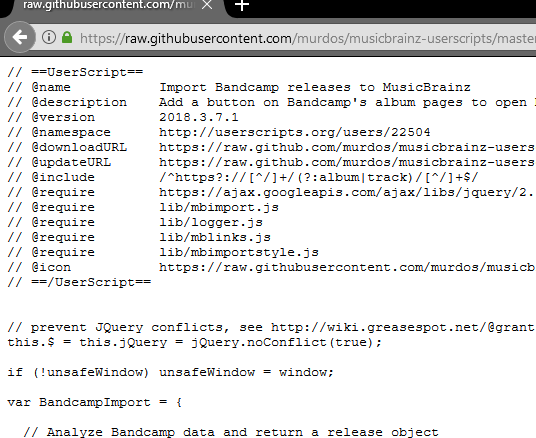
Thanks!
---
### Author:  [@rdswift](https://community.metabrainz.org/u/rdswift)
#### Post date: [April 20, 2018, 8:18pm UTC](https://community.metabrainz.org/t/can-you-use-picard-to-add-metadata-to-musicbrainz-from-your-music-files/375244/8 "2018-04-20T20:18:40Z")
If you’re using TamperMonkey, you should be able to open TamperMonkey and search for new scripts. One of the options is search GitHub. If you already know your script, all you have to do is open the raw view and TamperMonkey takes over and starts the installer.
I don’t have GreaseMonkey installed here, so can’t direct you that way.
---
### Author:  [@aerozol](https://community.metabrainz.org/u/aerozol)
#### Post date: [April 21, 2018, 12:38am UTC](https://community.metabrainz.org/t/can-you-use-picard-to-add-metadata-to-musicbrainz-from-your-music-files/375244/9 "2018-04-21T00:38:54Z")
Thanks for the recs!
Step by step userscript install, drafted before Zas did his… oh well
1. Install [Tampermonkey](https://chrome.google.com/webstore/detail/tampermonkey/dhdgffkkebhmkfjojejmpbldmpobfkfo?hl=en) for Chrome or [Greasemonkey](https://addons.mozilla.org/en-US/firefox/addon/greasemonkey/) for Firefox
2. Install the script from Github, from Murdos script page: [https://github.com/murdos/musicbrainz-userscripts](https://github.com/murdos/musicbrainz-userscripts)
Then click on: [bandcamp\_importer.user.js](https://github.com/murdos/musicbrainz-userscripts/blob/master/bandcamp_importer.user.js)
Then click on ‘Raw’ on the right, above the code.
Now your Tampermonkey plugin should recognize the code and allow you to install it.
**In your screenshot it seems like you don’t have Tampermonkey installed or you are running in incognito mode which probably disables it?**
1. Visit a Bandcamp album or single page, and after the page has loaded, an ‘import’ button will load. From here on in it’s all pretty straightforward!
The other useful feature is a ‘Original Image’ link will appear below the album image. Bandcamp resizes images over a certain size, this link will take you to the original.
Script 101:
Userscripts are just code that can be set to run on pages after they’ve loaded. You can use them to do simple stuff like change the font size on a website, or really complicated stuff. They’re often just used by communities to make websites easier to navigate or to add features.
If you have security concerns make sure to check the top of the code for this:
_@include_
Any url’s after that text is where the script will run. If it has this:
_@include [www.yourbank.com/\*](http://www.yourbank.com/*)_
…it’s probably not good.
You can also use @exclude to stop it from running on certain pages.
You don’t have to worry about MusicBrainz scripts, but something to keep in mind if you decide you’d like to use a script to help you play a browser based game or something like that in the future!
---
### Author:  [@c210344](https://community.metabrainz.org/u/c210344)
#### Post date: [April 21, 2018, 9:50am UTC](https://community.metabrainz.org/t/can-you-use-picard-to-add-metadata-to-musicbrainz-from-your-music-files/375244/10 "2018-04-21T09:50:34Z")
Ah, thank you! Sorry, I din’t realise that Tampermonkey was something you had to install, I thought it was someone’s username!
Right, will hopefully have a stab at this this weekend.
Thanks again!
---
### Author:  [@c210344](https://community.metabrainz.org/u/c210344)
#### Post date: [April 23, 2018, 10:36pm UTC](https://community.metabrainz.org/t/can-you-use-picard-to-add-metadata-to-musicbrainz-from-your-music-files/375244/11 "2018-04-23T22:36:01Z")
Ahaaaa! This is awesome, so much quicker!
Thanks to all who helped!